
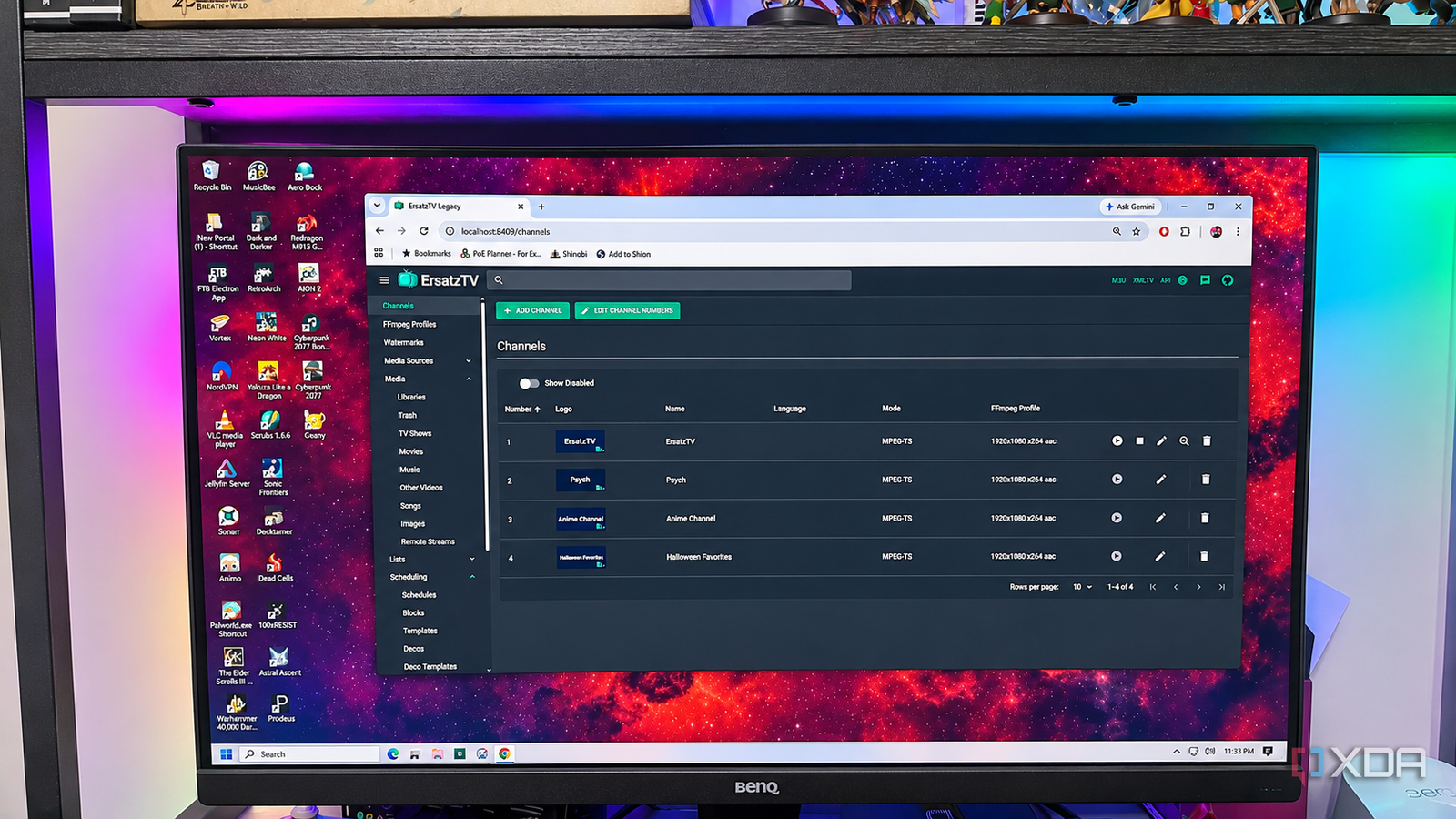
Published Nov 3, 2026, 6:00 PM EST Patrick is a seasoned writer with more than a decade of experience, specializing in any and all things tech. His work has been featured on platforms like CNET, Yahoo, Xfinity, and many other outlets. When not typing away, he can be found with his nose in a book. As a kid, I absolutely loved channel surfing. I never knew what I might stumble across, and the joy of discovering a new TV show was half the fun. I remember one night, I stumbled across a channel showing anime I'd never heard of before. For a kid whose knowledge of anime extended solely to what appeared on Toonami or Adult Swim, that was a huge win (and it birthed a lifelong love of Slayers). Nowadays, that experience is long gone. Everything is on-demand through streaming platforms, which means I basically always know what I'm going to find. I might not know if I'll like a show, but I at least have some idea of what it is before I start watching. Ersatz.tv let me change that by allowing me to create my own channel lineup that I can flip through. It's a bit like Spelunkr.tv, another service that's growing in popularity, but it's based entirely on my Jellyfin server (and doesn't have chat features or audience reactions, which I cannot stress enough how much I appreciate). Ersatz.tv links to a variety of platforms, including Jellyfin, Emby, and Plex, so you can recapture that nostalgic experience you grew up with. ErsatzTV turns my Jellyfin library into my personal cable network I can create channels from the media I already own I have a lot of older TV shows in my Jellyfin library. Titles like Friends, How I Met Your Mother, Psych, and so on. These are comfort shows — content I like to keep on in the background while I'm cleaning the house or doing dishes. ErsatzTV allows me to create a channel that's just these shows, with episodes playing in random order, in set time blocks that follow the structure of cable TV. ErsatzTV provides the framework, but I provide the content. You can install Ersatz in multiple ways, including prebuilt binary packages or Docker. Connecting it to your media server is as simple as grabbing the correct API key. I figured that, since it was so easy to connect the two, my content would appear right away, but I found that syncing the content was a separate step. Although ErsatzTV can detect your Jellyfin server, it can't access any content until you sync the libraries you want. I almost missed that step. Here's how to do it, using Jellyfin as an example. After you've added your Jellyfin API key to ErsatzTV, select Jellyfin in the left-hand menu. It's a subcategory of Media Sources. Once selected, click the Play button icon on the far right of the screen, between the refresh and folder icons. This opens a menu showing every top-level library on your Jellyfin server. Click the toggle on the right side of the screen, beneath Synchronize, and then click the Save Changes button just below the search bar. After that, your content should begin appearing in ErsatzTV. Give it 10 to 15 minutes, depending on your library size. Creating a channel was more involved than I expected Channels and schedules are separate pieces of the puzzle The fun starts once you move past the initial connection phase. That's when you can begin setting up custom channels in ErsatzTV, but this isn't as straightforward as it initially seemed. The channels work in tandem with schedules to create that cable TV experience. I enjoyed playing around with it, but I spent a lot of time in menus before I saw results. What threw me off was that creating a channel didn't actually let me select what I wanted to play. I had to create a schedule, select the shows I wanted to include, and then assign that schedule to a specific channel using a layout. None of the steps are particularly difficult to do, but they aren't immediately apparent when first using ErsatzTV. Several scheduling options are available, such as "Shuffle," which randomizes content without repeating it until everything has played, or "Season, Episode," which plays a TV series from start to finish in proper order. You can do a lot with this, like building a channel to play holiday movies or one dedicated solely to your favorite anime genre. Once I had that set up, I had to make the channel actually play. I added the newly created channels to Jellyfin. ErsatzTV provides the M3U playlist for Jellyfin's tuner, plus an XMLTV feed for the program guide. This gives you that classic TV guide channel where you can look to see what's currently playing. The end result brings back something streaming services lost Sometimes, I just want to watch TV without choosing what to watch While ErsatzTV isn't likely to surprise me with a new show — after all, I know what's in my Jellyfin library — it can give me something to watch that doesn't require any conscious effort on my part. Well, after the setup, anyway. Sometimes, I just want to turn on the TV and watch something without spending too long trying to decide what sounds good. Randomizing the programming means I can find something interesting I wasn't specifically looking for, like maybe an old show I haven't seen in years. It helps to wipe the digital dust off my Jellyfin server, so to speak. Channel surfing is fun again ErsatzTV is an awesome tool, but it's definitely one I'd only suggest to enthusiasts. You'll spend a fair bit of time getting it set up, and it can be pretty confusing to understand. But if you push through that (and the extensive documentation helps a lot), you'll find yourself with a nostalgic experience I thought Netflix had killed. ErsatzTV ErsatzTV lets you transform your media library into a personalized, live TV experience.
I missed the days of channel surfing, so I recreated the experience with Jellyfin
Full Article
Original Source
Read the full article at Xda-developers →KhanList aggregates and links to publicly available news content. We do not host full articles from third-party sources. Always verify important information with original sources.