
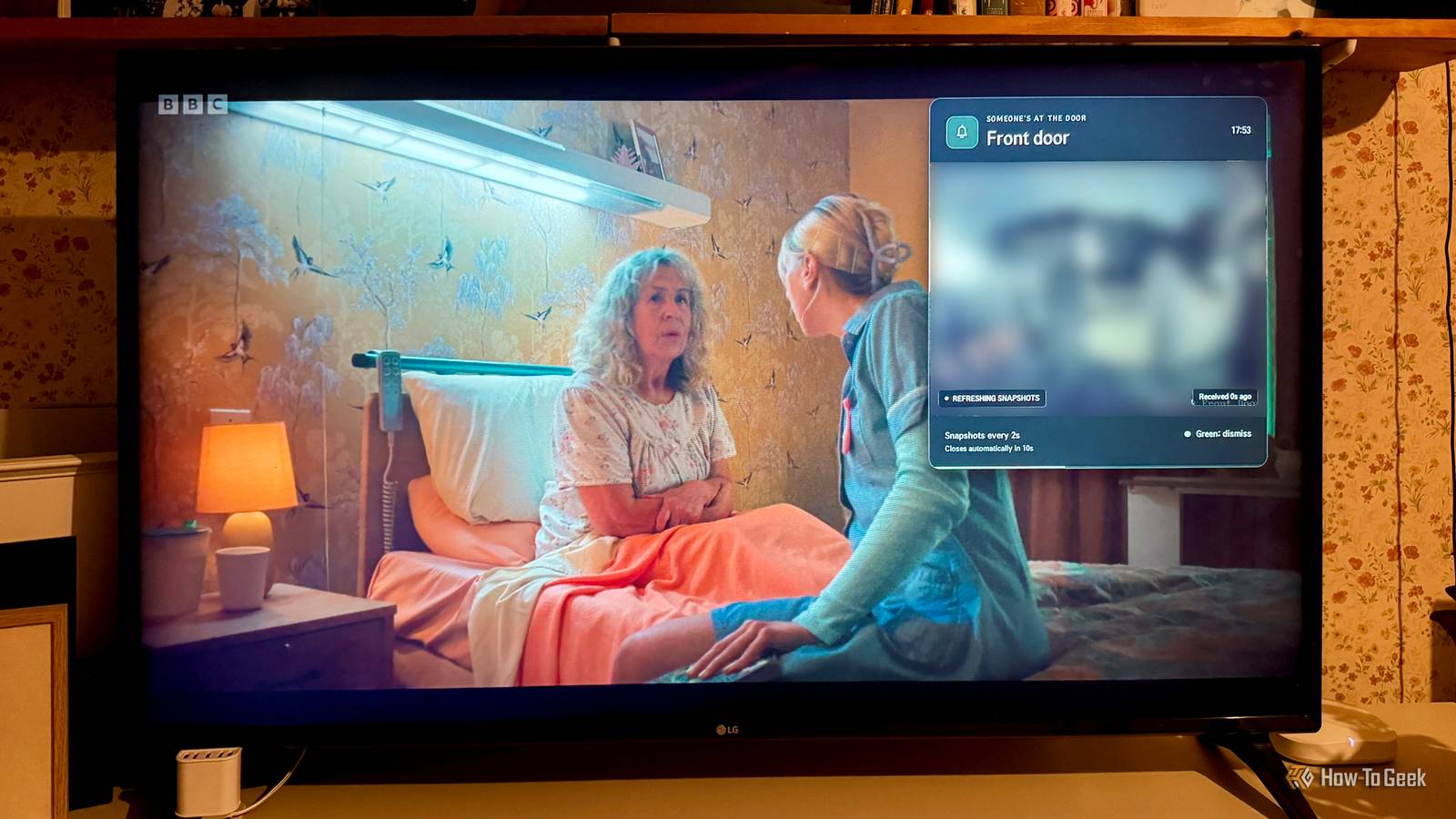
Published Nov 3, 2026, 6:31 PM EST Adam has a degree in Engineering and has a life-long interest in technology. He has been writing for over a decade for various print and online publications, with a focus on consumer tech. He joined How-To Geek in 2024 while working at Pocket-lint. As well as being a long-term fan of Apple products, he also has a strong interest in smart home tech, running a Home Assistant server at home to automate all his smart home devices. He believes that the ideal smart home should work with minimal interaction from the user, with automations running as if by magic rather than requiring you to push buttons on a control panel. You can find more of his work on Muck Rack. Sign in to your How-To Geek account I recently rooted my LG TV to try to stop it from spying on me. One of the benefits of doing so was that I was able to install homebrew apps on the TV to give it features that it didn’t previously have. When I realized that I could use AI to vibe-code custom apps for my TV, I decided to replicate an Apple TV feature that I’ve always wanted. Reddit is full of vibe-coded TV dashboards that all look the same There’s so much more you can do with a rooted TV Since the hugely popular YouTube video by Gamers Nexus about just how much data LG TVs are sending home, everyone and their mother has been rooting their TV and installing apps such as Glasshouse to try to block TV companies from accessing private data. This has led to an explosion of posts on Reddit from people who have vibe-coded a replacement home screen for their TV to replace the stock version. The problem is that all of these vibe-coded launchers just look exactly the same and do exactly the same things. It shows a real lack of imagination; creating a home screen is great, but it’s far from being the most interesting thing you can build for your rooted TV. I’ve been using AI to build a whole host of different features that are far more useful than just another launcher. I’ve always been jealous of the Apple TV feature that shows who’s at the door I have a text notification that a person has been spotted Credit: Apple One of the first things I decided to do was try to replicate an Apple TV feature that I’ve always been jealous of. HomeKit video doorbell notifications can show the live feed from a compatible video doorbell directly on your TV through an Apple TV. The camera feed appears picture-in-picture without pausing the show or movie that you’re watching. This is something that I’ve always wanted to have. Using Home Assistant, I can send a text alert to my TV when a person is detected at the front door, but I wasn’t able to show the video feed. It means that while I know that someone is at the door, I still can’t tell who it is. Until now, I’ve had to make do with workarounds, such as setting up a Raspberry Pi hooked up to the screen ripped from an old iPad. By placing it in a picture frame, I have a digital photo frame that can also show the doorbell feed when someone is at the door. It works, but it’s not nearly as useful or easy to make out as an on-screen video feed would be. I pointed Codex at my TV and told it what I wanted Screenshots allow Codex to see the results I decided to see if I could get an AI chatbot to vibe-code the feature that I wanted. I used Codex since I had a couple of usage-limit resets that needed using before they expired, but you could do the same with Claude Code. Through the Homebrew Channel, my rooted TV now runs an SSH server which Codex was able to connect to. Through the root shell, Codex is able to send commands on the same internal bus that LG’s native software uses. I quickly established that Codex could capture screenshots of my TV’s screen, so I explained what I wanted and asked it to go ahead and try to build it, using screenshots to check what the screen was displaying, so that I wouldn’t have to sit there and tell Codex whether the video feed had shown up or not. I provided a link to my video doorbell feed via Home Assistant. Codex worked for about 15 minutes, testing things out and taking screenshots to see what the results were. It then announced that the feature was working. My doorbell feature is exactly what I always wanted An almost-live view of the doorbell whenever a person is detected I immediately tested it out, and to my delight, it was exactly what I had wanted. When my doorbell detects a person at the front door, or someone physically rings the bell, an overlay appears on my TV showing the video feed from my doorbell. The overlay floats above whatever is currently playing, and the content continues to play without pausing. The feed is displayed for 25 seconds, with a bar showing how long until it will disappear. When the time runs out, the overlay disappears. I can also make the overlay disappear by pressing a button on the TV remote. It works perfectly. I have the exact feature that I wanted working on my standard TV. The overlay is triggered by Home Assistant, with the TV handling the overlay, and everything works locally without the camera feed needing to leave my home network. AI can do the hard work, but you still need a little imagination AI tools such as Claude Code and Codex have made it possible to make ideas into reality incredibly quickly and easily. It seems a waste to use that power to recreate yet another custom launcher that looks exactly like all the others. With a little imagination, you can make your TV do all sorts of things that the stock firmware just doesn’t offer.
I gave my LG TV the Apple TV doorbell feature it was missing
Full Article
Original Source
Read the full article at Howtogeek →KhanList aggregates and links to publicly available news content. We do not host full articles from third-party sources. Always verify important information with original sources.