
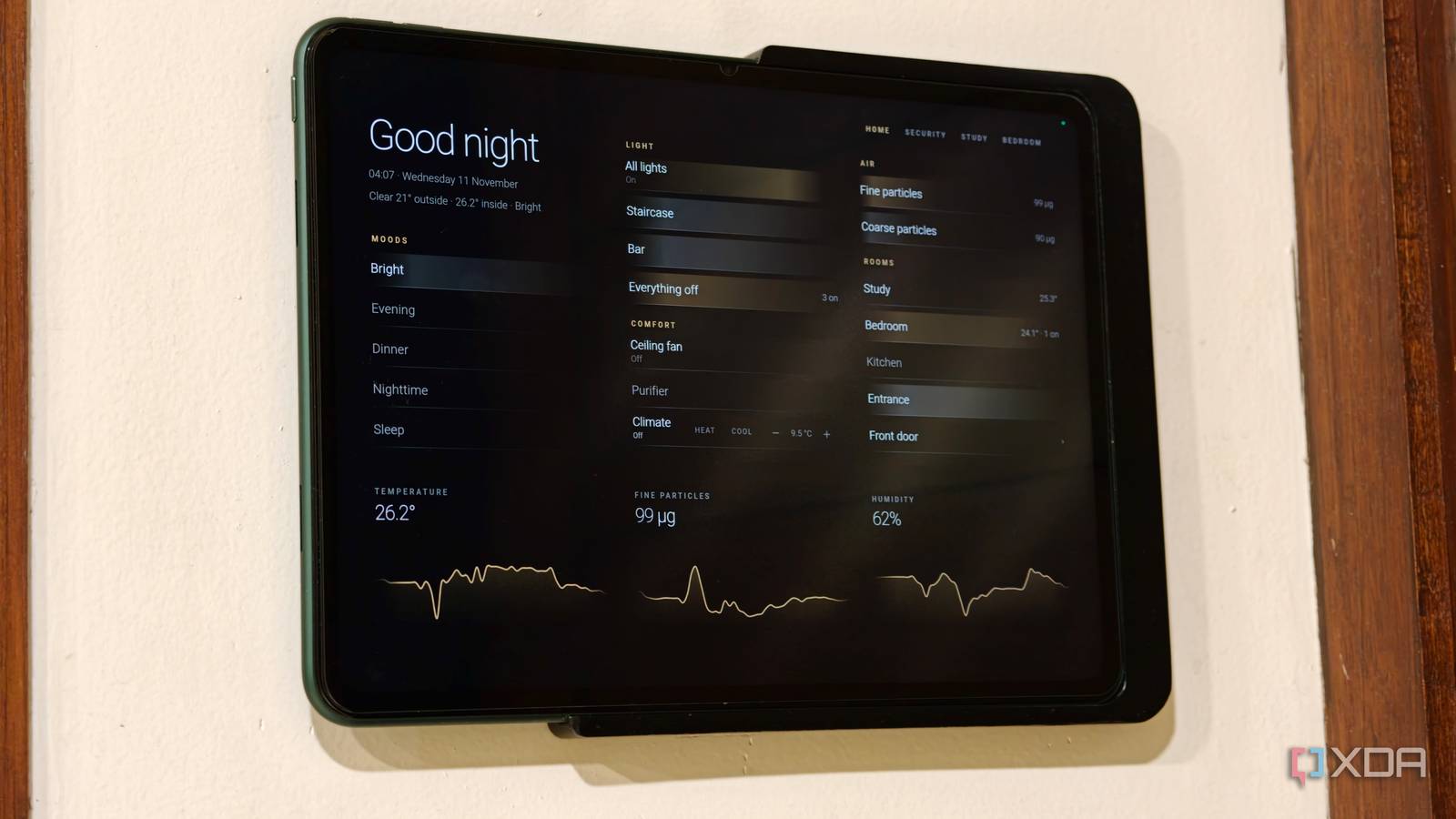
Published Nov 11, 2026, 7:30 AM EST Dhruv Bhutani has been writing about consumer technology since 2008, offering deep insights into the personal technology landscape through features and opinion pieces. He writes for XDA-Developers, where he focuses on topics like productivity, networking, self-hosting, and more. Over the years, his work has also appeared in leading publications such as Android Police, Android Authority, CNET, PCMag, and more. Outside of his professional work, Dhruv is an avid fan of horror media spanning films and literature, enjoys fitness activities, collects vinyl records, and plays the guitar. My Home Assistant setup powers my entire home, and it has grown considerably over the years. I've got literal dozens of lights, sensors, media players, and automations spread across my home. Unfortunately, my dashboard experiments haven't quite kept up. It looks fine, but there are plenty of imperfections. Between misaligned heights and a lack of specific controls, I just haven't had the time or the will to dive into the YAML to fix these. So, following advice from a friend, I decided to throw Claude at the problem. Instead of spending hours tweaking individual cards and troubleshooting configuration errors, I used Claude to understand my existing setup, identify devices and generate the configuration files needed for a full overhaul. And all it took to achieve that was a combination of an MCP connection, configuration files, and screenshots. It was able to achieve within an hour what would have taken me a few weekends to pull off. But more importantly, it gave my dashboard an aesthetic overhaul worthy of a commercial product. I love it. I connected Claude to Home Assistant using MCP Device data via MCP, dashboard YAML and screenshots to give it context Context is key when working with any tool, and in this case, the first step was to give Claude enough context about my Home Assistant setup to work with. I use the Claude desktop app on my Mac, to which I configured the Home Assistant Model Context Protocol server. MCP, if you're not aware, is an open standard that lets AI assistants communicate with external apps and access their tools and data. In this case, it acted as a bridge between Claude and my local Home Assistant installation, allowing it to get a deeper look at what makes my smart home tick. In practice, this MCP connection gives Claude a live snapshot of my smart home. It was able to look up device names, check the current status of a light, and even peek and prod to see how different entities react. That's obviously useful and necessary when working with a setup that's as extensive as mine. To give you an example, I have several Dyson fans, WiiM streamers, Plex players, and Alexa devices. Rather than manually digging through Home Assistant's entity list to figure out what's connected, I can ask Claude to identify the devices and check their current status. This was a big help during the troubleshooting step. As part of the redesign, this MCP connection also proved useful in figuring out why my music player widget was stuck on an old track, why Plex showed up as idle when music was playing or why a light in the entrance area stayed on. I can dig deep and figure these out manually too, but the MCP connection makes all of this seamless. MCP has its limitations so I gave Claude more context Dashboard YAML and screenshots fill in the gaps Credit: That said, there are a few limitations. The MCP, right now, only displays friendly names, not device entities. Nor does it give access to my Lovelace dashboard. That's why relying on the MCP alone wasn't going to cut it to achieve the redesign. So, I shared the actual dashboard YAML with Claude. This gave the AI assistant the card structure, entity references, and custom components I was using. That's another point of context. For one more point of context, I gave Claude some screenshots of my current interface. This let Claude see what it was working with and see how changes to the configuration translated into the actual interface, including problems such as overlapping cards, clipped text, and inconsistent spacing. That said, it's worth keeping in mind that Home Assistant's MCP support is evolving. I take a cautious approach towards Home Assistant upgrades and try to stay one version behind to be aware of any breaking changes. But the latest versions of the MCP server offer more features, like separate tool groups and the ability to read entity states and perform actions. Elsewhere, if you want to get into it, the HA-MCP project can even handle automations and scripting. It could eliminate some of the manual copy-pasting involved in my setup, but I'm not quite ready to give so much access just yet. Claude turned my ideas into working Home Assistant configurations From dashboard YAML to automations, Claude handles the heavy lifting With sufficient context, it was time to start making changes, and the workflow became a lot more interesting. Instead of asking Claude how I should modify a card, I just described my preferred layout and got it to generate a full configuration. For my dashboard, that meant creating and modifying YAML for individual cards, themes, scripts and automations. It was also able to help with more involved changes, like configuring a universal media player that switched between player sources. Claude provided actual configuration files to achieve this instead of just telling me what to do, which is a big part of this setup. Realistically, I couldn't have achieved some of the more complex UI changes here on my own. All I had to do was copy and paste these files back into Home Assistant, hit refresh or restart where relevant, and watch it all come to life. It didn't quite handle everything. For a few specific features, I had to intervene manually. Think of things like input select helpers or building a swipe card. But between having Claude create the config files, parse the YAML to catch syntax errors and test JavaScript templates, I was able to build a setup I would have otherwise struggled with. Claude makes Home Assistant upgrades feel effortless As useful as Claude was at this UX overhaul, ironically, that wasn't my biggest takeaway. There are plenty of ways to generate YAML, and if push came to shove, I'd have just read all of Home Assistant's extensive documentation. What was useful was that Claude could speak to my Home Assistant server, understand existing configurations, and turn them into working files that were borderline one-shot swap-ins. I've been putting off reorganizing my Home Assistant dashboard for months because it was tedious and time-consuming work. With Claude handling much of the configuration and troubleshooting, I was able to not just fix but seriously upgrade my smart home within an hour. Home Assistant OS Windows, macOS, Linux, Android, iOS, web iOS compatible Yes Android compatible Yes Home Assistant is the best way to connect your smart home systems together.
I let Claude redesign my Home Assistant dashboard, and it did in minutes what I'd put off for months
Full Article
Original Source
Read the full article at Xda-developers →KhanList aggregates and links to publicly available news content. We do not host full articles from third-party sources. Always verify important information with original sources.