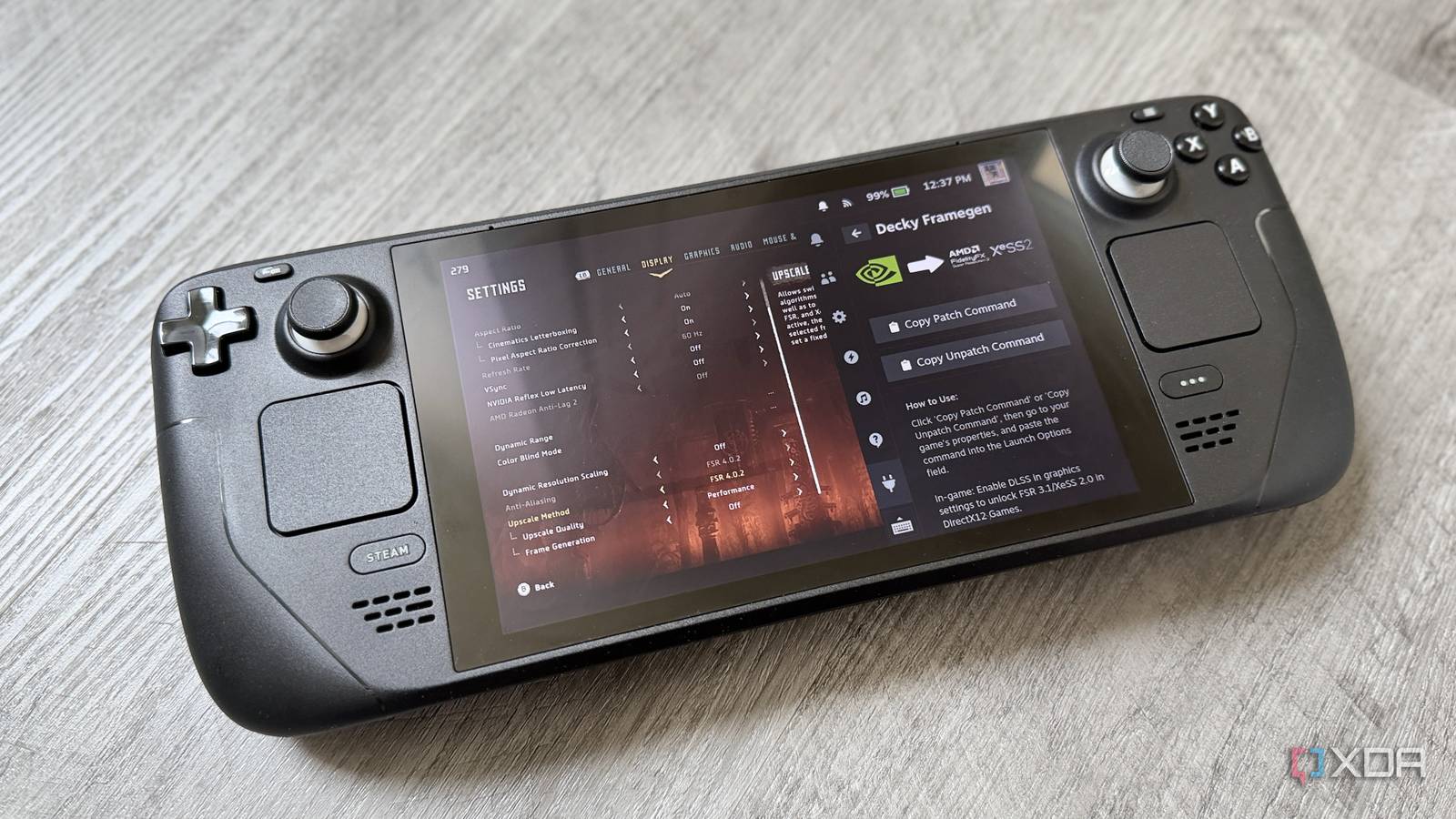
Published Jul 23, 2026, 9:00 AM EDT Maker, meme-r, and unabashed geek, Joe has been writing about technology since starting his career in 2018 at KnowTechie. He's covered everything from Apple to apps and crowdfunding and loves getting to the bottom of complicated topics. In that time, he's also written for SlashGear and numerous corporate clients before finding his home at XDA in the spring of 2023. He was the kid who took apart every toy to see how it worked, even if it didn't exactly go back together afterward. That's given him a solid background for explaining how complex systems work together, and he promises he's gotten better at the putting things back together stage since then. AMD's FSR 4 is the first version of FidelityFX Super Resolution that's actually worth getting excited about because it's built on machine learning rather than hand-tuned math. The catch is that AMD built it for the FP8 hardware in RDNA 4 GPUs, and my Steam Deck runs a humble RDNA 2 iGPU. AMD has promised official support for RDNA 2 desktop cards in early 2027, and handheld chips aren't even on the roadmap. That's a long time to stare at FSR 3's shimmering foliage. So I did what any inpatient Linux user would do: injected FSR 4 in myself with OptiScaler. Why AMD left the Steam Deck off the FSR 4 guest list It's not (entirely) artificial segmentation, I promise FSR 4's upscaling model runs on FP8 math, which RDNA 4 accelerates in hardware. The Deck's RDNA 2 silicon only speaks INT8, so the same model runs slower and eats more of the GPU budget; the exact budget you were trying to protect by upscaling in the first place. That's why AMD launched FSR 4 as RDNA 4-only, and why the backport schedule reads the way it does: FSR 4.1 hit desktop RDNA 3 cards this month, RDNA 2 desktop cards are penciled in for early 2027, and integrated graphics — the Deck, the ROG Xbox Ally, even Strix Halo — have no confirmed date at all. But here's the thing: an INT8 version of the FSR 4 model exists, partly because AMD accidentally leaked the FSR 4 source code, and the community has been running it on unsupported hardware ever since. Valve is even shipping a sanctioned flavor of this now — Proton Experimental auto-upgrades FSR 3.1 games to FSR 4.1 on discrete RDNA 3 GPUs and the upcoming Steam Machine. The Deck's iGPU didn't get the invite. Hence, the DIY. OptiScaler is the middleware doing the heavy lifting One tool to swap them all OptiScaler sits between the game and its upscaler like a switchboard operator. Every temporal upscaler — DLSS, XeSS, FSR 2 and up — takes fundamentally the same inputs, so OptiScaler intercepts the game's calls to whichever one it shipped with and redirects them to the backend you actually want. The FSR 4 INT8 model still isn't available in OptiScaler, so it defaults to the standard FSR 4 model which the Steam Deck can't accelerate (FP8 has no silicon path in RDNA 2). It's on the roadmap for OptiScaler, and we'll release an updated version once that hits, as it should provide even more performance on the Steam Deck. The ground rules: the game needs native support for DLSS 2+, FSR 2+, or XeSS to hook into, it needs to be DirectX 11 or 12 (Vulkan titles like the newer DOOM games are out), and anything with kernel-level anti-cheat is off the table unless you enjoy ban appeals. And RE Engine games are also notoriously cranky, often not working. OptiScaler How I put FSR 4 on my Steam Deck in about ten minutes Decky Framegen does the fiddly parts for you The manual route involves copying DLLs and editing an ini file, but the Decky Framegen plugin wraps the whole thing in two button presses. You'll need Decky Loader installed first, then it's a few simple steps: In Gaming Mode, press the ... button and open the Decky tab. Open the Decky store, search for Framegen, and install the Decky Framegen plugin. Open the plugin, and select Setup OptiScaler Mod. Copy the launch option the plugin displays into the game's Properties → Launch Options field. (Currently, this is ~/fgmod/fgmod %command%) Launch the game and press Insert to open the OptiScaler overlay — I mapped a rear button to Insert with Steam Input, which beats carrying a keyboard around. In the overlay, set the upscaler backend to FSR 4, select Balanced, and confirm that the version string starts with 4 under FFX Settings. If a game already supports FSR 3.1, you can skip OptiScaler entirely and just swap the FSR 3.1 DLLs for the FSR 4 INT8 ones in the game folder. Verify it took with MLSR-WATERMARK=1 in the launch options because some games' menus will insist they're still running FSR 3 even when they aren't. All testing was done with Decky Framegen 0.11.15, which ships with OptiScaler 0.9.3. That's the latest version of OptiScaler currently available when this was written, which bundles FSR 4.1, FSR-FG 4.0.0, and XeSS 3.0.1. Nothing is free, especially fake pixels The Deck pays the FP8 tax in frames and watts The two games I tested tell very different stories, and the difference is the whole point. In Horizon Zero Dawn Remastered, swapping FSR 3.1 for FSR 4 cost me a single frame — 31fps down to 30 — and the 99th percentile lows didn't move at all. That's not because the Deck's RDNA 2 silicon handles the heavier model gracefully; it's because the benchmark barely asks it to. The power overlay gives the game away: the CPU was pulling 6.8W while the GPU loafed along at under 5W of a 15W budget, which means the GPU spent the whole run waiting for the CPU to hand it work. When the CPU sets the pace, the upscaler can cost whatever it likes — the frame rate doesn't hear about it. The only place the FSR 4 tax shows up is in the GPU-side average, which dipped by about 8%, and even that's an undercount from a GPU that never got to stretch its legs. Horizon Zero Dawn Remastered (720p, Medium, DRS off) FSR 3.1.5 FSR 4.0.2 Delta Average FPS 31 30 -3.2% CPU avg FPS 31 30 3.2% CPU 99th percentile 18 18 0% GPU avg FPS 36 33 -8.3% GPU 99th percentile 23 22 -4.3% CPU mid-run power 69% @ 6.8 W 73% @ 7.1 W +0.3 W GPU mid-run power 92% @ 4.6 W 91% @ 3.1 W -1.5 W Shadow of the Tomb Raider is what happens when the GPU actually has to work. Same settings discipline, same benchmark methodology, and suddenly the tax is real: the 49fps average fell to 44, with the GPU-side average down 13.5%. The neat part is watching the bottleneck migrate mid-experiment — on FSR 3.1, the CPU was the limiter, and the heavier FSR 4 model dragged the run across the line into GPU-bound territory, which the power numbers confirm: CPU draw fell from 6.9W to 4.6W as it sat waiting on a GPU pinned at 98% either way. Notice what didn't change: total power. Shadow of the Tomb Raider (720p, Medium, DRS off) FSR 3.1.5 FSR 4.0.2 Delta Average FPS 49 44 -10.2% CPU avg FPS 49 46 -6.1% CPU 95th percentile 37 36 -2.7% GPU avg FPS 52 45 -13.5% GPU 95th percentile 41 38 -7.3% CPU mid-run power 82% @ 6.9 W 76% @ 4.6 W -2.3 W GPU mid-run power 98% @ 7.2 W 98% @ 7.5 W +0.3 W In both games and both upscalers, the Deck drew the same or less with FSR 4 enabled. The cost of the better upscaler isn't battery life — it's frames, and only in games where the GPU was the thing holding you back to begin with. Don't run OptiScaler in anything with anti-cheat. The tool works by intercepting the game's rendering calls, which is exactly what anti-cheat exists to detect. The ROG Ally X can use the INT8 version To put an actual number on the FSR 4 tax, I ran a controlled A/B on the ROG Ally X using Horizon Zero Dawn Remastered's built-in benchmark — same run both times, 1080p at the Medium preset with Performance upscaling, dynamic resolution scaling off, on proton-cachyos-11.0-20260702. The only variable was the upscaler: stock FSR 3.1 on one leg, and FSR 4 via the PROTON_FSR4_UPGRADE=1 launch option on the other, confirmed active by the on-screen fsr4-i8 upscale 4.1.1 watermark rather than the settings menu's word. The result: the 47fps average dropped to 40, a hair under 15%, with the GPU-side average falling 18% and the 1% lows moving proportionally — noticeably gentler than the ~25% hit the community had led me to expect. The more interesting number came from the power overlay, though: both runs pinned the GPU at 99%, pulling essentially identical wattage (19.1W versus 19.4W). The Ally X is power-limited either way, which means FSR 4 doesn't cost you battery life at all — it costs you seven frames inside the same power envelope, and what you get back is the ML model's considerably cleaner image. I'm more sensitive to motion than graphical fidelity, so it's not a trade-off I'd live with, but your preferences matter more than mine. AMD will get here eventually, but I'm not waiting The frustrating part is that this clearly can work. While OptiScaler only has the FP8 version of FSR 4 right now, INT8 is coming, Valve ships an auto-upgrade path for other hardware, and AMD's own roadmap says RDNA 2 support is coming. It's just that "early 2027 for desktop cards, handhelds TBD" is an answer built for RDNA 4 owners, and the Deck's install base deserves better than being last in line for the feature that would most help its aging silicon.
I hacked FSR4 onto my Steam Deck before Valve could ship it officially
Full Article
Original Source
Read the full article at Xda-developers →KhanList aggregates and links to publicly available news content. We do not host full articles from third-party sources. Always verify important information with original sources.