
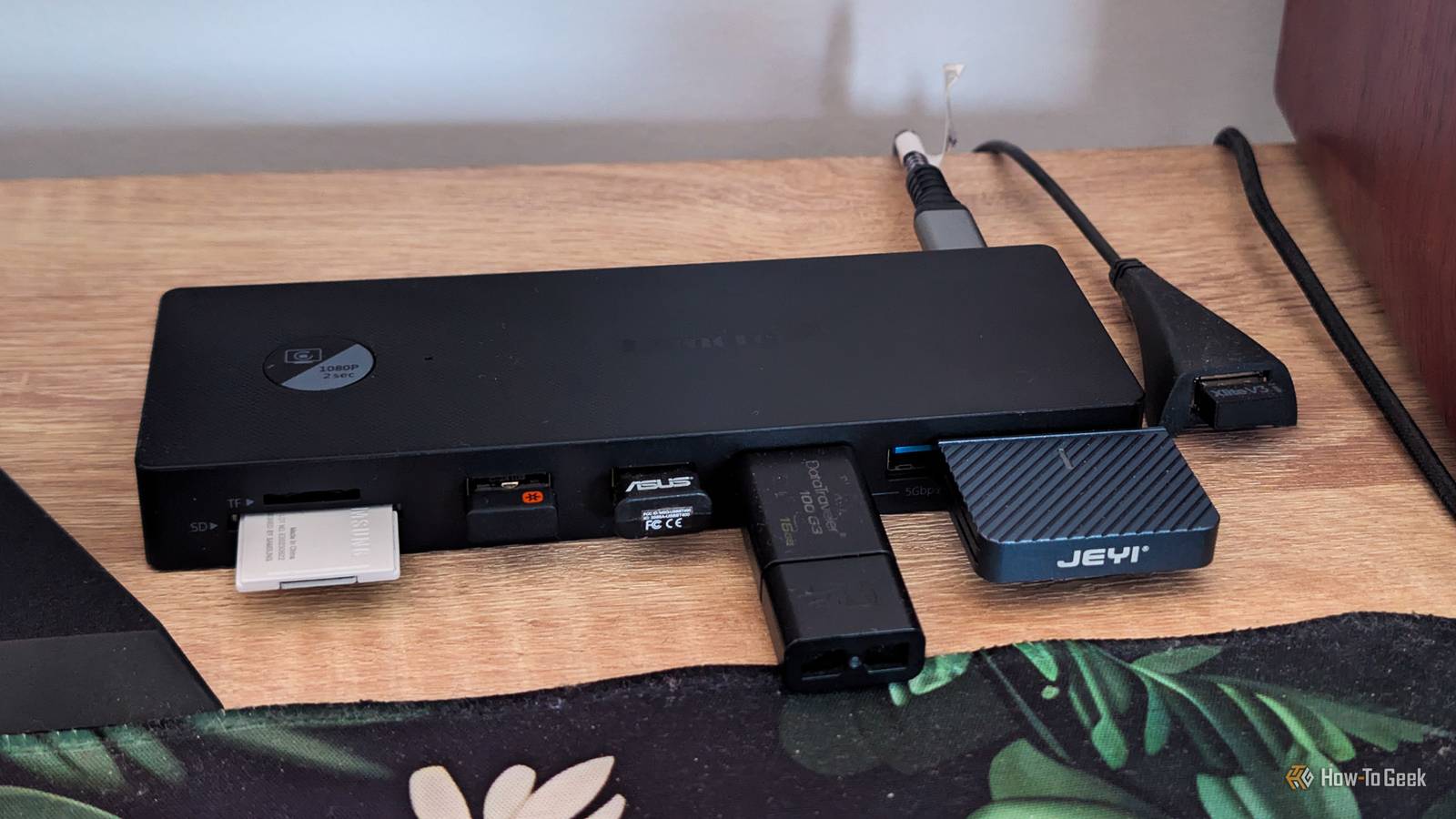
Published Nov 10, 2026, 7:30 AM EST Ever since he got his first smartphone, the legendary Nokia 6600, back in 2005, Goran became obsessed with technology. This obsession had only gotten worse after he received his first gaming PC a couple of months later. He fell in love with video games in the early '90s, shortly after embarking on his gaming journey with the Sega Master System II and SNES. Since then, he has built dozens of PCs, played thousands of games, and authored hundreds of articles about PC hardware, gaming hardware, and video games. He knows everything there is to know about the PC gaming and PC hardware space, and while his console gaming knowledge isn't as comprehensive, he considers himself a console veteran. Goran has almost a decade of experience writing about tech and video games for numerous web publications including TechSpot, TechPowerUp, and EsportsHeadlines. He has been writing for How-To Geek since December 2022. When he isn't gaming or deciding which component of his PC to upgrade next, you can find him strolling around Novi Sad while listening to music and contemplating what to play next. Back when I built my current PC in late 2020, I thought its six USB ports, along with the two on my case’s front panel, would be enough for my needs. The one thing I didn’t account for was that I’d still be using the same motherboard six years later, and that I’d end up with a bunch of USB peripherals, each needing its own port. Something had to be done, so I took the road less traveled: instead of getting a PCIe USB card, I expanded my USB ports with a USB-C dock. I ran out of USB ports on my desktop PC I couldn't believe it, yet there I was In 2020, those eight ports were more than enough. I soon upgraded to a new monitor that came with a two-port USB hub, which added one more free USB port to the equation (the hub itself took up one of my PC’s ports). Nine ports felt rather luxurious for my setup at the time. Six years later, though, things have changed considerably. I’ve gotten a second mouse, a second controller, a second keyboard, a USB-C portable SSD, and an SD card reader. To add insult to injury, the USB-C port on my case recently kicked the bucket, leaving me without any free USB ports. One silver lining was that my current monitor also has a two-port USB hub, so at least I didn’t lose any ports when I upgraded. This was a proper pain because I always had to keep something unplugged. I desperately needed more USB ports. I needed USB ports within arm’s reach, so a PCIe USB card was out of the question I also needed an SD card reader Being a desktop PC fiend, I first thought of getting a PCIe USB card, but there were two issues with this plan. First, I wanted the new ports to be within arm’s reach because reaching to the back of the case each time I plugged in the SSD was getting really tiring. Second, I needed a new SD card reader that would also be close at hand, since the reader I’d been using was plugged into the case’s remaining front USB port and wasn’t easily accessible while I was sitting at my desk. Since I’d had an extremely positive experience with my Mac mini’s Thunderbolt dock, which turned it into a more versatile machine than my Windows desktop, I decided to get myself a USB-C dock instead. My motherboard packed a 10Gbps USB-C port, which I could use for the dock, and I could place the dock under the monitor, giving me easy access to its USB ports and SD card reader. All I needed now was a USB-C dock that played nice with desktops. I ended up getting a USB-C dock for my Windows desktop, and I couldn't be happier Turns out that USB-C docks aren't reserved for laptops So, I needed a dock with at least three front-facing USB-A ports, a front-facing USB-C port for the SSD to replace the one the dock would take up, an SD card reader, and a cable long enough to keep it under my monitor (at least 3.3ft). To my surprise, not many docks offered such a combo. They either had short cables, needed a power adapter to work, or didn’t have all their USB ports on the front. I could’ve gotten a USB hub, which would work even with one of my motherboard’s two 5Gbps USB-A ports, but none of the ones I found (I’m not in the US, and my options were limited) had an SD card slot, a USB-C port, and a long enough cable, all of which were musts. In the end, I struck gold. I found a USB-C dock that ticked all the boxes, on Temu of all places. It packed four USB-A ports and one USB-C port, all of them front-mounted, plus a front-mounted SD and microSD card reader. It came with a short USB-C cable, but the cable was removable, so I could use one of mine. It had a USB Power Delivery port, but it didn’t need it to work. It also had three video ports, an Ethernet port, and a 3.5mm audio jack, though the audio jack is the only one of those I actually use. Best of all, it only cost $30. I clicked the Add to Cart button in a heartbeat, and a few weeks later, the mailman delivered it. I connected the dock to my motherboard with one of my USB4 cables, tested it with the USB-C SSD, and it all worked perfectly. I turned one USB-C port into five USB ports and an SD card reader for $30, without opening my case. All the ports are easily accessible, and I now have two free USB-A ports on the dock, plus a USB-C port for the SSD. It’s a small upgrade, but it’s one of the best I’ve made in years. Here are a few pointers if you want to follow my route It can be tricky to find a USB-C dock that includes an SD card slot and plays nice with desktops If my experience has given you the itch to get a USB-C dock for your desktop as well, here are a few tips I’d like to share. Firstly, if all you need is extra USB ports, get a USB hub instead. They’re cheap, there are both USB-A and USB-C models, and you’ll find one with a long enough cable relatively easily. If, like me, you need an SD card reader, a proper USB-C dock is usually the way to go. Just don’t forget that you probably won’t be able to use the dock’s video ports, since most USB-C ports on desktop motherboards are data-only, including mine. You may be able to use them if your motherboard packs Thunderbolt or USB4 ports, or a USB-C port with DisplayPort Alt Mode enabled. Even then, though, the video usually comes from your CPU’s integrated graphics, not your graphics card. That said, you can use the dock’s Ethernet port and 3.5mm audio jack if it includes them. Also, make sure the dock’s cable is long enough for your needs. Many docks have very short cables since they’re designed with laptops in mind, but you’ll be able to find a few options that come with 3.3ft cables or longer. Alternatively, you can look for a dock with a removable cable, but they’re not very common. While docks with a power input are fine, I’d avoid getting one that requires power to work because you’ll need an extra cable for it, and unlike a laptop, your desktop doesn’t need charging. The only reason I’m using a powered Thunderbolt dock with my Mac mini is that it was free (I got it in my MSI Claw 8 EX review bundle). Lastly, if you need multiple USB ports that each run at full speed, a PCIe USB card is the better choice because USB hubs and docks share the bandwidth of the single port they’re connected to. Just look for one with a dedicated controller for each port, since many cheaper cards split their bandwidth between ports too. Personally, I don’t mind the shared bandwidth since I only transfer files over one port at a time. LENTION USB-C Dock with 3.3ft Cable This LENTION USB-C dock is the closest match to mine that I could find on Amazon. It’s a bit more expensive, has only three USB ports on the front instead of five, and comes with a non-removable 3.3ft USB-C cable, so make sure that’s long enough for your setup. My only regret is that I didn't do it sooner I’ve been using the dock for about a month now, and it’s brilliant. I don’t have to crawl behind the case every day to plug in the SSD, and I don’t have to unplug the SD card reader to plug in my second keyboard’s dongle (a Logitech K400 Plus) every time I use my TV with the PC. I’ve also gotten a 3.5mm jack I can use with wired headphones, and I still have two free USB-A ports for USB flash drives, external SSDs, and other peripherals. If I could change one thing, it’d be getting a dock sooner. Instead, I put up with the USB struggle until I got a free Thunderbolt dock for my Mac mini and realized, “Hey, this setup could work great with my Windows desktop as well.” And what do you know? It does, and it’s fantastic.
I gave my desktop PC a laptop dock, and it’s the best $30 I’ve spent on it in years
Full Article
Original Source
Read the full article at Howtogeek →KhanList aggregates and links to publicly available news content. We do not host full articles from third-party sources. Always verify important information with original sources.