
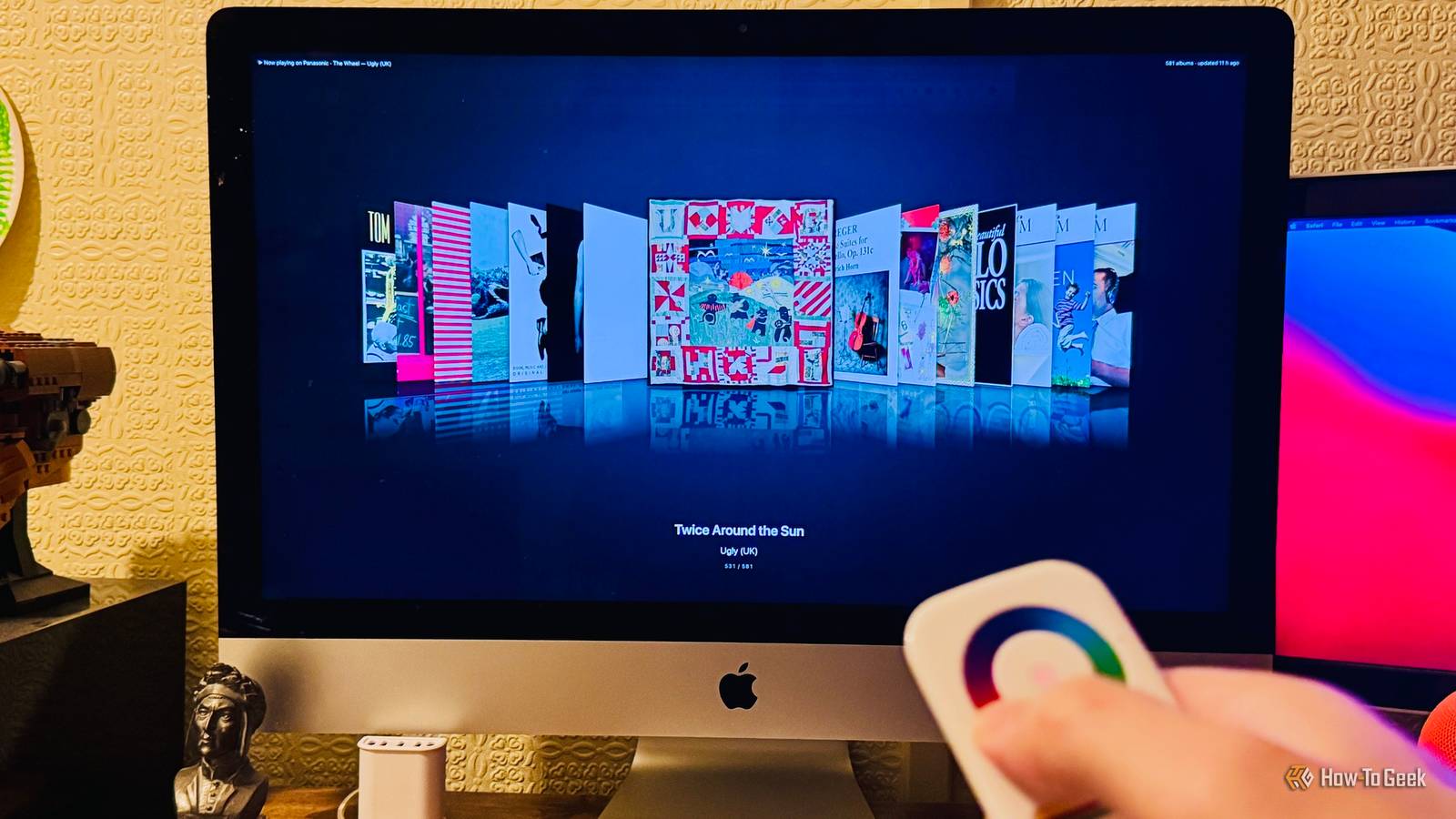
Published Oct 22, 2026, 8:00 PM EDT Adam has a degree in Engineering and has a life-long interest in technology. He has been writing for over a decade for various print and online publications, with a focus on consumer tech. He joined How-To Geek in 2024 while working at Pocket-lint. As well as being a long-term fan of Apple products, he also has a strong interest in smart home tech, running a Home Assistant server at home to automate all his smart home devices. He believes that the ideal smart home should work with minimal interaction from the user, with automations running as if by magic rather than requiring you to push buttons on a control panel. You can find more of his work on Muck Rack. I loved my first Walkman to the point where I used it until it fell apart, but my favorite music player was still my iPod. There was nothing quite like flipping through the albums in the Cover Flow view by spinning my thumb around the click wheel. When I found an old remote that had its own wheel-style input, I wondered if I could bring those days back. I still miss Cover Flow Flipping through albums on my iPod was a joy Cover Flow was a method of scrolling through files that made its way to the iPod, iTunes, and even Finder. For music, Cover Flow displayed a row of album covers, with one cover front and center, and the others stacked to either side. You could use the click wheel to scroll through the row of album covers to select the one you wanted to play. There were two things that made Cover Flow so good. Firstly, it looked stunning, with each album cover having a subtle reflection beneath it. It was a great way to appreciate the gorgeous album art of your music collection. The second thing that made it so great was the sensation of swiping through the album covers with the click wheel. Spinning your thumb around the wheel and seeing the covers fly past was just incredibly satisfying. Sadly, Cover Flow no longer exists in Apple Music, and the click wheel is a thing of the past. I found an old Zigbee remote with a color wheel in a drawer I wondered if I could use the color wheel to bring Cover Flow back I'd not really thought about Cover Flow for some time, until I found an old Zigbee smart home remote in my drawer. I'd bought it when I was trying to make my own universal remote to replace my Logitech Harmony setup, but it didn't have the right controls to be of any use, so it ended up in a drawer. The remote is intended for controlling lights and includes several buttons for turning lights on and off, as well as sliders for brightness and color temperature. At the top of the remote, there is a large circular touch control that you can use to select a specific color. When I spotted the remote in my drawer, the color wheel immediately made me think of the click wheel on an old iPod. I wondered if it would be possible to use the remote like a click wheel to swipe through album covers, just like the good old days. I connected the remote to Home Assistant using Zigbee2MQTT, set it to record the inputs from the remote, and then slowly ran my thumb around the wheel. To my delight, it produced a number from 0 to 254 that represented the position on the color wheel, and as I moved my thumb around the ring, new readings arrived about three times a second. It meant that by comparing two consecutive readings, I could tell which direction around the wheel I was scrolling, although I had to fix the case where, at the top of the wheel, it jumps from 254 back to 0. The only real limitation was that the remote only sends 29 readings (about 8.4 seconds of data) before it goes silent until you lift your thumb and touch it again, but it felt like a problem that I could live with. Like always, someone else already had a similar idea Cover Flow cards already existed, but none quite fit my needs The next part was to get the remote to scroll through a Cover Flow-style view of my Music Assistant albums in a dashboard. Like most good Home Assistant projects that I think of, someone else had already had the same idea, and there are several custom dashboard cards that can show albums in a style similar to Cover Flow. None of the cards were really suited to my needs, so I turned to Claude Code for help. Notice that I'm not saying "I built" because that really gets my goat. Claude built it; I just told it what to build, but Claude did it about a thousand times faster than I could have done. It uses albums saved in my Music Assistant library and ignores any albums that lack cover art or contain fewer than five songs. The first version Claude built let Home Assistant do the math that turned the data from the color wheel into instructions for which album cover to show. It worked, but scrolling from album to album was quite jumpy. Claude then moved the wheel handling to the card itself, which reads the remote directly and moves the covers by fractions at a time so that they appear to flow smoothly. Claude also added momentum, so that after a fast spin of the wheel, the albums continue to flow past and then slow to a stop. With the browser handling the animation, the flow feels really smooth and natural to use. Flipping through albums on my 27-inch iMac screen is amazing It's like having the world's biggest iPod After making a few further tweaks, I was really happy with what Claude had built. I have the Cover Flow dashboard run full-screen on my ancient iMac while I'm working, and it looks incredible on the 27-inch 5K display. When I want to play music, I just slide my thumb around the color wheel and play the selected album by pressing the ON button on the remote. Once I've started an album playing, a Now Playing screen appears that shows the track listing and lyrics for the current song. The exact line in the lyrics is highlighted as the music plays. Scrolling the color wheel in the Now Playing screen lets me select different tracks, and another button on the remote takes me back to the Cover Flow screen if I want to select a different album or switch to a Cover Flow of my playlists. It's honestly a joy to use and works even better than I'd expected. It really is like having an iPod with a giant 27-inch screen on my desk. It's also helped me discover just how many lyrics I've been singing completely wrong this whole time. Sometimes the best ideas happen by chance This whole project came about because I spotted an old remote, and it gave me an idea. Inspiration can be found in the strangest of places, and the projects that come out of nowhere can often turn out to be the best. My next plan is to translate the whole thing to my TV to give me an even bigger iPod in the living room.
I gave Home Assistant a physical color wheel, and now I flip through albums like it's 2008
Full Article
Original Source
Read the full article at Howtogeek →KhanList aggregates and links to publicly available news content. We do not host full articles from third-party sources. Always verify important information with original sources.