
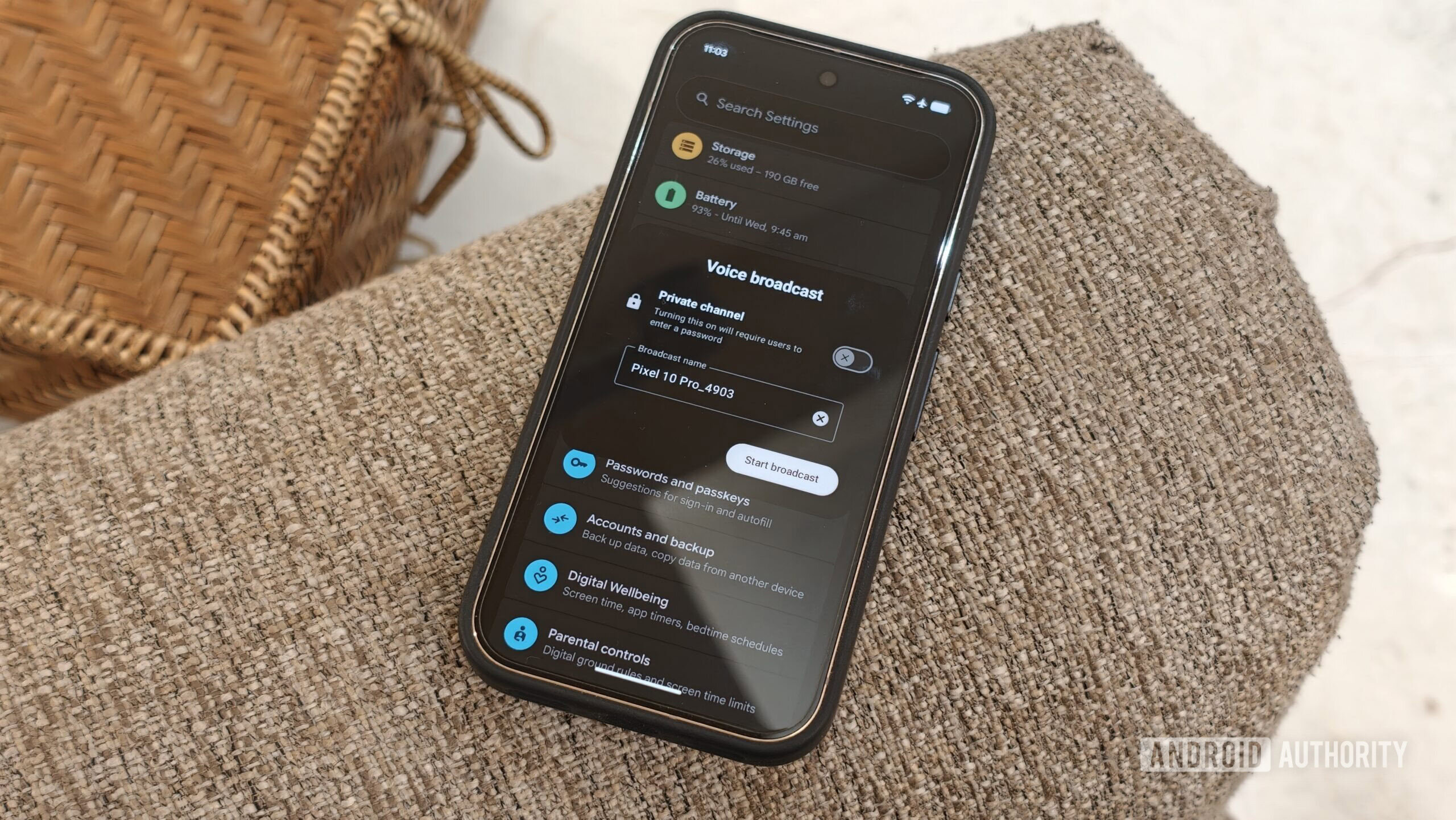
Dhruv Bhutani / Android AuthorityWhile the stable Android 17 QPR2 release is still a while away, Google has been steadily pushing out its cryptically named beta updates to supported Pixel phones. Earlier this week, I got the brilliantly named Android 17 QPR2 Beta 4 update pushed to one of my Pixels. You can probably make out by now that I’m not a big fan of Google’s nomenclature of its beta releases, but what matters is what’s in it.Before you get your hopes up, the latest update isn’t as big a release as QPR2 Beta 3, from what I can see, but there are still some nice little nuggets here that should appeal to many users. I’ve spent the last couple of days testing the update on a Pixel 10 Pro, and here are some features that stood out to me.A cleaner status bar, finallyDhruv Bhutani / Android AuthorityFor years, stock Android on Pixel phones has offered far less, borderline non-existent, status bar customization than Samsung’s One UI or OnePlus’ OxygenOS.Android 17 QPR2 Beta 4 finally gives users much more control over what is displayed in the status bar. The new status bar, accessed via the new Status Bar option under Notification settings, lets you decide which icons appear at the top of the screen.The Pixel status bar is finally getting some much-needed customization.The controls are split into two sections that let you manage notification and system icons. As a bit of a minimalist, the ability to toggle between all notifications, priority notifications, and no notifications at all is excellent. I’ve set mine to no notifications for an absolutely clean look. Similarly, the System Icons toggles let you opt in or out of indicators that show mute status, vibration mode, and battery percentage.While the improved settings pale in comparison to the granular control offered by other Android OEMs, it’s a step in the right direction and very much welcome.Voice Broadcast comes to Quick SettingsDhruv Bhutani / Android AuthorityWith the QPR2 Beta 4 update, Google is also easing access to the Voice Broadcast feature it had introduced with Beta 2. It’s a somewhat niche feature that has the potential to unlock some pretty interesting use cases.The voice broadcast feature uses Bluetooth LE and Auracast to let you broadcast your voice to any Auracast-compatible device nearby. While Auracast sharing isn’t new to the beta, nor is the Voice Broadcast feature for that matter, Beta 4 makes it much easier to access. You can now just tap a Quick Settings toggle to start broadcasting your voice. Easy as that.I’m not sure I’ll use Voice Broadcast often, but the potential is fascinating.All that said, I couldn’t get it working quite right. Tapping the Voice Broadcast quick tile starts the broadcast just fine; it’ll even let you set up a private broadcast with a password. However, connecting via a pair of Auracast-enabled headphones, all I could hear was garbled warbling. Perhaps the feature still needs some time in the oven, or it could be a lack of compatibility with my hardware.Regardless, the potential use cases here are interesting. I can see it being used as an accessibility tool, as well as by tour guides or teachers in a classroom. Not something I expect to use every day, but definitely something cool.More control over agentic AI with the AI Agent DashboardDhruv Bhutani / Android AuthorityGoogle is adding more and more AI features to Android, which means having clear visibility into what those features can access or what they are doing in the background is getting all the more important if you care about your privacy. Beta 4 addresses some of those concerns with a new AI Agent dashboard and a revamped Notification Intelligence menu.The AI Agent dashboard, found in Settings, provides a central place to view the AI tools and machine learning models running on your phone. Right now, the tab doesn’t show anything under it, but once on-device agentic tools become more commonplace, I expect this feature to become a very important part of keeping tabs on exactly what these agents are doing.Android’s AI Agent Dashboard should give users more control over what AI can see.More importantly, this setting will let you set permissions for individual agents. That means you should be able to prevent an AI tool from accessing notifications from sensitive apps, such as banking or private messaging apps.Dhruv Bhutani / Android AuthorityElsewhere, there’s a new Notification Intelligence page. While the subset of features here isn’t exactly new, I like that all these related notification controls sit together under a single tab. You no longer have to hunt across the interface to find individual toggles and options.The settings included here are fairly straightforward, with options to bundle lower-priority notifications and to recap larger notifications using on-device AI. The changes are largely quality-of-life additions that should ease access.Small quality-of-life additions that add upJoe Maring / Android AuthorityThe biggest Android updates usually focus on new visual features or major changes. But these smaller improvements can have just as big an impact on how you use your phone every day. While Beta 4 clearly isn’t quite as substantial as Beta 3, these quality-of-life additions are certainly welcome.Looking to get in on the action? Joining the beta is easy enough. All you have to do is head over to the Android Beta for Pixel website, log in, and select your Pixel device. The update should show up as an OTA within minutes. Moreover, the beta is stable enough that it shouldn’t be an issue running it on your daily driver.Thank you for being part of our community. Read our Comment Policy before posting.
I downloaded Android 17 QPR2 Beta 4. These 3 features instantly upgraded my Pixel
Full Article
Original Source
Read the full article at Androidauthority →KhanList aggregates and links to publicly available news content. We do not host full articles from third-party sources. Always verify important information with original sources.