
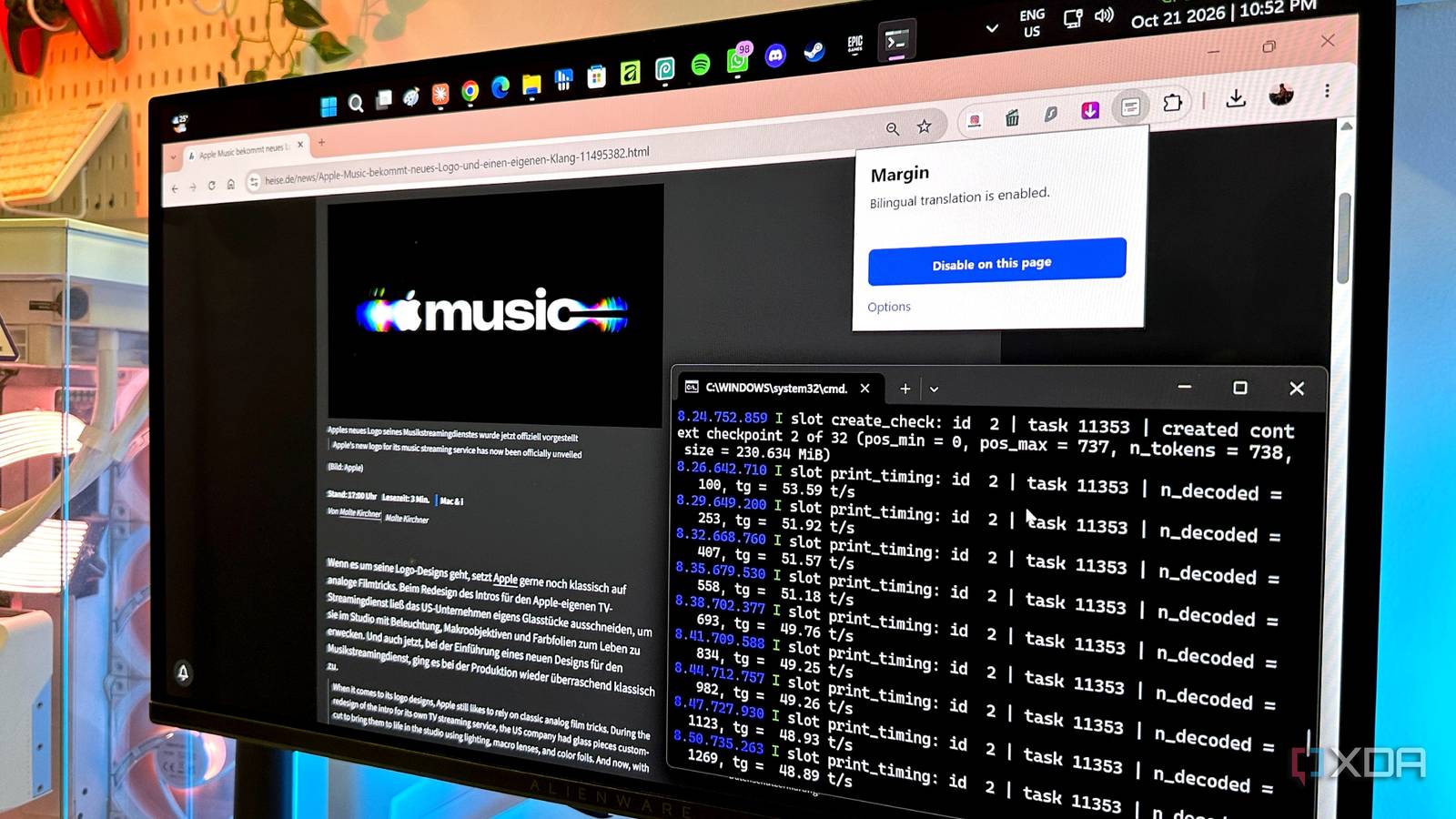
Published Oct 22, 2026, 7:31 AM EDT Gaming has been Samarveer’s greatest passion, and the Literature graduate in him takes immense joy in dissecting games for their themes, messages, and impact. Samarveer holds a deep appreciation of gaming, and considers the platform to be the most immersive and impactful across all media. He can be found engaging with gaming communities online, always ready to debate the finer points of ray tracing or itching to write an 8-page collegiate thesis on any game that impacts him emotionally. Google Translate is one of those tools that most of us take for granted. It's free, it’s convenient, and it's usually good enough to get the gist of something written in a language we don't speak. But as local AI models get better, I've started wondering whether sending text to a cloud service should still be the default when our own hardware is increasingly capable of doing the same job. Truth be told, I barely use Google Translate to begin with, so it's not like I'm abandoning a tool I've relied on for years. Instead, I wanted to find out how difficult it would be to build a translation setup that runs entirely on my PC through my GPU, all without an internet connection. Turns out, we've come remarkably far in the self-hosted LLM space, because the results were much more interesting than I expected. Google Translate isn't the only way to get things translated Convenience often comes at the cost of control It would be rather silly of me to pretend that Google Translate isn't good at what it does. It's free, it's accessible from practically any device, and when it comes to translating restaurant menus, foreign-language signboards, or a particularly long insult from your Call of Duty rivals on an Asian server, it's perfectly adequate. However, convenience has a funny way of making us overlook the alternatives, especially when a tool becomes the default for something as mundane as translating text. The first limitation is connectivity. Google does have offline language packs, and by and large, they are useful, but the translation experience is vastly different than the one you get online. If you're somewhere with unreliable internet, blocked services, or expensive mobile data, even a familiar workflow can become a nuisance. Then there's control over the text itself. Sending sensitive documents to an online service isn't always appropriate, whether you're dealing with confidential correspondence or simply don't want another third party processing your content. Local inference offers a straightforward alternative: keep the text and translation process on your own machine. Lastly, flexibility is a pretty big plus, too. A conventional translator generally gives you a translation, without saying much — if anything — in its tone, terminology, or intended audience. On the other hand, a language model can potentially account for those instructions, even though the results do depend on the model itself. Regardless, it would be an overstatement to say that all of this makes Google Translate "obsolete." However, it does make a local alternative worth exploring, especially when it's remarkably easy to set up and begin using. I set up my own offline translation model It even works as a browser extension My setup has three moving parts — llama.cpp to run the models, the models themselves, and a Chrome extension that connects everything to the browser. I went with llama.cpp over Ollama because its server exposes an endpoint that works with my chosen browser integration, keeping the setup relatively straightforward. I've begun feeling limited by the 12GB of VRAM on my RTX 4070 Ti, so I had to be realistic about model sizes. As such, I settled on Gemma 4 12B (Q4_K_M) and Qwen3.5-9B (Q5_K_M) for my experiments, since these models would cover my different language requirements without spilling over into the much-slower system RAM and holding up my local LLM's responses. With llama.cpp up and running and GPU offloading enabled, I've managed to keep my Gemma and Qwen models limited to the GPU only, serving the model to the llama.cpp Web UI in my browser. With the model loaded and ready in the server, I installed the Margin Chrome extension, which lets me explicitly use my llama.cpp-hosted server as the translation model. I didn't have to copy walls of text and put them into the webUI to ask Gemma 4 for translation help — I just pointed Margin at it, and the extension used my own locally-hosted LLM to translate webpages on the fly. For European languages, I've been using Gemma, and the results have been excellent in my experience. The translations have been natural enough for my needs, and I haven't encountered any issues that would make me want to switch back to a cloud-based workflow. For other languages such as Japanese, Chinese, or Korean, I've found that hosting Qwen3.5 actually proves to be much more capable at translating without losing grammatical accuracy. Should everyone replace Google Translate with local AI? A particular section of users stands to benefit the most I wouldn't recommend everyone spend an afternoon setting up a local translation model. Google Translate remains far more convenient for quick translations, and not everyone needs to run an LLM just to understand a foreign-language menu. However, if you deal with technical documentation regularly, engage in foreign-language research, confidential contracts or embargoes that simply do not allow for third-party cloud translations legally, such as material covered by NDAs, that's when keeping translation entirely on your own hardware proves to have some pretty nice benefits. We talk a lot about how self-hosting LLMs keeps things private, but that isn't the only selling point (nor the biggest one). A local LLM can do much more than translate words from one language to another. You can explicitly ask it to preserve a particular tone, explain cultural nuances, retain technical terminology, or make a message sound more natural without losing its intended meaning. Try getting Google Translate to follow that many instructions consistently. That flexibility makes local AI particularly useful when crafting messages in another language, where sounding like a real person matters more than producing a technically correct but awkward sentence. You can refine the translation conversationally, and ask the model to adjust its phrasing until you're happy with it. For everyone else, though, Google Translate will do just fine. But if you need greater control over your translations, a local model is well worth the effort. Some parts of de-Googling are pretty easy I wouldn't build a local translation model just to avoid opening another browser tab, but I can't deny that it's incredibly satisfying to see my gaming PC turn into a tool that can do considerably more than render pretty games quickly. My RTX 4070 Ti was already doing enough heavy lifting in games. Giving it another job feels like getting more out of hardware I already own. It's genuinely impressive how local AI workflows can replace every cloud service we use, provided we put our mind to it. We can now build remarkably capable alternatives without waiting for a company to decide what features we need, what limitations we should accept, or how long a particular tool deserves to exist. llama.cpp Llama.cpp is an open-source framework that runs large language models locally on your computer.
I ditched Google Translate for a local model running on my GPU, and it works offline too
Full Article
Original Source
Read the full article at Xda-developers →KhanList aggregates and links to publicly available news content. We do not host full articles from third-party sources. Always verify important information with original sources.