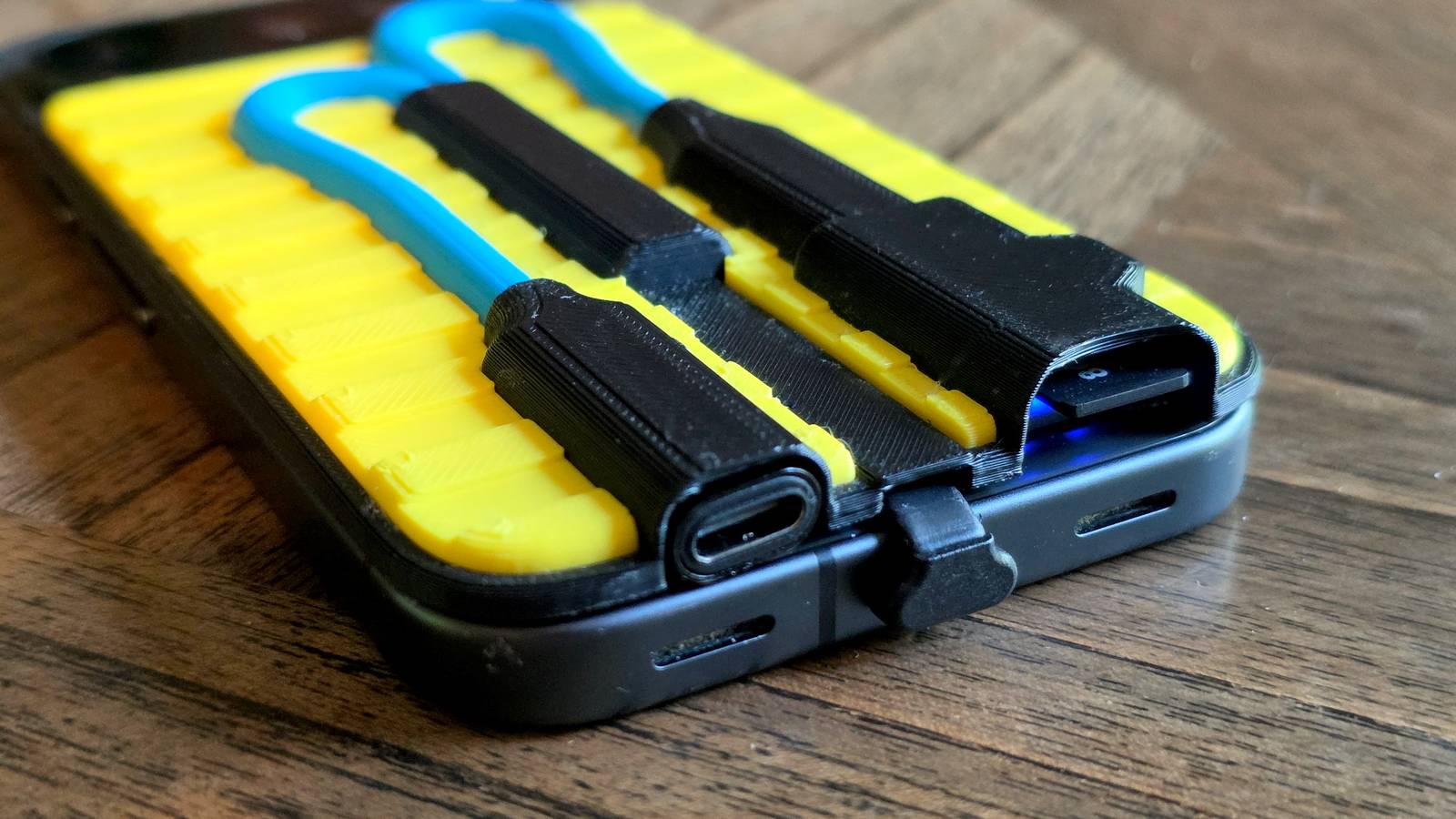
Published Aug 9, 2026, 8:45 AM EDT Joe Fedewa has been writing about technology for over a decade. Android and the rest of the Google ecosystem have been a focus for years, as well as reviewing devices, hosting podcasts, filming videos, and writing tutorials. Joe loves all things technology and is also an avid DIYer and food blogger. He has written thousands of articles, hundreds of tutorials, and dozens of reviews. Before joining How-To Geek, Joe worked at XDA-Developers as Managing Editor and covered news from the Google ecosystem. He got his start in the industry covering Windows Phone on a small blog, and later moved to Phandroid where he covered Android news, reviewed devices, wrote tutorials, created YouTube videos, and hosted a podcast. From smartphones to Bluetooth earbuds to Z-Wave switches, Joe is interested in all kinds of technology. After several years of jailbreaking and heavily modifying an iPod Touch, he moved on to his first smartphone, the HTC DROID Eris. He's been hooked ever since. The days of every Android phone including a microSD card slot are ancient history. Of course, it’s possible to plug external storage into your phone’s USB-C port, and portable SSDs are becoming more common. However, they have one fatal flaw that people love to point out. I wanted to solve it. The rise of portable SSDs is not surprising. Opting for a phone with more storage is more expensive than ever, and while something like the trendy Sharge Disk Pro is far from affordable, it will work with any phone you get. That being said, it’s an imperfect solution to a problem, and I decided to take a crack at improving it. The problem with portable external storage It’s the USB headphone situation all over again Credit: Andy Betts / How-To Geek When phone makers started removing the 3.5mm headphone jack, those who didn’t want to use Bluetooth headphones heard the same response over and over again: “You can still use wired headphones with the USB-C port!” That’s true, but what about when you want to charge your phone while listening to music? There’s only one USB port. That’s the same problem that people point out with portable storage options. I know this, because I’ve written about it a couple of times. It’s perfectly possible to get extra storage with some sort of external device, but no one wants to walk around with a flash drive sticking out of the bottom of their phone, or a chunky hockey puck on the back. And again, the USB port is constantly occupied. To be clear, that’s not really the point of portable storage devices. They’re more for occasionally moving stuff off your phone to clear up space, not a permanent extra storage partition for your phone. MicroSD cards were permanent extra storage partitions, and that’s what I wanted to add to my phone. The answer was three cheap accessories One long Amazon deep dive later… Credit: Joe Fedewa / How-To Geek To recap, there are two problems with portable storage devices. They occupy the USB-C port. They aren’t compact enough for 24/7 use. In my mind, there was a simple solution to the first problem—add another USB port! That’s easy enough to fix with a splitter cable, but not just any splitter cable. It’s critical that one side supports charging and the other side is for data—the one I found was $13. There are many different types of storage devices you could use here. I opted to throw back to the old Android days with a USB-C to microSD adapter for $10. Now, this only solved the first problem. The splitter allows for an external storage device to be plugged in while charging the phone through USB, but I’m not going to walk around with two cables flopping out of my phone. It still needed to be compact and portable. Samsung EVO Plus MicroSDXC I remembered the flat cables on wireless charging adapters I’ve used in the past. They barely stick out from the USB port and wrap neatly around the back of the phone. My thinking was I could plug the splitter into the flat cable and keep everything on the back of my phone. So, I looked for a very short, flat USB-C cable, and I found a perfect one for only $9 that was less than 3 inches. With those three accessories in hand for a tad more than $30, I could technically solve both problems with a bit of tape. Yeah, no—I have a 3D printer, I can do better than that. After multiple fit tests and design iterations, I came up with an “enclosure” for everything that I’m mostly happy with. Is it weird looking? Sure. Does it solve both of the problems I outlined above? Absolutely. I have a fully-functional USB-C port for charging, there’s nothing thick sticking out of the bottom of the phone, and the enclosure barely sticks out further than my Pixel 10’s camera bump. I can still comfortably hold my phone, put it in my pocket, and charge it—all with a microSD card slot. A fun proof-of-concept I know there are some obvious problems with this “solution.” Most notably, there’s zero protection for the microSD card. It can easily be pulled out by anyone, and it’s clearly not waterproof—the latter applies to the extra USB port, too. However, as a fun little “can I do it?” project, I’m calling this a big success. It could be improved by replacing the microSD adapter with a flash drive and fully enclosing that part. While it may not look as cool as Sharge’s retro-inspired transparent portable SSD, it’s much more affordable (and I made it myself).
I added microSD storage back to my phone for $30 without losing the charging port
Full Article
Original Source
Read the full article at Howtogeek →KhanList aggregates and links to publicly available news content. We do not host full articles from third-party sources. Always verify important information with original sources.