
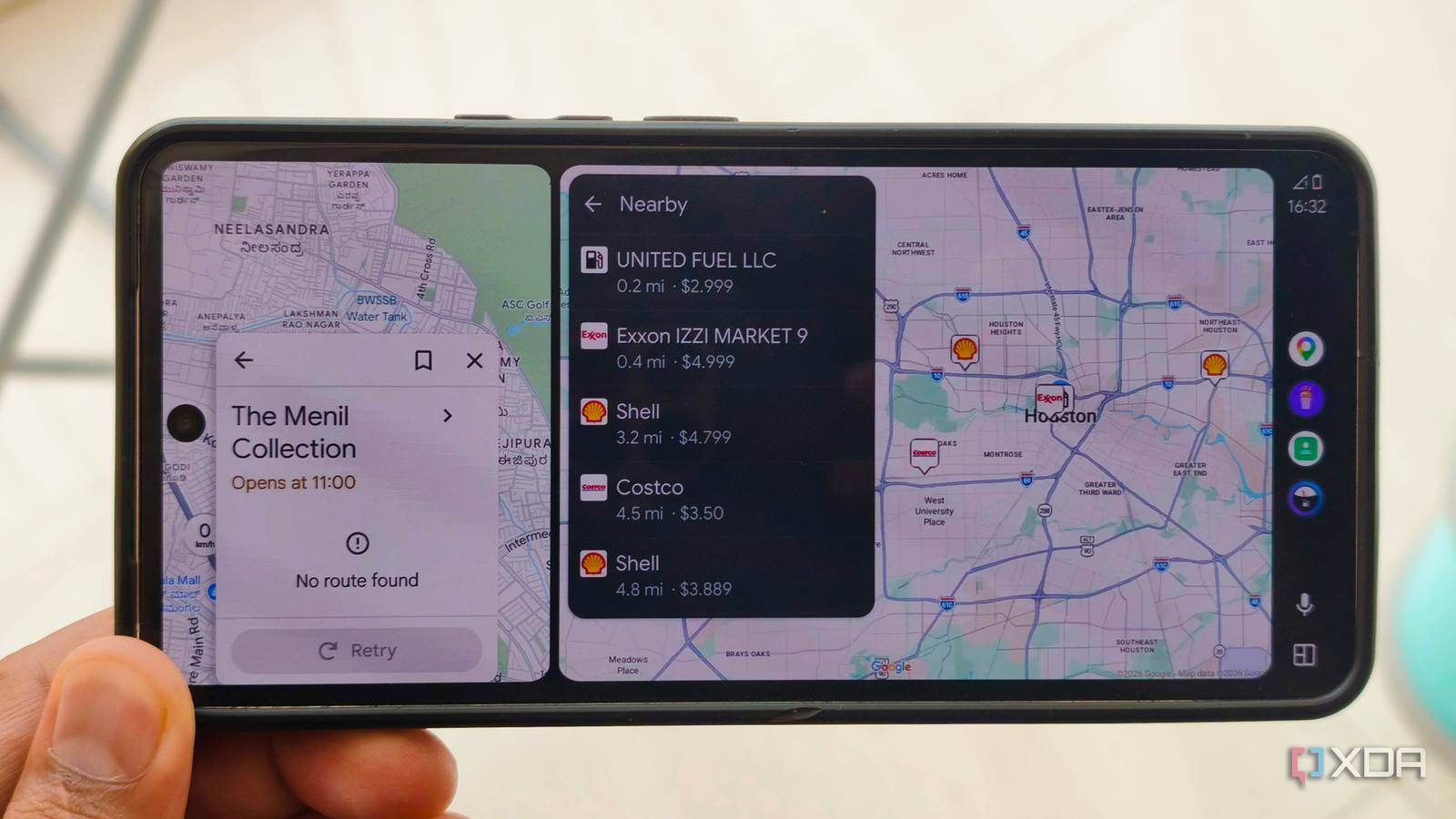
Published Nov 15, 2026, 10:00 AM EST Anurag is an experienced journalist and author who’s been covering tech for the past 5 years, with a focus on Windows, Android, and Apple. He’s written for sites like Android Police, Neowin, Dexerto, and MakeTechEasier. Anurag’s always pumped about tech and loves getting his hands on the latest gadgets. When he's not procrastinating, you’ll probably find him catching the newest movies in theaters or scrolling through Twitter from his bed. There are plenty of gas stations around me, but I've never paid much attention to where I fill up. Most of the time, I just stop at whichever station is convenient when my tank starts running low. The problem is that gas prices can vary quite a bit, even between stations that are only a few miles apart. And when you're filling up an entire tank, those differences add up over time. Recently, I started using an app called Fuelio that lets me compare gas prices at nearby stations directly through Android Auto. The closest gas station isn't always the cheapest A few cents per gallon add up Gas prices aren't consistent across stations, even within the same neighborhood. You could have a Shell charging $3.79 per gallon and a Costco or another station a couple of miles away selling gas for $3.49. That's a 30-cent difference, which works out to $3.60 on a 12-gallon fill-up. It doesn't sound like much for a single stop, but if you're filling up every week, that's nearly $190 over a year. Most of us don't go around comparing gas prices before every fill-up. I'd usually stop somewhere along my route, and as long as the price wasn't unusually high, I wouldn't think twice about it. Google Maps is great for finding nearby gas stations, but you still have to check individual listings, and prices aren't always available. However, Fuelio, instead of treating every gas station as just another point on the map, lets me look at nearby options based on their reported fuel prices. I can quickly see whether a station a little farther down the road is worth considering. One thing worth knowing is that Fuelio relies on crowdsourced gas prices in the US. This means the prices you see are submitted by other drivers rather than updated directly by gas stations. As a result, the accuracy and availability of prices depend on how actively people contribute in your area. Some stations might have recently updated prices, whereas others might have outdated information or no prices listed at all. Of course, driving an extra five miles just to save a dollar on gas defeats the purpose. I'm more interested in finding cheaper stations that are already along my route or require only a small detour. Fuelio makes comparing gas prices easy on Android Auto Everything you need is on your car's screen Getting Fuelio working with Android Auto is pretty easy. You can download it from the Google Play Store. Once installed, open the app on your phone, add your vehicle, select the fuel type it uses, and allow location access. You can also adjust the search radius to control how far the app looks for nearby gas stations. Opening the app in Android Auto brings up nearby gas stations, which I can browse either on a map or in a list. I particularly like the list view because I can quickly compare the reported price and distance of different stations without having to open each one individually. Tapping a station brings up more details, including its available fuel prices. The app also lets you search for stations by city or address, which is useful when you're heading somewhere unfamiliar. There's no need to create an account, and the basic gas price comparison features are free. Fuelio does quite a bit more than compare gas prices, though. You can track how much you spend on gas and calculate your car's fuel economy over time. Android Auto even has a simplified form for logging a fill-up, so you don't necessarily have to pull out your phone every time you stop for gas. Fuelio also has an optional Premium subscription that adds some useful features, particularly for longer road trips. One of them is a route planner that shows gas stations along your journey, complete with their reported prices. You can filter stations by fuel type or brand, estimate how much gas the trip will require, and get suggested stops based on your vehicle's range. The app also provides a breakdown of the estimated fuel expenses for the journey. There are a few other premium extras, including more advanced route customization and receipt scanning for automatically recording fill-up details. However, most of these features are available through the phone app, and you don't need a subscription to compare nearby gas prices on Android Auto. Android Auto is capable of a lot more than you think The right apps make all the difference I've been experimenting with quite a few Android Auto apps recently, and I've realized that there's a lot more you can do with the platform than just navigation and music. The problem is that Google is fairly restrictive about which apps it allows on Android Auto, so many interesting ones don't get nearly as much attention as they deserve. For example, I recently installed RadioShake, a completely free app that brings more than 45,000 internet radio stations to Android Auto. I've also been using HomeCar to access my Home Assistant dashboard directly from my car's screen. I can check my security cameras, control my entrance lights, and see whether I've locked the front door without reaching for my phone. There are other interesting options, too. Widgets for Auto lets you display Android widgets, including weather forecasts and calendar schedules, on your dashboard. AA Browser brings a proper web browser to Android Auto, which is useful for checking restaurant menus, hotel information, or other websites when you're parked. Some of these apps require sideloading or additional setup, but they work without rooting your phone. Every gallon counts Fuelio has become one of those apps I didn't know I needed until I started using it. It takes only a few seconds to compare nearby gas prices, and even if I save just a couple of dollars on each fill-up, that's money I'd otherwise be spending unnecessarily.
I added a fuel price app to Android Auto, and I stopped overpaying at the first station I see
Full Article
Original Source
Read the full article at Xda-developers →KhanList aggregates and links to publicly available news content. We do not host full articles from third-party sources. Always verify important information with original sources.