
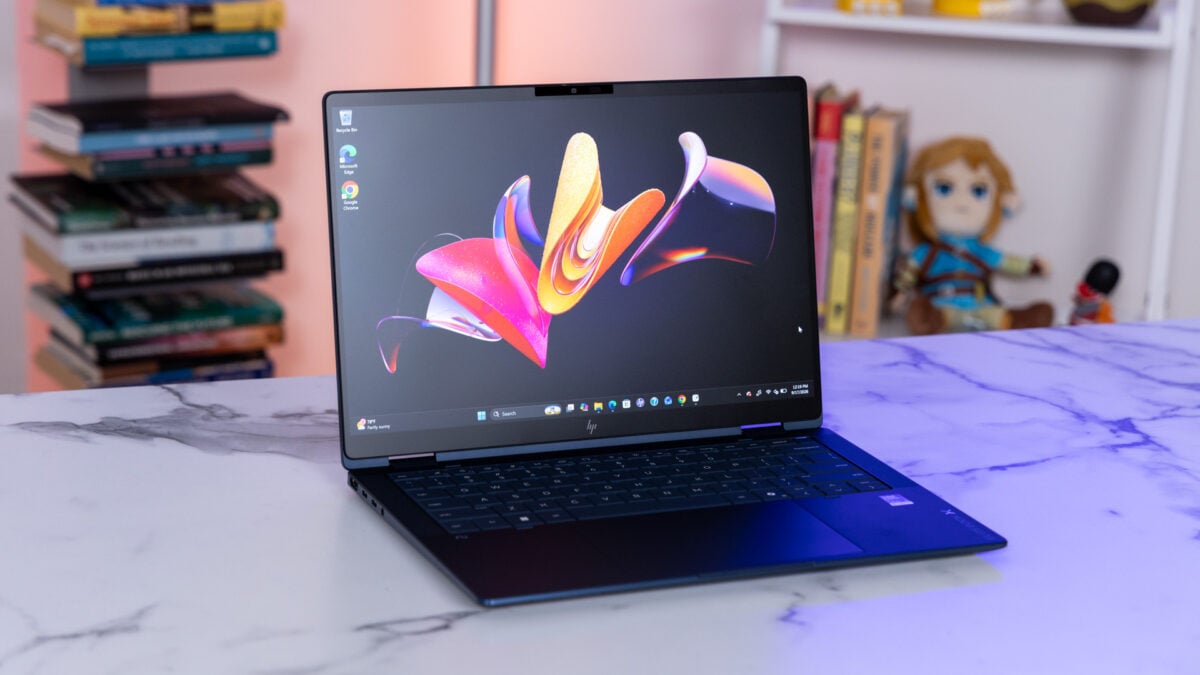
Plenty of laptops strive to be a great Windows alternative to Apple’s MacBooks. It’s a tough bar to clear, but the business-oriented HP EliteBook X Flip G2i 14 AI is a good competitor. The problem is price, of course, as it is with all business laptops. Let’s get into how much this monstrosity costs. HP sent us the HP EliteBook X Flip G2i 14 AI, outfitted with an Intel Core Ultra X7 358H processor, 32GB of RAM, and a 1TB SSD. That costs a ridiculous $3,499, and normally I would condemn such a thing for its price-to-performance ratio, but this product is not for the average consumer—it’s priced high because businesses can buy it in bulk. Unless you have money to throw around, something like the MacBook Air will be a cheaper but equally premium-feeling option. HP EliteBook X Flip G2i 14 AI The HP EliteBook X Flip G2i 14 AI offers a satisfying keyboard and trackpad, paired with long battery life, making for an excellent business laptop. Thin and light Bouncy keyboard and smooth touchpad Solid array of ports Bright OLED screen Long battery life Garaged pen Business laptop tax Imbalanced audio Performance isn’t competitive But if you’re a self-employed professional or small business owner who hasn’t yet run screaming for the hills from that lofty price tag, it’s worth hearing out the list of features that make the EliteBook X such a great machine, especially compared with the likes of a MacBook Air. Spoiler: It’s got way more ports, and it still manages to be light and thin. Premium in all the right places © Raymond Wong / Gizmodo The gorgeous dark blue colorway sets the appropriate tone for the EliteBook experience. It’s compact, at 2.86 pounds and 0.31~0.57 inches thick (from front to rear)—not as petite as the MacBook Air 13 (2.7 pounds, 0.44 inches), but svelte all the same. It’s also surprisingly sturdy, having passed 19 MIL-STD-810H military-grade tests, which include drops, shocks, dust, and extreme temperatures. As soon as I lifted the EliteBook X’s lid, I knew I was going to have a pleasant typing experience. The keys are large, with carved edges that make each look like a mini dais. This is a clever bit of design because it gives my fingers enough room to fit comfortably on each key while also letting them feel their way around the deck without requiring me to look down. I took off at a steady 84 words per minute, my average, with very few flubs. © Raymond Wong / Gizmodo Despite the thin frame, the key travel feels satisfying and bouncy. The gold standard for business laptop keyboards is the Lenovo ThinkPad X1 Carbon, and the EliteBook X offers solid competition. Outside of the keyboard space, it doesn’t get much better than this. © Raymond Wong / Gizmodo Of course, a solid keyboard does not a perfect navigation experience make: that requires a great trackpad as well, and the EliteBook X’s is just that. My fingers swam across its glass surface like a fish through water. The haptics aren’t as intense as I’d like, but they’re fine enough to avoid replicating the shallow feel of a mechanical clicker. The trackpad is also relatively large (roughly 89 x 138 millimeters) for a 14-inch laptop and gave me plenty of room to navigate. © Raymond Wong / Gizmodo Thin does not mean poor connectivity in the business category (I’m looking at you, MacBook Air), and the EliteBook X comes packing. There are two Thunderbolt 4 slots, one USB Type-C, and one USB Type-A. Those cover the charging port as well as modern and legacy peripherals. You’ve got HDMI 2.1 for presentations, a nano lock slot for security, and even a headphone jack. © Raymond Wong / Gizmodo You’ll also find a garaged pen on the right. The EliteBook X is a 2-in-1, meaning you can fold it backward into tablet mode to take notes and scribbles. The pen was nicely responsive when I mapped out a small dungeon for my D&D campaign in Paint; my only quibble is that its buttons are slightly higher than where my thumb would naturally rest. I’d recommend it for notetakers more so than artists, because it’s small and doesn’t offer a tail eraser or choice of nubs. © Raymond Wong / Gizmodo Overall, the price HP is asking is hefty, but the EliteBook X is as premium as it gets for those who can afford it. A gorgeous and practical display © Raymond Wong / Gizmodo I had my reservations about the EliteBook X’s display since HP slapped an anti-glare coating on its 14-inch OLED panel, which often adds a harsh, fuzzy layer to the screen. However, it wasn’t nearly as distracting as the coating I saw on the LG Gram Pro 16. Don’t get me wrong, the anti-glare still created some fuzz, and I’ll always prefer glossy over matte for that reason, but it makes sense for a business laptop. The last thing you want is killer overhead office lights blasting your glossy display while you’re trying to take notes during a meeting. Outside of work, the 2,880 x 1,800 resolution and 120Hz refresh rate made it worth watching my favorite shows on. In Frieren: Beyond Journey’s End, Fern’s purple hair looked crisp and flowy in the wind, overcoming the anti-glare coating, which tends to soften edges. The starry night looming over her magical battle presented stunning shades of blue. That’s thanks not only to the 100% DCI-P3 color gamut coverage but also to the panel’s 500-nit brightness. Even in landscapes with brighter colors—of which there are many in Frieren—I was impressed that the anti-glare coating didn’t break the immersion—it was more visible, but it didn’t break focus. © Raymond Wong / Gizmodo The top-firing speakers were surprisingly loud in my office—I could hear them clearly from the next room over. I listened to Bershy’s “Radio,” where the synths and percussion hit hard and heavy, so much so that they occasionally matched or overcame the vocals. It wasn’t accurately reproduced, so it didn’t sound natural, but it didn’t sound bad, either, just off balance. I was a bit concerned about how the mixing sounded while consuming entertainment: the magic sound effects in Frieren were sharp and hollow, though the dialogue, like the vocals, was smooth. That also held up when voicing chatting with friends, so meeting audio, most importantly, should be loud and clear. © Raymond Wong / Gizmodo Manufacturers can easily fumble even a 3K webcam like the one on the EliteBook, but HP did a solid job here. The image is sharp enough to capture the frizz in the curls on my head, and it accurately reproduced the rosy notes of my skin on video calls. More importantly, it didn’t overexpose my ceiling lights, which is vital for office workers. As a plus for those folks in particular, it features a physical privacy shutter. You don’t need the gorgeous display to run a business, but the matte screen, sharp webcam, and vocal-present speakers are solid for the core use case. Performance isn’t the priority © Raymond Wong / Gizmodo With an Intel Core Ultra X7 358H chipset and 32GB of RAM, the EliteBook X doesn’t come close to offering a good price-to-performance ratio, but as I said earlier, you’ll have to table that grievance, since this is a business laptop. Unfortunately, even with that grace, the EliteBook X seemed to be racing for last place on the Geekbench 6 test. Two systems powered by the same chipset as the EliteBook X (1.5GHz base clock speed), the MSI Prestige 14 Flip AI and Dell XPS 16, scored 8.3% and 11% higher in multi-core performance, respectively, and 21.8% and 23.4% higher in single-core performance, respectively. It makes sense that the XPS 16 scored the highest since it’s a bigger laptop that allows for superior cooling, but the EliteBook X should have been able to keep pace with the Prestige 14 (0.47 inches thin) at the very least. Even against a smaller laptop, the EliteBook can’t keep up. The 13-inch MacBook Air’s M5 chip (3GHz base clock speed) was 12.1% stronger in multi-core and a staggering 76.5% faster in single-core. Remember, this is a laptop that starts at $1,299 and has only 10 cores, compared to Intel’s 16. The EliteBook X had similar trouble with the Cinebench 2026 rendering benchmark. The M5 chip scored 17.8% and 68.3% higher in multi-core and single-core performance, respectively. Meanwhile, its CPU siblings from MSI and Dell were 27.7% and 27.3% faster, respectively, to complete the multi-core task and 24.6% and 28.9% faster in single-core. © Raymond Wong / Gizmodo Even if we forget the egregious price, the EliteBook X is not the laptop to go to for stellar performance. For casual business needs, such as surfing the web, chatting with colleagues, and managing Excel spreadsheets, the EliteBook offers more than enough horsepower. Heavy-duty work like video editing and coding isn’t happening, at least not efficiently. On the plus side, all laptops should aim for long battery life, but it’s especially important for business laptops to get through a full on-the-go workday, and the EliteBook X did not disappoint. I spent a couple of days reading, writing, chatting with friends, and watching Critical Role, and the laptop lasted a bit over 16 hours before I had to reach for a charger. I set the brightness to 50%, had the battery profile set to “Smart Sense” in the HP app (which overrides Windows settings by default), and disabled “Energy Saver.” The EliteBook X could last a tight two workdays or one heck of a long day with entertainment mixed in. For comparison, the XPS 16 also lasted 16 hours, coming close to the M5 MacBook Air’s 18 hours, which is quite impressive since Apple’s M-series chips set the gold standard for battery life. For work and play © Raymond Wong / Gizmodo You’re not getting a good deal on graphics. If we ignore price again, however, the EliteBook X’s Intel ARC B390 is solid for lightweight tasks, and—dare I say—competitive. On 3DMark’s “Steel Nomad” test, which measures rendering performance, the EliteBook X scored 9.3% higher than the XPS 16 and 1.9% higher than the Prestige 14, both of which are equipped with the same Intel ARC B390 integrated GPU. It actually beat the M5 MacBook Air by 42%. In practice, the Intel ARC B390 also makes Cyberpunk 2077 perfectly playable. On Low settings with Intel’s Super Resolution set to Ultra Performance, the EliteBook X hit a strong 73 fps at its native resolution (2,880 x 1,800). It’s sharp and even makes use of its high-refresh-rate display. Turning on frame generation netted me 112 fps, which is close to realizing the full potential of the refresh rate. If your company manages to snag an EliteBook X, you could do some solid gaming during your break. As far as workday tasks go, of course, the graphics will be good for keeping the display on and maybe some light editing or design. This is pretty typical for business laptops, even those as luxurious as this. If you want a business laptop with a strong GPU, look for a workstation. Great for what it is © Raymond Wong / Gizmodo The HP EliteBook X Flip G2i 14 AI is a luxurious business laptop for workers who want the shiniest toy and don’t mind paying extra. As a 2-in-1 with integrated graphics, it’s an ideal purchase for folks who need to take notes or sketch graphs on the go and also want a quality entertainment device to use outside of work. What makes a good business laptop is its interactive experience and its longevity. The EliteBook X kills on both fronts. You’ve got a bouncy keyboard and a smooth touchpad, plus a 2-in-1 design with a touchscreen and a garaged pen. That’s more options than most laptops give you—you’ll find 2-in-1s in the business category, but a stylus is rarer. You can also squeeze in two full workdays on battery with no problem, and some overtime if you lower the brightness or turn on energy-saving profiles. Unfortunately, it’s not a perfect laptop. The performance isn’t all that competitive, even with laptops that share its chipset. It’s also disappointing that the speakers suffer from a wonky soundstage. But overall, if you want a premium business laptop experience, the EliteBook X checks a lot of boxes. If you like the sound of this system but can’t quite stomach that price point, the MSI Prestige 14 Flip AI also offers a 2-in-1 and stylus features for a starting price of $1,299. Or, if you’re just looking for a clamshell, the significantly cheaper M5 13-inch MacBook Air should do just fine.
HP EliteBook X Flip G2i 14 AI Review: Great for the Office, if Not Your Wallet
Full Article
Original Source
Read the full article at Gizmodo →KhanList aggregates and links to publicly available news content. We do not host full articles from third-party sources. Always verify important information with original sources.