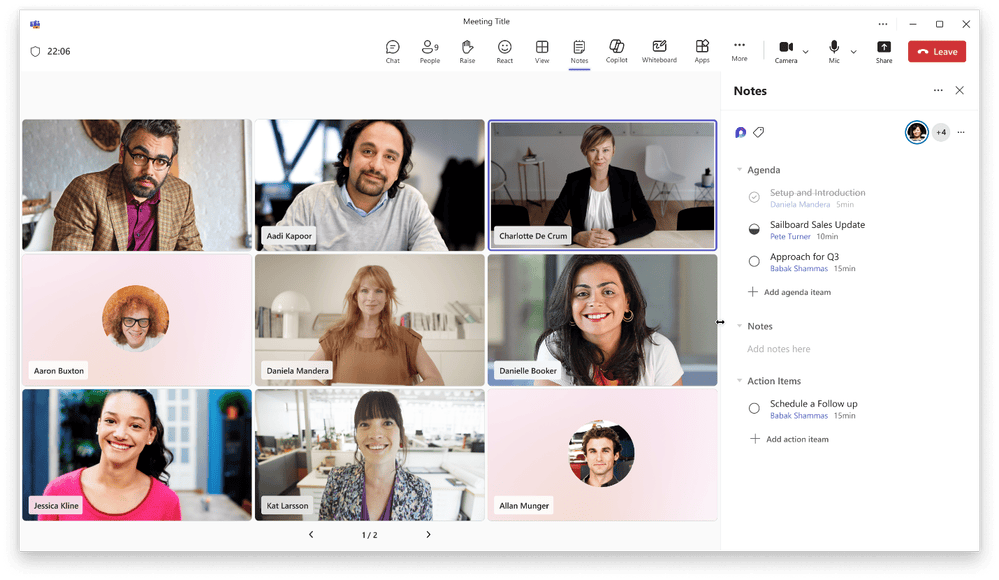
Microsoft Teams has been a part of our business since we started remote work. But the concern started when we didn’t have control over our chats, calls, and files. This raised privacy-related concerns.So we tried a Microsoft Teams clone to keep our data secure and private. In this step-by-step guide, I’ll share how we designed, built and deployed a custom messaging solution from the ground up.What is a Microsoft Teams Clone?A Microsoft Teams clone app is a custom-built communication platform that is similar to Teams’ workflow, chat, channels, meetings and file sharing but runs on your own infrastructure.It provides you with all the modules a modern team wants in one place, without having to fiddle around with five different tools.Breaking Down Microsoft Teams Clone’s Core ModulesBefore diving into development, it helps to know what features are necessary for building a Teams clone app. Here’s what actually goes inside it:Team Workspace - A shared place where everyone projects and team members collaborate.Chat - One-on-one and group messaging in real time.Channels - Rooms that are topic-based and team-specific for organized conversation.Meetings - Schedule and instant video huddles for complete team syncing.Voice Calls - Quick audio check-ins without the overhead of a full meeting.HD Video Calls - Face-to-face conversations with real-time streaming.File Sharing - Simple document and media sharing with version history.Calendar - Meetings are automatically scheduled on the calendar for all teams.Notifications - Smart alerts ensure that nothing important is missed.Why Build an On-Premises Microsoft Teams Clone?Enterprises handling sensitive data risk data leaks when they rely on someone else’s server for internal conversations. So building an on premise Microsoft Teams clone gives teams complete control and customization instead of dependency.Here’s why building an on-premise communication solution is better:Complete Data Ownership - Every message, call and file stays on your own servers for complete control.Full Source Code Access - All of the code is yours, so nothing is a black box that you cannot touch or fix.Private Deployment - The platform runs inside your own infrastructure, isolating public networks.Better Security - You control encryption, access rules and audit logs instead of relying on vendor defaults.Custom Branding - Your name and identity are on the platform, eliminating someone else's tag.Unlimited Customization - You can add, remove or rebuild any feature to fit your workflow without the vendor's roadmap approval.No Recurring Per-User Subscription - Pay once for the license instead of paying more for each new user.Multi-Tenant Support - You can run multiple client accounts or business units on one platform without extra infrastructure.Better Compliance - You set the standards for security and data handling that are specific to your industry and region.Enterprise Integrations - Connect natively with your existing CRM, HRMS and internal tools without API restrictions.One-Time License Fee - Pay once and own the solution instead of paying according to users, features or usage.How Does Microsoft Teams Clone Architecture Work?In a Microsoft Teams clone architecture, a client request goes through an API gateway to a real-time messaging server over a message queue like Kafka or RabbitMQ.Here, videos and voice calls are done over WebRTC with STUN/TURN servers handling connection negotiation and a presence service showing who's online in the workspace.This kind of event-driven setup lets a business collaboration platform support thousands of simultaneous users without lag or dropped messages.Microsoft Teams Clone ArchitectureTop 10 Features of a Microsoft Teams CloneA strong Microsoft Teams clone isn’t just a chat tool with a calendar, it’s a complete productivity hub for your entire business. There are 10 things that separate a simple messaging app from an enterprise communications platform:Team Workspaces - One centralized space for organizations to manage people, projects and conversations.Channels - Department and project-focused chats are confined to designated spaces.Direct Messaging - For quick exchanges, you can have private one-on-one conversations.Voice Calling - Instant audio calls for quick queries without the scheduling overhead.HD Meetings - HD video conferencing over WebRTC without lag.Screen Sharing - Live presentations, demos and troubleshooting on calls.Calendar - Meetings are synchronized across the team with integrated scheduling.File Sharing - Secure file transfer with end-to-end encryption for data protection.Admin Dashboard - Users, roles and permissions are managed and controlled centrally.Enterprise Security - Get layers of single-sign-on, multi-factor authentication and end-to-end encryption for complete protection.What Technologies Are Used For Building A Microsoft Teams Clone App?The right tech stack determines whether your platform scales or buckles under enterprise load. Modern stacks combine a fluid frontend with a resilient and real-time backend for messaging and video on demand. Here are the recommended technologies to build a strong instant messaging app.i) Frontend TechnologyWeb, Android and iOS use different tech to deliver a good interface experience for the end user.Microsoft Teams Clone App Frontend Technologyii) Backend TechnologyWeb & Mobile use the same backend technology to deliver better control, response and user experience.Microsoft Teams Clone App Backend TechnologyWhat is the major difference between Microsoft Teams vs Building an On-Premises Microsoft Teams Clone?Now that you have the two options, choosing between renting and owning becomes much easier. This is how a private collaboration platform stacks up against the default cloud-hosted Teams model:Building an On-Premises Microsoft Teams CloneHow To Build A Microsoft Teams Clone Using MirrorFly IM Solution?When I wanted to build an app similar to Microsoft Teams for my business. I researched various solutions and narrowed down my choices to Apphitect and MirrorFly IM solution.I went ahead with MirrorFly, as it provided me with deeper customization to build an enterprise messaging app that meets my requirements. Now, let’s see how I developed a Microsoft Teams clone for our business using MirrorFly SDK.Step 1: Initial SetupAdd the dependencies and get MirrorFly SDK’s license key.For Android, iOS and Web chat SDK, see the requirements below.Android Lollipop 5 or above with API Level 21Java 7 or higherGradle 4.1.0 or highertargetSdkVersion, compileSdk 34 or aboveGet your MirrorFly license keyNavigate to the application info section to find the license key you are looking for if you are already a registered user. If you are new, contact the MirrorFly Team to set up your account and log in.1. Create a new project in Android Studio2. Add this code to your setting.gradle file if you are using Gradle 6.8 or higher. But if you are using Gradle 6.7 or lower add it to your root build.gradle file.Note: Check the release notes for more details on Gradle updates before starting the process.dependencyResolutionManagement { repositories { mavenCentral() google() jcenter() maven { url "https://repo.mirrorfly.com/release" } } } 3. Now add these dependencies to the app/build.gradle file.dependencies { implementation 'com.mirrorfly.sdk:mirrorflysdk:7.13.7' } 4. To eliminate conflicts with imported libraries, you need to add the line mentioned below to the gradle.properties file.android.enableJetifier=true 5. Now, in the AndroidManifest.xml file, add the following permissions 6. Let's initialise the MirrorFly Chat SDKCheck to ensure it meets all the basic requirements before you start using the MirrorFly SDK.Now go to your application class and using the onCreate() method, call the following from ChatManager to provide the necessary data.ChatManager.initializeSDK("LICENSE_KEY", (isSuccess, throwable, data) -> { if(isSuccess){ Log.d("TAG", "initializeSDK success "); }else { Log.d("TAG", "initializeSDK failed with reason "+data.get("message")); } }); Step 2: Add MyApplicationAdd the MyApplication class to your AndroidManifest.xml file. ... Step 3: Register UserYou can use the following code in Sandbox or Live mode to register a user. This depends on your setIsTrialLicenceKey setting.FlyCore.registerUser(USER_IDENTIFIER, (isSuccess, throwable, data ) -> { if(isSuccess) { Boolean isNewUser = (Boolean) data.get("is_new_user"); // true - if the current user is different from the previous session's logged-in user, false - if the same user is logging in again String userJid = (String) data.get("userJid"); //Ex. 12345678@xmpp-preprod-sandbox.mirrorfly.com (USER_IDENTIFIER+@+domain of the chat server) JSONObject responseObject = (JSONObject) data.get("data"); String username = responseObject.getString("username"); } else { // Register user failed print throwable to find the exception details. } }); Step 4: Connect To Chat ServerAfter a successful registration, MirrorFly Chat SDK will automatically connect to the chat server. Also, it can monitor the application’s lifecycle for managing connections from servers as required.Observe Connection Events: You’ll receive the connection status in the callback method once ChatConnectionListener is set.
How to Build a Private Microsoft Teams Clone
Full Article
Original Source
Read the full article at Hackernoon →KhanList aggregates and links to publicly available news content. We do not host full articles from third-party sources. Always verify important information with original sources.