
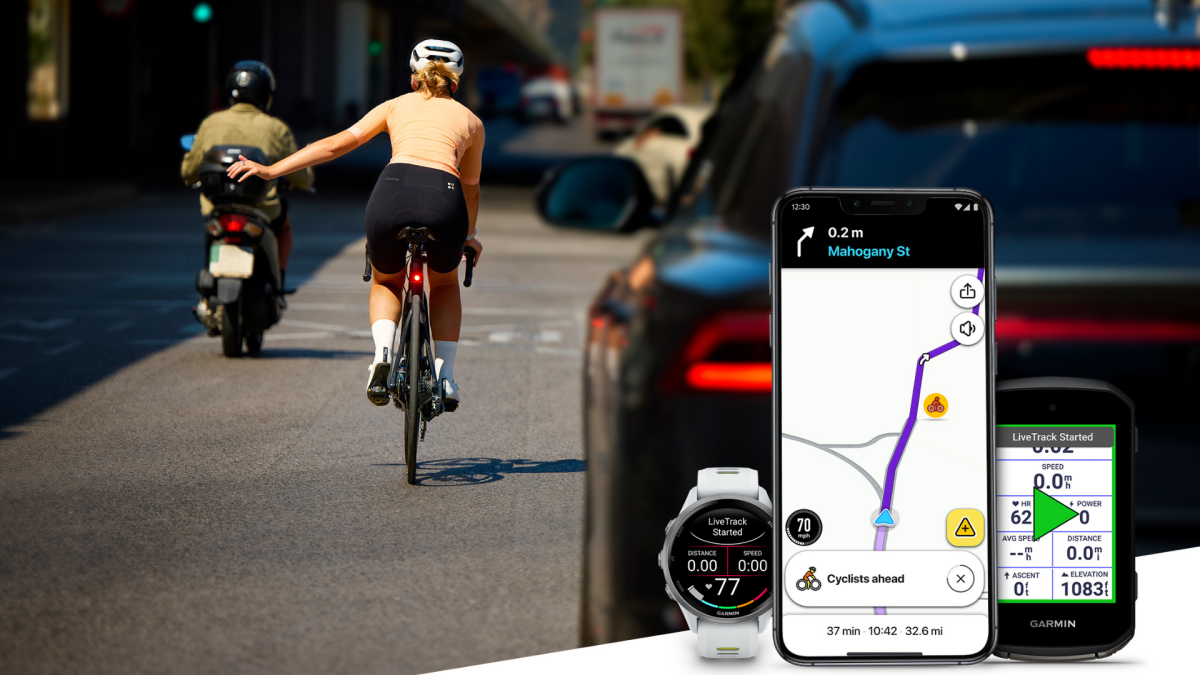
Meredith Dietz Meredith Dietz Senior Staff Writer ExperienceMeredith is a marathon runner and stand-up comedian. As Lifehacker’s Senior Staff Writer, she covers personal fitness tech, home gym equipment, and more. Read Full Bio November 11, 2026 Add as a preferred source on Google Add as a preferred source on Google We may earn a commission from links on this page. Credit: Image courtesy of Garmin. Table of Contents Cyclists who ride with Garmin gear can now appear as live, moving icons on the Waze driving app, and nearby drivers will receive an alert to slow down and watch for them on the road.For riders already using Garmin devices, opting in costs nothing and adds a new layer of safety, particularly on roads where drivers may not expect cyclists. The feature is rolling out now, but you should be aware of its limitations. How Garmin cyclists can show up for Waze driversRiders can simply opt in once through Garmin Connect. After that, sharing starts automatically when an outdoor cycling activity begins and stops when the ride ends. While a ride is underway, Waze users near the cyclist see a cyclist icon move along the road and receive a Live Cycling Alert reminding them to slow down and stay aware. The feature runs on LiveTrack, Garmin's existing live location-sharing tool, which lets friends and family follow a rider's real-time location, speed, course, and more. Garmin says this collaboration extends that peace of mind to motorists, giving them greater awareness of their surroundings.Garmin notes its location sharing is temporary and session-based. The rider's name, identity, and route are hidden, and no personal information is shared or displayed in Waze. Drivers see only an anonymous icon and the alert.How to use Garmin Connect's Waze featureYou'll need a few things to get this feature up and running:A compatible Garmin Edge bike computer or Garmin watchA phone running Garmin Connect with a data connectionAn outdoor cycling activity (the feature doesn't apply to indoor rides)The good news is using the feature is free: LiveTrack costs nothing on compatible Garmin bike computers and watches, and Waze is free for drivers. What do you think so far? The limits of this new safety featureThis new feature is a great safety perk, but there are real-world caveats worth considering:This feature is for Waze only. Alerts reach drivers only when Waze is open on their phone. Google Maps, which has far more users, is excluded, so a large portion of the drivers you share the road with won't see you this way.It depends on your phone's signal. Your position travels from the Garmin to your phone, then to Garmin's servers, then to Waze, and finally to the driver's phone. On a patchy rural signal, a few seconds of lag could put the icon on the wrong side of a bend from where you actually are. A rider who leaves their phone at home or whose phone loses signal simply won't show up on a Waze map, as a ride without a data connection is invisible to Waze.Finally, remember to treat this safety feature as an extra perk, not a guarantee. At the end of the day, it isn't a replacement for bike lights, bright clothing, and defensive riding. Lifehacker has been a go-to source of tech help and life advice since 2005. Our mission is to offer reliable tech help and credible, practical, science-based life advice to help you live better. Our Mission Our Team Newsletter © 2001-2026 Ziff Davis, LLC., A ZIFF DAVIS COMPANY. ALL RIGHTS RESERVED. Lifehacker is a federally registered trademark of Ziff Davis and may not be used by third parties without explicit permission. The display of third-party trademarks and trade names on this site does not necessarily indicate any affiliation or the endorsement of Lifehacker. If you click an affiliate link and buy a product or service, we may be paid a fee by that merchant.
Garmin Cyclists Can Now Make Themselves Appear on Waze in Real Time
Full Article
Original Source
Read the full article at Lifehacker →KhanList aggregates and links to publicly available news content. We do not host full articles from third-party sources. Always verify important information with original sources.