
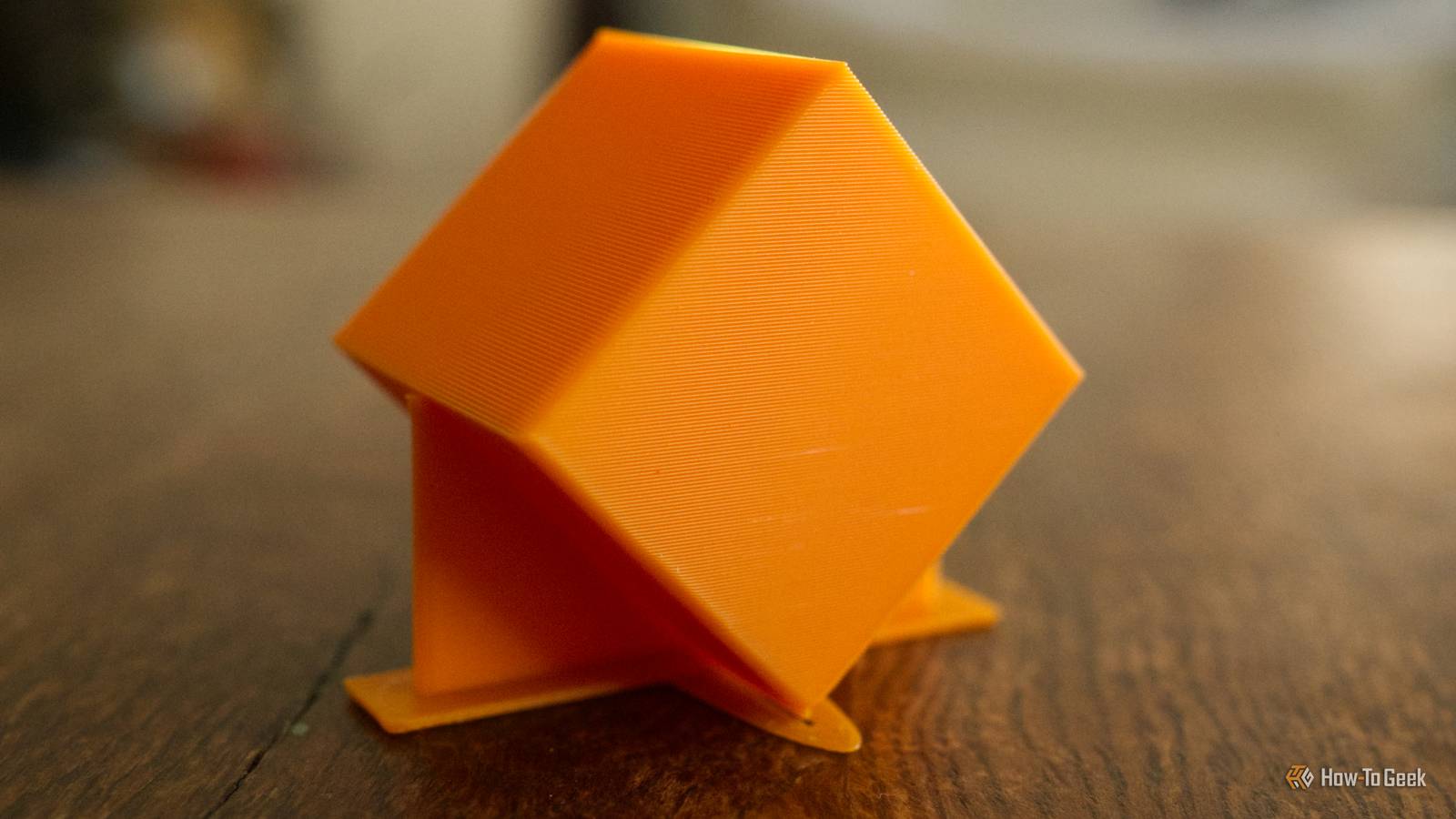
Published Sep 30, 2026, 8:30 AM EDT Tim has been covering technology for almost 20 years, in that time spanning a broad range of topics from security to product reviews. He is especially focused on the Apple ecosystem, productivity, and consumer advice. Over the years Tim has written thousands of articles, reviews, and round-ups in addition to producing video content and original photography. A graduate of journalism, he found his footing as a freelancer with a laptop and loves how he is able to work from practically anywhere. Now a Senior Editor for iPhone, Mac, and Smart Home at How-To Geek, Tim still loves to write. He can also be found crafting round-ups and productivity posts for the Zapier blog. Earlier in his career Tim spent nearly a decade as a writer and eventually Apple section editor for MakeUseOf. Tim currently lives in Brisbane, Australia. Outside of work he loves to hike and work out, play video games, and spend quality time with his wonderful partner and two cats Inka and Roger. Supports are a frustrating but often necessary part of 3D printing. They make it possible to print overhanging elements, but they can feel wasteful and leave behind unsightly marks. While you might be used to standard or tree-like supports, fins are another option that don’t (currently) exist within your slicer of choice. Supports are necessary for the best print orientation Rotate your prints for strength Credit: Patrick Campanale / How-To Geek Most of us will go out of our way to avoid having to use supports where possible. This can often mean orienting a print in a manner so that it supports itself by minimizing or eliminating overhangs. Sounds great, right? The only problem here is that the way you orient a print on the print bed can greatly determine the object’s strength. 3D printers build items line by line, depositing new filament on top of old filament and effectively “growing” an object from the base up. These layer lines represent the greatest point of weakness. If a 3D-printed object is weakest at its layer lines, orienting a print in a manner that avoids this weakness is best for durability. Doing this can often mean introducing supports. This is especially true for right angles; for example, placing a cube on its edge so that the layer lines run diagonally through the print when in its intended orientation. Most of us let the slicer decide where to put the supports, but this can result in a messy implementation. For example, a cube oriented on its edge and sliced in Bambu Studio with tree supports enabled can end up looking a little something like this: That’s a lot of contact points for what is ultimately a very simple design. You could reduce the threshold angle, but this introduces an element of risk to your print that could result in warping or a failed print altogether. One remedy you might not have considered is building supports into your model, notably fin supports. As the name suggests, this method adds large straight supports to the edges of your print where reinforcement is required. The thin strands that connect your print to the support (known as tines) run horizontally with the layer lines, which means stronger support, fewer points of contact, and more efficient printing. While this sounds great in theory, not everyone is crazy about designing their own supports or even models in the first place. There’s a solution to that. Drag and drop your STL and go PrintFins is a free web app that adds fins to your models automatically. All you need to do is upload an STL or 3MF file, rotate it so that it is oriented in a manner that best suits your use case, then export it and open it in your slicer. You can then open the resulting 3MF file in your slicer of choice and enjoy baked-in fin supports. One thing to note is that your slicer might scream at you when you open the file about no print profile being included. This is nothing to worry about, since the 3MF only contains the model geometry. You’ll need to quickly run through a pre-print checklist (turning off supports) before you slice and send the job to your printer. Here’s the cube we sliced earlier with fin supports instead of automatic slicer supports: The tool includes options for automatically adding fins or manually drawing them, plus a calculator to help you decide on orientation and force distribution or whether fins are even needed in the first place. If you’d rather, you can run the project locally as a self-hosted service by following the instructions on the project’s GitHub page. The author is also working on plugins for OrcaSlicer and PrusaSlicer. Fins have other uses too Ensure a perfect, snug fit I first heard about support fins from a 3D printing YouTube creator called Slant 3D. The author of PrintFins, Matthew Trahan, specifically references this channel on the project’s GitHub page, noting that: “the technique isn't new (Slant3D has evangelized designed-in supports for years), but until now you had to CAD it by hand every time.” But Slant 3D has also talked about using fins for other reasons, notably grip fins. Grip fins are a design choice that improves the fit between two 3D-printed parts. The technique is useful in combating the many variables that can cause parts to be too tight or too loose, like the ability to measure accurately and the tendency for material to shrink. Grip fins use small cutouts to introduce a gap that allows for a small amount of flex. This allows you to design for very tight tolerances, since you know that the model will flex at the point of assembly on account of the fin design. It’s a great idea, but one that you’ll need to factor into your model when you’re designing it. If you’re interested in learning more, watch Slant 3D’s video about it. Fins are especially useful when strength dictates a less-than-ideal print orientation, but they’re not the be-all and end-all of 3D printing. See how else you can minimize your dependence on supports, particularly for models that don’t need to be particularly strong.
Fins are the best 3D printing supports you’re not using
Full Article
Original Source
Read the full article at Howtogeek →KhanList aggregates and links to publicly available news content. We do not host full articles from third-party sources. Always verify important information with original sources.