
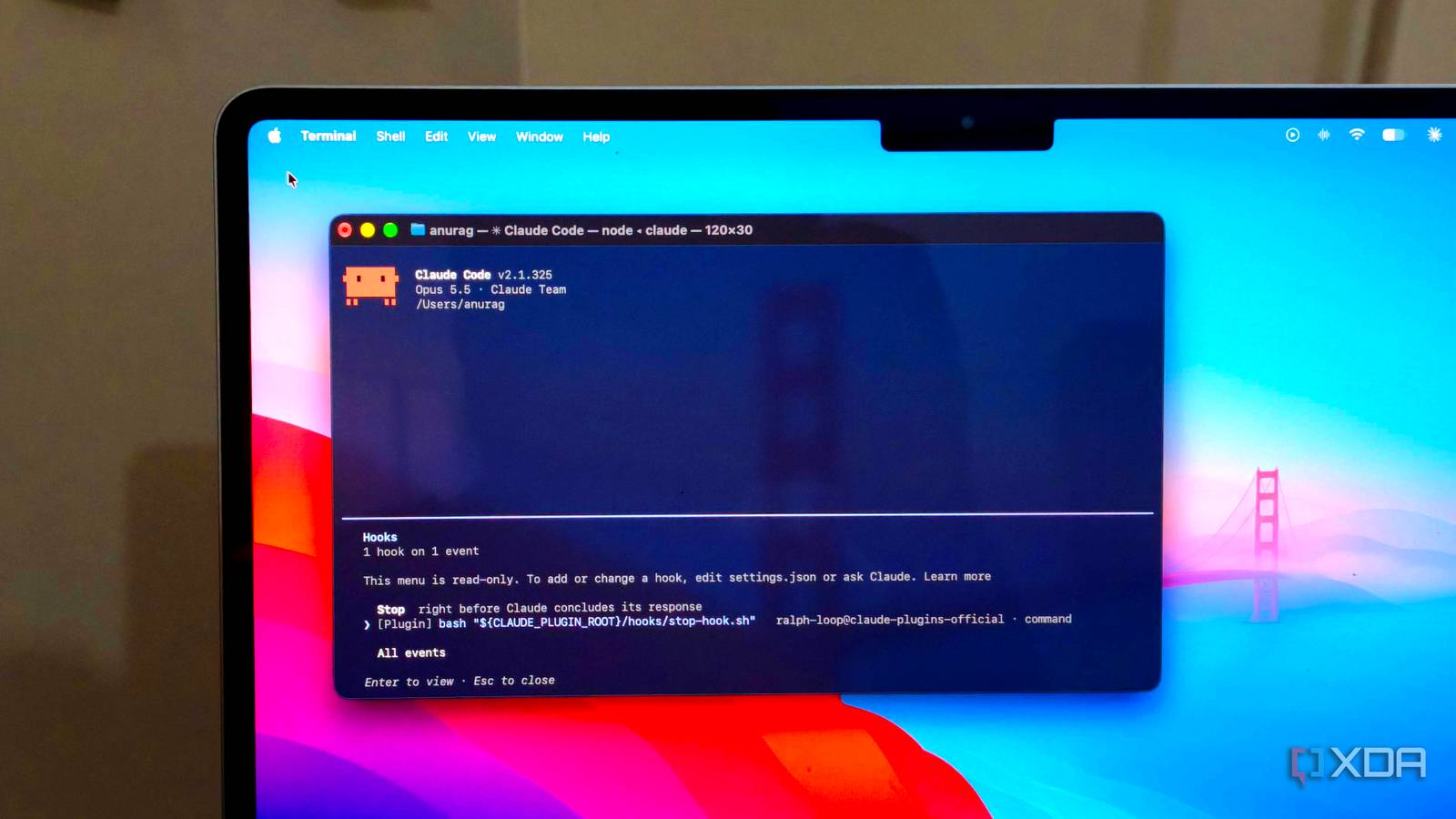
Published Nov 21, 2026, 6:00 AM EST Anurag is an experienced journalist and author who’s been covering tech for the past 5 years, with a focus on Windows, Android, and Apple. He’s written for sites like Android Police, Neowin, Dexerto, and MakeTechEasier. Anurag’s always pumped about tech and loves getting his hands on the latest gadgets. When he's not procrastinating, you’ll probably find him catching the newest movies in theaters or scrolling through Twitter from his bed. One of the most frustrating things I've encountered while using Claude Code is having to correct the same mistakes multiple times. I've tried documenting these mistakes and adding instructions to my project's CLAUDE.md file, which helps, but I still have to keep an eye on whether those instructions are being followed. More recently, though, I've been experimenting with Claude Code's hooks, and I think they're one of its most underrated features. Hooks let you automatically run commands before or after certain actions, or when Claude finishes a task. I've been using them to catch errors, enforce project rules, and make sure Claude checks its own work without having to remind it every time. Claude Code's project instructions aren't always enough Some rules need to be enforced Claude Code's CLAUDE.md file is useful for giving it project-specific instructions. You can tell it which commands to use, which files it shouldn't touch, and how to approach a particular codebase. I've also experimented with maintaining a separate mistakes.md file to document problems I've encountered. These files help Claude work with more context, but they're still instructions that the model has to interpret. This becomes a problem with things you want done consistently over time. For example, if you've asked Claude to run tests after making changes, you shouldn't have to check whether it actually did. The same goes for avoiding certain configuration files or checking that its edits haven't introduced new errors. Hooks give you more control over these actions. Claude Code exposes several events throughout its workflow, and you can attach scripts or commands to them. A PreToolUse hook runs before Claude executes a tool and can block an action, such as an attempt to edit a protected file. Similarly, a PostToolUse hook runs after a tool completes, which is useful for automatically running formatting, linting, or other checks following code changes. There are also Stop and TaskCompleted hooks that can check whether certain conditions have been met before Claude finishes its work. You configure these hooks once, and Claude Code automatically invokes them whenever the corresponding events occur. If a check fails, the hook can provide feedback or block certain actions. I started turning mistakes into hooks Giving Claude Code some guardrails When using Hooks, you need to be specific about what you want to prevent. An instruction like "don't break anything" isn't useful, but telling Claude not to modify certain configuration files or finish a task with failing tests gives you something you can actually enforce. For example, you can create a small script that checks the file path whenever Claude attempts to make an edit. If the path matches a protected file, such as .env, the script exits with code 2 and returns an explanation. Claude Code blocks the edit and passes that explanation back to the model. You can keep these scripts in your project's .claude/hooks/ directory and register them through .claude/settings.json. I've also found automated validation particularly useful. You can have Claude Code run Prettier or a linter whenever it modifies a file, so formatting issues and other common errors are caught immediately. For more expensive checks, such as running an entire test suite, it makes more sense to wait until the task is complete. A TaskCompleted hook can execute your tests and prevent Claude from marking the task as finished if they fail, giving it the opportunity to fix the errors. You don't necessarily have to write these scripts yourself, either. You can describe the checks you want to Claude Code and ask it to generate the hook scripts and configuration. The /hooks command lets you inspect what's configured, and you can deliberately trigger a failing condition to verify that everything works. Hooks can do a lot more than prevent mistakes There's plenty more you can automate Claude Code can work through complicated tasks without needing much intervention, and I don't particularly enjoy sitting around watching the terminal. However, it occasionally needs permission to execute a command or asks a question before proceeding. You can configure a Notification hook to send a desktop notification whenever Claude needs your attention. On macOS, you can even use the built-in osascript command to display these alerts without installing anything additional. Another interesting application is managing context during longer sessions. Claude Code automatically compacts conversations when its context window starts filling up, and important details can sometimes get lost in the summary. You can configure a SessionStart hook to run after compaction and feed Claude fresh information about your project. For example, a script could retrieve recent Git commits, unfinished tasks, or relevant notes from your project files and add them back to Claude's context. Since the information comes directly from your project, it can stay up to date as your work progresses. You can also connect hooks to other tools and services. For instance, a hook could send a webhook to n8n when Claude completes a task, maintain a local activity log, or trigger another automation based on what happened during the session. I already use n8n for several of my personal projects, so there's plenty of potential to incorporate Claude Code into those existing workflows. There's plenty more to explore with mods Hooks are just one way to customize Claude Code. I've also built a mod to track my usage limits, and there's plenty more you can add, from custom status lines and shortcuts to integrations with other tools. If you use Claude Code regularly, I'd recommend exploring mods.
Claude Code's hooks are its most underrated feature, and they stopped it from making the same mistakes twice
Full Article
Original Source
Read the full article at Xda-developers →KhanList aggregates and links to publicly available news content. We do not host full articles from third-party sources. Always verify important information with original sources.