
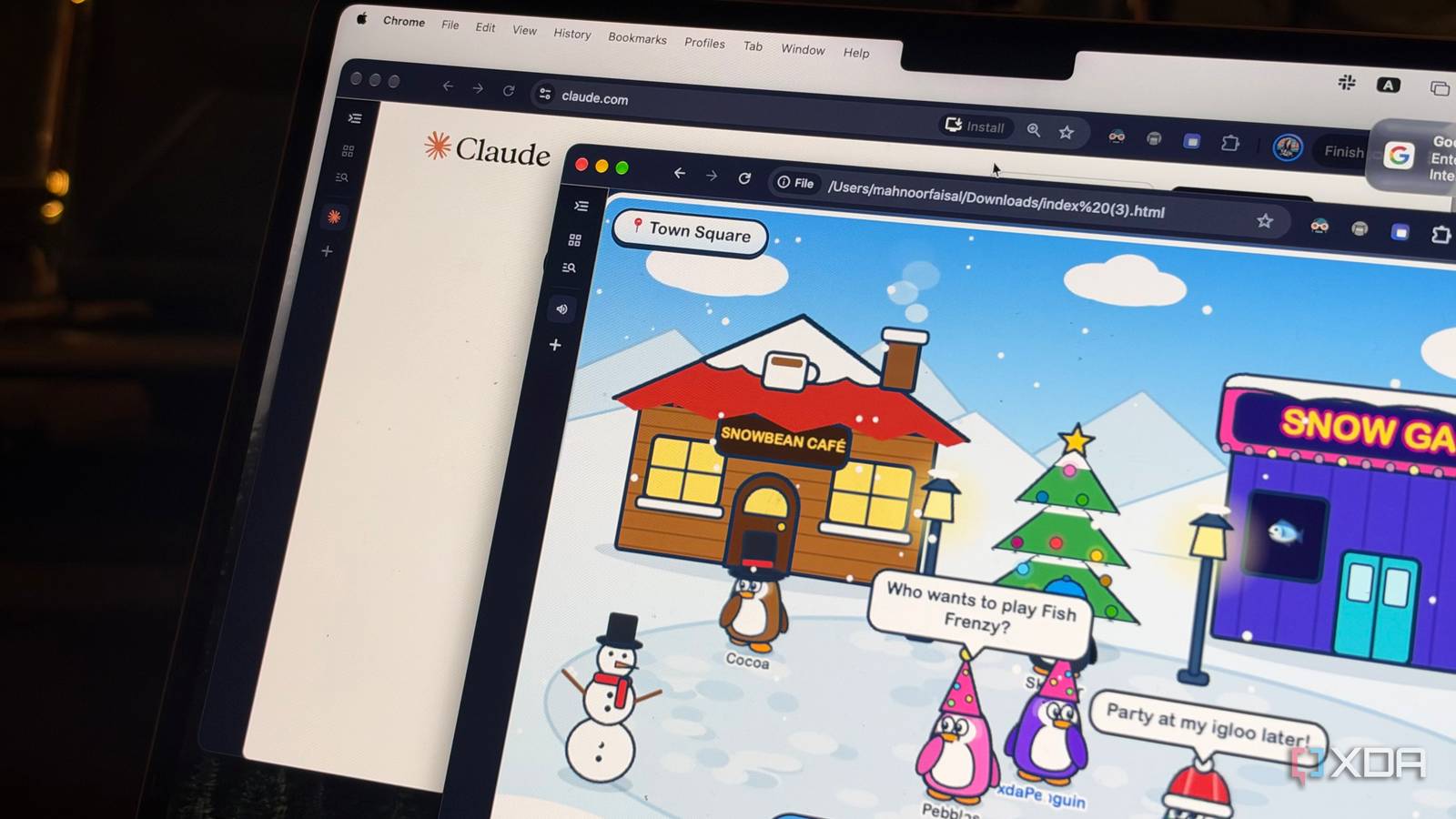
If nothing else kills me, nostalgia will. That's a saying I've always, always resonated with. I'm the kind of person who holds on to handwritten notes and letters people give me, keeps random little things purely because they remind me of a particular moment, and gets extremely sentimental over things most people wouldn't think twice about. Don't get me started on childhood memories! Despite having the memory of a goldfish, I somehow manage to remember the most random, oddly specific things from my childhood. A game I used to spend hours playing, a website I was obsessed with, or a toy I haven't seen in over a decade. Sometimes, I don't even remember what something was called, just bits and pieces of what it looked like or how it worked. Yet, somehow, those little memories have stuck with me all these years. Now, how does this all connect to Claude Code? Well, I've realized Claude Code isn't just good for building apps, but also for bringing back things I thought I'd never get to experience again. I brought my favorite childhood games back to life The games I grew up with are back (sort of) One childhood memory I vividly remember is coming home from school, dialing my friend's home phone number, and hopping onto Club Penguin together to spend hours waddling around the island, decorating our igloos, and playing mini-games. I also remember being heartbroken when I heard the game was shutting down in 2017, despite having outgrown it years earlier. It felt like a little piece of my childhood was disappearing forever. Since then, there have been plenty of fan-made recreations of Club Penguin. Rather than revisiting one of those, I wanted to see if Claude Code could build my own little version of the game. So, I headed to Claude Code, sent it a detailed prompt with everything I wanted in my remake, and watched the tool work its magic. I wanted something I could play directly in my browser, complete with a snowy town, a customizable penguin, a few locations to explore, and some mini-games. While a huge part of what made Club Penguin so special to me was playing it with friends, I decided to keep my remake entirely single-player since I just wanted something simple that would let me relive a little bit of my childhood. Claude Code ended up building a little game called Waddle Island, and I was surprised right away by how much it managed to pack into it. There was a snowy town square with colorful buildings, a café, and an arcade, along with a customizable penguin I could move around simply by clicking anywhere on the screen. I could even visit my own igloo and decorate it with furniture, just like I used to in Club Penguin! Plus, I could customize my penguin and rename it too. I called mine XDAPenguin, and of course, changed its color to purple to match XDA's branding. It also included a playable mini-game called Fish Frenzy, where I had to catch falling fish while avoiding chunks of ice. To make the world feel a little less empty, Claude Code added non-player characters (NPCs) that wandered around, chatted, and reacted to me, along with emotes, speech bubbles, and background music. MSN Messenger is back, and so are the nudges I brought the internet of my childhood back, too Another thing that immediately came to mind was MSN Messenger. If you were around during the 2000s, you'll probably remember the excitement of seeing your friends come online, changing your display name to something ridiculously dramatic, and, of course, spamming people with nudges until they finally replied. While messaging apps have come a long way since then, there's something about MSN Messenger that modern alternatives just can't replicate. So, naturally, I decided to see if Claude Code could bring it back. I wanted more than just an interface that looked like MSN Messenger. I wanted the whole experience, from the classic sign-in screen and contact list to the iconic notification sounds and nudges. Since I wasn't planning on connecting with actual people, I also asked Claude Code to simulate conversations with friends. Claude Code ended up building a fairly detailed recreation, complete with a Windows-style desktop, customizable display pictures, status messages, and even the option to show what music I was listening to. It also created fictional contacts that would come online, message me randomly, and respond to my messages. The nudges worked too! I could shake chat windows, hear those nostalgic notification sounds, and watch little pop-ups appear when someone signed in. Sure, I couldn't actually talk to my childhood friends, but for a little nostalgia project, it brought back so many of the details I'd missed about MSN Messenger. I even brought back a browser feature I couldn't let go of Sometimes, it's the little things I miss Not everything I miss is necessarily from my childhood, though. Sometimes, it's something as simple as a feature from an app or browser I've stopped using. For instance, I recently switched away from Zen, but there was one feature I just couldn't let go of: Glance. It lets you preview webpages in a floating window without opening another tab, which is incredibly useful when you're someone like me who constantly has a million tabs open for research. Rather than switching back to Zen just for that one feature, I decided to see if Claude Code could bring it to Chrome instead. Around 20 minutes later, I had a working Chrome extension that recreated the experience, complete with customizable shortcuts, resizable preview windows, and plenty of settings to tweak. Just like that, I had one less thing to miss about my old browser. I even brought my childhood iPod touch back to life Slide to unlock a whole lot of nostalgia There've been very few times when I've opened something Claude Code generated for the first time and instantly smiled. This was one of them! If you head over to my XDA author bio real quick, you'll notice I have a short paragraph about how the iPod touch was the very first Apple device I owned, and how it sparked my love for Apple's ecosystem. Though I've held on to my iPod touch (told you I'm a nostalgic person), I've since forgotten the password I set on it and lost its charger. So, I asked Claude Code to whip up a browser-based recreation of my old iPod touch, complete with the classic iOS 6 interface and some of the apps I remember using back in the day. Within minutes, I felt like I had stepped back into my childhood. The result was an interactive iPod touch that featured the familiar black glass front, physical Home button, and iconic slide-to-unlock screen. Once I unlocked it, I was greeted by the classic iOS 6 home screen, complete with glossy app icons, the old dock, and even those familiar app-opening animations. Claude Code also recreated several apps, including Music, Notes, Photos, and Settings. Surprisingly, the music that was preloaded into the recreation actually worked! It came preloaded with a few photos, and I could import my own too. Similarly, there were three notes already added to the classic yellow notepad-style Notes app, and I could create new ones, edit existing ones, and delete them, just like on the original iPod touch. It had all sorts of little details, like the old keyboard sounds, volume controls, and app switcher, that made the experience feel close to what I remembered. I really appreciated the attention to the smallest details, too! For instance, in the Settings app, when I toggled on Do Not Disturb, the familiar crescent moon icon appeared in the status bar, just like it did on the original iPod touch. Why not use AI to bring back the good old days? We're constantly talking about AI in a negative light, whether it's the threat of job displacement, the rise of AI-generated slop, or the countless ethical concerns surrounding it. While these are all very valid concerns, I think it's easy to forget that AI can be used for things that are simply... fun. Everything I created above using Claude Code would've once required days of learning how to code, followed by even more time actually building it. Now, all it takes is a detailed prompt and a little patience!
Claude Code isn't just for building apps anymore, and I'm using it to bring back what I miss
Full Article
Original Source
Read the full article at Xda-developers →KhanList aggregates and links to publicly available news content. We do not host full articles from third-party sources. Always verify important information with original sources.