
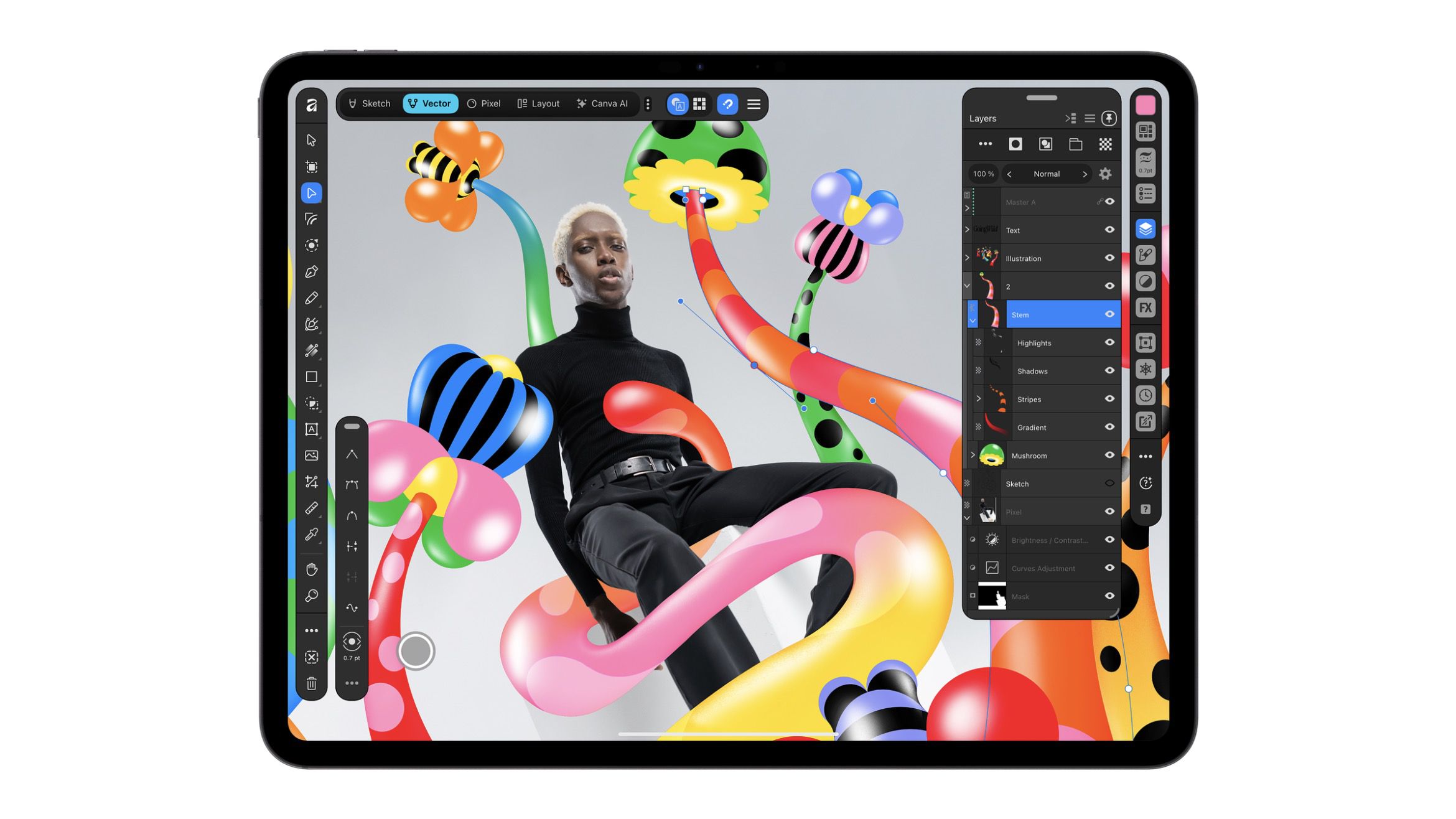
Canva today released Affinity for iPad, bringing its free all-in-one design app to Apple's tablet, along with a new Sketch Studio built for touch and Apple Pencil. The release follows last year's desktop app relaunch, which combined the previously separate Affinity Designer, Photo, and Publisher apps into a single app for Mac and Windows. Canva had promised an iPad version in 2026, and says the desktop app has since attracted more than seven million sign-ups. The iPad app brings sketching, vector graphics, photo editing, and page layout together in one interface. Users can switch between Sketch, Vector, Pixel, and Layout studios while working in the same .af file, which can also be opened on desktop. Sketch Studio adds freehand drawing with a customizable brush library, while Sketch to Shapes turns hand-drawn forms into editable vector shapes. Photo tools include RAW editing, non-destructive adjustments, and a Mask Tool designed to help trace difficult edges such as hair and fur with Apple Pencil. Elsewhere, layout tools support multi-page documents, master pages, and print-ready output. Canva says the interface has been designed specifically for iPad rather than scaled down from the desktop app. As for Apple Pencil Pro support, it includes barrel roll, squeeze, and hover, alongside pressure and tilt controls. The core sketching, vector, photo, and layout tools are free for individuals, but a free Canva account is required to use the app. The only paid-for features are the AI tools, which are locked behind a Canva premium plan – continuing the approach introduced with 2025's desktop relaunch. The paid features are available through Canva AI Studio and include Generative Expand, image upscaling, noise reduction, and Decompose Layer, which splits a flat image into editable layers. Despite the shared file format, some desktop features are missing from the iPad version at launch. Affinity's website lists Books, Batch, Data Merge, Quick Adjustments, Info and Scope panels, macro recording, and Astrophotography Studio among the omissions, with more features planned over time. Affinity by Canva is available on the App Store as a free download with in-app purchases and requires iPadOS 18.0 or later. Popular StoriesApple Alerts Stores to iPhone Duo's Display Cracking IssueIn a memo shared with Apple Stores and Apple Authorized Service Providers this week, and later obtained by MacRumors, Apple provided technicians with guidance on how to diagnose and address the iPhone Duo's inner display cracking issue. If a customer reports the issue, Apple advised technicians to inspect the iPhone Duo and repair or replace it in accordance with their standard procedures....14 New Things Your iPhone Can Do in iOS 27.2Friday October 30, 2026 12:42 pm PDT by Tim HardwickApple released iOS 27.2 on October 26, bringing enhancements to Siri AI, adding Suggestions in Messages, and sneaking in a string of smaller additions across Photos, Podcasts, Games, Apple TV, and FaceTime. iOS 27.2 is available to download to your device now via Settings ➝ General ➝ Software Update. Note that some features may not be available in all regions or on all iPhone models....Apple Launching Five New Products This FridayMonday November 2, 2026 1:22 am PST by Tim HardwickApple is releasing five new products this Friday, November 6, following pre-orders that opened last week, including its first touchscreen MacBook Pro models. The following new products will be available from Friday: iPad mini with OLED display and A20 Pro chip iMac with M6 chip 14-inch MacBook Pro with M6 chip 14-inch MacBook Pro with OLED touchscreen 16-inch MacBook Pro with OLED...
Canva Brings Free All-in-One Affinity App to iPad
Full Article
Original Source
Read the full article at Macrumors →KhanList aggregates and links to publicly available news content. We do not host full articles from third-party sources. Always verify important information with original sources.