
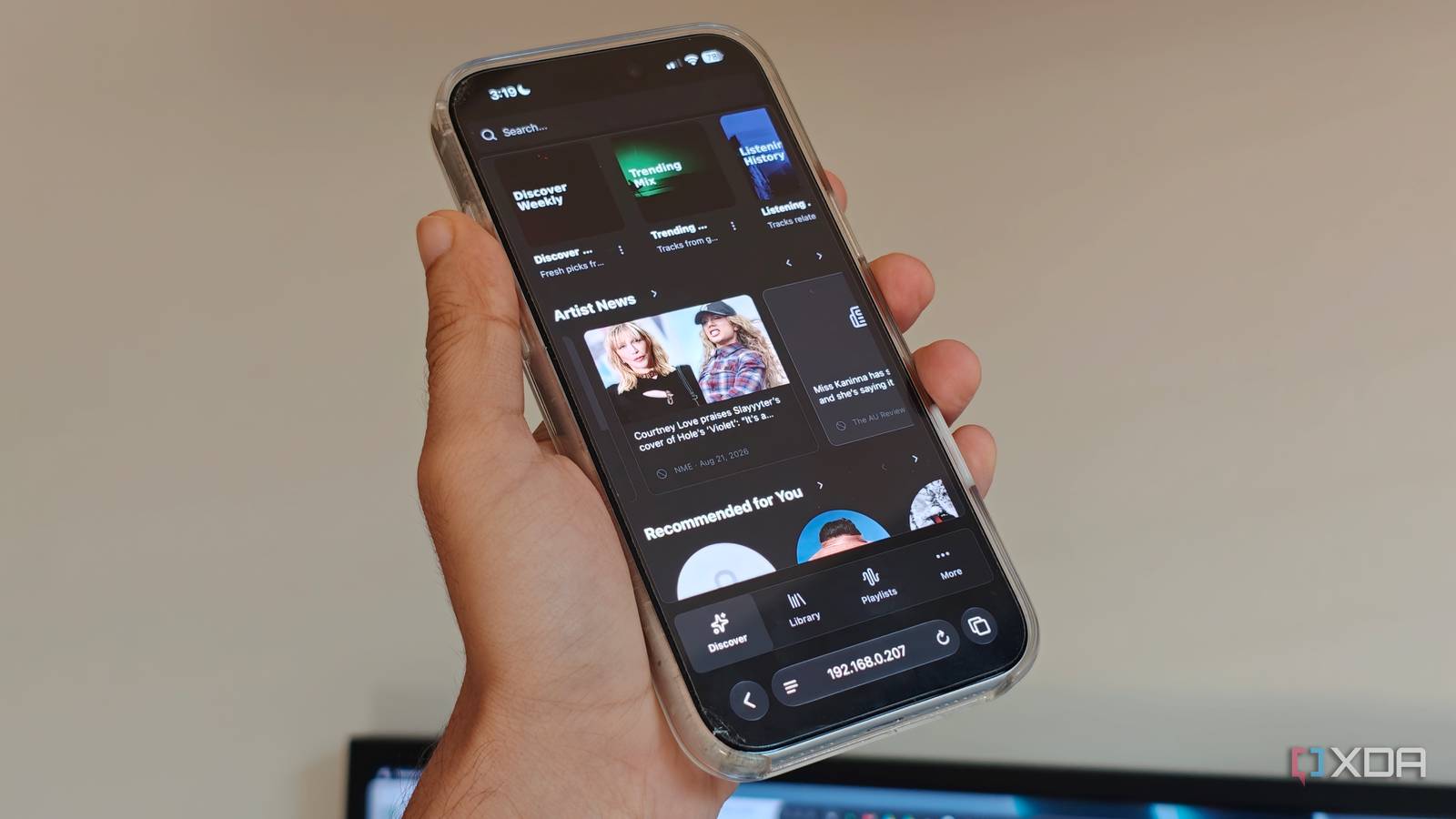
Published Aug 26, 2026, 5:30 PM EDT Dhruv Bhutani has been writing about consumer technology since 2008, offering deep insights into the personal technology landscape through features and opinion pieces. He writes for XDA-Developers, where he focuses on topics like productivity, networking, self-hosting, and more. Over the years, his work has also appeared in leading publications such as Android Police, Android Authority, CNET, PCMag, and more. Outside of his professional work, Dhruv is an avid fan of horror media spanning films and literature, enjoys fitness activities, collects vinyl records, and plays the guitar. Switching to a self-hosted music library has been one of the best projects I've taken on recently. However, there's one use where streaming services still win out. It's finding something I haven't heard before. Between recommendations and fresh playlists, streaming services give me something new to listen to. So, I've been looking for a way to bring similar functionality to my self-hosted setup. I recently came across an open-source app called Aurral that taps into tools like Lidarr and Navidrome, which I already use, to add a discovery layer to my local library. The tool helps me discover new artists I don't already have in my music library. But more than that, Aurral can turn those recommendations into playlists that automatically refresh on schedule. Aurral makes the tedious part of manual music discovery easier Finding music beyond the artists you already have in your collection My biggest issue with a self-hosted library is that unless you're actively looking for fresh music, it's a fairly static endeavor. I have a sizable music library, but a lot of it gets hidden away simply because I end up listening to the top artists. Discovering new music is a lot more manual than what streaming services do. Aurral builds off your existing library and expands it further. Specifically, the app's Discover section pulls together recommendations, recent releases, and related artists by connecting to Lidarr. In fact, Lidarr acts as the glue that pulls up the artists and releases already in your library. This lets Aurral suggest artists that aren't already in your music library. Additionally, you can connect Aurral to your listening history through services like Last.fm or ListenBrainz. These give Aurral much more context about your listening habits through years of data. All that to say is that unlike many similar services that rely only on looking up directly related artists, Aurral tries to build a more holistic picture of your musical interests by connecting to as many sources as possible. Finally, when it comes to discovery itself, Aurral lets you dial in exactly how wide you want to cast your net. Between safer, balanced and deeper discovery modes, there's a lot of flexibility here. As I mentioned earlier, Aurral integrates deeply with Lidarr, and that integration makes the workflow effective. If I manually discover a related artist or album I want to listen to, I can tap Add to Lidarr in the interface, and it follows whatever setup you have to grab the files. Aurral updates the request and download status so you don't need to dive into Lidarr to see the current status. Effectively, Aurral combines discovery and library management for your local music library. Scheduled flows are the best part of Aurral Bringing streaming-style playlists to your local music library Credit: Credit: While discovering related artists and manually adding albums to my library is cool, it's still a fairly manual process. Instead, what keeps me coming back to Aurral is the scheduled flows. My favorite part of streaming services is the bespoke weekly services and release radar lineups they generate. I've never been great at replicating that experience manually. Aurral's flows go a long way towards bringing that same experience to your streaming library. I can create a dynamic playlist, choose how many tracks I want, decide when it should refresh, and Aurral taps into Lidarr to pull that music and build custom playlists for me. These flows go well beyond standard playlists. They can use Aurral's own recommendations, music from my existing library, trending artists, and even specific genre tags that I define. This works beautifully as a weekly discovery playground. And the best part is that once configured, I don't really have to come back to Aurral either. These playlists show up in both Navidrome and Plexamp, and I can continue playing music at my usual sources. From there, if there's an artist that I particularly enjoy, I can just go ahead and tap Add to Lidarr and Aurral, ensuring that I'm able to grab all their releases. This means you can comfortably experiment with music and discovery without fully committing to an artist. Nor do you have to clutter a carefully curated music library. Finally, if you are still dabbling in both streaming services and a personal music collection, Aurral easily syncs Spotify playlists, ensuring that you can stay up to date on releases. I've been using it to sync down my favorite weekly Drum and Bass playlists, and it works like a charm. Filling the discovery gap in local music collections Aurral isn't a replacement for essentials like Navidrome and Lidarr. You'll still need those tools for playback and library management. Instead, Aurral acts as the discovery layer on top, adding a degree of smarts that neither of those has. It helps you find new artists and music, and build compelling playlists that can rival, if not exceed, what streaming services give you, making it one of the coolest additions I've made to my self-hosted music collection. Aurral Aurral is a self-hosted software that connects to Last.fm, Spotify and Lidarr to create custom generated playlist focussed on discovery while also handling library management.
Aurral brings Spotify's best feature to my self-hosted music library
Full Article
Original Source
Read the full article at Xda-developers →KhanList aggregates and links to publicly available news content. We do not host full articles from third-party sources. Always verify important information with original sources.