
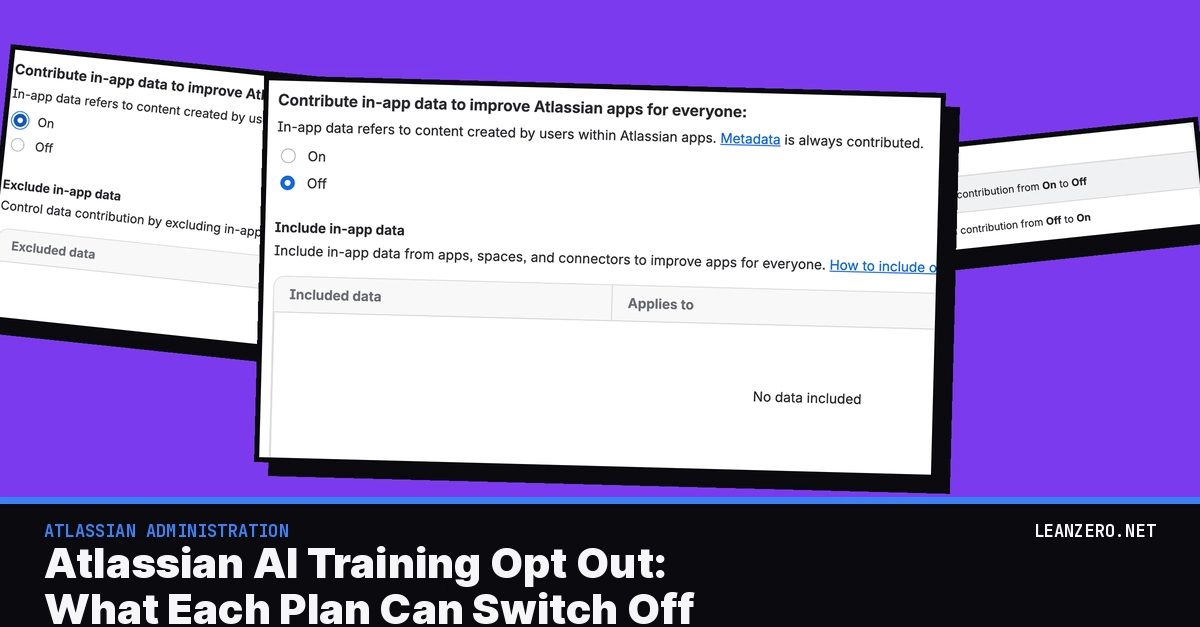
If your Atlassian organization is on Free or Standard and nobody has changed one particular admin setting since 17 August 2026, Atlassian has been allowed to use your Jira and Confluence content to improve its apps for everyone. It's on by default. On Premium and Enterprise the same content starts switched off, but every plan below Enterprise still contributes metadata, which is numbers and patterns Atlassian derives from your content, and you can't stop it. The Atlassian AI training opt out is one setting per organization, called Data contribution, under Security in Atlassian Administration. Every plan can switch in-app data (the content your people write) on or off there. Metadata has a switch only on Enterprise. A lot of admins are finding this out late. On 21 April someone posted "Atlassian Enables Default Customer Data Collection to Train AI" on the Community. It had 3,863 views when I checked on 16 November, and most of what ranks for it was written before the change started. So on 16 November we changed the setting on our own test org, which is on Premium, and switched it back. It took a radio button plus a separate Save, with no confirmation dialog, and our audit log stored both changes with the old and new value. I didn't expect this bit: whether you'll have that audit row at all depends on your subscriptions. Five things we found on our own org The page path is /o//data-contribution, and the sidebar item still carries a New tag. On a Premium org there is no metadata switch at all. The page only says "Metadata is always contributed". Picking On or Off changes nothing until you click Save, and there's no "are you sure" dialog. Our org audit log wrote "Updated in-app data contribution from Off to On" in the same minute we saved. Atlassian's audit log page says organizations without Atlassian Guard (Atlassian's paid security add-on) or an Enterprise plan don't store org-level events at all. The guided tour on the page says it plainly: keeping the setting Off and adding spaces one by one lets you "contribute selectively while keeping your organization opted out". What Atlassian AI training data covers: metadata vs in-app data Atlassian splits your data into two kinds, and the whole opt-out question hangs on which one you mean. In-app data is what your people type. Atlassian's page on what types of data your organization contributes lists the titles and content of Confluence pages and the titles, descriptions and comments of Jira work items (Atlassian's current name for issues). Custom status and workflow names count as well. Atlassian's page on how it protects contributed data gives a work item called "Fix login error on iOS after the latest mobile update" as its example. Metadata comes in two kinds. Content attributes are statistics and fields derived from your content. Atlassian's examples are a readability score for a Confluence page, how similar two pages are, a classification like "sales work item", story points, and the SLA (service level agreement) on a Jira Service Management request. Common patterns are things Atlassian finds across many customers in search queries, prompts to Rovo Chat (the chat in Rovo, Atlassian's AI assistant) and configuration, like a work type called "Laptop repair ticket". Atlassian says it drops anything low in frequency that "may be unique to your organization". What does Atlassian use metadata for? The same page lists four uses, among them training its search model and root cause analysis suggestions. Its data contribution FAQ adds that data from one app can improve features across the whole portfolio, and that Rovo Chat conversations and search queries fall under the setting too. For your data protection lead, the contract side is in Atlassian's Data Processing Addendum, effective 17 August 2026. It says Atlassian "must de-identify and aggregate Customer Data and may use such De-identified and Aggregated Data to improve the Cloud Products", in line with these settings. Atlassian data contribution settings by plan: what you can switch off Here's Atlassian's Data contribution settings page as it read on 16 November 2026, put into one table. Highest active plan Metadata Can you change it? In-app data default Can you change it? Free Always contributed No On Yes, to Off Standard Always contributed No On Yes, to Off Premium Always contributed No Off Yes, to On Enterprise On Yes, to Off Off Yes, to On What counts is the highest plan in your whole organization, and Atlassian says that includes trials. Its own examples help here. Confluence Free plus Jira Standard means in-app data is On. Confluence Standard plus a Jira Premium trial means it's Off. Confluence Free plus Jira Enterprise gives you in-app Off and metadata On, with the metadata switch available. So one Enterprise app is enough to get the metadata switch for the whole organization. On Enterprise that switch also "controls metadata contributions from applicable Teamwork Graph connectors too". Teamwork Graph connectors are the ones that bring content from other tools into Atlassian's apps, and Atlassian only uses a connector's data if that connector has a setting on this page. The FAQ says you can see your plans under Apps > Atlassian apps. Our Billing and subscriptions page shows a Premium subscription, a Free one and Atlassian Guard, and no Enterprise, which matches what the Data contribution page showed us. Atlassian also warns that "Some Atlassian customers, including those with specific compliance requirements, may see different defaults", so read your own screen before you write anything down. Jira AI training opt out: switch off in-app data, step by step Before you start: Atlassian lists the role for this as Organization admin, on Atlassian Cloud, any plan. Atlassian Government Cloud doesn't have this setting. If your company has more than one organization, repeat this in each one. When you're done, the page shows in-app data Off, and you have a screenshot of it with the date noted. Go to admin.atlassian.com and pick your organization in the switcher at the top left. Its name shows above the sidebar. In the sidebar, select Security, then Data contribution. The page is headed Data contribution, and a three-step tour pops up over it. Step through it or close it. Find Contribute in-app data to improve Atlassian apps for everyone: and read the line under it. If it says "Metadata is always contributed", your highest plan is below Enterprise. Atlassian's page says Enterprise orgs get a metadata setting too (we couldn't check that, because our org is Premium). If Off is already selected, nothing needs saving. Go to step 7. Otherwise select Off. The table below changes to Include in-app data with No data included. Select Save at the top right. The button only appears after you change the radio button, and without this click nothing is stored. Reload the page. Off stays selected. Good. Take a screenshot of the page and write down the date you took it. If you changed the setting and your org has Atlassian Guard or an Enterprise plan, also open Insights > Audit log and look for the row "Updated in-app data contribution from On to Off". When we tested the other direction (Off to On), the table swapped to Exclude in-app data, with Select data to exclude, and the blue Save button appeared. We also left the page once without saving, and the setting was still Off when we came back. Those include and exclude tables are a bit of a middle path, and the tour explains them well: "Keep it off to contribute only from the spaces, apps, and connectors you include. Turn it on to contribute more broadly and then exclude specific spaces, apps, or connectors." Atlassian's include or exclude page adds that platform apps like Rovo and Goals can't be picked one by one. They follow the organization setting, and so does content that isn't inside a space, such as site-wide Confluence configuration. And these tables only handle in-app data, so you can't exclude one space's metadata. One organization at a time: trials, downgrades and the 30-day window Atlassian's FAQ is plain about it: settings "are determined independently for each Atlassian cloud organization". If your company has a second organization, say one for testing or one that came with an acquisition, it has its own setting and its own defaults. Billing changes can move things under you too, so I'd put these on the calendar of whoever owns your Atlassian billing. When you add a new app, Atlassian starts using its data 30 days later, following your existing settings. A new space in an existing app is used from the day you create it. When a trial ends and your highest plan changes, you get 30 days to review before the new settings apply. A downgrade doesn't reset your choices to the new plan's defaults, Atlassian says, with one exception. If you leave Enterprise, metadata contribution is turned back on, and you get a notice and 30 days to review. If an upgrade brings new settings, Atlassian says it will tell you. Trials are what I'd watch, I think. They're easy to miss. Atlassian's pages don't mention Enterprise trials by name, so this is my reading of the two rules together, and we haven't tested it: trials count toward your highest plan, so an Enterprise trial should give you the metadata switch, and leaving Enterprise turns metadata back on. Atlassian AI data collection after you opt out: 30 and 90 days Atlassian's page spells out what happens when you opt out, or delete an app or a site. It removes the in-app data within 30 days from the datasets it uses to improve apps for all customers, and the content attributes within 90 days. It will "retrain any models previously trained on that data". It stops collecting new data from that app, and it stops looking for recurring patterns in data you contributed before. But the same page says that data "de-identified and aggregated at a customer level such that it is no longer associated with individual customers (including common patterns), may be retained for up to seven years". So patterns already extracted before your opt-out can probably stay. I couldn't find a page that says how long a retrain takes. In one April thread a member read Atlassian's page as saying that models trained during the 30 to 90 days after an opt-out would not be removed. Atlassian's page said then, and still says, that it will "retrain any models previously trained on that data", though it gives no timeline for the retrain. I'd quote Atlassian's page in your own documents. Note that the FAQ says "metadata within 90 days" where the support pages say "content attributes". How to evidence the setting for an audit I wanted to see this one with our own eyes. None of Atlassian's pages I read says the change is logged, and the audit log's activities database doesn't list it. On our org it is logged. It's quick, too. We saved On at 11:31 and Off at 11:32 (Bucharest time), and the audit log showed both rows, each with the person's name and e-mail, the city, the IP address, and this text: Our org has Atlassian Guard Premium, though, and Atlassian's audit log page says Insights are only available with Atlassian Guard (Standard or Premium) or at least one Enterprise plan: "Without these subscriptions, organization-level logs will not store or display any events." So on a Free, Standard or Premium org without Guard, I don't expect you'll have this row. Your evidence there is the screenshot from step 7, with its date. If you do have Guard, export the row with Export log at the top of the audit log page. The banner on our page says new entries can be viewed for 12 months. And don't mix this up with the audit log's own In-app data settings: that one decides whether page titles show up in the audit log and has nothing to do with contribution. Atlassian Rovo training data: the no-training promise covers third-party models only You may have read Atlassian's older promise that Rovo data isn't used for training, and wondered how both can be true. The old knowledge base article now redirects to How Rovo customer data is handled, and it splits the two cleanly. The no-training promise is about third-party model providers. Atlassian says customer data "is never shared with third-party AI providers to train, fine-tune, or improve their AI models". Its FAQ names the providers and says they work under zero data retention agreements. Data contribution is about Atlassian itself. The same article says Atlassian "may use metadata to fine-tune open-source models that operate strictly within Atlassian's infrastructure", subject to these settings. The answer did change, though. A Bitbucket thread from January 2026 quotes the trust page as saying "No, Rovo does not use your inputs or outputs to train Atlassian apps and services." That line is gone from the AI Trust Center today. And turning Rovo off doesn't change any of this. The FAQ says the AI setting and the data contribution setting "are independent of each other". If you've already followed our guide to disabling Rovo in Jira and Confluence, you still need to visit the Data contribution page. Who is left out: Loom, Bitbucket, Data Center and regulated orgs According to Atlassian's availability page, the settings cover Jira, Confluence and Jira Service Management, plus platform apps such as Rovo and Goals. Atlassian says it doesn't use data from apps that don't have a setting yet, such as Loom or Bitbucket, and the FAQ adds Trello. It also doesn't use Marketplace apps, even Atlassian's own like Jira Service Management Forms. The FAQ says Data Center products aren't part of this change. Some organizations are excluded completely: those with customer-managed keys or bring-your-own-key encryption (you hold the encryption key), Atlassian Government Cloud, Atlassian Isolated Cloud, organizations set up for HIPAA (the US health data law), and "certain government and financial services customers". For those, the FAQ says contribution is off "and you won't have the option to turn it on". I couldn't find a definition of which financial services customers that means. If one of these applies to you, it keeps metadata out without Enterprise. For the health case, Atlassian's HIPAA implementation guide says business associate agreements are available on paid plans from Standard up, not on Free or trial plans. I couldn't confirm that signing one is what gets an org excluded. In one Community thread an Atlassian reply says the excluded orgs are those "that have notified us", and a Free-tier org in that thread was excluded anyway. What I'd do, plan by plan Free or Standard. Your in-app data is going in today unless someone switched it off. If your Confluence holds HR or legal material, switch it Off and save, then take the screenshot from step 7. If one space is fine to share, add it under Include. Keep the rest out. Remember that whatever you include helps Atlassian's apps for every customer. Premium. Your in-app data started Off. Check it's still Off. Then write down that metadata can't be stopped on your plan, and give that sentence to your security or data protection lead. If they can't accept it, the in-product route is an Enterprise plan on one app. Enterprise, or a single Enterprise app. You have the metadata switch. If your lead's line is "nothing derived from our content leaves us", switch metadata Off. If you're comfortable with de-identified statistics improving search for you and everyone else, leave it On. Record the choice either way. Metadata comes back on if that Enterprise subscription ends. Several organizations. List them all. Check each one, including any test organization. If you're also setting Rovo limits on the same admin pages, our walkthrough on setting the Rovo usage limit and extra usage covers that part. Which way did your organization go on this, and did your auditors ask for proof? I'd love to hear how other admins are documenting it. Originally published on leanzero.net. More Atlassian, Forge and local-AI write-ups at leanzero.net/blog, and if you're planning a migration or a Forge app, that's what we do: leanzero.net/services.
Atlassian AI Training Opt Out: What Each Plan Can Switch Off
Full Article
Original Source
Read the full article at Dev →KhanList aggregates and links to publicly available news content. We do not host full articles from third-party sources. Always verify important information with original sources.