
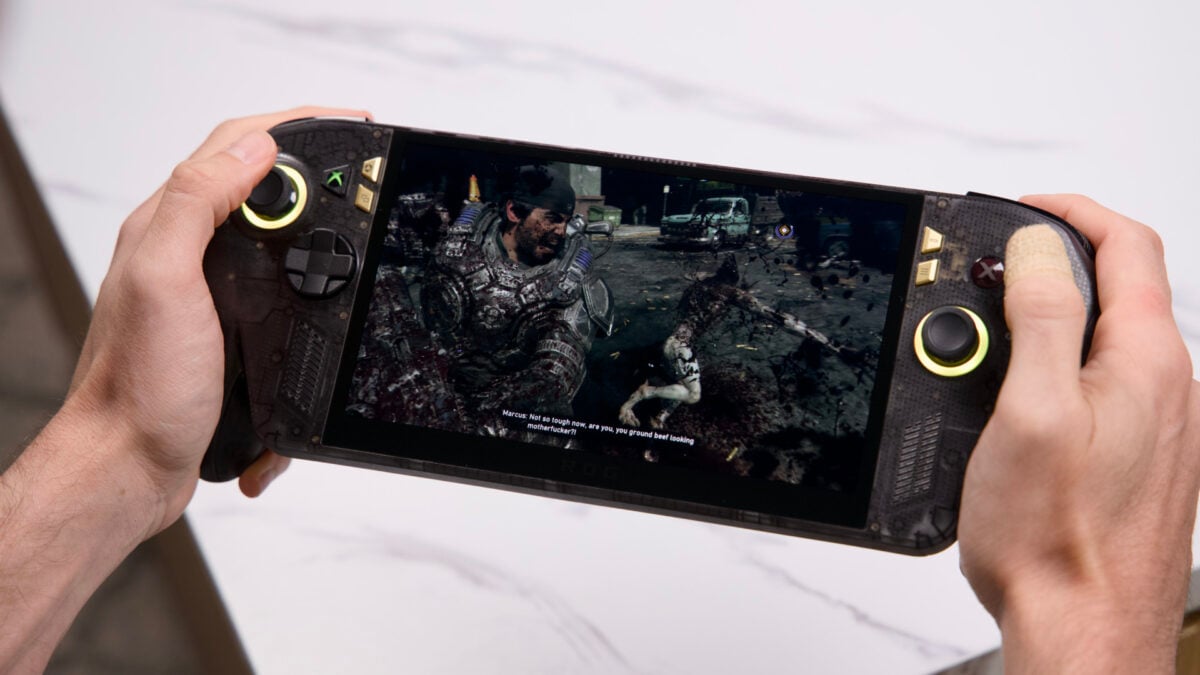
When Valve took a year to redo its original Steam Deck from 2022, it didn’t just go about adding a better screen. The Steam Deck OLED included redesigned sticks, a modified chip, and an improved battery that could handle the new screen. Asus decided to go the same route, but its $300 upgrade over the original Asus ROG Xbox Ally X is somehow both more and less drastic. The Asus ROG Xbox Ally X20 is now the most aesthetically pleasing gaming handheld PC I’ve ever held in my quaking hands. Asus ROG Xbox Ally X20 The 20th anniversary edition of the Xbox Ally X feels and looks amazing. If you really love OLED displays and want the most comfortable handheld, this is it. Beautiful, bigger OLED screen Modified controls make it extra comfortable Grippy back Anti-drift TMR joysticks Transforming D-pad isn't extra useful Performance isn't up to snuff with Intel handhelds Screen isn't great for direct light It’s a device that I can fall in love with, but it makes me feel like the worse partner in the relationship. While the $1,300 Xbox Ally X20 is fun and boisterous and the life of a party on a plane or train trip, there are other handhelds that have me doing the Distracted Boyfriend meme when looking at the few other handhelds that have already come out this year. Namely, the MSI Claw 8 EX AI+ has the kind of performance I want for playing all my games with a more stable framerate. MSI’s handheld also costs $500 more, so there’s a good reason I shouldn’t be quite so disloyal. Still, having played both, I can say that the Intel G3 Extreme chip in the competing handhelds is a better option than the nearly two-year-old AMD Ryzen Z2 Extreme inside the Asus ROG Xbox Ally X20. I can’t tell you when and where it will be worth spending more than $1,000 on a gaming handheld, but at the very least I can tell you the X20 looks and feels the best of any device that may demand your attention in 2026. The Asus ROG Xbox Ally X20 bundle comes with a giant Pelican case. It’s probably not necessary for most buyers. © Kyle Barr / Gizmodo There are also two versions of this handheld available. One, with just the handheld, costs the stated $1,300. The Asus ROG Xbox Ally X20 / X20 Bundle also comes packed with a pair of Asus ROG Xreal R1 glasses for $2,500. The reason it’s so premium is because it comes in a giant Pelican case. Is that worth it? I can’t say, but if you really want this handheld for the OLED screen, then I don’t know why you would want to stick another screen in front of your eyes with a pair of glasses. Damn is it a nice handheld to hold Playing this handheld feels extra comfortable because of small tweaks to the ergnomics. © Matthew Wille / Gizmodo Back at the Steam Deck OLED launch, I had honestly considered buying the limited-edition version with a translucent shell and orange thumbsticks. Asus, ripping a page right out of Valve’s book, has crafted a similarly beautiful-looking device, just with shining gold accents. This handheld is technically a part of Asus’ 20th anniversary product line, which includes even more gaudy gold limited edition mice, keyboards, and even a board game. I’ll let Asus get weird with it on their other devices so long as they kept the X20 relatively sane. There’s a single “20th Anniversary” sticker pressed into the rear of the shell. Other than that, the only hints to this Goldmember-style colorway are the buttons and the default color of the RGB surrounding both thumbsticks. You can still change the color of each to the traditional unicorn puke light show if you prefer. There are two USB-C ports, though only one of them is USB4. © Kyle Barr / Gizmodo The only thing missing would be RGB accents behind the face buttons, but I can live with that loss considering just how nice this screen is. The new OLED display is slightly larger than the original Asus ROG Xbox Ally X at 7.4 inches (compared to 7 inches), and that’s all due to reduced bezels along the tops and sides. It maintains the same maximum 1080p resolution and 16:9 aspect ratio, so there’s no actual downside to the new display setup. Asus’ handheld also supports up to 120Hz refresh rates and VRR (variable refresh rate), so it’s a great device for playing less-demanding titles, such as Hades II and RPGs like Esoteric Ebb or Zero Parades: For Dead Spies. OLED displays often struggle in the brightness department, though the Xbox Ally X20’s screen hits a stated max of 600 nits typical brightness but can claim a peak of 1,400 nits of luminance in HDR content. The only time the screen struggled was in direct, bright light, where the image started to wash out. The screen is also occasionally prone to reflectivity, though it’s not the worst of its kind that I’ve experienced. That prize belongs to the Lenovo Legion Go 2, a now near-$3,000 handheld. The back of the grips also has a rubberized texture that makes it easier to hold. © Kyle Barr / Gizmodo As a media device, the Asus ROG Xbox Ally X20 looks great, and it also sounds boisterous enough I didn’t find myself immediately reaching for a pair of headphones. There are two front-facing speakers that can get loud, especially when playing right in front of your face. The handheld also supports Dolby Atmos for those few games that also support the standard. Just in case, there’s also an extra headphone jack. As for connectivity, you’re granted two USB-C ports on top that both support power delivery. However, only one of them is USB4 that’s compatible with Thunderbolt 4, so if you plan to hook up an eGPU, you’ll need to use the right-most connection. You’ll also find the microSD card slot on top if you hoped to expand the handheld’s base 1TB of storage. The fingerprint reader power button makes signing into Windows a bit faster. © Kyle Barr / Gizmodo The X20 is slightly heavier than the previous Xbox Ally X at 1.66 pounds (compared to the original’s 1.58). That’s due to the reconfigured cooling apparatus made to deal with the heat from the new display. I couldn’t feel any real difference swapping from one handheld to the other. That being said, this is not the kind of light device you can use continuously with arms extended. You’ll still need to prop your elbows on some surface for stability. It would be one thing if Asus merely made a handheld with a pretty veneer and nothing else, but the company went the extra mile and essentially fixed all my minor quibbles with its Xbox Ally X, or at least most of them. Better controls in every way The “transforming” D-pad isn’t as useful as you may have hoped. © Kyle Barr / Gizmodo Asus made a few adjustments to the overall look and shape of the Xbox Ally X. The first major change is the introduction of TMR (tunneling magnetoresistance) joysticks. These kinds of sticks are touted as more drift-resistant than older joysticks, and that means you shouldn’t expect to have any annoying fake inputs after enough wear and tear. On a more anecdotal note, TMR sticks don’t often feel as spindly as many Hall Effect joysticks. If I compare the MSI Claw 8 EX AI+’s Hall Effect sensors to the Xbox Ally X20’s, the Asus handheld has a slightly stiffer stick that gives it more presence when gaming. Asus also made small but notable adjustments to the controls. The “B” button on the right side is now no longer proud against the handheld shell. Even though I didn’t have many problems with the original Ally’s controls, being more flush with the plastic makes it easier to press. In addition, Asus made the bumper buttons more clicky, and that’s something I could immediately tell felt better than the original $1,000 Xbox Ally X. TMR thumbsticks are not only more drift-resistant, but they also feel better than Hall Effect sticks on average. © Kyle Barr / Gizmodo The most dramatic change from the original handheld is the new “transforming” D-pad. By default, it’s a dish-shaped four-way directional pad, but you can lift it up and spin it to turn it into an eight-way pad. The problem is the pad doesn’t lock in place when turned, so sliding your finger across the pad will likely spin it and cause it to lock back in place in the four-directional mode. I’m not playing many fighting games on this device, so it doesn’t actually change how I use it, but if this was one of the main reasons you were looking to get the Xbox Ally X20, you may need to consider other options. The original Xbox Ally X was the first to promote a handheld with grips directly inspired by an Xbox controller. It makes the handheld feel thicker than other, similar devices, but it trades less portability for comfort. Unlike many other Steam Deck-shaped devices, where after enough hours I start to develop small cramps in my hand, I never feel like I need to pause and stretch my digits as they start to fall asleep. The Impulse Triggers have a smooth action that adds nice feedback when playing shooters like ‘Gears of War: E-Day.’ © Kyle Barr / Gizmodo If I have one prominent complaint, it’s that the Armoury Crate and “Action Button” (which defaults to taking screenshots) sit above the typical in-game menu buttons. I wish Asus had taken the time to switch them on the revised handheld, but no such luck. At least the Xbox button now includes a green backlight that reminds me of the recent Xbox rebrand. The light turns off when you’re not actively exploring the menus. It’s a small quibble, I know, but I prefer to see that green Xbox button on all the time, if nothing else to give me a burst of nostalgia for my early Xbox 360 days. Other handhelds may have the X20 beat (and cost way more) The Intel chip on the MSI Claw 8 EX AI+ still has the Xbox Ally X beat. © Kyle Barr / Gizmodo While the Steam Deck OLED managed to eek slightly better performance than its predecessor, the Asus ROG Xbox Ally X20 is functionally the same as the original from 2025. The updated handheld is running on the same AMD Ryzen Z2 Extreme APU and 24GB of 8,000MHz LPDDR5X RAM. Despite changes to its thermals, the device goes tit for tat when compared to the Xbox Ally X from last year. In all my CPU and GPU benchmarks, the X20 performed equivalently, only managing at best 3% better in some synthetic benchmarks like 3D Mark Steel Nomad. In game benchmarks, the X20 occasionally outputs an average of one to three fewer frames per second than the original. That’s well within a margin of error, so we can essentially call each device the equivalent of the other at their max TDP (thermal design power). The OLED screen can occasionally make up for having to lower graphics settings to achieve a better framerate. © Matthew Wille / Gizmodo What does that mean for recent titles? In Gears of War: E-Day, running at the max 1080p and medium graphics settings without any upscaling, the game hits around 16 fps with the game’s benchmark. It needs to use TSR, FSR, or XeSS upscaling to even hope for a playable frame rate. In regular gameplay, that means I was managing an average of 35 fps under these settings while occasionally dipping into the high 20s when there were more characters on-screen. How about a title like Star Wars: Galactic Racer? I can manage a frame rate that sits above 30 fps with graphics settings set to high, again relying on upscaling. That framerate can tank into the 20s when walking around the small third-person areas, which could prove annoying as I tried to chum it up with my best bud Biddy Blas. Without trying on frame generation, this doesn’t exactly feel like a $1,300 experience. The $1,800 MSI Claw 8 EX AI+ and its Intel G3 Extreme chip manages an average of 30 to 40% better frame rates in many of these titles. While that doesn’t seem like much, it means I can play Gears of War at just below 40 fps on high settings and that handheld’s max 1200p resolution with Intel’s own XeSS upscaling, something I can’t quite achieve on the AMD-based handhelds. It’s just a smoother overall experience, and that really does matter. OLED is amazing for contrast-filled games, like ‘No Parades: For Dead Spies.’ © Matthew Wille / Gizmodo In-game benchmarks show this discrepancy in action. The MSI handheld performs nearly 40% better than the Asus ROG in Forza Horizon 6 at high settings and Cyberpunk 2077 running in the Steam Deck graphics profile. The ROG Xbox Ally X20 still maxes out at 30W TDP, while the MSI Claw can hit a peak of 35W. When away from a plug, the handhelds are still not comparable. I can regularly get more than 40 fps in Forza on the MSI device where the X20 struggles to meet the same performance. Of course, not all is equal in Xbox land. Microsoft added an advanced shader delivery profile for AMD-based hardware, but Intel is stuck with shader load times that can take upwards of 30 minutes to complete. This is just one case, though it may matter to you if you’re hoping to play the latest games from the Xbox maker. You have to consider future handhelds, too © Kyle Barr / Gizmodo As much as Asus has tried to remodel its hardware, the software side of things remains iffy. Microsoft first touted its “full screen experience” with handheld PCs more than a year ago, and there are still routine issues with the software. Sure, I don’t have nearly as many problems putting its handhelds to sleep as I once did, though I still have occasions where a device turns on randomly without my input. Xbox has made small, though notable adjustments to the UX over the last several months. Chief among the improvements is the default performance profiles on specific Xbox titles that guarantee a more stable experience with base settings. What’s still missing is a user interface that doesn’t look like a dark grey void without any of the typical Xbox console embellishments. That may be changing soon. There’s an early version of the new Xbox PC app—called “Garrison”—floating around purporting to be a much cleaner and improved version of what we already have. It’s obviously inspired by the Xbox Cloud Gaming app, but more importantly, it’s a controller-first UI that seems like it would be a shoo-in for the Xbox Ally X and X20. © Matthew Wille / Gizmodo And still, there are many menu controls you cannot easily use from either the Xbox app or the Quick Access menu. An option to change display settings and power modes right from the main menu seems obvious, but Microsoft has yet to figure any of that out. So as we wait for a better UI, we also have to consider what other handhelds are on the horizon. The Acer Predator Atlas 8 is still set to arrive this October, and the company promises you can get it for the same $1,300 as the Xbox Ally X20. I’ve only had a brief hands-on with this handheld and Acer’s similar, though lower-priced, Predator Atlas 7. I can’t tell you which is better, but the performance difference between Asus’ and MSI’s handheld PCs is enough that we have to take note. If we only focus on the present, then I’d say the Asus ROG Xbox Ally X20 is the handheld that I’d—almost—wish to take with me everywhere. If you’re not super keen on playing the latest and greatest AAA titles, this handheld is more than enough. We’re so close to reaching perfection that I’m hopeful the next generation of handhelds will finally give me the one I can recommend without any caveats.
Asus ROG Xbox Ally X20 Review: The Prettiest, Most Comfortable Handheld You Can Buy
Full Article
Original Source
Read the full article at Gizmodo →KhanList aggregates and links to publicly available news content. We do not host full articles from third-party sources. Always verify important information with original sources.