
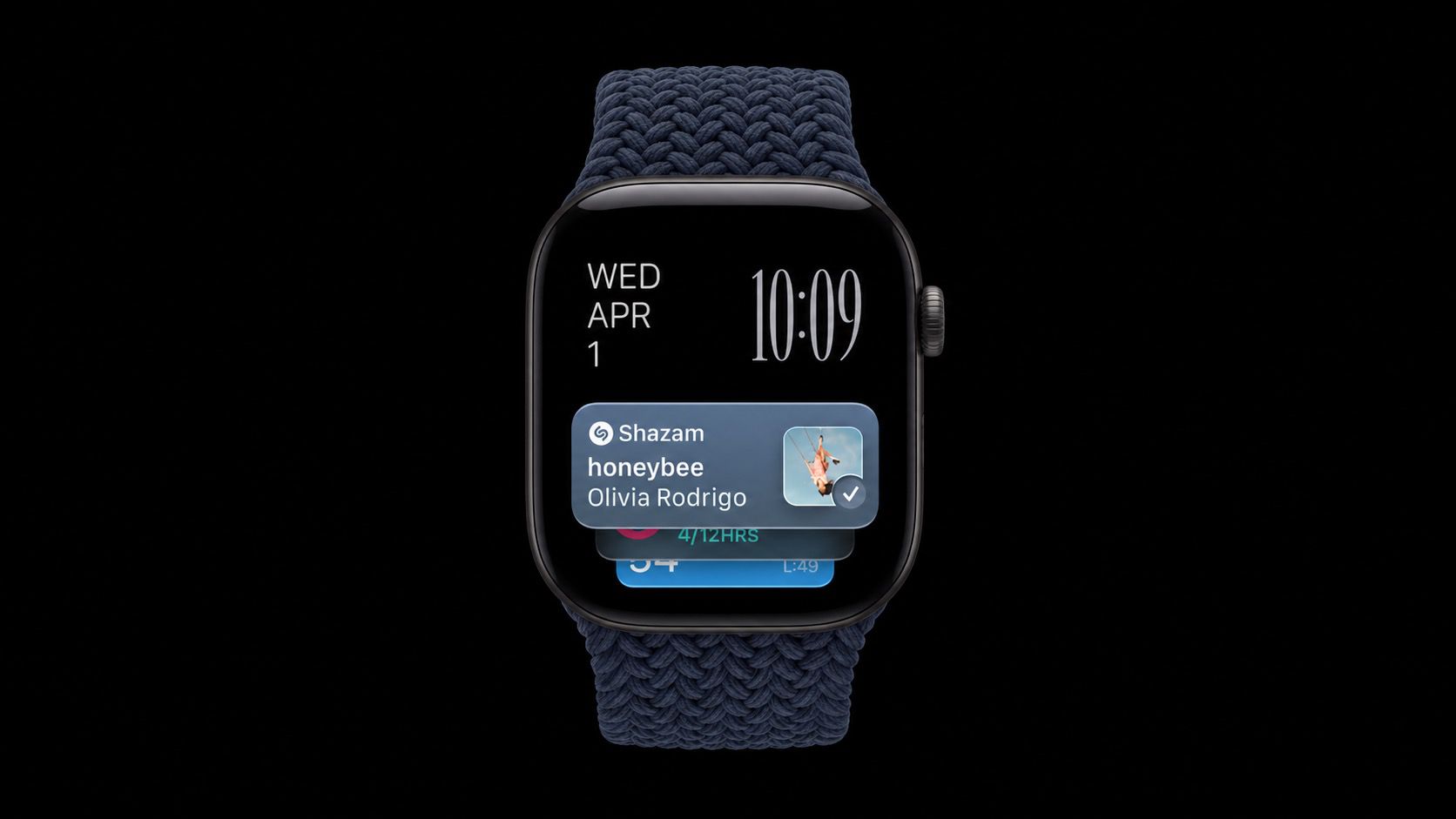
Ever been in a situation where you hear a song in a cafe, a shop, or a car, and wonder what it is? On the latest Apple Watch models, your watch can work it out for you, and you don't even need to ask. The music doesn't have to be playing on the watch. It just needs to be audible around you. Apple Watch does the rest. It's all thanks to a new automatic feature in iOS 27 called Music Recognition, which is just one of Apple's new Audio Intelligence features. It uses Shazam to identify songs around you and surfaces the answer in the Smart Stack, including the title and artist, without you tapping anything. It requires an Apple Watch Series 12 or Apple Watch Ultra 4 paired with an iPhone 11 or later (or iPhone SE 2nd generation or later) running iOS 27. Using Music Recognition on Apple Watch When you hear music nearby, just swipe up from the watch face (or turn the Digital Crown upward) to open the Smart Stack. Then check the Music Recognition widget. It should show the song title and artist as soon as it has identified the music, which shouldn't take long. The best bit is that you can save the song to your Shazam history or Apple Music library with a tap. How to Turn On Automatic Music Recognition Usually, you can just tap Enable Music Detection when the Music Recognition widget appears for the first time in your Smart Stack – the feature works from then on. But if for any reason you're not seeing it happen automatically after this initial step, here's how to enable it manually: Open the Settings app on your Apple Watch. Tap Smart Stack. Turn on Music Detection. Older Apple Watch models can still identify songs manually with the Music Recognition app, but the automatic Smart Stack version is limited to Series 12 and Ultra 4. Privacy Apple says no audio is recorded or stored in the process of identifying songs. Instead, audio is processed in a protected buffer inside the device's Secure Exclave, and only an acoustic signature of the song – which can't be reversed into the original audio – is sent to Shazam's servers for identification. Popular StoriesApple Offers Steps to Fix Daylight Saving Time Bug on Apple WatchSunday November 1, 2026 3:34 am PST by Tim HardwickApple has published a support document describing what to do if your Apple Watch continues to show time that's off by one hour after daylight savings time changes. "This incorrect time appears only on the Always On display when your wrist is down," says Apple. "When you activate the display by tapping it or raising your wrist, the time changes to the correct hour." To fix the issue, Apple says ...Apple Watch Series 12, Ultra 4 Owners Report Skin IrritationWednesday October 7, 2026 12:02 pm PDT by Juli CloverSome Apple Watch Series 12 and Ultra 4 owners have experienced unexpected skin irritation with the new models, according to reports on the MacRumors forums and Reddit. Affected users complain of a burning sensation and redness under the sensor area. The Apple Watch Series 12 and Ultra 4 measure heart rate every five seconds, and some people have wondered if that's the cause of the skin...MacRumors Giveaway: Win an Apple Watch Series 12 and a Nylon Band From Southern StrapsFriday October 9, 2026 10:20 am PDT by Juli CloverFor this week's giveaway, we've teamed up with Southern Straps to offer MacRumors readers a chance to win an Apple Watch Series 12 and a nylon band from Southern Straps to go along with it. Southern Straps is a California-based company that has been making high-quality bands for the Apple Watch since the device first launched in 2015, and the company's selection of bands offer a an...
Apple Watch Automatically Identifies Songs Playing Around You
Full Article
Original Source
Read the full article at Macrumors →KhanList aggregates and links to publicly available news content. We do not host full articles from third-party sources. Always verify important information with original sources.