
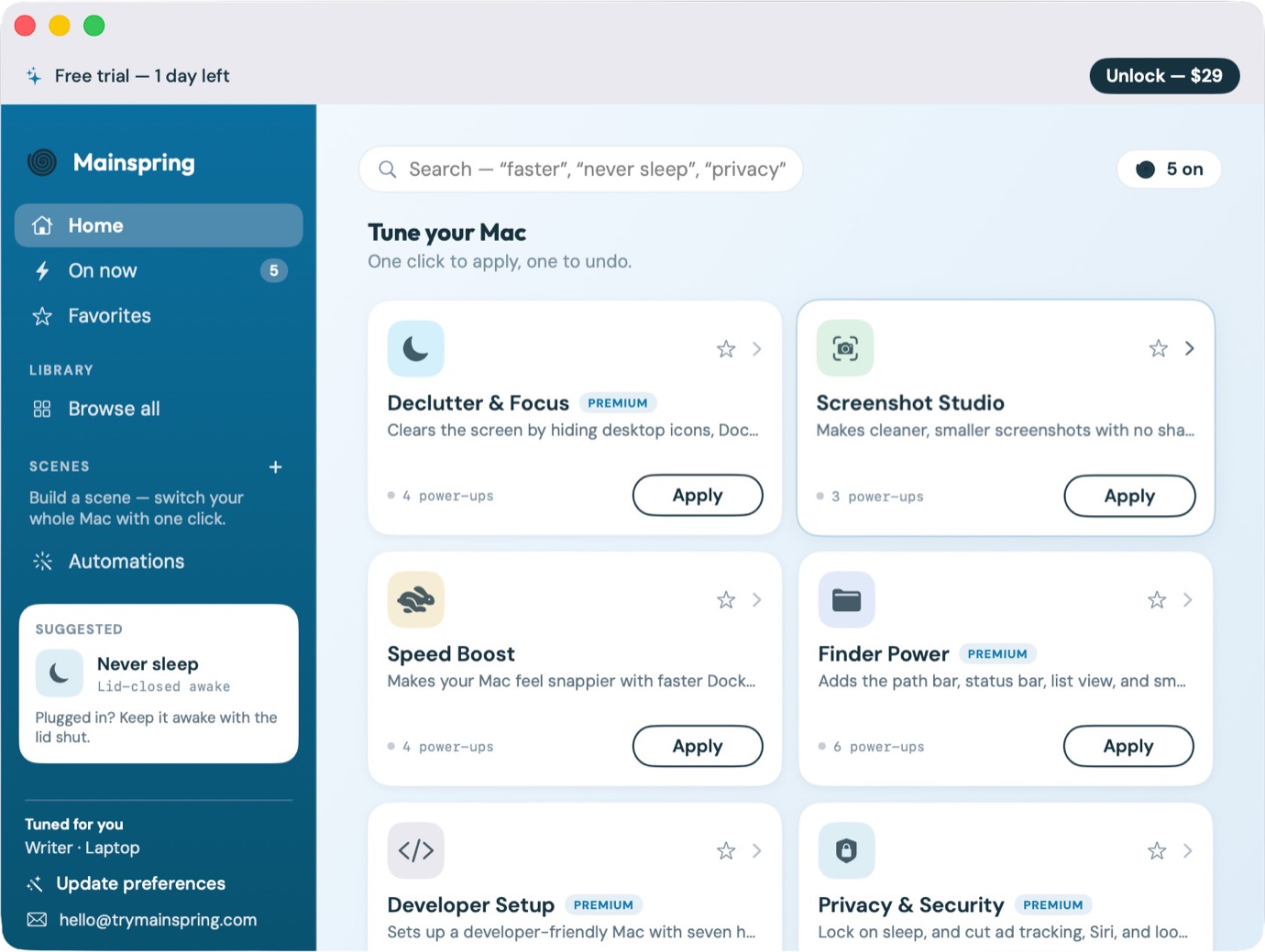
Sometimes, it’s the little things in life, as this week’s crop of intriguing apps proves. None of our entries promise anything revolutionary — just control over one aspect or another of your Mac that should stand to make your user experience just a tad bit better. Oh and we throw in a game, too. All work, no play and all that. So let’s work our way down the list of possible additions to your Mac or iPhone. And if you have something you’d like to see featured in this space, let us know about it via email at apps@sixcolors.com. Mainspring Your Mac is more powerful than you know, with a lot of controls hidden well out of view (at least if you don’t want to dig around in the Terminal). Mainspring imagines a world where you can control some of those features via toggles in a utility panel. Want to speed things up by removing the delay before your auto-hidden Dock pops up or making the hide and show animation go faster? Turn those features on. You can also tweak the built-in screenshot tools to remove drop shadows or save your files as JPGs instead of PNGs. Or you can explore dozens of other optimizations covering various aspects of your Mac, tailored to whether you’re using a laptop or desktop. Best of all, undoing those changes is as simple as sliding the toggle off. Mainspring really lets you tweak and fine-tune your Mac without running the risk of damaging something important in the process. What I really appreciate about Mainspring is the setup feature that proposes different scenarios for getting started. I selected the Writer settings, which gave me access to the different screenshot tools that I could turn on and turn off. The app really makes it easier for amateurs like me to use. You’ll need to pay a one-time fee of $29 for an unlocked copy of Mainspring, but the app comes with a free trial that lets you use it for one day so you can see if Mainspring’s various settings are just the tweaks your Mac needs. Docktor Sometimes, when I’m jumping between different apps for the same project, I forget what I’ve got open where. Did I start writing that document in BBEdit or in Google Docs in Safari? The free Docktor utility resolves any lingering doubts by adding live previews of each open app’s window when you hover over its icon in the Dock. You will have to turn on some permissions to let Docktor do its thing, such as allowing screen recording to capture live thumbnails using ScreenCaptureKit. Optional permissions allow Docktor to know your location and look at your calendar to populate relevant widgets that can be added to either side of your Dock. That’s another bonus feature for Docktor apart from the live thumbnail previews, though by default, the widgets appeared a little faint on my display. I took care of that by going into Docktor’s settings and fiddling with the Liquid Glass to make things easier on my eyes. That may be a step too far for some users, but the app is free to download and use so you can give it a try to see if it delivers what you’re looking for in a productivity-boosting utility. Pop Out Timer Apple devices have their own built-in Clock apps, though the one that comes with the Mac is a bit pedestrian for my tastes. Pop Out Timer offers a different spin on things, with a floating window that you can place just about anywhere on your screen. That can come in handy when using the stopwatch mode if you want to keep an eye on your time while running through a presentation. As for me, I’ve used Pop Out Timer’s stopwatch as an impromptu time tracker for logging how much time I’m spending on projects where I bill by the hour. The app also features timer, clock and pomodoro modes. Customization features in Pop Out Timer’s settings let you adjust the aspect ratio of the floating timer as well as the background and text colors. The app, which also runs on iPhones and iPads, is free to try, with timers restricted to 5 minutes. If you like what you see, unlock the premium version, either with a subscription (49 cents/month or $4/year) or a one-time $12 purchase. TrillMark When you’re heads down on a project, those notification pings your Mac sends out can fade into the background — which really defeats the purpose of notifications if you ask me. The $8 TrillMark lets you assign different sounds to notifications coming from different apps, so that an alert coming in from Slack will make a different noise compared to a News notification. To differentiate notifications even further, TrillMark lets you set colors for individual apps, so that you’re sure to see the alerts that are critical to you and to know which apps they’re coming from at a glance. TrillMark requires some tweaking. For instance, when I’m shuffling through songs in the Music app, I have a notification appear on screen with the song title and artist, but I don’t necessarily want a noise from TrillMark pinging over the music. Fortunately, if you go into the settings, you can ensure that such notifications appear silently. Echo Let’s wrap up this week’s look at apps with an iOS puzzle game that lets you clear your mind while passing a few spare moments. Echo requires you to navigate your way through a maze with just a limited number of moves, but fortunately, there’s an Echo button where your past moves reappear to help you unlock doors and overcome obstacles. It’s a difficult concept to explain, but all becomes clear the moment you start playing. Different game modes — a campaign mode along with endless play and daily puzzles — add to Echo’s replayability, while soothing music creates a very calming experience. Best of all, Echo is a free download with no ads marring the experience, though there is a button where you can send a tip the developer’s way. [Philip Michaels has been writing about technology since 1999, most notably for Macworld and Tom’s Guide. He currently finds himself between jobs, so if you need someone who can string a few sentences together (or make your sentences read a lot better), drop him a line.] If you appreciate articles like this one, support us by becoming a Six Colors subscriber. Subscribers get access to an exclusive podcast, members-only stories, and a special community.
App Report: Tiny delights
Full Article
Original Source
Read the full article at Sixcolors →KhanList aggregates and links to publicly available news content. We do not host full articles from third-party sources. Always verify important information with original sources.