
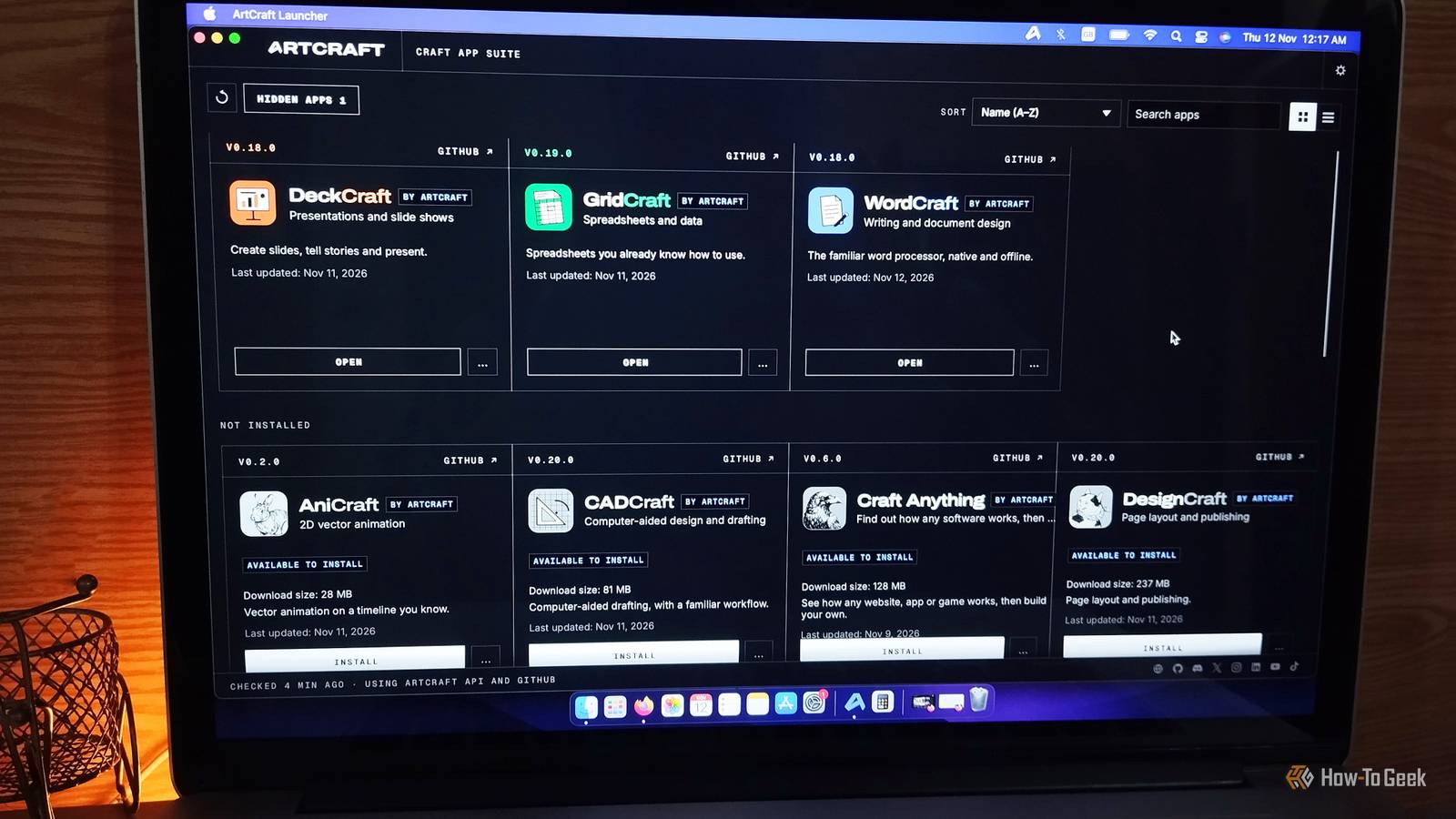
Open-source developers have spent decades proving that powerful software doesn't have to come with a price tag. GIMP, LibreOffice, and Blender started as alternatives to expensive commercial tools and have grown into applications people rely on every day. Now, AI coding assistants are speeding things up, making it possible for a single developer to attempt what once required an entire team. That's good news for anyone tired of subscription fees that can add up to hundreds of dollars a year. ArtCraft is one such ambitious project. What started as a solo vibe-coding experiment has grown to 23 GitHub contributors. It's a software suite available on the web, macOS, Windows, and Linux. After taking aim at Adobe's creative apps, it's now coming for Microsoft Office with free alternatives to Word, Excel, and PowerPoint. ArtCraft's journey from Adobe to Microsoft ArtCraft was started by software engineer Brandon Thomas, the founder and former CEO of Storyteller.ai. What began as a solo vibe-coding project has grown into a community effort, with 23 contributors listed on GitHub. Thomas initially used AI coding assistants to build free, open-source alternatives to Adobe's creative suite, including tools targeting Photoshop, Premiere Pro, and Lightroom. Now, he's expanding that ambition to Microsoft's productivity suite with WordCraft, GridCraft, and DeckCraft, targeting Word, Excel, and PowerPoint, respectively. The three Office apps are written in Rust with help from Claude Opus 5.5. The growing contributor base is encouraging, too. More hands mean more opportunities for bug fixes, new features, and testing with real-world files, all of which matter for relatively young projects trying to compete with established software. The idea is simple: give people access to familiar creative tools without locking essential features behind expensive subscriptions. WordCraft wants to replace Microsoft Word It feels like Microsoft Word, minus the subscription If you've used Microsoft Word for years, WordCraft should feel relatively familiar. It uses a ribbon-style interface with tabs, formatting controls, and a Styles gallery, so you don't have to learn an entirely new way of working just to write a document. WordCraft goes beyond basic text editing, too. It supports tables, document styles, track changes, comments, and document comparison. You can also create tables of contents, footnotes, citations, bibliographies, indexes, and captions. That's quite a list for a free word processor that's still in development. File compatibility is another important part of the package. WordCraft can open and save DOCX documents, import and export formats such as ODT, RTF, HTML, Markdown, and TXT, and export PDFs with selectable text. It also includes offline spelling and grammar assistance. You won't necessarily get the same polished document compatibility and advanced workflow as Microsoft Word, but WordCraft already looks like more than a basic text editor. It gives you access to features such as sections, page numbers, indexing, and document formatting without needing a Microsoft 365 subscription. If you've ever had to switch from Google Docs to Word because of its limitations, WordCraft is worth exploring. Gridcraft takes aim at Microsoft Excel Spreadsheets, formulas, charts, and more A spreadsheet application is only as useful as its ability to handle your data, and GridCraft seems to understand that. It offers a familiar spreadsheet layout with ribbon tabs, a formula bar, sheet tabs, a Name Box, and conditional formatting. If you've spent time in Excel, finding your way around shouldn't be difficult. The more interesting part is its calculation engine. GridCraft advertises more than 500 spreadsheet functions, including dynamic arrays and advanced functions such as LET, LAMBDA, MAP, and REDUCE. You can use formulas to calculate values, organize data, and build more complex spreadsheets without relying on a separate application. It also supports charts and PivotTables. You get 17 chart types, customizable chart formatting, and PivotTables with filters, field lists, and date grouping. That's a fairly ambitious feature set for an application that doesn't charge you a monthly fee. GridCraft reads and writes XLSX files and supports spreadsheet elements such as formatting, tables, validation, comments, and sparklines. Of course, having a long feature list doesn't guarantee that every complicated Excel workbook will behave exactly as expected. Still, for budgeting, organizing information, and everyday calculations, it has plenty worth investigating. DeckCraft wants to make PowerPoint less essential Work with spreadsheets, data, and formulas DeckCraft is ArtCraft's answer to PowerPoint, and its feature set goes beyond putting text and pictures on slides. You get a slide editor with a ribbon, slide thumbnails, notes, and tools for arranging elements. It also supports slide masters, layouts, themes, and speaker notes, giving you more control over the appearance and structure of a presentation. There are plenty of customization options, too. DeckCraft includes more than 150 vector shapes, adjustable gradients, connectors, and styling controls. You can also add transitions and animations, including motion paths and Morph-style transitions. When you're ready to present, its presenter view includes speaker notes, upcoming slide previews, and an elapsed timer. DeckCraft can open and save PPTX presentations, export slides as PDFs, and render them as images. That's useful if you want to share your work without asking everyone to install the same application. I did run into a small installation hiccup here. I was using my Mac for the rest of my testing, but DeckCraft wouldn't launch after installation, even after I tried an earlier release (using ArtCraft launcher). I installed it on my Windows machine instead, and it worked without a problem. The app had received an update just two days earlier, so this could have been a temporary update-related issue rather than a broader compatibility problem. Can ArtCraft really replace Microsoft Office? Let's be realistic. Microsoft Word, Excel, and PowerPoint have been around for decades, with years of refinement, testing, and user feedback behind them. Matching their advanced features, compatibility, and reliability is a huge challenge for any new project. ArtCraft's apps are still young and currently described as pre-alpha. Still, the momentum is real. WordCraft has gathered over 17.8K GitHub stars in just a month, which is impressive for such an early project. Professionals who depend on Office's advanced tools should stick with their subscriptions for now. But for students, casual users, and anyone who simply needs to open a document and get some work done, these free alternatives are promising. Keep an eye on ArtCraft and check back in a few months. The gap may be smaller than you'd expect.
Adobe isn't the only target: a vibe coder wants to replace Microsoft Office, too
Full Article
Original Source
Read the full article at Howtogeek →KhanList aggregates and links to publicly available news content. We do not host full articles from third-party sources. Always verify important information with original sources.