
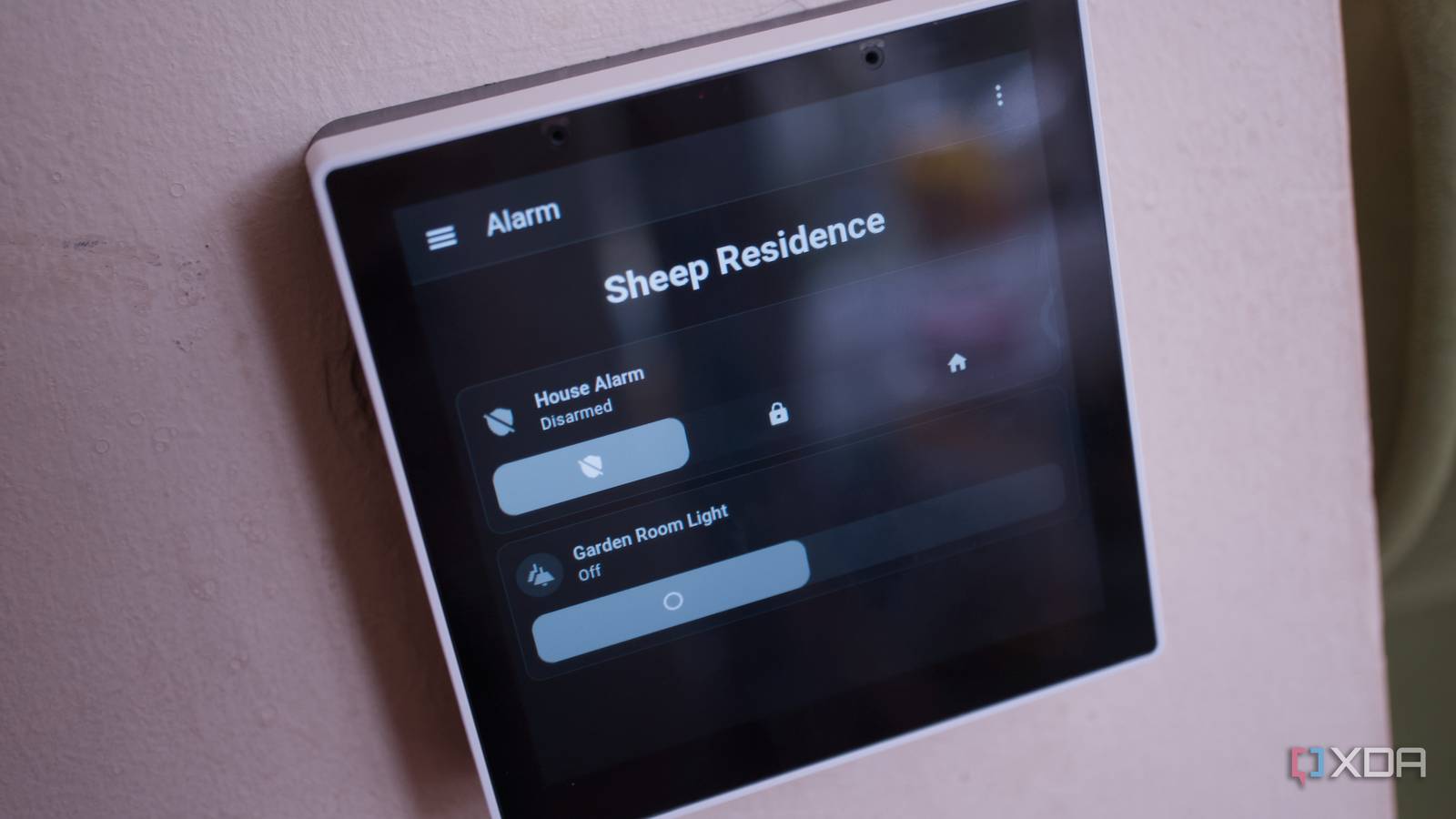
Published Sep 30, 2026, 2:30 PM EDT Richard is the PC Hardware Lead at XDA and has been covering the technology industry for almost two decades. He's been building PCs since young, and when not creating content, you can often find him inside a chassis somewhere. We've had someone pop round to provide a quote for a monitored alarm system, and it's quite something. I don't want to pay much and don't really feel the need to have it monitored since I could contact the authorities myself and have them attend the scene. Plus, I've already configured the property with strategically positioned cameras, so I thought I'd build a smart home alarm system myself, using nothing but some Zigbee sensors, a screen, and one light switch housing. The result is a clean, subscription-free, and versatile security solution. Saving money on the hardware Do you really need live monitoring? Source: Amazon A Ring alarm starter kit costs around $250 for the base station, a keypad, four door/window sensors, an extender, and a single motion sensor. A pack of four Zgibee door sensors can be bought for $40. A single motion sensor is around $16. That's $56 so far. Sonoff sells an excellent NSPanel display and light switch for $129, which can then all be linked together with a Zigbee broadcaster for Home Assistant on a separate server. Without factoring in that cost, it's $185 for a similar DIY alarm setup. Except, unlike Ring products, everything here is powered by Zigbee, and I can customize it how I see fit, use third-party integrations, and configure automations to personalize the alarm system to our needs. The four-door sensors take care of the side entrance, main entrance, rear doors, and office door. The hallway is fairly tight, so that single motion sensor is perfect for keeping tabs on movement throughout the house. The NSPanel Pro can be used as the brain of the operation, but here it's tasked with boosting the Zigbee signal and interacting with Home Assistant. Zigbee is great for these low-powered devices, as it means they don't need to use too much battery. The two AAA modules inside each door sensor should last for months, if not years, depending on usage and how many times the doors are opened and closed. To control everything is my Sonoff 3.0 Zigbee dongle connected directly to the Proxmox server running Home Assistant. This configuration is neat, keeps as much off Wi-Fi as possible, and is pretty much completely open, allowing me to fully customize it. Something I didn't mention yet is there's not a single subscription here. We paid for Ring Premium since we had a doorbell and the alarm system, which allowed it to be monitored. This wasn't particularly useful. We'd get a call most times (not all), and Ring can't actually notify the authorities. For that to happen, the system needs to be professionally installed and monitored. It just didn't feel like the alarm system was nearby. So, now we can have an almost identical setup without spending a penny each month. Installing your own alarm system is easy Everything using the same dedicated network I already planned out how everything was going to be positioned. The issue with the existing home alarm system we had with Ring was it required three power outlets. One for the primary hub, another for the extender, and a third for the keypad. You'd need four if using the doorbell and chime. This new Zigbee setup would require none ... or rather one when counting the Proxmox server. But since we already had Proxmox and Home Assistant running, it's almost for free. The existing keypad was awkwardly positioned in the hallway above a single power outlet. This needed to be disconnected each time we required access to the outlet, so I opted to move to a powered screen, the NSPanel Pro Gen2 from Sonoff. It's powered by Android, can connect to and launch with Home Assistant, and takes five minutes to install. All I required was a free single light switch that could be removed. The NSPanel doubles as a smart display and relay for two light fixtures. The metal light box I selected was a little tight, however, and so I opted for a 10mm spacer bracket, costing $4. After installing the screen, the result was a flush, sleek-looking alarm panel that doubled up as a smart home display. We could view energy cards, have access to Alarmo, and toggle the light switch as usual. Not a single cable needed to be routed. The panel has a speaker, and if we wanted, we could always pick up a dedicated Zigbee alarm siren and still be under the cost of a Ring kit. Using Alarmo in Home Assistant It's a match made in heaven Alarmo is an available Home Assistant integration, which essentially functions as a home security control center. It takes sensor inputs from all our Zigbee devices, including an existing water leak sensor, and provides the means to configure various modes, codes, and more. And because it's all heavily customizable, I could configure each mode setting to perform actions, such as sending notifications to devices and playing audio files. Now, we have mobile notifications for doors and audible announcements. Ring's own settings were limited, and a chime didn't really notify precisely what was going on. If I didn't have my phone with me to spot the back door opening, I'd be none the wiser. And remember those cameras connected through Frigate? I can set automations to task Frigate with snapshotting and saving clips if an alarm triggers. I can use object detection to work out what could have triggered an alarm if in view. Camera feeds can be passed through to the NSPanel so everyone in the home can see what's outside. If an alarm sounds, I can check the feeds and see a quick history snapshot of what happened just before it was triggered. The alarm can then be disabled if it's a false alarm, or I can notify authorities immediately. If I want, I can add other branded hardware further down the line, opening up new avenues for perfecting our smart home and securing it. But most of all, everything stays online without a reliance on third-party services. It's not for everyone, however That said, though I thoroughly enjoyed creating this setup and I'm happy with the results, it's not perfect. First, like other DIY solutions, there isn't any live monitoring. I need to be the point of contact for authorities. Second, it's not suitable for insurance or legally required systems. Our home insurance provider won't care how many sensors and sirens I have installed. But to save some money while still offering good levels of protection? It's not too bad at all!
A few Zigbee sensors and a light switch replaced my $250 Ring alarm system
Full Article
Original Source
Read the full article at Xda-developers →KhanList aggregates and links to publicly available news content. We do not host full articles from third-party sources. Always verify important information with original sources.