
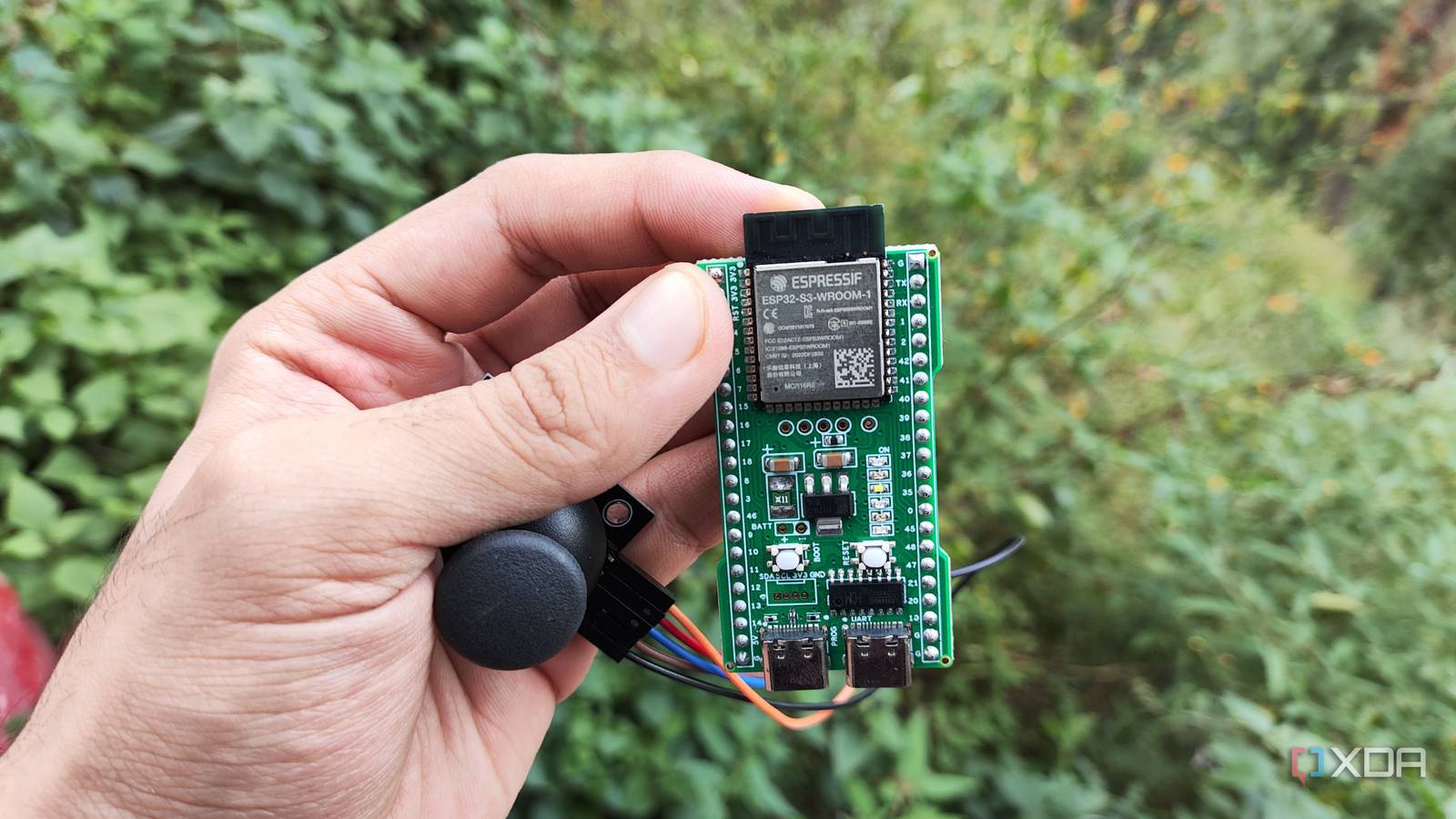
Published Oct 29, 2026, 11:01 AM EDT Ayush Pande is a PC hardware and gaming writer. When he's not working on a new article, you can find him with his head stuck inside a PC or tinkering with a server operating system. Besides computing, his interests include spending hours in long RPGs, yelling at his friends in co-op games, and practicing guitar. Between their terrific connectivity options, solid performance, easy coding tools, and cheap price tags, ESP32 microcontrollers are a godsend for DIY gizmos. If you’re as big a fan of Home Assistant as I am, you can rely on ESPHome to turn these pint-sized boards into weather stations, mailbox notifiers, presence sensing hubs, and dozens of smart devices. On the networking front, ESP32 modules can easily accommodate Wi-Fi scanners, Bluetooth proxies, and even ad-blocking scripts, provided your microcontroller has enough PSRAM. And that’s before I mention specialized boards that cram additional features under the hood. My trusty ESP32-S3, for example, packs native USB support, and that’s a game-changer for building PC accessories. In fact, a simple code file I created as a proof of concept quickly snowballed into an everyday macro pad I use during meetings. My ESP32 doubles as a makeshift macro pad during my meetings And all it took was the native USB functionality and a cheap sensor A couple of days ago, I decided to look into the USB OTG controller on my ESP32-S3, as it seemed like a quirky but practical feature. After all, a port capable of mimicking a typical USB device opens doors to quite a lot of possibilities for DIY PC products, including conventional mice, keyboards, and controllers. Combine that with an ESP32-S3 armed with a microSD Card, and you can even turn this tiny system into a flash drive. Me? I've been using it as a macro board after I realized I could have this pint-sized board execute entire shortcut keys on my PC. In fact, it's a project I worked on a few days ago, and I ended up reusing several code snippets. Specifically, I'd paired my Espressif ESP32-S3 WROOM-1 with a KY-023 sensor and wrote a couple of snippets to trigger the Win+E shortcut key on my PC every time I pressed down on the analog stick. However, this setup was rather minimal, and even if I mapped the action to something like Ctrl+S, it’d be weird to keep my ESP32 and analog stick combo on my desk just for a single key press. So, I decided to enhance this setup by mapping more actions to this seemingly minimalist macro pad (or rather, macro stick, since it’s only a single module). Just like typical analog sticks, the KY-023 can recognize directional input, which lets me map four more actions to my ESP32-S3 without needing additional buttons or dealing with more cable clutter. Since I attend Google Meet calls practically every day, I ended up turning my makeshift ESP32 macro stick into something that can aid my video conferencing tasks. For the first combo, I decided to map headphone volume control to the up and down movements of the analog stick. Specifically, I wanted Windows to increase the volume by 2 every time I move up on the analog stick, and decrease it by 2 if I tilted it down – which is pretty much necessary for my setup since my current keyboard doesn’t have a scroll wheel. Code-wise, I appended a new block to accept directional input from my ESP32, which needed all sorts of tweaks before it’d register the tilts correctly. void handleDirectionalInput() { int x = analogRead(JOY_X_PIN); int y = analogRead(JOY_Y_PIN); bool up = y CENTER + DEADZONE; bool left = x CENTER + DEADZONE; uint32_t now = millis(); if (up && !movedUp && now - lastActionTime >= REPEAT_DELAY_MS) { doUp(); lastActionTime = now; } movedUp = up; if (down && !movedDown && now - lastActionTime >= REPEAT_DELAY_MS) { doDown(); lastActionTime = now; } movedDown = down; if (left && !movedLeft && now - lastActionTime >= REPEAT_DELAY_MS) { doLeft(); lastActionTime = now; } movedLeft = left; if (right && !movedRight && now - lastActionTime >= REPEAT_DELAY_MS) { doRight(); lastActionTime = now; } movedRight = right; } Likewise, I also created a set of functions for the volume control commands. Then, I wanted to map the Ctrl + D shortcut to the left directional input, as it would toggle the microphone on/off on Google Meet. Likewise, I created another function block to have the PC register Ctrl + E when I tilt the analog stick right. As for the last function, I mapped it to take a screenshot using Windows + Shift + S. void tiltVolumeUp() { ConsumerControl.press(CONSUMER_CONTROL_VOLUME_INCREMENT); delay(20); ConsumerControl.release(); } void tiltVolumeDown() { ConsumerControl.press(CONSUMER_CONTROL_VOLUME_DECREMENT); delay(20); ConsumerControl.release(); } void tiltMic() { Keyboard.press(KEY_LEFT_CTRL); Keyboard.press('d'); delay(30); Keyboard.releaseAll(); } void tiltCamera() { Keyboard.press(KEY_LEFT_CTRL); Keyboard.press('e'); delay(30); Keyboard.releaseAll(); } void pressScreenshot() { Keyboard.press(KEY_LEFT_GUI); Keyboard.press(KEY_LEFT_SHIFT); Keyboard.press('s'); delay(50); Keyboard.releaseAll(); } Once I’d flashed the microcontroller with my freshly-crafted new code, I switched to the USB OTG port and tried out all the actions. And sure enough, all the macros worked as expected. However, there was still a lot more to be done here... But the real fun began when I started building profiles for different tasks Swapping between them is as simple as tapping the boot button Although this ESP32-S3 macro stick caters to my video conferencing needs, it’s not very useful when I’m knee-deep in a text file or tweaking spreadsheets. So, I figured I could create different profiles and have the microcontroller swap between the two as soon as I pressed the BOOT button. And this train of thought is precisely what led me down the slippery slope of attempting to cram different mappings on the ESP32. First, I defined the profiles and added more code that lets me swap between them every time I press the BOOT button. constexpr uint8_t PROFILE_BUTTON_PIN = 0; enum Profile : uint8_t { PROFILE_MEET_MEDIA = 0, //The OG profile for Google Meet PROFILE_EDITING = 1, //The second profile for typical productivity apps PROFILE_COUNT }; Profile currentProfile = PROFILE_MEET_MEDIA; bool previousSwitchState = HIGH; uint32_t lastSwitchPressTime = 0; bool previousBootState = HIGH; uint32_t lastBootPressTime = 0; uint32_t lastActionTime = 0; bool movedUp = false; bool movedDown = false; bool movedLeft = false; bool movedRight = false; void handleBootButton() { bool currentBootState = digitalRead(PROFILE_BUTTON_PIN); if (previousBootState == HIGH && currentBootState == LOW && millis() - lastBootPressTime >= DEBOUNCE_MS) { lastBootPressTime = millis(); currentProfile = static_cast((currentProfile + 1) % PROFILE_COUNT); } previousBootState = currentBootState; } Then, I created an entirely new set of functions for the second profile, and I wanted this one to cater to typical productivity tools. As such, I configured the tilt mappings to include save, undo, redo, clipboard, and task manager functions. Since the code snippet was pretty much the same as what I’d used for the non-volume mappings for my Google Meet-centric profile, I simply copied them again and tweaked the function names and their respective shortcuts. Finally, I crafted some functions involving if-else chains to force the ESP32 to check the current profile before triggering the shortcuts. void doUp() { if (currentProfile == PROFILE_MEET_MEDIA) { tiltVolumeUp(); } else { tiltSave(); } } void doDown() { if (currentProfile == PROFILE_MEET_MEDIA) { tiltVolumeDown(); } else { tiltClipboard(); } } void doLeft() { if (currentProfile == PROFILE_MEET_MEDIA) { tiltMic(); } else { tiltUndo(); } } void doRight() { if (currentProfile == PROFILE_MEET_MEDIA) { tiltCamera(); } else { tiltRedo(); } } void doPress() { if (currentProfile == PROFILE_MEET_MEDIA) { pressScreenshot(); } else { pressTaskManager(); } } If you're wondering, here's what the final code looks like: But there’s still a lot I can do for my DIY macro “stick” I’ve been using this makeshift setup for a few days now, and it works a lot better than I expected. That said, I feel like there are some cool ways I can build on this project – and I’m not just talking about adding new button modules, either. I’m planning to map yet another profile for this setup, except, I want this one to use shortcuts specifically centered around RTSS stats and other gaming utilities. To make switching between profiles a bit easier, I plan to add a cycle function to the RESET button as well. Since my ESP32-S3 has an LED built into it, it’d be interesting if it changed its color to match different profiles. But considering all the debugging I’d have to do if I want everything to work as expected, I’ll probably have to set aside an entire weekend to improve this project. ESP32-S3
A $10 ESP32 that pretends to be a macro board is the most useful gadget on my desk
Full Article
Original Source
Read the full article at Xda-developers →KhanList aggregates and links to publicly available news content. We do not host full articles from third-party sources. Always verify important information with original sources.