
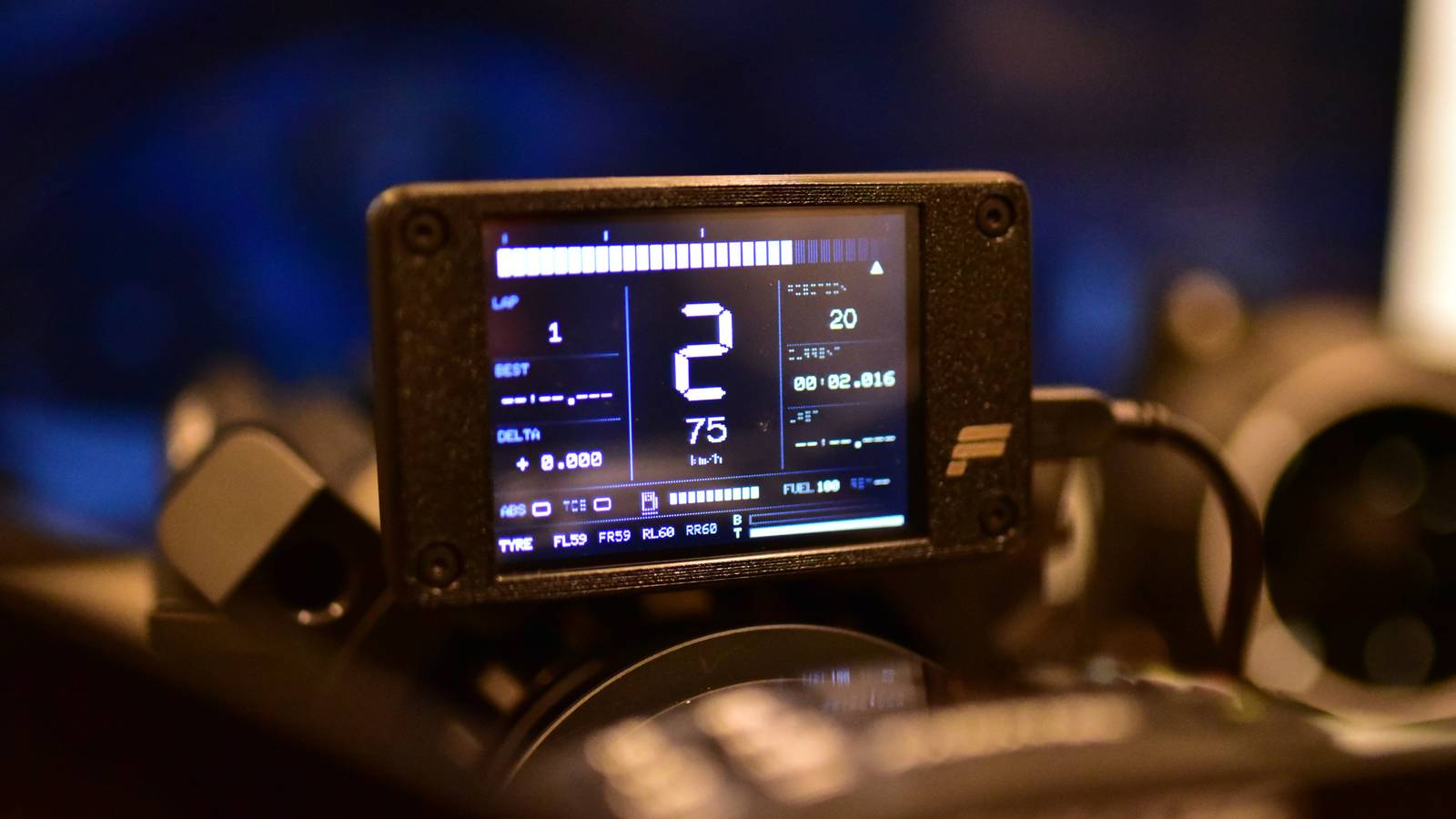
Published Aug 30, 2026, 6:00 AM EDT Tim has been covering technology for almost 20 years, in that time spanning a broad range of topics from security to product reviews. He is especially focused on the Apple ecosystem, productivity, and consumer advice. Over the years Tim has written thousands of articles, reviews, and round-ups in addition to producing video content and original photography. A graduate of journalism, he found his footing as a freelancer with a laptop and loves how he is able to work from practically anywhere. Now a Senior Editor for iPhone, Mac, and Smart Home at How-To Geek, Tim still loves to write. He can also be found crafting round-ups and productivity posts for the Zapier blog. Earlier in his career Tim spent nearly a decade as a writer and eventually Apple section editor for MakeUseOf. Tim currently lives in Brisbane, Australia. Outside of work he loves to hike and work out, play video games, and spend quality time with his wonderful partner and two cats Inka and Roger. The Cheap Yellow Display (CYD) combines an ESP32 microcontroller and small LCD touch display in one affordable package. The integrated screen means that you can build many projects without ever picking up a soldering iron or a breadboard. Weather and forecast station A dedicated display for checking the weather Credit: Adam Davidson / How-To Geek If you want a dedicated weather terminal that shows the current conditions and a forecast based on a location of your choice, the CYD is a great choice. There is no shortage of projects like this, but one that really stands out is Nicholas Wilde’s CYD Weather Station. The project is under active development, despite its early pre-1.0 release state. It pulls information from the internet, using two weather services (Open-Meteo and OpenWeatherMap). There are tabs for current conditions, a three-day forecast, hourly predictions, and a menu to change settings like units and theme. You can even wire a sensor directly to the board (the DHT22 is supported) if you want to measure local temperature. Installation is quick and easy via the ESP32 Web Flasher and a browser like Chrome or Edge. Looking for more inspiration? See how one How-To Geek writer designed their own CYD weather display using ESPHome and Home Assistant. ESP32 Marauder Hack your own network The ESP32 Marauder project is a suite of offensive and defensive Wi-Fi and Bluetooth tools designed for penetration testing. There’s a lot to sink your teeth into here if you’re interested in finding out just how secure your home network and other devices are. Check the Marauder wiki for the full lowdown, but once installed, you’ll have access to Wi-Fi and Bluetooth sniffers, scanners, and other attack vectors. You can build your own ESP32 Marauder with a compatible microcontroller, display, and some means of controlling it, or you can use the ESP32 Marauder Cheap Yellow Display project. This is a port of the Marauder firmware to a range of CYD models, from 1.9-inch non-touch varieties right through to 3.5-inch giants. Bluetooth MP3 player Own your tunes Dedicated MP3 players like the iPod have experienced something of a renaissance in recent years. They don’t require subscriptions or use invasive algorithms to recommend music, instead leaving discovery and acquisition entirely up to you. For many who still remember or missed out on the good old days, this can feel like a breath of fresh air. Rather than tracking down a barely working iPod or paying over the odds for a new model, why not build yourself a Cheap Yellow MP3 Player? It streams to any Bluetooth headphones, uses a microSD card for storage, and the whole thing is open source so you can hack it into a device you actually want to use. Retro mini TV for videos and games With a cute 3D printed shell The CYD is at the heart of this retro mini TV project which, as designed, looks like a replica of the set seen on The Simpsons. It’s actually an amalgamation of several projects, including the NES emulator Anemoia-ESP32 and MiniLegoTV, in a snazzy 3D-printed case. While the CYD is the brain (and face) of the operation, this one is a little more complex on account of the additional components you’ll need. That includes a speaker, switches, connectors, bolts, an IO expander for the controller, and some screws. Racing sim dashboard Works great with Gran Turismo 7 and a race wheel The ESP32 GT7 Dashboard is a standalone Gran Turismo 7 dashboard designed to be mounted above a race wheel. This is possible since GT7 publishes telemetry over the local network via the UDP protocol, a phenomenon that isn’t just limited to Sony’s racer. Since fans of sim racers tend to take their setups seriously, there are plenty of other simulators that support this feature. This one was built with PlatformIO and the Arduino IDE, with the source code available for anyone to fork. You can install the dashboard by flashing your CYD with a web browser. Home Assistant music remote A dedicated music controller that anyone can use Credit: TheDiffi / GitHub Having to get your phone out to start music playback, skip a track, or pick something else can be a chore. Having a dedicated device that can be passed around or left on the coffee table for anyone to use is a better idea. That’s where the CYD Jukebox comes in. This is a media playback remote that’s designed specifically for controlling media players within Home Assistant. It pairs beautifully with Music Assistant, which offers a way of bringing together all of your libraries (including local files and streaming services like Apple Music), all in one place. Make it even better by adding a battery and charging circuitry, then 3D printing a case to fit. Home Assistant controller with ESPHome Display information and control devices Credit: anthony-spruyt / GitHub With ESPHome, you can use simple YAML code to pull information from Home Assistant and even control devices. The easiest way to build a simple controller is to use a project like ESPHome Modular LVGL Buttons, which uses the touchscreen interface of your CYD to control entities like lights, covers, switches, and more. You can use this to display information too, or you can turn to another project like the CYD SmartEnergyMeter, which displays your current power usage, production, and battery levels (as long as they are available in Home Assistant). Use these as a blueprint to design your own, or get started from scratch with ESPHome—there’s a reason why everyone is using it! Still not sure what the fuss is about? Check out why your next ESP32 project should involve a CYD.
7 projects you can build with an ESP32-powered Cheap Yellow Display
Full Article
Original Source
Read the full article at Howtogeek →KhanList aggregates and links to publicly available news content. We do not host full articles from third-party sources. Always verify important information with original sources.