
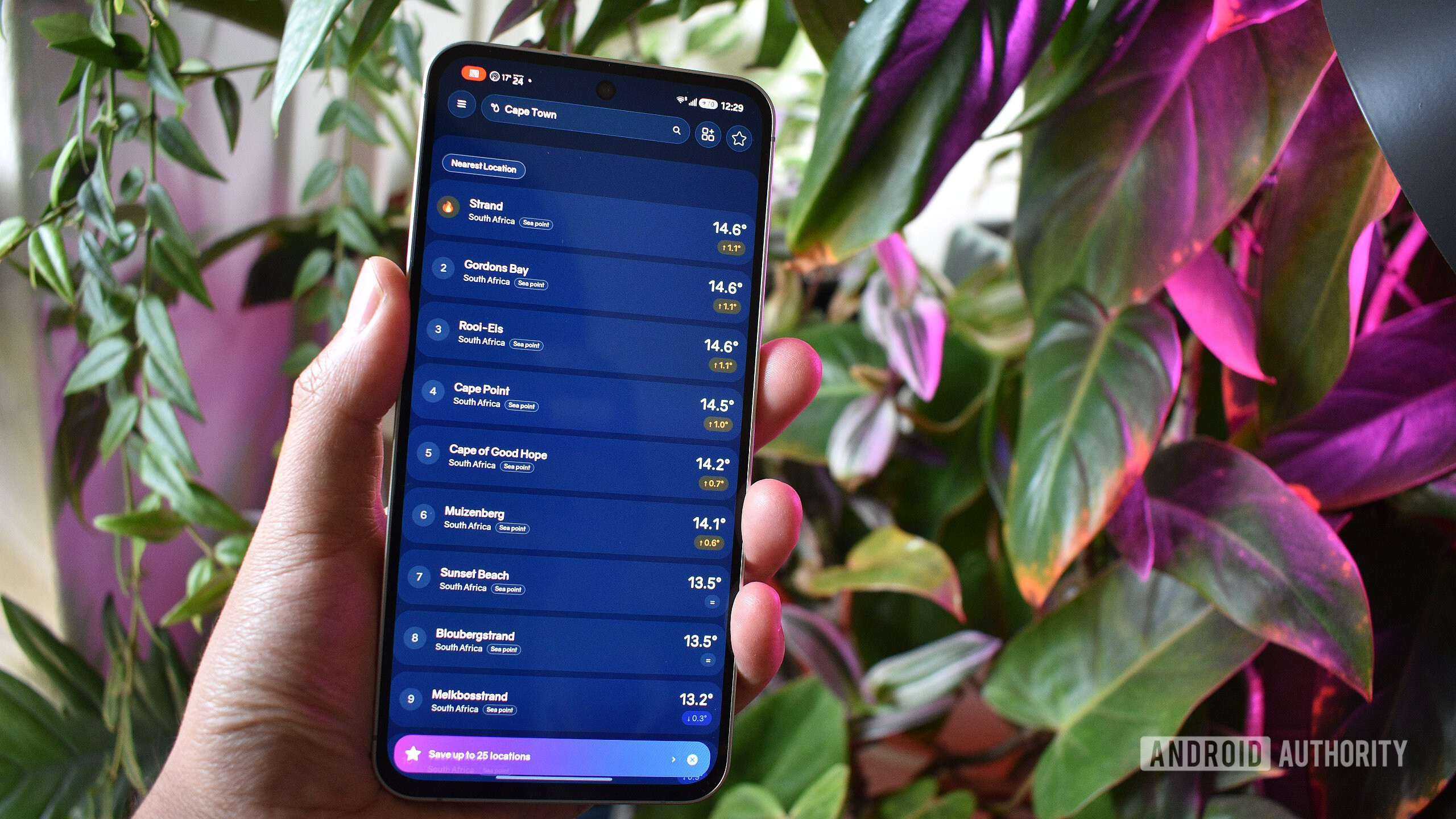
Andy Walker / Android AuthorityKeeping up with the latest and greatest apps and games is a difficult task, but I’m here to help. Each month, I detail a list of the best new Android apps and games, and this month’s edition is packed with a selection of Android apps that solve common and strange digital problems.Let’s jump right in. Here are the best new Android apps and games you should try in September 2026.Sunbird iMessage support on Android is back after a years-long hiatus. Price: Free 14-day trial / Monthly subscription from $2.99 per month Developer: Sunbird Secure Messaging Hadlee Simons / Android AuthorityBack in 2022, a novel app called Sunbird promised to bring iMessage conversations to Android smartphone owners. Although functional, the app was soon removed from the Play Store due to security concerns. Now, it’s back and promising users plenty.For starters, I should warn that the app demands a premium. Although it offers a 14-day free trial, it will require a monthly or annual subscription fee to continue using it.However, by paying this fee, users gain access to the wealth of iMessage features, including reactions, video, chat group management tools, and, most importantly for many users, blue bubbles.While RCS has made apps like Sunbird largely redundant, I do appreciate novel solutions to stranger online problems. If you feel left out by being the only Android user in a sea of iOS friends, Sunbird might be a viable solution. Notability Another former Apple exclusive debuts on Android. Price: Requires account / Free / Subscription to unlock all features from $4.99/month Developer: Ginger Labs Keeping up the theme of iOS apps on Android, Notability is the latest former iOS exclusive to arrive on Pixels, Samsungs, and the lot.The app has been available as a beta on Android for several months now, but it recently entered its stable era. In short, the app is a digital notebook that allows users to record thoughts in written or typed text. It’s targeted towards students, especially given its built-in flashcard creator and quiz tool, but its transcription feature makes it a good bet for office meetings, too.Notability isn’t free. You will need to create an account to use it, and then pay a monthly fee to keep your data at hand. I’d also suggest you use a device with a stylus to make its annotating smarts a little easier to use. HiLight Studio Google couldn’t do what the vibe-coded app can. Price: Free Developer: Dhananjay Bhosale It’s fair to say that the Pixel 11 Pro’s HiLight is both the most intriguing and least impressive feature. Out of the box, the notification light on the rear camera glass does very little, even though its potential ceiling is tall. That’s where third-party developers come to the rescue.How do you feel about the Pixel 11 Pro's HiLight feature?117 votesHiLight Studio gives Pixel 11 Pro users greater access and control over that LED. For instance, the app can pull colors from your wallpaper, apply various effects, adjust lighting duration, create presets, and much more. The app is vibecoded, but this highlights just how little effort Google put into HiLight itself.Notably, the app isn’t available on the Play Store, so you’ll need to snag it via GitHub. It also requires Shizuku to open the necessary permission channels to access the HiLight’s controls. But once set up, it certainly enhances the Pixel 11 Pro’s defining feature. Bare Browser (formerly Chromium Extend) Run fully-fledged Chromium on your Android phone with ease. Price: Free Developer: Shshtwy It’s a great time to be shopping for a new primary Android browser, especially given all the novel solutions third-party developers are building out of frustration or necessity. One such example I’ve encountered is Bare Browser — a fully fledged de-Googled desktop Chromium experience that runs on Android.That sounds like a recipe for a slow experience, but it’s anything but. First and foremost, Bare Browser supports extensions, which is massive for a Firefox junkie like me. It supports adding custom search engines and a third-party download manager and is completely devoid of Gemini or any other Google trinkets.What is your current primary Android web browser?19 votes I should warn that, since its name changed to Bare Browser, the app is back in alpha. In short, I wouldn’t use it as my default or mission-critical browser on Android. Additionally, the file size is massive at 464MB — this is a repackaged desktop browser, after all — but if you have the space, it’s well worth trying. Sea Temperature Check beach conditions, water temperature, and more seaside forecasts with this app. Price: Free with ads / Subscription from $1.99 / Lifetime unlock: $49.99 Developer: Georgiy Gorokhov Finally, I wanted to end this edition with a rather strange find.Given the current news cycle surrounding El Niño and its effects on global weather patterns, I grew increasingly interested in sea surface temperatures. A cursory search on the Play Store for such an app revealed the aptly named Sea Temperature.Although it doesn’t offer El Niño tracking as was my initial hope, Sea Temperature is far more useful as my side of the world heads into the warmer months.Think of it like a weather app but for the sea. Pick a point along the coastline, and the app will provide a breakdown of water temperature, swimming conditions, conditions for other water-related activities, a brief weather overview, and nearby temperature readings. This is brilliant if you’re looking for the best swimming beach and aren’t too familiar with the area.The app is free to use and supported by ads, but it does sprinkle in some useful details for paying customers. This includes widgets, historical and real-time data, and beach conditions. That’s it for the September 2026 roundup of the best new Android apps and games! Have you stumbled across any new apps or titles that you think deserve inclusion? Would you like to suggest a game or app? Let me know down in the comments below. Thank you for being part of our community. Read our Comment Policy before posting.
5 of the best new Android apps you need to try this September
Full Article
Original Source
Read the full article at Androidauthority →KhanList aggregates and links to publicly available news content. We do not host full articles from third-party sources. Always verify important information with original sources.