
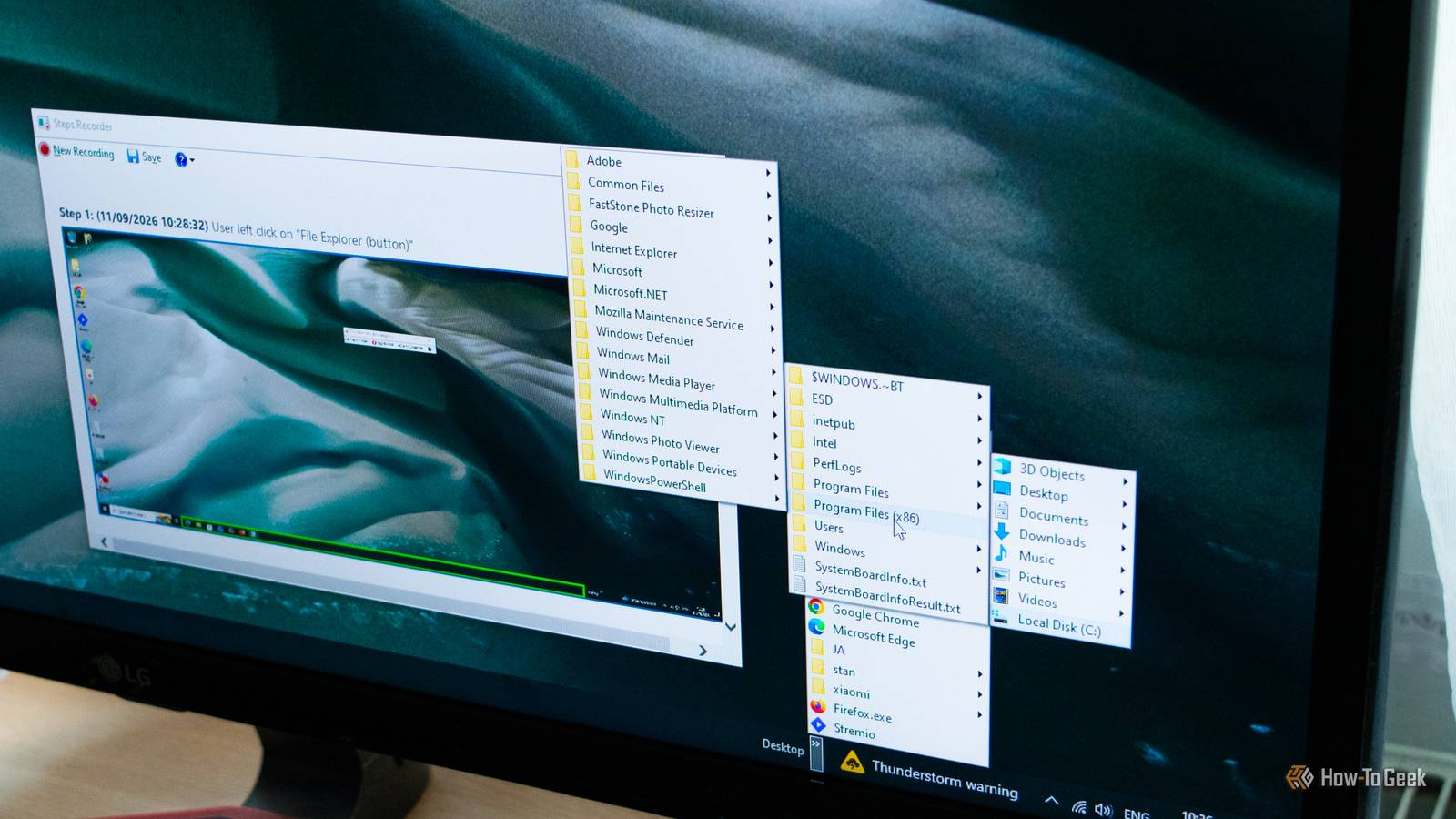
Published Sep 12, 2026, 1:00 PM EDT Ever since he got his first smartphone, the legendary Nokia 6600, back in 2005, Goran became obsessed with technology. This obsession had only gotten worse after he received his first gaming PC a couple of months later. He fell in love with video games in the early '90s, shortly after embarking on his gaming journey with the Sega Master System II and SNES. Since then, he has built dozens of PCs, played thousands of games, and authored hundreds of articles about PC hardware, gaming hardware, and video games. He knows everything there is to know about the PC gaming and PC hardware space, and while his console gaming knowledge isn't as comprehensive, he considers himself a console veteran. Goran has almost a decade of experience writing about tech and video games for numerous web publications including TechSpot, TechPowerUp, and EsportsHeadlines. He has been writing for How-To Geek since December 2022. When he isn't gaming or deciding which component of his PC to upgrade next, you can find him strolling around Novi Sad while listening to music and contemplating what to play next. Microsoft included a number of really helpful features and tools in past versions of Windows that many users came to love. While some of these utilities have survived the transition to Windows 11, others were left by the wayside. Some even made it to Windows 11, only to be retired in one of its subsequent updates. Here are some of my favorite classic Windows tools that are missing from Windows 11, with the latest version of Windows still lacking equivalent features. Windows Easy Transfer You could transfer your files and settings to a new Windows PC with a simple USB flash drive Windows Easy Transfer was nothing short of magic back in the day. One simple app let you transfer all your files, Windows settings, accounts, music and videos, and more from your old PC to a new one. The second PC didn't even need to run the same version of Windows; you could, for instance, transfer your files and settings from a Vista PC to one running Windows 7, and it all worked without a hitch. I also liked that I didn't necessarily have to move stuff directly to another PC. I could back up my data to a flash drive, install a new version of Windows, then plug the drive back into it and transfer everything in one sweeping move. It was awesome. Windows Easy Transfer didn't only work with flash drives; you could also use external HDDs, CDs and DVDs, transfer files and settings over a local network, or use a specialized Easy Transfer Cable, which no one I knew at the time had, although it definitely did exist as an option. Microsoft decided not to include the tool in Windows 10, and more than a decade later, we still don't have a modern Easy Transfer equivalent on Windows 11. Sure, Windows 11 lets you back up files and settings and restore them when you set up a new PC or reinstall Windows. But in this case, your files are backed up to OneDrive, while your settings and other backup information are stored with your Microsoft account. In other words, there isn't a built-in Windows 11 tool you can use to create an Easy Transfer-style offline backup, offload it to an external drive, and transfer it to another PC. Granted, there's the User State Migration Tool (USMT), but it's a command-line tool designed for administrators running large-scale Windows deployments, not something most people use to move their stuff to a new PC. Windows Media Center was the star of the HTPC era The era of HTPCs (Home Theater PCs) was really exciting, especially after Microsoft introduced the legendary Windows Media Center. It was an all-in-one solution that let you turn a Windows PC into a remote-control-friendly box for watching movies and TV shows, listening to music, watching regular TV programs (if you had a TV tuner card installed), and even recording your favorite shows to watch later. Windows Media Center was one of the first Windows apps that made PCs feel like proper living-room devices you could place under the TV and use with a remote. Alas, that time is long gone. Windows Media Center didn't find its way to Windows 10, and you can't have it on Windows 11 either. Truth be told, we've got a plethora of other ways to do the same things on modern PCs, and most people don't even hook their PCs up to TVs for media consumption anymore, instead using Android streaming boxes or Apple TV. In the end, streaming won, but I still have a special place in my heart for the 2000s HTPC era when Windows Media Center ruled supreme. Browse your entire PC right from the taskbar! Taskbar toolbars were a Windows feature that allowed you to pin any folder to the taskbar and then freely explore its contents without opening File Explorer or leaving the Windows desktop. Better still, you could even create a Desktop toolbar and not only have quick access to every icon on your desktop, which was super handy for people rocking "1001-icon desktops," but also browse a bunch of user folders or even launch Control Panel modules right from the toolbar. You probably know what happened to Taskbar Toolbars in Windows 11; the feature didn't make the cut, and there's a slim chance Microsoft will bring it back. That's a shame because it was a genuinely useful feature that retained some of the magic of the classic Windows XP-style Start menu on Windows 10. Steps Recorder The ultimate Windows troubleshooting tool Steps Recorder, also known as Problem Steps Recorder, was arguably the best Windows troubleshooting tool. It let you record your screen while capturing every step of a process or action, making it easy to show or reproduce an issue. Windows would automatically create screenshots of every action, while you could also add comments to explain what was happening in more detail. You could then save the recording and share it with a support agent or a tech-savvy friend (myself, in the case of many of my friends), who could help you troubleshoot the issue while having a clear idea of what happened. Conversely, you could record your screen while performing an action and then send it to a friend, who could watch the recording and learn how to do it themselves instead of you having to explain it over the phone or through messages, which was a godsend at times. Steps Recorder did survive the transition to Windows 11, at least for a while. For some reason, Microsoft deprecated this handy tool a few years ago, and it has since disappeared from my Windows 11 PC, and probably many other Windows 11 machines as well. While the company offers a few alternatives, such as Snipping Tool and Clipchamp, none of the built-in Windows tools offer the same usability as Steps Recorder. Bummer. It's a crying shame Microsoft retired these tools While I understand why Microsoft decided to move on from Windows Media Center and Windows Easy Transfer — why offer an offline way to back up and restore files and settings when you can nudge people toward OneDrive and get them to create a Microsoft account — I really don't get why Windows 11 doesn't have Taskbar toolbars or why we've been robbed of Problem Steps Recorder. Both were very handy Windows tools that didn't deserve the axe.
4 classic Windows tools that did things Windows 11 still can't
Full Article
Original Source
Read the full article at Howtogeek →KhanList aggregates and links to publicly available news content. We do not host full articles from third-party sources. Always verify important information with original sources.