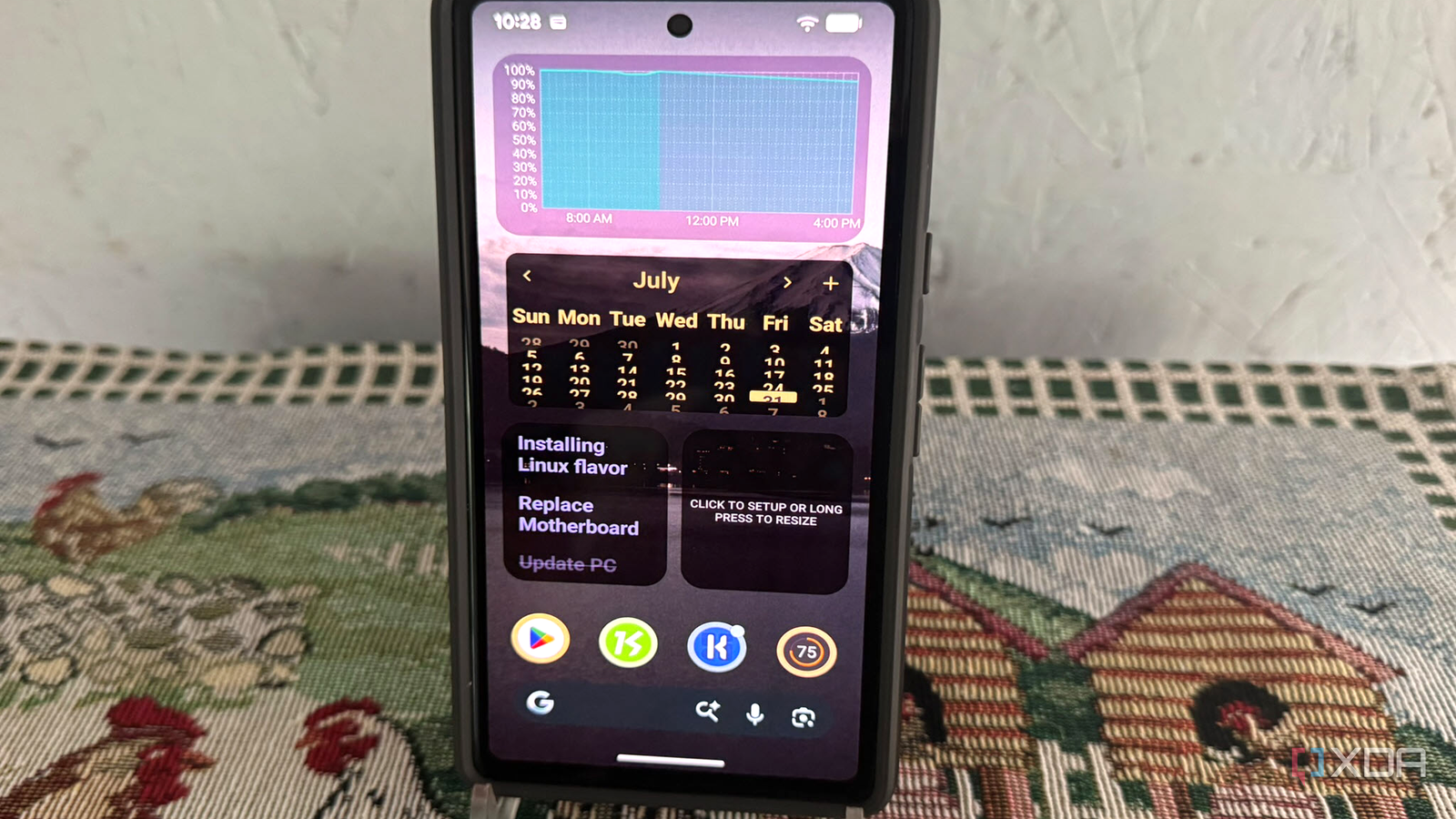
Published Aug 6, 2026, 7:30 AM EDT Based in rural Minnesota, Brian Burgess worked in IT for 10 years before finding his passion for writing about consumer technology. Brian earned his degree in computer and network technology in 2000. He held various IT positions, including help desk support, router installations for IBM, database administration, and other associate network administration roles. He's been a personal technology journalist for 18 years and has written thousands of articles about Microsoft products and services, Android, iOS, streaming, and more. He has written for notable tech sites including XDA, InformationWeek, How-To Geek, Byte, groovyPost, and others. When he is away from the keyboard, you will hear him playing guitar, working outdoors, and watching Star Trek. When you buy a new Pixel phone, you are likely — or even pushed — to install and/or use preinstalled Google apps and widgets. However, there are several widgets that I use nearly every day that are not created by Google. In many cases, they work better than the typical Google ones you are expected to use. There are plenty of good widget options for Android that aren't as tightly locked into the Google ecosystem as other Google-made options. Here are four alternative app widgets that I use daily on my Pixel phone. Starting with KWGT Kustom Widget The best place to start if you want to create a control panel of custom widgets that aren't from Google is KWGT Kustom Widget Maker. The visual editor is packed with options to customize my widgets, rather than building everything from scratch. It supports customization and lets me build widgets with touch actions, progress bars, and other dynamic options for a customized panel. I like it because it is designed for custom widgets, making my phone feel less like a "default Google" product and more like my own creation. It goes beyond the stock widgets, and I can choose from a vast array of customization packs and create widgets from scratch with different shapes, colors, and touch actions. The only issue I have is that it doesn't resize widgets like other third-party Android launchers, such as Nova Launcher or Lawnchair. Still, it isn't a deal-breaker, and the few bucks to buy the pro version are worth it to me. Also, I can pair launchers to compensate for a unique experience on my phone. Private alternative to Google Notes I use Fossify Notes instead One of the cool things I like about Fossify widgets is that they are free and open-source, and don't try to upsell me on additional features. The other advantage is privacy. For instance, Fossify doesn't even request internet permission on my Pixel, and being ad-free means it doesn't request unnecessary permissions. It's refreshing since Google Keep is cloud-based and tied to my Google account. Creating notes is simple; they stay local, and I always have the widget at my fingertips when I need to type a new note or checklist. Customizing the look and feel of the widget is also straightforward. Of course, the downside is that the notes don't sync with other devices, which can be a pro or con. If I need sync and additional functionality for my notes, I can always use Keep or Standard Notes for encryption. More info than Google's battery widget Google's default battery widget only displays my Pixel's battery percentage, which is fine when I need to see it at a glance. However, there are many times when I want to go deeper and learn more about the battery's power consumption. I can use Battery Widget Reborn to see how long the remaining charge will last, get better visual customizations, access Bluetooth and Wi-Fi toggle buttons, view the battery temperature, and much more. Battery Widget Reborn offers a trove of battery data compared to the stock battery widget. Plus, I can take that data and make it more visually appealing than other battery monitoring apps. I especially like that I can see how long the current charge on my battery will last for the rest of the day. It deduces that by looking at the history of my resource and app usage. Fossify Calendar For private appointments I mentioned the benefit of privacy with Fossify Notes earlier, and the same applies to the Fossify Calendar widget. Google Calendar is deeply integrated with your phone and can sync between devices. Sync is a benefit, but it also raises privacy concerns — especially for personal appointments I don't want people to know about. It is also lightweight, open-source, and less cluttered than Google Calendar. Fossify's widget also offers more theme options and greater customization. I like how I can easily adjust the size and theme with a couple of taps, so it displays what I need on the home screen. While I might use Google or another Calendar app for general appointments or meetings so they're synced where I need them, for personal and private events, I stick with the Fossify Calendar widget where they live locally on my phone. Using better widgets on your Google Pixel phone Many people just stick with the default Google widgets to help manage their phones. However, the whole point of Android is that you can customize it to get everything you want from it and more. The stock apps are tied to your Google account, are less private, and leave little room for customization. With alternative widgets, you can build your own beautiful-looking system that provides more information that's available at your fingertips. What are some of your favorite widgets for Pixel that aren't built by Google?
4 Android widgets I use every day on my Pixel that aren't from Google
Full Article
Original Source
Read the full article at Xda-developers →KhanList aggregates and links to publicly available news content. We do not host full articles from third-party sources. Always verify important information with original sources.