
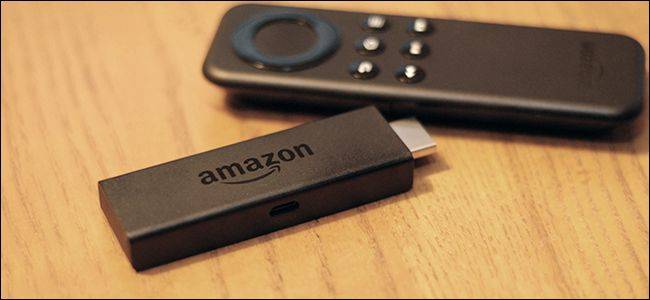
Published Aug 22, 2026, 8:30 AM EDT After graduating from Marist University with a degree in communications and journalism, Dan Girolamo has over 10 years of experience writing about entertainment and sports. Dan's work can be seen in various publications, including Digital Trends, SportsCasting, and Tom's Guide. Throughout his career, Dan has interviewed several high-profile filmmakers and creatives, including Brendan Fraser, Jamie Lee Curtis, Caitriona Balfe, Frank Grillo, Miranda Cosgrove, Jai Courtney, Chris Columbus and James Cameron. Dan joins How-To Geek as a Senior Editor. When he's not writing about entertainment, Dan is either watching a movie or praying for the New York Knicks to win a championship. Unfortunately, the end of August means the end of summer is near. It's the last chance to get that last-minute trip in before the school year starts, and the weather starts to cool down. As one of those people taking a trip, I've started to realize that the most important tool in my suitcase is an Amazon Fire TV Stick. I understand the urge to leave it at home. You might think to yourself, "I'm going away to get some rest and relaxation. I'm not going to watch much television. Why would I bring my Fire TV Stick?" It turns out that having a device like a Fire TV Stick for streaming your favorite shows is a need, not a want. Not convinced yet? Here are several reasons why you should pack your Fire Stick on your next trip. TVs at hotels and Airbnbs are unreliable Unfamiliar setup leads to unnecessary scrolling When I get to my hotel or Airbnb, one of the first things I do when I arrive is turn on the TV. I'm used to having the TV in my apartment for nearly the entire day. I'll even use it for white noise while I'm writing or online shopping. As for what I watch? If it's at night, I typically have a sporting event on. During the day, I love the Food Network and debate shows. I don't know if it's just me, but these hotel and Airbnb TVs are frustrating. I'm unfamiliar with the lineup, so I'm constantly looking for the guide to find the right channels. These TVs usually have basic cable most of the time. If you're lucky, you might get HBO, but that's a rarity. It's like playing cards without a full deck. What's the point? This is where a Fire TV Stick comes in handy, so you can access your streaming services. Most hotel rooms will have televisions with HDMI ports, although some older TVs may not. Simply find the open HDMI port and plug it in. If it's a tight squeeze, you might need to bring an HDMI extender cable. It's a good investment, even if you never have to use it in a hotel. Quiz8 Questions · Test Your KnowledgeAmazon Fire TV StickTrivia challengeThink you know your streaming stick inside and out? Put your Fire TV knowledge to the test.SetupFeaturesHardwareAppsHistoryBeginIn what year did Amazon first release the original Fire TV Stick?A2012B2013C2014D2015Correct! Amazon launched the first Fire TV Stick in November 2014, offering a more affordable alternative to the full-sized Fire TV box. It plugged directly into an HDMI port and quickly became one of Amazon's best-selling devices.Not quite. The original Fire TV Stick was released in November 2014. It came out about seven months after the original Fire TV box and was positioned as a budget-friendly streaming option for cord-cutters.ContinueHow does the Amazon Fire TV Stick connect to your television?AUSB-A portBDisplayPortCComposite AV portDHDMI portCorrect! The Fire TV Stick plugs directly into an HDMI port on your TV. This is what gives it its distinctive stick shape, and it draws power via a separate Micro-USB or USB-C cable depending on the model.Not quite. The Fire TV Stick connects via HDMI, which is why it has that signature dongle shape. It also requires a power cable — either Micro-USB or USB-C — to function, as HDMI alone doesn't supply enough power.ContinueWhich voice assistant is built into the Amazon Fire TV Stick remote?AGoogle AssistantBSiriCAlexaDCortanaCorrect! Amazon's own voice assistant, Alexa, is integrated into the Fire TV Stick remote. You can use it to search for content, control playback, check the weather, and even control smart home devices.Not quite. The Fire TV Stick uses Alexa, Amazon's proprietary voice assistant. Pressing and holding the microphone button on the remote lets you speak commands, making it easy to find shows or control compatible smart home gadgets.ContinueWhat type of network connection does the standard Fire TV Stick use to stream content?AEthernet (wired)BBluetooth onlyCWi-FiDCellular LTECorrect! The standard Fire TV Stick relies on Wi-Fi to stream content. Unlike some competitors and the Fire TV Cube, the basic stick does not include a built-in Ethernet port, though adapters are available.Not quite. The standard Fire TV Stick uses Wi-Fi for its internet connection. If you need a wired Ethernet connection for a more stable signal, you would need a separate Ethernet adapter or consider upgrading to the Fire TV Cube.ContinueWhat is the maximum streaming resolution supported by the Fire TV Stick 4K Max?A1080p Full HDB2K (1440p)C4K Ultra HDD8K Ultra HDCorrect! The Fire TV Stick 4K Max supports streaming up to 4K Ultra HD resolution. It also supports HDR formats including Dolby Vision, HDR10+, and HLG, delivering excellent picture quality on compatible TVs.Not quite. The Fire TV Stick 4K Max tops out at 4K Ultra HD resolution. It also supports advanced HDR formats like Dolby Vision and HDR10+, making it one of the most capable streaming sticks in Amazon's lineup.ContinueWhich app store is used to download streaming apps on a Fire TV Stick?AGoogle Play StoreBApple App StoreCAmazon AppstoreDSamsung Galaxy StoreCorrect! Fire TV Stick uses the Amazon Appstore to download apps and games. Because it runs a forked version of Android, the Google Play Store is not available, though many popular streaming apps like Netflix and Disney+ are still offered.Not quite. The Fire TV Stick uses the Amazon Appstore, not the Google Play Store. While the device runs a modified version of Android, Amazon's ecosystem replaces Google's, so you browse and install apps through Amazon's own storefront.ContinueWhich of the following audio formats is supported by the Fire TV Stick 4K for enhanced surround sound?ADolby AtmosBDTS:X ProCTHX Spatial AudioDSony 360 Reality AudioCorrect! The Fire TV Stick 4K supports Dolby Atmos, which delivers immersive three-dimensional surround sound. You'll need a compatible soundbar or AV receiver to experience the full effect, but it's a significant audio upgrade over standard surround sound.Not quite. The Fire TV Stick 4K supports Dolby Atmos for immersive audio. While the other options are real audio technologies, Dolby Atmos is the surround sound format officially supported and promoted by Amazon on its 4K Fire TV devices.ContinueWhat feature introduced in the Fire TV Stick 4K Max (2nd generation) allows for faster app switching and smoother performance?ATurbo ModeBWi-Fi 6E supportCDual-core processingDCloud Boost technologyCorrect! The second-generation Fire TV Stick 4K Max introduced Wi-Fi 6E support, which provides faster wireless speeds and reduced interference compared to older Wi-Fi standards. This results in smoother streaming and quicker load times when your router also supports Wi-Fi 6E.Not quite. The headline new feature of the second-generation Fire TV Stick 4K Max was Wi-Fi 6E support. This next-generation wireless standard operates on the 6 GHz band, reducing congestion and enabling faster, more reliable streaming performance than previous models.See My ScoreChallenge CompleteYour Score/ 8Thanks for playing!Try Again You'll also want to bring the wall power adapter in case the TV doesn't have an available USB port. You might have to unplug some other things for your power adapter. It might even be a good idea to bring a Micro-USB cable with you. They're inexpensive—you can get one for less than $15. You can always bring an extra Micro-USB cable and a wall adapter if you forget the factory power cord or the TV doesn't have a USB port. With your Fire TV Stick plugged in, connect to the hotel Wi-Fi. If the login page doesn't automatically appear, you can try opening Silk Browser and typing an IP like 1.1.1.1or google.com into the search bar to take you to the hotel's Wi-Fi login page. Then, log in with your Wi-Fi credentials and start streaming. If that doesn't work, you could also disconnect your Fire Stick and connect to a mobile phone hotspot. Access travel resources besides shows and movies Streaming is only one of the benefits Credit: Jorge Aguilar / How-To Geek Having your Netflix, Prime Video, and HBO Max subscriptions with you on the road is a game-changer. It's also not the only reason to bring a Fire TV Stick. How many of you have tried to work out in a hotel gym and immediately turned around because it was too small or didn't have any weights? By hooking up a Fire TV Stick to the TV, you can use your fitness apps to get in a quick workout to start the day. Even if it's not a full workout, I know plenty of people who like to use fitness apps for some yoga or light stretching to combat the jet lag. The resources don't stop there. Use an app on your Fire TV Stick to check the weather for the day. Look through travel guide apps for inspiration on what to do while you're on vacation. As you can see, there's more to the Fire TV Stick than streaming. Compact and easy to pack Size is not an issue Credit: Andy Betts / How-To Geek Think about how much stuff you pack in a suitcase. I shouldn't be talking because I normally overpack. That being said, Fire TV Sticks won't be the reason your suitcase exceeds the weight limit. Fire TV Sticks weigh between one and two ounces. They're small and easy to transport. If you're worried about it moving around in your suitcase, I suggest putting your Fire Stick and your cables in a plastic or reusable bag. That way, everything stays in one place. Fire TV Stick 4K Operating System FireOS Resolution 4K A step up from the Fire Stick TV Lite is the Fire Stick TV 4K. It offers a Dolby Vision upgrade and TV controls on the Alexa remote. What's the risk of bringing a Fire TV Stick? Let's say you can't set up your Fire TV Stick. You either forget the right cord or the TV restricts access to HDMI inputs. It's not the end of the world. It's such a small device that you won't regret bringing it along. And if it works, even better. The pros outweigh the cons tenfold.
3 reasons why a Fire TV Stick is the most important gadget in your suitcase
Full Article
Original Source
Read the full article at Howtogeek →KhanList aggregates and links to publicly available news content. We do not host full articles from third-party sources. Always verify important information with original sources.