
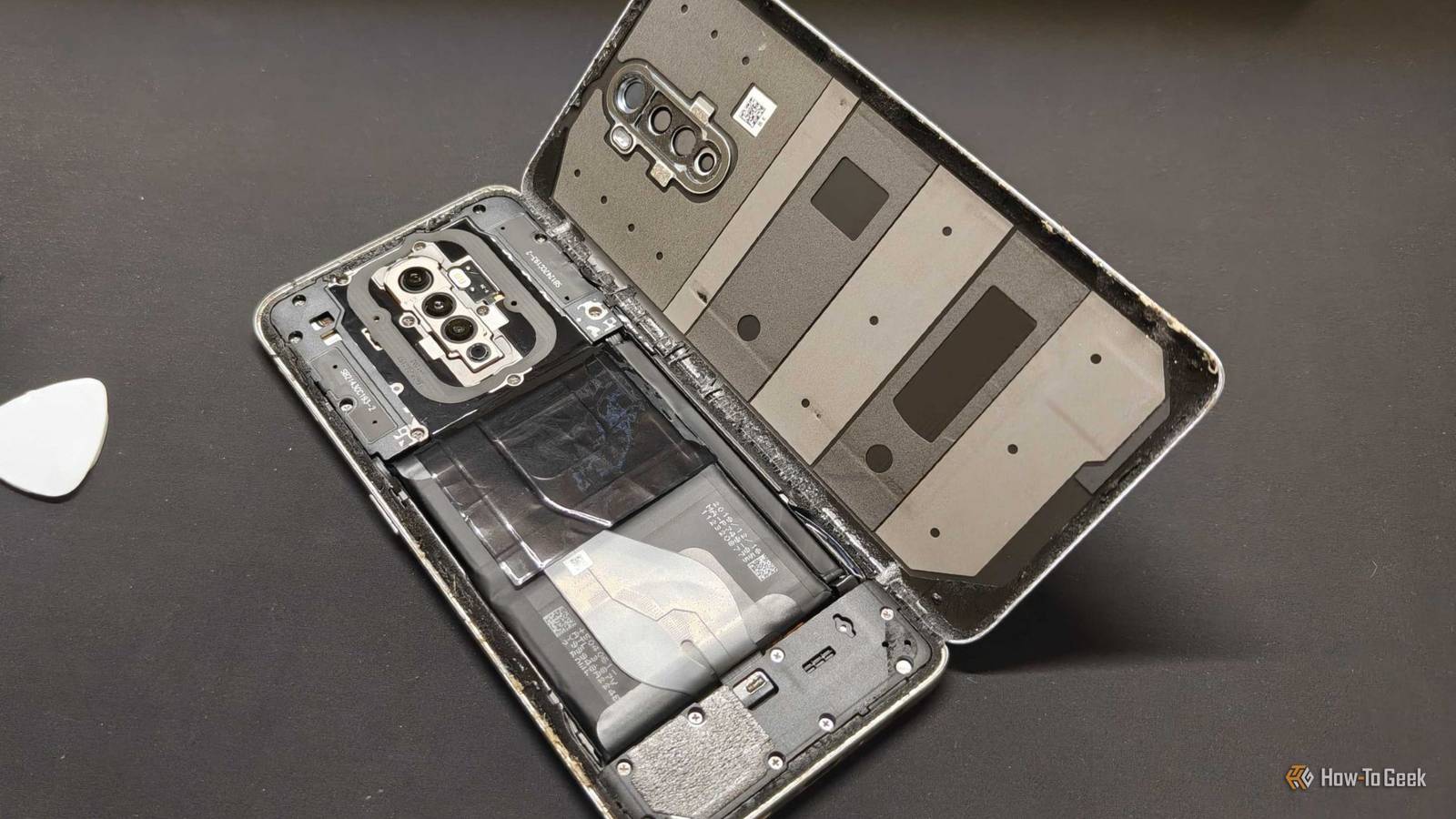
Published Sep 24, 2026, 9:00 AM EDT Aggy is a veteran writer and editor in the technology and gaming space. Having served as a Managing Editor for high-traffic digital publications, alongside being an editor and consultant for over a dozen sites. Aggy's published work spans a wide and respected array of tech and gaming outlets, including WePC, Screen Rant, How-To Geek, Android Police, PC Invasion, and Try Hard Guides. Beyond editorial work, Aggy's direct experience in the tech sphere extends to app development. Aggy has published two games under Tales and is always eager to learn and do more. He also likes working on computers and researching in his spare time. He knows about Windows, Linux, Audio, Video, and much more. Most people assume a slowing phone means it's time for an upgrade, but that's not true. The real answer is almost always that the battery behind your screen is wearing out. Once you see how much the battery matters, you'll stop blaming the rest of the phone. A new battery fixed my phone, and I swore up and down it was something else. Your battery is the real reason your phone feels slow An old battery can't feed your phone enough power When a phone starts feeling slow, most people blame the processor or the software, or they think the manufacturer is slowing it down on purpose. Usually, it's none of those, and your real problem is the battery. Lithium-ion batteries wear out with use, no matter how well you treat them. After a few hundred charge cycles, the chemistry inside breaks down in ways you can't undo. First, it can't hold as much charge, but the bigger problem with speed is that its internal resistance goes up. I once explained to my wife that it's like a pipe with something stuck inside. Water still flows, but not as fast or with as much force. It's also not something you can fix. The battery is just worn out. Phone chips also have to pull power at different rates depending on what you're doing. If you open a heavy app or play a game, you're asking the chip for a sudden power spike. A new battery handles that fine, but a worn one can't keep up. If the chip pulls power too fast, the voltage drops hard. Your phone is built to prevent overheating or shutdown when you push it too hard. It checks the battery's health in the background, and once the battery looks worn, it cuts back on how much it does at once. This is why your phone will still work but will start getting slower over time. I used to blame my Wi-Fi because my phone would slow down whenever Wi-Fi was on. It was actually worse on Wi-Fi than on 5G. That problem went away with a new battery. It wasn't the Wi-Fi. It was everything that kicked in with it, like updates, location services, and other background tasks that put a lot of pressure on an old battery. You can pay a shop or swap the battery yourself Doing the swap yourself takes patience with glue and cables Back in the early days of mobile phones, swapping a dead battery was so simple. You just popped the plastic back cover off with your fingernail and dropped in a new one. Now phones are glued shut for waterproofing, and swapping a battery is a real pain. Professional repair usually runs $40 to $100 depending on the shop and the phone. I'd never recommend going to an official store for this because then it's more expensive. Your cheapest professional option is a local third-party shop, usually $45 to $75, and you'll wait about 30 minutes to an hour. If you're comfortable getting your hands dirty, you can do this yourself. iFixit charges $46 for a battery replacement kit. It sounds really scary, but iFixit pretty much gives you everything you need, and if you have an older Android and feel confident, I'd say do it yourself. Apple products are the ones no beginner should try, since they feel built to keep amateurs from saving money. First, let your battery drop below 25% to cut down the fire or explosion risk if something goes wrong, then shut the phone down. Next, unscrew the screws on the outside and heat up the edges. Use the suction cup and picks to gently work through the glue and separate the display or back panel. Please be careful and go slow here since those ribbon cables are easy to nick. Once you're inside, unscrew the metal bracket protecting the battery connector. Use a plastic spudger to pry the connector straight up off the motherboard. That kills power to the board while you work, which is super important. Find the stretch release adhesive tabs along the battery's edges and pull them slowly at a low angle, almost flat. They'll stretch out and release if you're patient. If a tab snaps, don't panic. Put a few drops of strong isopropyl alcohol (90% or higher) under the battery to soften the bond. Wait a minute, then lift it out carefully with a plastic tool. Never puncture or bend the battery, because that's how you get a fire. Clean off any leftover adhesive, then put down the new strips. Test the new battery by plugging it in for a moment to check alignment before you finish things off. Finally, reassemble everything in reverse order. Then calibrate the new battery by charging it to full and draining it all the way down once. Bad replacement batteries are not worth the risk Stick with parts from places you can actually trust When you get a battery replaced, the replacement cell itself is the biggest thing to watch out for. There are a lot of off-brand, fake, and uncertified batteries out there that may skip quality checks. Everything you buy for a replacement should come from a source you trust, which is why I recommend iFixit so much. They don't cut corners on parts, and their phone and device reviews are usually spot on. If you want to be totally safe, buy the battery from Samsung Parts USA. A cheap battery can leave you worse off Keep in mind that not every repair shop uses good batteries, and a cheap one can leave you worse off than before. If you do it yourself, buying from a place like iFixit costs about the same as a local shop visit anyway, so there's no reason to cheap out on the battery. A battery swap is still one of the best deals out there, especially if your phone works fine otherwise and you'd rather not replace it.
Your phone's battery is still replaceable, and it's cheaper than you think
Full Article
Original Source
Read the full article at Howtogeek →KhanList aggregates and links to publicly available news content. We do not host full articles from third-party sources. Always verify important information with original sources.