
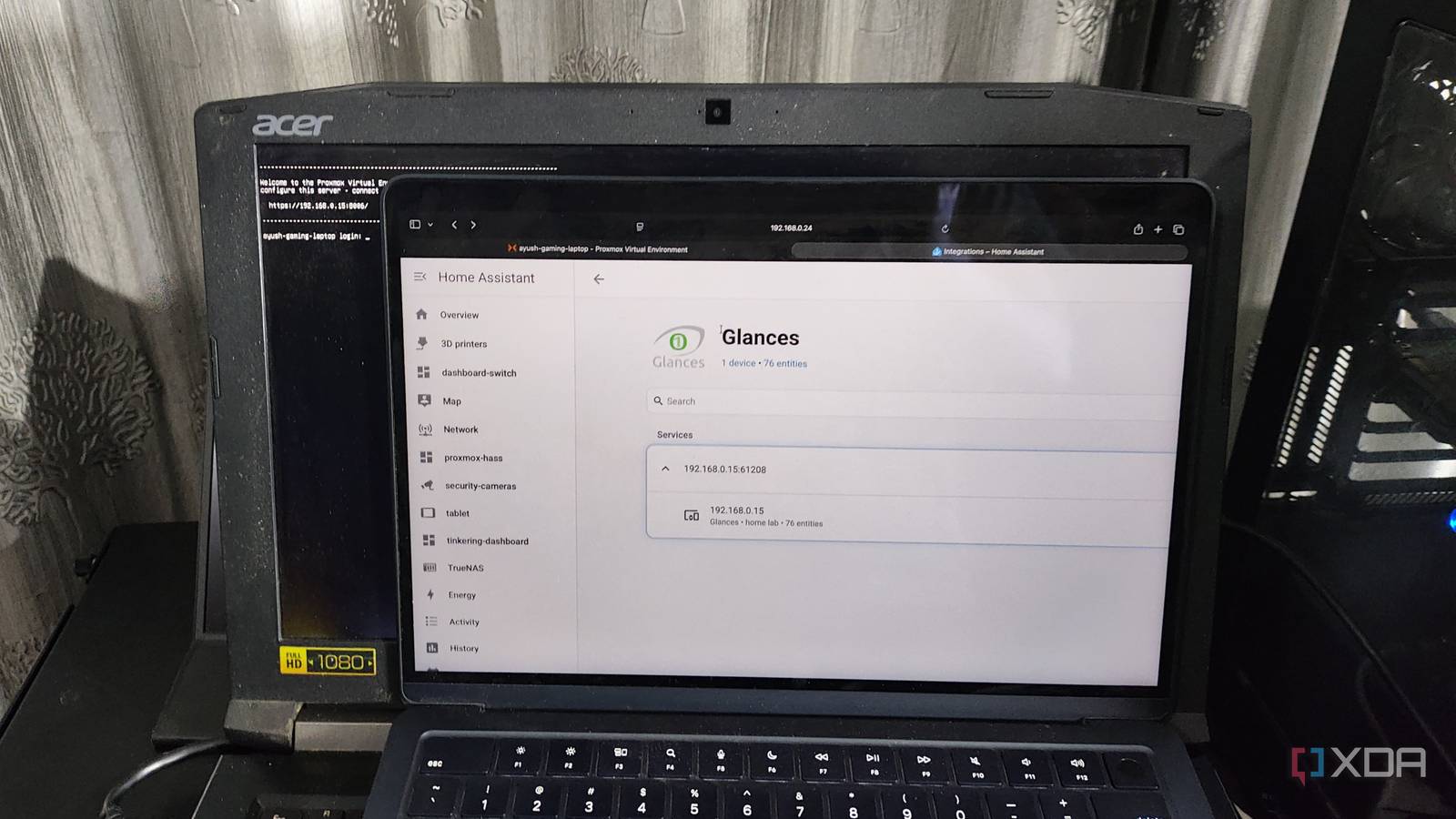
Published Nov 26, 2026, 8:00 PM EST Ayush Pande is a PC hardware and gaming writer. When he's not working on a new article, you can find him with his head stuck inside a PC or tinkering with a server operating system. Besides computing, his interests include spending hours in long RPGs, yelling at his friends in co-op games, and practicing guitar. With the RAM apocalypse in full swing, I’ve spent the last couple of months repurposing any and all hardware I could find into home servers for my tinkering experiments. Contrary to what many folks believe, you don’t need a top-tier processor or ungodly amounts of RAM to tinker with virtual machines and containers. As long as you’ve got an x86 system released in the last two decade, you can build a rock-solid self-hosting workstation without spending thousands of dollars. This statement also applies to laptops, and I say that as someone still using a budget Lenovo model from 2014 as a cluster node. If anything, laptops have a couple of advantages over traditional PCs for your tinkering experiments, provided you don’t fall into the same beginner traps when reusing your old daily driver as a container-hosting server. Yes, I speak from experience On the surface, a dinosaur laptop may not seem all that impressive for server tasks, especially when you compare it to a tower-sized PC. That said, if all you’re planning to do is run a few containerized tools, even the cheapest laptops on flea markets can pull their own weight. Heck, I’ve got a Lenovo G510 that can handle around ten FOSS tools, which is pretty darn impressive considering it’s powered by a mere 2-core processor and 4GB of RAM. Meanwhile, my Acer Predator Helios 300 has enough firepower to not only run a Windows 11 VM, but it can also drive AI models like Gemma 4 E4B at well over 30 tokens/second – at the same time, no less. In fact, this i7-7700HQ machine can still double as a reliable remote gaming server for indie titles in 2026, and as long as I don’t go too trigger-happy when over-provisioning the system resources, I can even use it as a testing ground for my distro-hopping experiments. Proxmox works really well with old laptops, as its lightweight web UI doesn’t consume too many resources all while letting me tinker with GPU passthrough, clustering, and other advanced features. But the laptops themselves have a couple of neat perks. Troubleshooting, for one, is a lot easier on my laptops, as I can use its built-in screen and keyboard to run different tests instead of scurrying around the house looking for displays and KB+M on my tower-sized PC servers. Even my outdated machines don’t consume too much energy when idle, which is far from their PC counterparts. Plus, the fact that I can get Wi-Fi and Bluetooth provisions baked into my DIY workstation is pretty handy for Home Assistant and other services that can make use of wireless connectivity options. Sadly, I can’t quite say the same about my laptop batteries … In the name of all that’s holy, its battery is not a UPS replacement It’s more of a potential fire hazard Many beginners treat the laptop battery as a stand-in for a dedicated UPS, which makes sense considering you could lose entire projects to a random outage. But one quick trip to the r/spicypillows subreddit is all it’d take to make you fear the built-in battery as much as I do. Most laptops use lithium-ion batteries, and leaving them plugged in at 100% capacity non-stop can put them under a lot of chemical stress. Combine that with a home server that you’d end up running 24/7, and your laptop’s battery can end up degrading at an accelerated rate. Over time, it might start to swell up, at which point it becomes a potential fire hazard. Personally, I prefer getting rid of the battery altogether, as I’d rather not deal with a ticking health hazard in my home lab nodes. But since many laptops don’t work without a battery shoved into their chassis, I use an automation pipeline to cap the maximum charging capacity on the battery. Specifically, I’ve installed a Glances server directly on the Proxmox node to keep tabs on the battery statistics. Home Assistant already has a Glances integration, which makes importing the battery metrics a cakewalk. Toss a smart plug between the wall socket and the laptop’s charger, and all it takes is two automations to get this pipeline working – one that turns the smart plug off at a specific battery level (say, 80%), and another that turns it back on once the battery percentage hits the red zone. I’d still recommend tossing the battery out of the laptop’s chassis whenever possible, but this wacky automation workflow can reduce the degradation rate to some extent. Running your laptop with its lid closed isn’t a good idea, either All that trapped heat can damage the chassis Another laptop server “trick” I’ve seen floating around online is that keeping the lid closed can keep the keyboard dust-free and make it easy to pile up other hardware for an efficient-looking desk. Unfortunately, these perks come at steep costs, namely increased heat buildup and potential damage to the display and keyboard. Plenty of laptops have air vents around the hinges and the top deck of the laptop, and you’ll find just as many that dissipate heat through the keyboard. Closing the lid can make these vents and openings inaccessible, thereby increasing the temps on your laptop. If you leave your laptop-turned-home server running 24/7, the extra heat would not only cause the laptop internals to start throttling, but could end up damaging the built-in screen and keyboard. Your laptop can be a reliable home server, as long as you do things the right way I’ve been using my dinosaur gaming and budget laptops as server nodes for well over a year now, and they’ve held up just fine during this time. Sure, they may not be as powerful as my repurposed Xeon workstation or an old 2K gaming PC. But thanks to Proxmox and a little bit of tinkering, they’re chugging along nicely as LXC-hosting rigs. Proxmox Proxmox is an open-source platform built on Debian Linux designed for server virtualization.
Your old laptop is a great home server, but most people get these two things wrong
Full Article
Original Source
Read the full article at Xda-developers →KhanList aggregates and links to publicly available news content. We do not host full articles from third-party sources. Always verify important information with original sources.