
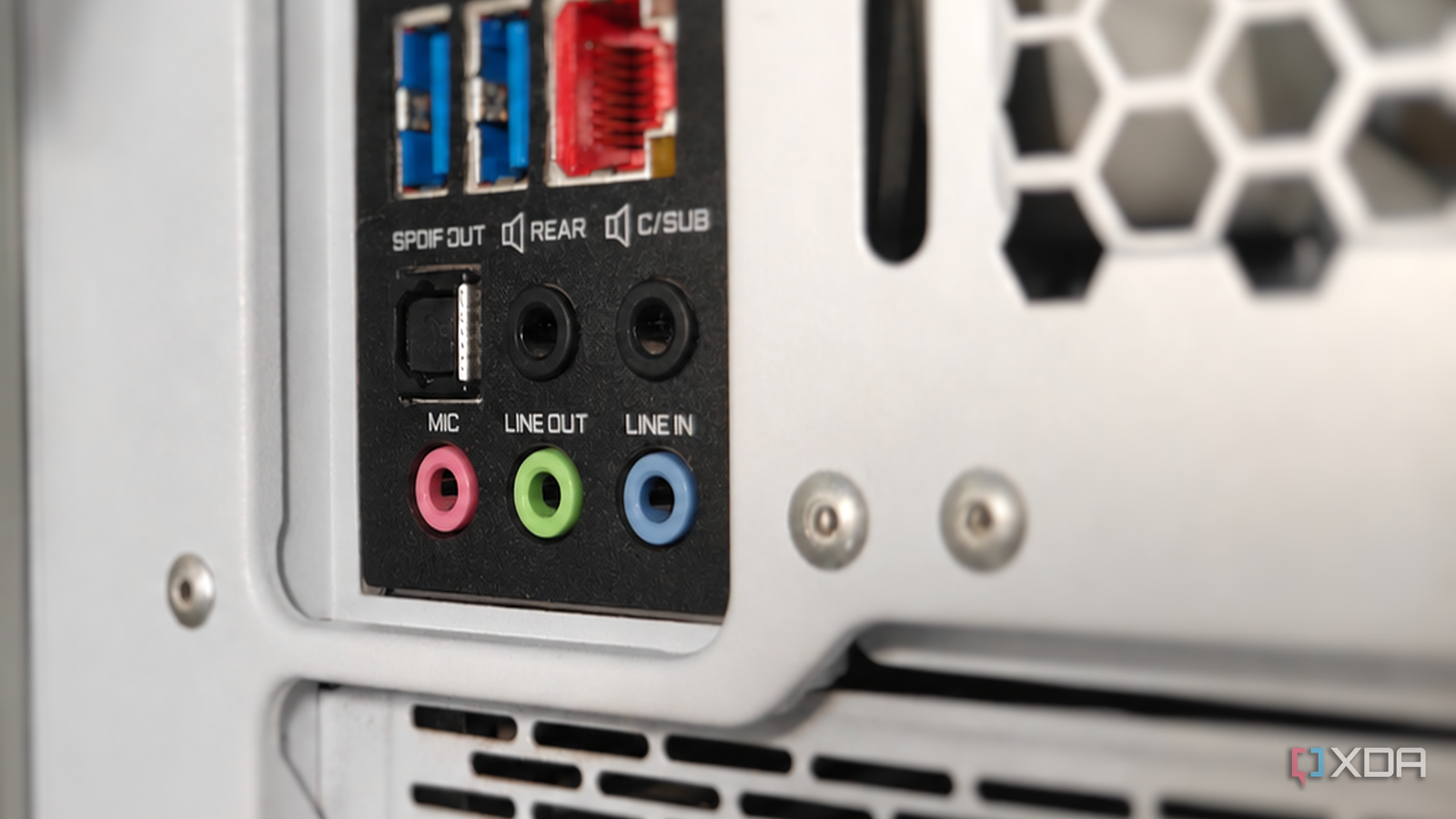
Published Oct 20, 2026, 7:00 AM EDT After a 7-year corporate stint, Tanveer found his love for writing and tech too much to resist. An MBA in Marketing and the owner of a PC building business, he writes on PC hardware, technology, and Windows. When not scouring the web for ideas, he can be found building PCs, watching anime, or playing Smash Karts on his RTX 3080 (sigh). Wireless headphones and soundbars have come a long way, but audiophiles still swear by wired speakers. You're probably familiar with your motherboard's pink, green, and blue (possibly others) audio jacks even if you've never plugged in a wired speaker. These jacks have been color-coded the same way on most motherboards for almost three decades, all because of a design guide dating back to 1999. It was meant to simplify motherboard I/O and make it easier for consumers to know which cable to plug where. The colors determined for the audio jacks didn't mean anything special; they weren't even designed by an audio company. They were part of the PC 99 System Design Guide first published by Microsoft and Intel in mid-1998, and most motherboards never changed it. We're following a decades-old suggestion by Microsoft and Intel Standardization was sorely needed Before the first ever PC System Design Guide came out, we had the Hardware Design Guide for Microsoft Windows 95, focusing on Windows 95 and IBM PC compatible systems. After Microsoft Press published it in 1994, it formally partnered with Intel to launch the PC 97 System Design Guide, categorizing PCs into Basic, Workstation, and Entertainment. It also standardized the features and standards system manufacturers had to implement to earn the "Designed for Windows" logo. Technologies like ACPI, which allowed Windows to control features like the "Instant On" sleep mode, USB support, and AC '97 codec, were some of the standardizations introduced by PC 97. The purple and green color codes for PS/2 keyboards and mice were also part of this guide. PC 98 added the Mobile PC category and emphasized moving from the legacy ISA bus to USB. Then, PC 99 was finalized in 1998, introducing the Pantone colors for motherboard audio jacks, among other recommendations. Before that, the ports behind motherboards were a mess, so standardized color codes were needed to make things easier for consumers and manufacturers. Ever since manufacturers started implementing PC 99 in 1999 and 2000, the pink jack has meant mic in, light green has meant line out, and light blue has meant line in. There were other codes, too, such as black for rear/surround, orange for center/subwoofer, and silver/grey for side surround speakers, which can still be found on many motherboards. In the 2020s, manufacturers began replacing multiple audio jacks with line-out and mic jacks alongside an optical S/PDIF port. The colors are there for your convenience, not a rigid hardware rule The jacks are way more similar than you think If you've used desktop PCs long enough, you've probably diligently plugged your wired speakers, headphones, and microphones into the "correct" audio jacks all this time. The interesting thing here is that you didn't have to. The line in, line out, and mic in jacks (and others) are identical connectors, and what each one does is decided by the motherboard hardware and audio driver. On your modern motherboard, you can plug a microphone into the green jack, your Realtek software can detect the change, and you can configure it to treat the green jack as "mic in." This is made possible by Intel's High Definition Audio (HD Audio) standard, which arrived in 2004 and enabled jack detection and retasking. Your motherboard's audio hardware can dynamically reassign a particular jack's function in software on motherboards that support it. It's not that the audio jacks manufactured before 2004 did not support retasking — motherboards of the time lacked the sensing and multiplexing hardware to do it. The upgrade was to the internal circuitry, not the jacks themselves, making universal retasking a thing. This is how modern motherboards with a few jacks can retask them as needed. They also double up as, say, line-in and speaker out, or mic-in and subwoofer out. The standard survived due to convention more than anything else Although manufacturers have adapted it over the years Like most standards, the audio jack color codes have survived this long simply because changing them will create needless confusion. When PC 99 introduced the Pantone-coded design guide for audio jacks, manufacturers adopted it pretty much instantly. It simplified connections for consumers, and they embraced it, too. The design guide became so popular that it's used not just on PCs, but on other equipment as well. Home theater receivers, audio mixers, gaming consoles, and car audio systems use many of the same colors for audio jacks seen on desktop motherboards. Some motherboard manufacturers don't use the colors at all, using black-colored jacks instead, with labels telling the consumer which one to use for what purpose. So, the guide remains a recommendation, not a mandate. The guidelines that shaped decades of motherboard design Motherboards for almost 30 years have been using the color code that Microsoft and Intel recommended in the late 90s. We've seen motherboard audio, sound cards, and external DACs go through multiple waves of innovation, but the audio jacks have remained mostly unchanged. It's a convention that is simple and easily implemented, explaining its longevity.
Your motherboard's audio jacks are still color-coded by a 1999 standard you've never heard about
Full Article
Original Source
Read the full article at Xda-developers →KhanList aggregates and links to publicly available news content. We do not host full articles from third-party sources. Always verify important information with original sources.