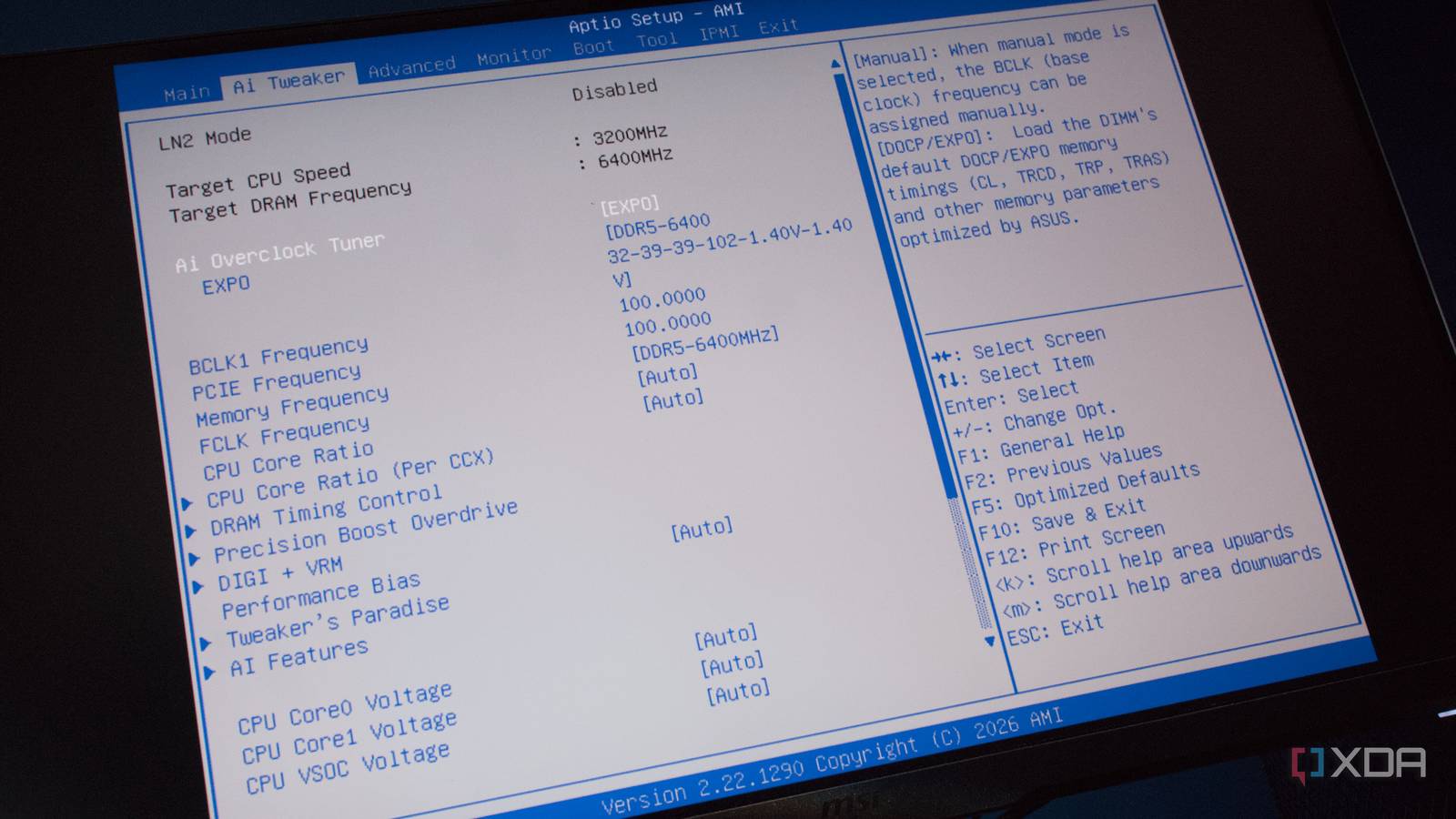
Published Jul 31, 2026, 7:00 AM EDT Richard is the PC Hardware Lead at XDA and has been covering the technology industry for almost two decades. He's been building PCs since young, and when not creating content, you can often find him inside a chassis somewhere. XMP and EXPO are two technologies from Intel and AMD, respectively, that allow system memory to operate at higher speeds than initially rated. It's quite the trap, as these features are not enabled by default. If you purchase a new RAM kit and wish to install it believing your PC would automatically start using the DDR5-6000 modules at 6,000 MT/s, you'll be shocked to see that the OS will only report the kit running at a lower JEDEC-rated speed, such as 4,000 MT/s. That's not a faulty RAM module or few. That's actually by design unless you change one BIOS/UEFI setting. This is still one of the easiest bottlenecks to miss For gaming and beyond Credit: Source: XDACredit: Running RAM at JEDEC-rated speeds isn't terrible. Your PC won't suddenly fall apart, nor will it really cause issues with running the most demanding games and software. But what you are doing is purposely handicapping your entire PC with slower memory. It's quite the surprise for those who are maybe upgrading a PC for the first time with what they believe to be faster RAM. On booting the OS with a successful cycle, one would see maybe a slight improvement, but it would likely be considerably below expectations. That's where XMP and EXPO come in. Extreme Memory Profile (XMP) and Extended Profiles for Overclocking (EXPO) are two features for allowing RAM to operate at advertised speeds instead of baseline on Intel and AMD platforms, respectively. Without these features enabled, that super-fast RAM kit will be running at the same speed as more affordable modules. It doesn't matter whether you have the fastest CPU and GPU known to man; if your RAM is not running at advertised speeds, you're leaving performance on the table. The issue with EXPO and XMP is that these are marketed by the respective brands as overclocking. It's why they're off by default. No two systems are the same. Even if you build the exact same system for yourself and someone else, they may react differently to overclocked memory profiles and settings, which is why it's generally seen as the safer route to have all this disabled by default and allow anyone to access available profiles with the single selection or click of a button. Installing RAM is just half the job. RAM modules will have specific information available for motherboards to boot reliably. This is what's first loaded before any overclocking profile is applied. Depending on the kit, faster profiles may be available, and it's these that can then be selected from within the BIOS/UEFI to unlock more tightly controlled and performative frequencies, timings, and voltages. Without XMP and EXPO, the motherboard will always choose the safer defaults over enthusiast profiles. And just because you've successfully doubled RAM capacity, it doesn't mean speeds have increased too. How using slow RAM can create bottlenecks It's not immediately apparent without a little digging Let's take gaming as an example. The CPU handles game logic, draw calls, physics, simulation, and all other work before the GPU can even generate a resulting image for the connected monitor. This process involves fetching and storing data in RAM. The processor is incredibly fast, and the connection between it and system memory is generally rapid too, but it can only operate as quickly as the RAM will allow. An incorrectly configured RAM setup will restrict how quickly the CPU can complete its workloads, resulting in slower frame times. This isn't apparent in every game, which is why it can easily fly under the radar. Terraria isn't going to be bothered that the RAM on the system is running at 6,000 MT/s instead of 7,600 MT/s. X4: Foundations and other heavy simulation games, on the other hand, can be negatively affected by such a configuration. Even gaming at 1080p with a powerful GPU can show issues relating to memory speeds. The same goes for applying XMP and EXP. You may not notice a difference without looking deeper at performance metrics. But not everyone needs EXPO or XMP. If your GPU is already maxed out in games, making your RAM run that little bit faster won't have a meaningful impact since it's the GPU that's causing the bottleneck. Activating these features won't suddenly transform your system into a more capable machine that can handle 4K gaming with all settings enabled without the right GPU and CPU combo, but it will help in those instances where it's the CPU that's the limiting factor in a game. Activating it takes less than a minute Just boot into BIOS/UEFI and you're done Most modern motherboards I've had access to recently have all had EXPO and XMP settings available on the dashboard. That really does make it a case of booting into the motherboard firmware, changing a single setting, saving the changes, and rebooting to see if all is well. If you're not familiar with EXPO and XMP, there's a good chance you have no idea what it does and likely even overlooked the setting within the firmware interface. But don't feel too bad about it, as it's actually good to run the system with default settings first. This not only ensures the rest of your system is good to go, but it can also help to provide a benchmark to compare against. Take some readings from some of your most-played games. Try to get a reading from various genres, if possible. Frame rates, 1% lows, timing, and more. This will help provide a way to see if activating these memory overclock profiles will make much of a difference—it more than likely will for some games and overall responsiveness of the system when running multiple apps. It's essentially free performance, so even if you don't notice much of an improvement in various applications and games that are used on the system, it will have an effect on the overall build. There's no tradeoff for activating XMP and EXPO either, so it's a no-brainer and takes no time to activate.
Your gaming rig's biggest bottleneck might be a BIOS setting you never touched
Full Article
Original Source
Read the full article at Xda-developers →KhanList aggregates and links to publicly available news content. We do not host full articles from third-party sources. Always verify important information with original sources.