
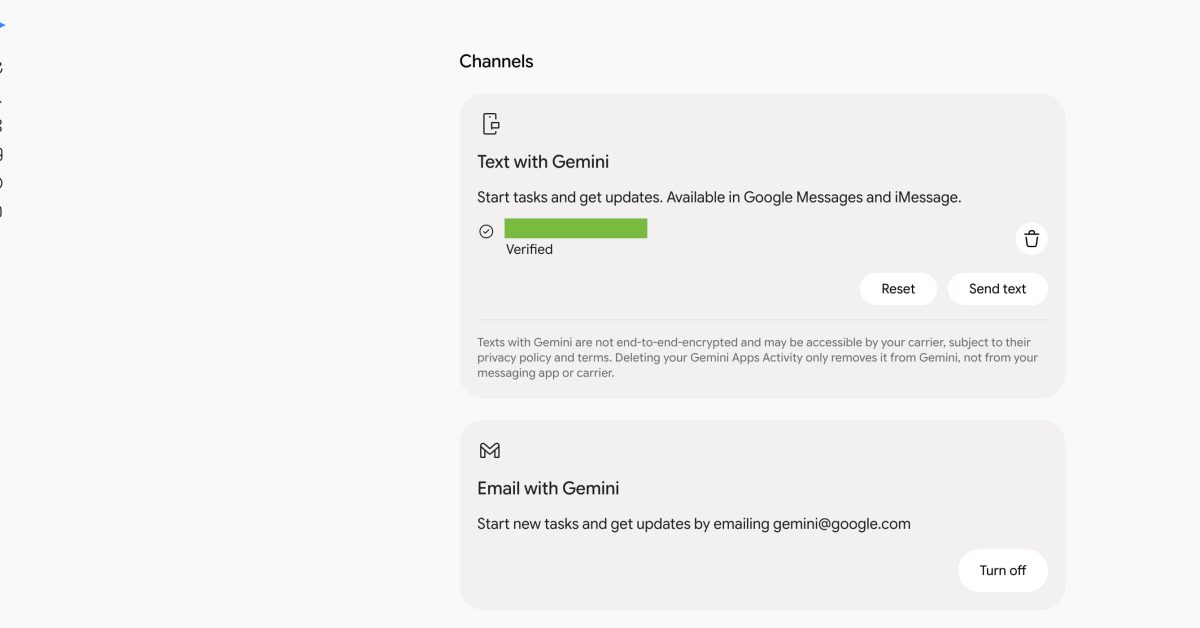
As previewed at I/O 2026, you can text — via Google Messages and iMessage — or email directly with Gemini. Instead of using the Gemini app, you can now reach the AI assistant to “start tasks and get updates” using your preferred method of communication. To get started, go to gemini.google.com/channels. Text with Gemini works via Google Messages and iMessage. Google does note that this method is “not end-to-end encrypted and may be accessible by your carrier.” The setup process involves verifying a phone number. Existing numbers associated with your Google Account appear automatically, and there’s the ability to add a new one. Afterward, you’ll receive a text from Gemini via RCS Business Messaging that offers a pretty straightforward chat experience. (Amusingly, Text with Gemini coexists with the existing Google Messages integration, which you can distinguish by the old blue/purple icon.) Email with Gemini lets you “start tasks and get updates by emailing” gemini@google.com. You can manage phone numbers and turn off both options from this new Channels page. If you’re more familiar with using your email client or phone’s messaging app, Text and Email with Gemini might boost your assistant usage. This is available first in the US. Meanwhile, when announced in May, these two options were intended for Gemini Spark, which has since been integrated into the main Gemini experience as “tasks.” FTC: We use income earning auto affiliate links. More.
You can now Email and Text (via Google Messages, iMessage) with Gemini
Full Article
Original Source
Read the full article at 9to5google →KhanList aggregates and links to publicly available news content. We do not host full articles from third-party sources. Always verify important information with original sources.