
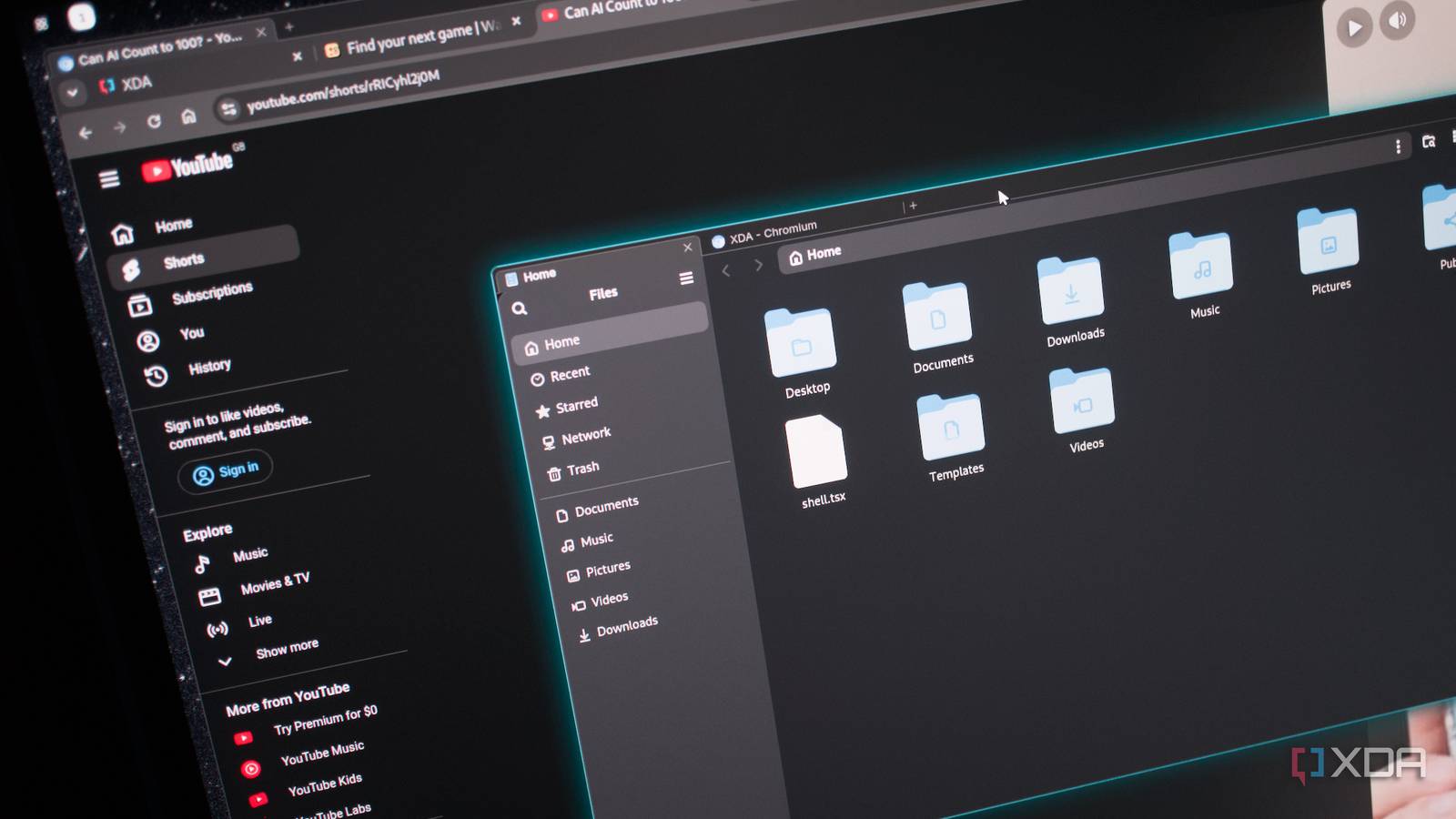
Published Nov 9, 2026, 7:00 PM EST Richard is the PC Hardware Lead at XDA and has been covering the technology industry for almost two decades. He's been building PCs since young, and when not creating content, you can often find him inside a chassis somewhere. Chromium is everywhere. I'm using it to edit and publish this very article. There's a good chance you're using a Chromium-powered browser to read it. Google exercises considerable control over web publishing technologies through this initiative, which may not sound like such a bad idea on paper, but it's also responsible for a high-revenue ad-publishing business. Ad-blockers beware! Still, Chromium is solid, and you can now design and put together your own Linux desktop using HTML and CSS. Why, I hear you ask? Well, why not? I decided to take Domicile for a spin. Making a Linux distro look like a website Well, not really, but you get the idea... Linux distributions (distros) come in all shapes and sizes. You've got the option of having a one-click installer that'll have you up and running in no time. There are also distros like Arch Linux that provide a blank canvas for you to configure your own Linux OS installation with various custom integrations. Want a tiling window manager? Give Hyprland a try. Fancy yourself a free and open-source OS that looks like Apple's macOS? That's also possible. Then there are setups that try something truly unique and different, such as Domicile. It's not really a Linux distro of sorts, but more an experimental Linux desktop where a modified Chromium is the Wayland compositor. If that sounds ridiculous, it's because it is. Native apps, websites, and the desktop's own interface are elements on one web page, laid out with CSS and composited together. It's like ChromeOS, where everything is centralized around web tech. Wayland windows as DOM elements. Chromium as the compositor. May God have mercy on our souls. If you're at all familiar with web technology, such as CSS and HTML, you'll feel right at home with Domicile. Once you've chosen your favorite flavor of Linux (I went with the tried and tested standard of Debian), installing and running Domicile is incredibly easy. Simply add the repository, install Domicile, and launch the shell. I logged out and back in with Domicile running alone instead of on top of Wayland. The latter is how it'll be when you're messing with initial files, but it's much better to run a dedicated session. Running Chromium within Chromium Look, Ma, no hands! I really like tile-based desktop environments (DEs) like Sway and River. They're great at getting more done simultaneously without having to drag around windows and figure out where that one Google Chrome tab is located. Domicile is a little like that off the bat with its default configuration. It reminds me very much of ChromeOS (with Google's newer Googlebook OS now taking a different direction) with its emphasis on the web and the present tabbed layout. What's interesting is Firefox outright refused to let the mouse interact with the browser. For whatever reason, Firefox wouldn't respond to mouse clicks in my installation. After a single command, I was now running Chromium on Domicile via Chromium. RAM is a little on the heavy side, as one would expect. 3GB as a baseline and about 3.5GB with a few smaller website tabs open within Chromium. But configuring everything is fairly painless. If you're used to working with CSS, it'll feel much more familiar than something like Hyprland. Npm is used to share packages too, everything from launchers to an entire desktop. It's pretty neat and something new to try when looking at how best next to switching things up on your Linux machine. While not perfect (and developed with the assistance of AI), Domicile is already shaping up to be quite the entry point for making something run a little like ChromeOS, but without all the limitations that come with it. If you own a compatible Google Chromebook (x86-64), this could be something worth considering to maintain that free experience without losing too much from a traditional desktop. Customizing Domicile with CSS is surprisingly easy Who needs a conventional desktop theme anyway? What makes Domicile particularly interesting is how much control you have over the desktop's appearance and behavior. Most Linux desktop environments allow you to customize the interface through themes, extensions, and configuration files. Domicile takes a different approach by treating the entire desktop as a web page. If you know your way around CSS, you can create some truly bizarre setups without having to learn how to write a traditional Wayland compositor. The default Manganese shell provides an excellent starting point, but you can build your own shell using React, HTML, and CSS. For example, CSS Flexbox and Grid can be used to arrange application windows, while properties such as border-radius, box-shadow, and filter can adjust how those windows appear. One setup could be as simple as having a side-by-side two-app layout or as complex as recreating Windows Phone on desktop, designing your own minimalist tiling desktop, or making Linux look like a futuristic control panel. It's not replacing KDE Plasma just yet I love KDE. It's customizable, looks smart as default, and doesn't tax the system too much. Domicile is experimental software, and my experiences with Firefox refusing to respond to mouse input demonstrate that there are still some rough edges to contend with. There's also the obvious question of resource consumption, given that we're essentially using Chromium to manage our entire desktop. Having said that, it's an interesting project that demonstrates just how flexible Linux can be. Do I believe you should give it a go in a virtualized environment or even toy with a Chromebook that could run it? Absolutely.
You can now build your own Linux desktop with HTML and CSS, and it looks better than KDE Plasma
Full Article
Original Source
Read the full article at Xda-developers →KhanList aggregates and links to publicly available news content. We do not host full articles from third-party sources. Always verify important information with original sources.