
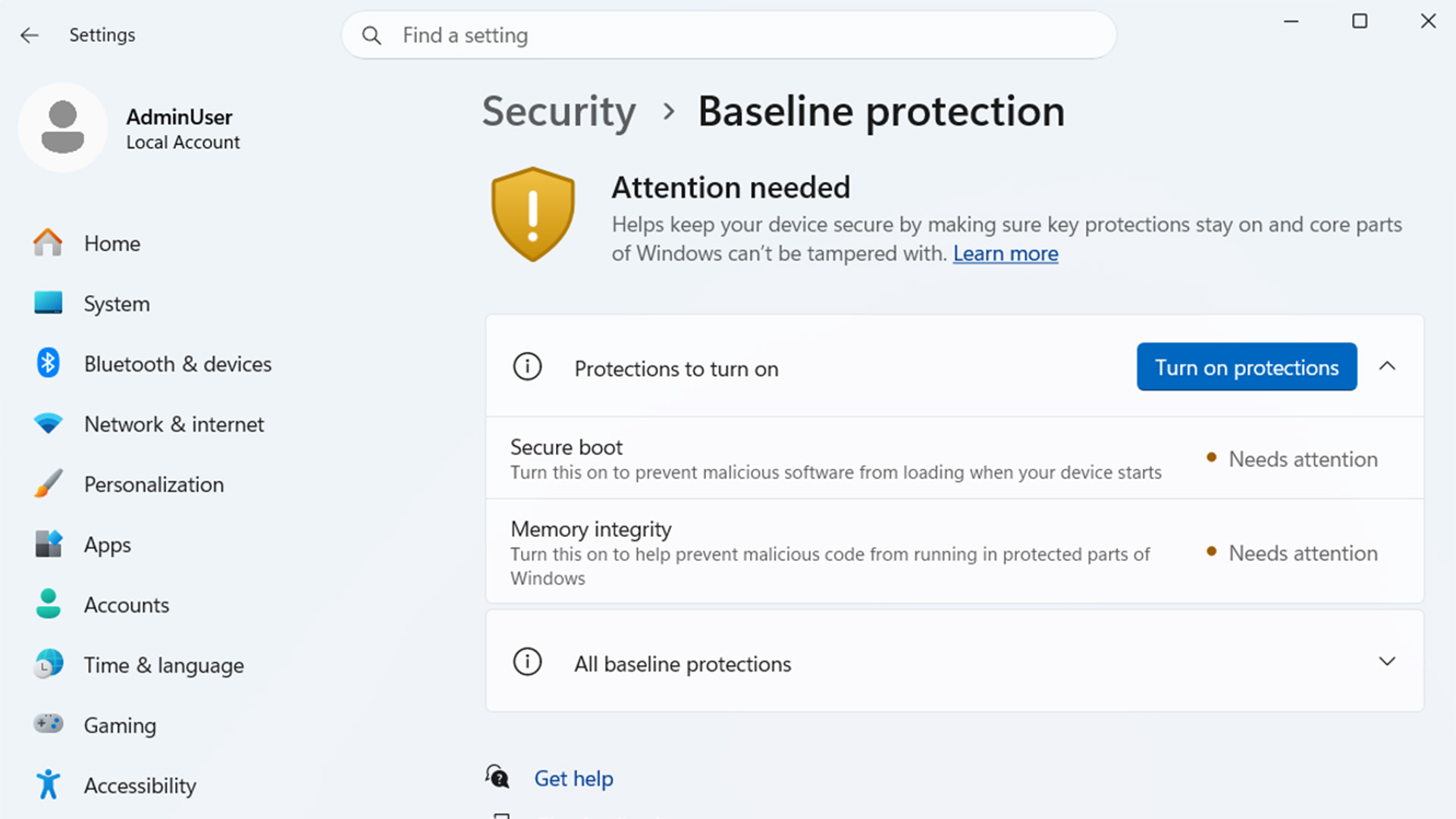
Microsoft’s collecting all of Windows 11’s hardware-related security features under one roof starting in 2027. Announced during its Ignite developer conference this week, in addition to seven new AI models, baseline protection is a way to make Windows more secure out of the box. The combination of core security safeguards into a single pass-or-fail device status is a boon, but it may also introduce problems, including for gamers, who tend to tweak aspects of the operating system environment, like UEFI BIOS settings. A Microsoft spokesperson told CNET in an email that baseline protection is still in the preview stage and that the company will “continue to iterate and build upon this based on the feedback the company hears from customers, partners and developers.” Currently, Windows’ eight key hardware security features are spread across the OS: the Trusted Platform Module security processor, Memory Integrity (which prevents unwanted alternation of data in memory), Kernel debugger protection (to guard the core code of the OS), Secure Boot (which ensures no tampering during system startup), driver security and a few others. To manage or check these settings, you have to visit multiple locations, and if app developers need to verify them at runtime, they have to perform similar gymnastics. The upcoming functionality will consolidate all those settings into a single control panel within Windows’ Security settings section, where you’ll be able to check their status and apply any necessary updates. Since it tracks all eight security features, developers will only need to confirm that baseline protection is met. The feature is currently available in Windows Insider builds and is expected to roll out to the general public in 2027. The good news Microsoft announced 11 partners for Baseline protection, including Adobe, Blizzard, Dropbox and 1Password.Microsoft Baseline protection provides instructions for enabling these features if they’re not readily available. For example, enabling Secure Boot requires restarting directly into your BIOS. To save you time, the panel provides step-by-step instructions right on the screen, so you don’t have to look up how to do it yourself. Application developers may have the biggest win here. The ability to poll just one security feature instead of eight individual ones streamlines the development process and allows developers to check security features quickly and easily. For instance, game anti-cheat software relies on multiple security measures to verify that no third-party code is running. Microsoft has 11 initial software partners, including heavy hitters like Adobe, 1Password, Blizzard and Epic Games, each of which is incorporating support to help it identify risk faster, including detecting counterfeit and malicious software. “A consistent security signal gives apps and organizations a shared foundation to build on,” said Michael Draper, vice president of Global Consumer Trust at Adobe, in a testimonial. The bad news Power users and gamers potentially stand to lose the most from this new feature. Many of them intentionally disable certain security settings to dual-boot Linux, run custom hardware drivers or improve gaming performance by disabling Virtualization-Based Security, which can lower frame rates and cause visual glitches. Also, since developers can perform a single pass-fail check for all the settings, users may be shoehorned into keeping all eight features enabled, even if the developer doesn’t need them all. Microsoft is leaving enforcement up to the developer, though. For example, an application may check baseline protection, see that it’s not fully satisfied, but allow a user to run it anyway with a warning screen or another pop-up or reminder. Alternatively, the software may refuse to run until the user enables full baseline protection. “Windows baseline protection gives the app information on each security requirement, and developers can choose to enable some or all requirements,” said a Microsoft spokesperson. “Microsoft still recommends developers embrace all requirements to meet the strongest security bar.” Adobe, Blizzard, 1Password and most of Microsoft’s other partners haven’t expressly said they’ll lock users out of apps without complaints, but a few have strongly hinted that this will be the case.
Windows’ Baseline Protection Can Simplify Security, but There Could Be Pitfalls
Full Article
Original Source
Read the full article at Cnet →KhanList aggregates and links to publicly available news content. We do not host full articles from third-party sources. Always verify important information with original sources.