
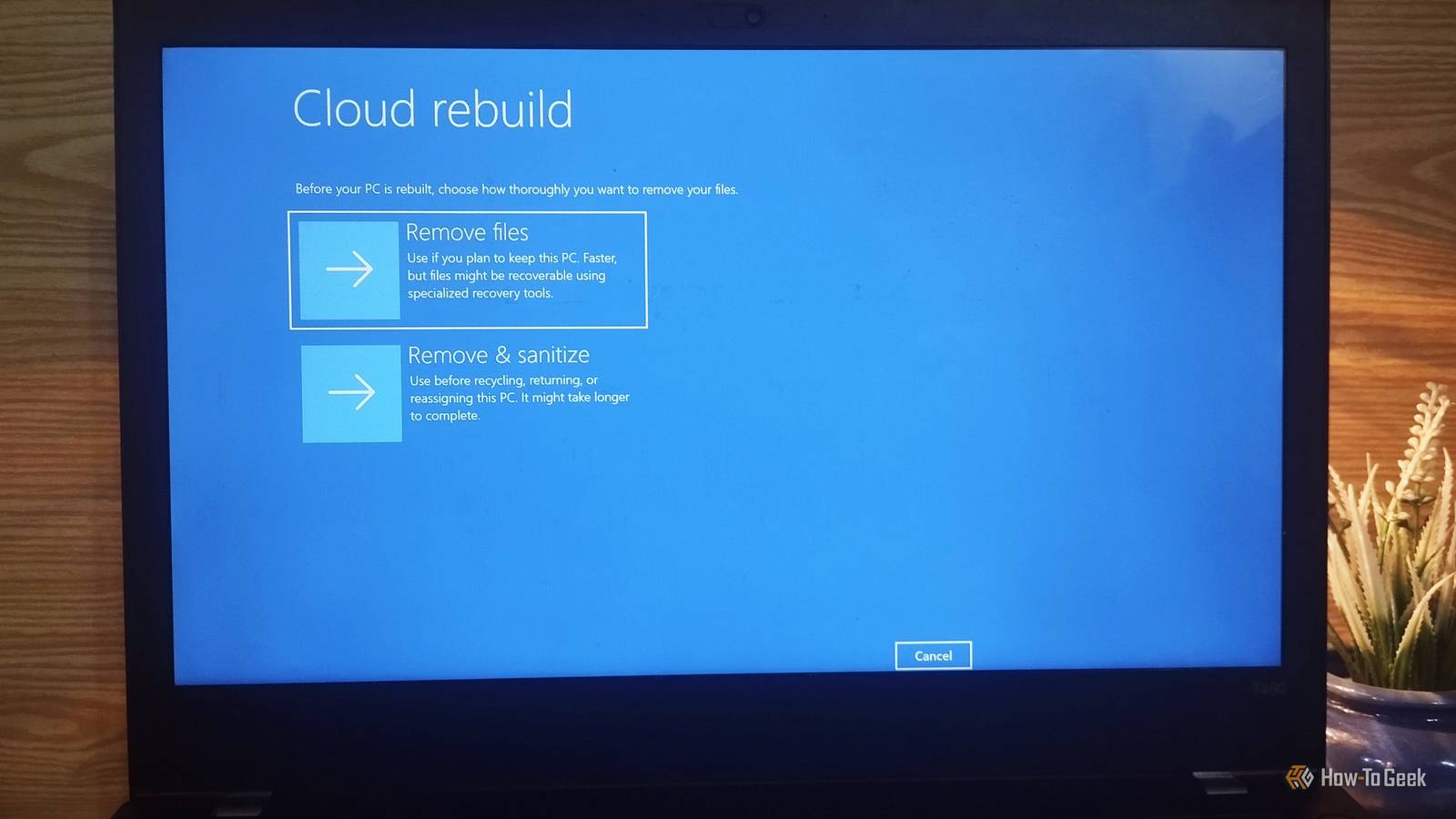
Published Nov 28, 2026, 4:00 PM EST Nimrah has spent the last five-plus years writing about technology, with Linux being one of her favorite subjects to explore. Her work covers everything from Linux and open-source software to databases, cybersecurity, and everyday software. She has contributed to Baeldung, Make Tech Easier, and LinuxHint. She particularly enjoys turning a concept that initially seems complicated into something anyone can understand. Away from tech, she loves to read, cook new recipes, and try new restaurants and cuisines. When Windows refuses to boot, reinstalling it can turn into a project of its own. You need another working computer, a Windows ISO, and a USB drive to create installation media. That's a lot of preparation when all you want is a working PC again. Microsoft recently introduced a Cloud Rebuild feature in Windows 11, offering a simpler alternative. It lets you download a fresh Windows installation and the drivers your hardware needs directly through Windows Update. Even better, it works from the recovery environment, so you don't need to get your existing Windows installation running first. For years, we've kept a rescue USB drive handy for the inevitable moment Windows decides not to cooperate. Cloud rebuild might finally give that USB drive a chance to store something else. However, the feature is rolling out gradually, so check whether it's available on your PC and give it a try. I'd still keep that recovery USB around for now, though. New Windows features don't always work as smoothly as Microsoft promises. Windows 11 can now reinstall itself without a USB drive Cloud rebuild downloads a fresh copy of Windows Cloud rebuild is designed for situations where your Windows installation is damaged, and other recovery options haven't helped. Rather than relying on the existing Windows files on your PC, it downloads a fresh Windows image and the necessary device drivers from Windows Update. Microsoft introduced the feature with its October 2026 non-security update for Windows 11 versions 25H2 and 26H2, KB5127936. Once your PC has the required update, Cloud rebuild can work even when Windows itself won't start. It runs through the Windows Recovery Environment (WinRE), which is separate from your regular Windows installation. This is particularly useful because you don't need to prepare installation media beforehand or borrow another computer to download Windows. Your PC handles the download and installation itself. You also get a fresh installation rather than trying to repair potentially corrupted system files. You can rebuild Windows from its recovery environment Just connect to the internet and let Windows do the work If Windows is still working, you can start the process by opening Settings > System > Recovery and selecting Rebuild this PC option. Your computer will restart into the Windows Recovery Environment, where Cloud Rebuild takes over. If Windows won't start, you can still access the feature through WinRE. After repeated failed startup attempts, Windows should enter its recovery environment automatically. From there, navigate to Troubleshoot > Recovery and uninstall > Cloud rebuild. You'll need an active internet connection, either through Wi-Fi or a wired Ethernet connection. Before the installation begins, Windows displays the target operating system's build, edition, and language for you to review. It also asks you to confirm what should happen to your existing data. Cloud Rebuild offers options to remove your files or remove and sanitize them. The latter is particularly useful if you're preparing a PC for someone else or getting rid of an old machine. However, don't treat either option as a routine repair setting. Cloud rebuild removes your personal files, applications, accounts, and settings, so back up anything important before proceeding. Once you confirm your choices, Windows downloads the installation files and required drivers, removes the existing installation, and installs Windows again. Your PC may restart several times during the process. Keep it connected to power and avoid shutting it down until the rebuild finishes. Afterward, you'll go through Windows setup as though you were using a new PC. That means signing in to your accounts, restoring your backed-up files, and reinstalling your applications. Cloud rebuild saves you from creating installation media, not from setting up your computer again. Don't rely on Cloud rebuild just yet An unreliable internet connection can leave you stuck The biggest catch is right there in the name: Cloud rebuild needs an internet connection. A bootable USB contains the installation files locally, but Microsoft's recovery tool must download them before it can reinstall Windows. I tried Cloud rebuild several times, but it repeatedly struggled to connect to my home Wi-Fi. My network works perfectly well with my other devices (including the same PC), so I initially expected the recovery environment to connect without any trouble. Switching to my mobile hotspot, however, worked every time. This wasn't a one-off issue either, as I ran into the same problem across multiple attempts. Your experience may differ, but this suggests that certain router security settings or network compatibility issues could interfere with the recovery environment's connection. I couldn't confirm that my router was responsible, so I wouldn't assume every failed connection has the same cause. Microsoft also supports wired Ethernet, which is worth trying if Wi-Fi refuses to cooperate. Still, this requirement makes Cloud rebuild less dependable in situations where your internet connection is unavailable, unreliable, or difficult to access. Your rescue USB isn't obsolete just yet Cloud rebuild makes reinstalling Windows considerably more convenient, especially if you haven't prepared installation media in advance. Being able to download a fresh Windows installation directly from the recovery environment is a welcome improvement. I'd still keep a bootable USB drive somewhere safe, though. My home Wi-Fi experience is a good reminder that internet connectivity isn't something you should take for granted when your PC is already in trouble. Cloud rebuild is a great recovery option, but I'd rather have both available than discover my internet connection is the problem when Windows refuses to start. What do you think about this feature and the new context menu update?
Windows 11's new recovery tool could make your rescue USB obsolete
Full Article
Original Source
Read the full article at Howtogeek →KhanList aggregates and links to publicly available news content. We do not host full articles from third-party sources. Always verify important information with original sources.