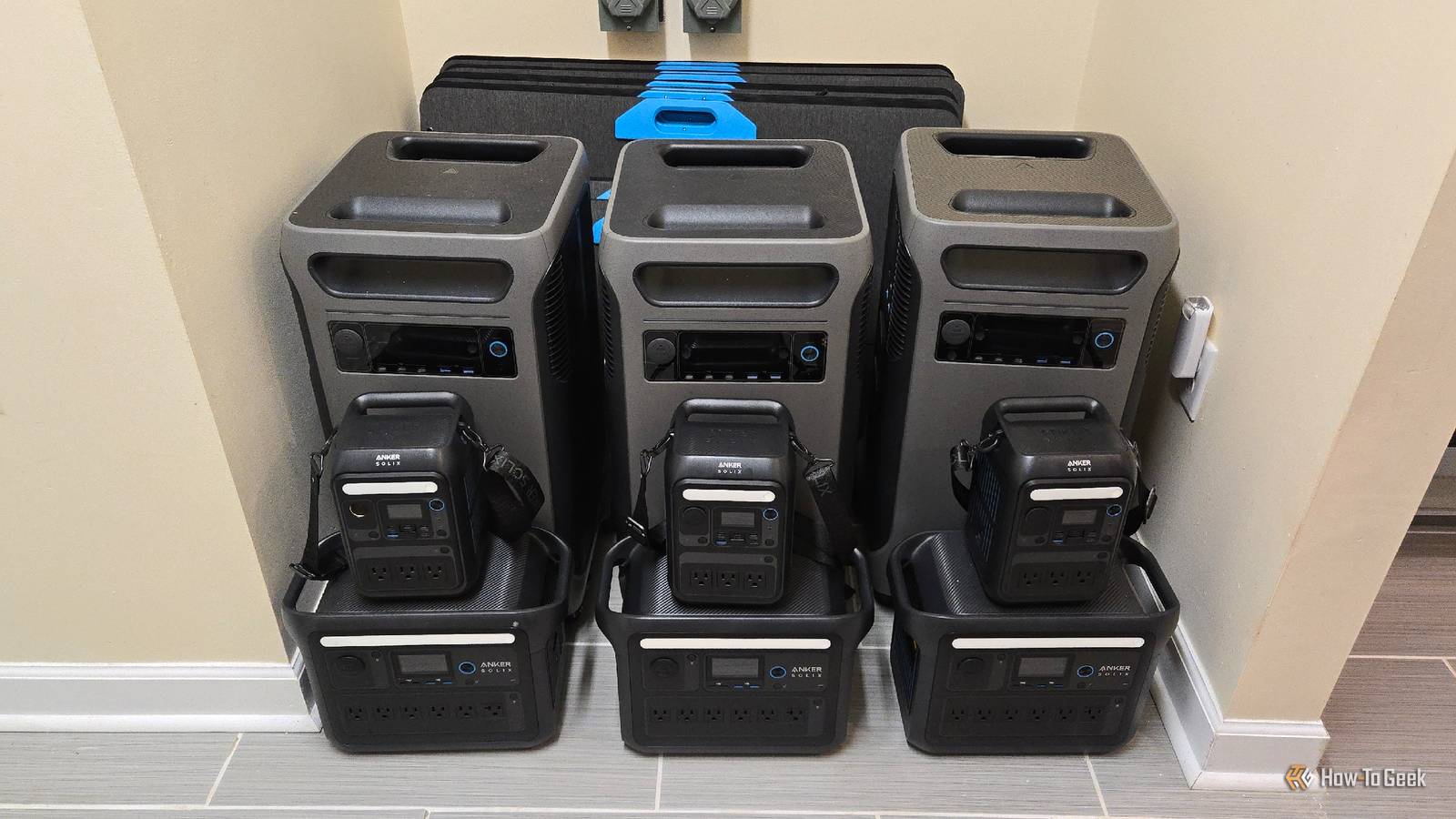
Published Jul 24, 2026, 7:00 AM EDT Bertel is a lifelong tech enthusiast with over a decade of experience writing thousands of articles about Android devices, Linux, and more. Before joining the How-To Geek team, Bertel wrote for the likes of MakeUseOf, MakeTechEasier, and Android Police—at the latter he wrote over 3,500 articles. He delights in helping others decide which tech to bring into their lives... and which tech to do without. Bertel graduated from the College of William and Mary in 2012 with degrees in History and Government. He has spent his entire career as a tech journalist covering Android, Linux, wearables, smart home devices, and more. My family has enough solar panels on our roof to offset all of our annual home energy needs, but just covering our roof with photovoltaic panels was not enough to make our renewable energy dreams come true. Here are the other investments we've made along the way. Buy a portable power station that can power your home You still need to weather an outage It's not immediately obvious, but most homes with solar panels still lose power when the grid goes down. These solar arrays are designed to turn off in the event of an outage, which protects the engineers working to get our power back on. To turn on the lights in the meantime, we need a home backup battery. Built-in batteries like a Tesla Powerwall or an Enphase IQ battery tend to be expensive, with installs starting at around $15,000. Unlike solar panels, they rarely pay for themselves in the long run. For the time being, my wife and I have opted to purchase large portable power stations instead. When the lights go out, we connect an Anker SOLIX F3800 or Anker SOLIX F3800 Plus to our electrical panel using a generator inlet box and an interlock kit. The panels on our roof remain off, but at least we can still power our home using the energy we captured while the panels were on. Anker SOLIX F3800 Plus Brand Anker Dimensions 27.6x10.3x15.6 The Anker F3800 Plus is an updated version of Anker's F3800 solar generator, offering the same 3.84kWh capacity and 6000W output. This model comes with improved charging, with a new max solar input of 3200W and 165V, along with support for 240V from a gas generator. Supplement with smaller portable power stations Don't put too much strain on one battery An Anker SOLIX F3800 supplies both less and more power than you might expect. On one hand, it can easily turn on all the lights in our home as well as the ceiling fans. We can keep our internet router running with no problem, and our fridge will continue to preserve our food. It powers our well pump and our septic tank so that we retain access to water. On the other hand, with a starting capacity of 3800kWh, we can expect it to run out of juice in under twelve hours when carrying that kind of load. The battery will drain even faster if we turn on the TV, plug in a computer, or run our NAS. To extend how long this power station is able to power our home, it helps to unload smaller devices onto separate smaller power stations. During an outage, we plug our TV and Nintendo Switch dock into an Anker SOLIX C1000 instead. From our experience, the TV can run on this battery for around six hours. Considering we aren't the sort to keep the TV on all day, six hours is plenty. Anker SOLIX C1000 Gen 2 Dimensions 15.12 × 8.19 × 9.61 inches Weight 24.9 pounds The Anker Solix C1000 Gen 2 is a small, compact, and lightweight portable power station. With a fast 49-minute recharge time and up to 2,000W of output power, you'll find that this compact system has everything you need. With five 120V AC ports, three USB-C (two of which can do 140W), USB-A, and a DC car port, you can use this portable power station to recharge all of your gear off-grid or when the grid goes down. Smaller power stations like the Anker SOLIX C300 are more than large enough to power fans and recharge laptops. We've also filled our home with portable power banks for our phones and tablets as well. Replace disposable batteries with rechargeables Every battery is a chance to recapture energy from the sun Credit: Bertel King / How-To Geek Disposable batteries can buy you time during a power outage, but you'll eventually need to run to the store for more. Rechargeable batteries cost more up front but eliminate this concern. Ours power our devices for months. When they run out, we can bring them back to life using the same portable power stations we use to power other devices. Renewable batteries don't hold all that much power, so recharging them doesn't put much of a dent even in our smaller portable power stations. Stock up on portable solar panels These are needed to supply power indefinitely I want a built-in home battery that can manage our rooftop solar during outages, but in the meantime, we have stocked up on portable solar panels so that we have a way to recharge all of our batteries. Our large 400W panels connect to our F3800 and, when we have more than one plugged in at once, allow the power station to bring in energy from the sun at a faster rate than it sends power out to the house. These 400W panels are heavier and far more unwieldy than I expected, so I prefer to pull out smaller panels whenever possible. 200W panels are often enough to rejuvenate our C1000 units within a few hours, but I actually use our 100W panels the most since they're so light. It may take me longer to charge, but that's the advantage of having multiples of each power station. We can leave one outside to capture energy throughout the day while we use the other indoors. Choose battery-powered devices whenever possible These reduce the demand on your solar equipment Whether you have a home backup battery or not, don't expect your house to be able to output the same amount of energy that it can when the grid is up—not unless you've spent many tens of thousands of dollars for that much capacity. It's far more affordable to reduce how much of a load you're putting on your system. A desktop PC can drain a power station in just a few hours, but a laptop can last most of the day on its own without needing any power from your home. Then, when it's time to recharge, it may only require as much power as a desktop would pull in one hour. You can recharge it several times before draining a power station, meaning you can use it for days not hours. By doing my computing from a foldable phone instead of a laptop, the math is even better. Keeping my computer charged is no longer a concern. While a PlayStation 5 requires continuous power, a battery-powered Nintendo Switch can outlast most outages without even needing to be plugged in. You can watch videos on a tablet instead of the TV. My favorite new tech product of the past year is SwitchBot’s circulating pedestal fan, which can run for up to 12 hours on its own built-in battery. This helps us keep air circulating even if we leave the ceiling fans off. SwitchBot Standing Circulator Fan Brand SwitchBot Timer Yes Warm weather can be a sticky situation, but SwitchBot aims to fix that with its smart Standing Circulator Fan. The fan can be controlled by the SwitchBot app, is adjustable, and operates quietly to easily fit into your home and routine. Last year, I filled my home with cheap night lights that stay on during an outage by switching over from AC to battery power automatically. This way we're never left in the dark. They even double as flashlights. Every device we've transitioned from wall power to battery power has made outages less disruptive and reduced the amount of solar energy we need to sustain our everyday life. Batteries are the secret to making solar work I love solar energy, but it's an inherently intermittent source of power. Clouds can block the sky throughout the day. Sometimes it rains. Sometimes snow blankets our roof. The secret to living off solar is to get as many batteries as you can in as many sizes as possible in order to capture maximum energy while the sun is high in the sky.
Whole-home solar isn't enough—here are 5 extra things I had to buy to make it work
Full Article
Original Source
Read the full article at Howtogeek →KhanList aggregates and links to publicly available news content. We do not host full articles from third-party sources. Always verify important information with original sources.