
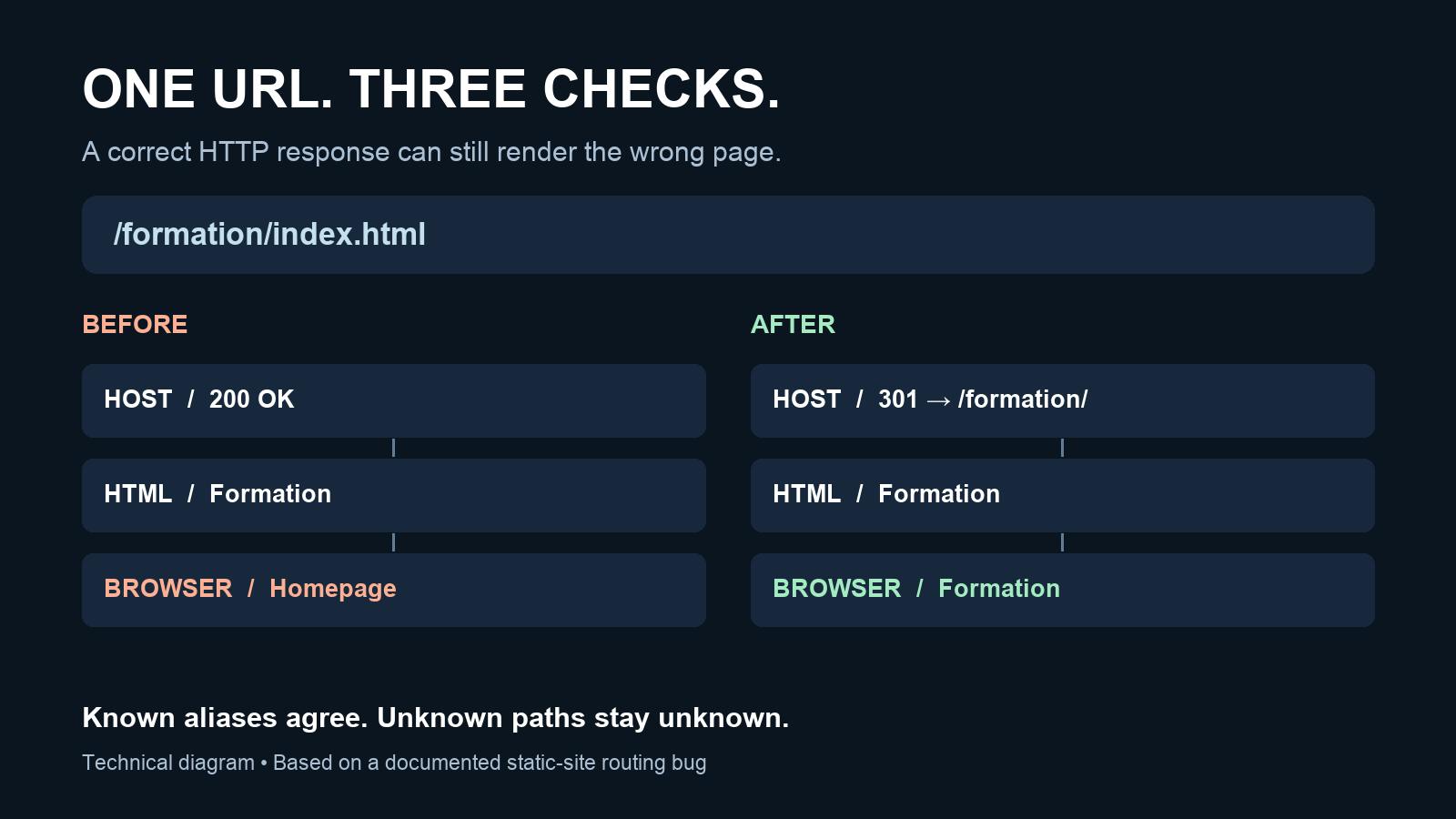
A static page can return the correct HTML and still display the wrong content once JavaScript runs. On a small AI-assisted website, an index.html alias exposed exactly that failure: the server supplied an interior page, then client-side route selection replaced it with the homepage. The useful fix was to align route identity across the host and the browser, while keeping unknown paths unknown. The response was correct. The rendered page was not The failing address was /formation/index.html. It pointed to a real generated HTML file. Looking only at its HTTP response suggested that the route worked. After the client script ran, however, the page showed the homepage. This was not evidence that static hosting was unreliable. Two parts of the application interpreted the same address differently. The host understood a file path, while the browser-side code selected content from a route map whose keys used directory-style URLs. That distinction changes the debugging question. Instead of asking only whether a URL returns 200, ask which page it represents at three points: Layer Question Host What status and destination does the request produce? Initial HTML Which title and main content did the server return? Browser after JavaScript Which title and main content remain visible? Google's JavaScript SEO documentation also distinguishes crawling, rendering and indexing. A correct response body is worth checking, but it is not the whole rendered result. Define which addresses represent the same page For this site's directory-based pages, /formation, /formation/ and /formation/index.html refer to one published page. That is a project convention, not a universal rule for every web application. The resolver now normalizes the supported alias, then checks the list of published pages: export function resolveRoute(pathname, pages) { const path = pathname.replace(/\/index\.html$/, '/'); const route = path.endsWith('/') ? path : `${path}/`; return Object.hasOwn(pages, route) ? route : null; } This is the resolver used in the project. It accepts a pathname, such as location.pathname, rather than a complete URL containing query parameters or a fragment. Passing an entire URL into it would violate that input contract. Object.hasOwn checks the object's own properties. More importantly for the route behavior, the last line returns null when a normalized path is absent. A missing route must not become the homepage merely because the homepage is an available fallback. The function is intentionally limited. It does not implement locale aliases, dynamic route parameters, case folding or arbitrary file-extension rewriting. Adding those transformations without a requirement could make distinct resources collide. Test a missing page as well as an existing one Here is a standalone check using Node's built-in assertion module. Save the resolver above as routes.mjs and this snippet as check-routes.mjs, then run node check-routes.mjs: import assert from 'node:assert/strict'; import { resolveRoute } from './routes.mjs'; const pages = { '/': {}, '/formation/': {} }; const cases = [ ['/', '/'], ['/index.html', '/'], ['/formation', '/formation/'], ['/formation/', '/formation/'], ['/formation/index.html', '/formation/'], ['/missing/', null], ['/missing/index.html', null], ['/formation/unknown/', null], ['/assets/image.webp', null], ]; for (const [input, expected] of cases) { assert.equal(resolveRoute(input, pages), expected, input); } console.log(`${cases.length} route cases passed`); These assertions check route selection. They do not prove that the host sends a redirect, that an HTTP 404 is returned, or that the browser renders the intended content. Those are separate behaviors with separate checks. This is also a useful constraint when an AI coding assistant proposes a repair: provide the expected outcomes before accepting the implementation. HackerNoon's discussion of spec-driven development offers broader workflow context; a nine-row route table is a smaller way to make one requirement explicit. Redirect known aliases at the host Normalizing the browser's route lookup does not change the address shown to a visitor. The hosting configuration therefore also redirects known index.html aliases to their corresponding directory URLs. For a published page on Netlify, the relevant _redirects entry has this form: /formation/index.html /formation/ 301! The ! forces this rule even when a file exists at the source path. Netlify documents that behavior in its redirect options. Use this deliberately for known aliases. A catch-all rule sending every unknown URL to the homepage would conceal a different problem. In the recorded publication checks, the site's known aliases returned 301 redirects to their corresponding pages, and a test query parameter was preserved. The unknown-path check returned 404. These are observations about that deployment, not a guarantee about any other Netlify configuration. Close the loop in the browser After changing a route map or hosting rule, open the interior URL directly. Do not rely exclusively on navigation from the homepage: that route may exercise different client-side behavior. Reload it, check the final address, and compare the visible heading and main content with the initial HTML. Also test an absent path. If the host returns a 404 but a script replaces the page with homepage content, the layers still disagree. Conversely, a screen saying “not found” with a successful status is not the same as a real HTTP 404. The repair in this case was small, but the acceptance condition involved more than one file. The host, generated HTML and browser must agree on page identity. Treating that agreement as a testable requirement makes a deployment easier to inspect than relying on a successful build or a single status code. The documented implementation case records the original symptom and publication checks. It does not establish a ranking, traffic, or revenue improvement.
When Static HTML and JavaScript Disagree About the Page URL
Full Article
Original Source
Read the full article at Hackernoon →KhanList aggregates and links to publicly available news content. We do not host full articles from third-party sources. Always verify important information with original sources.