
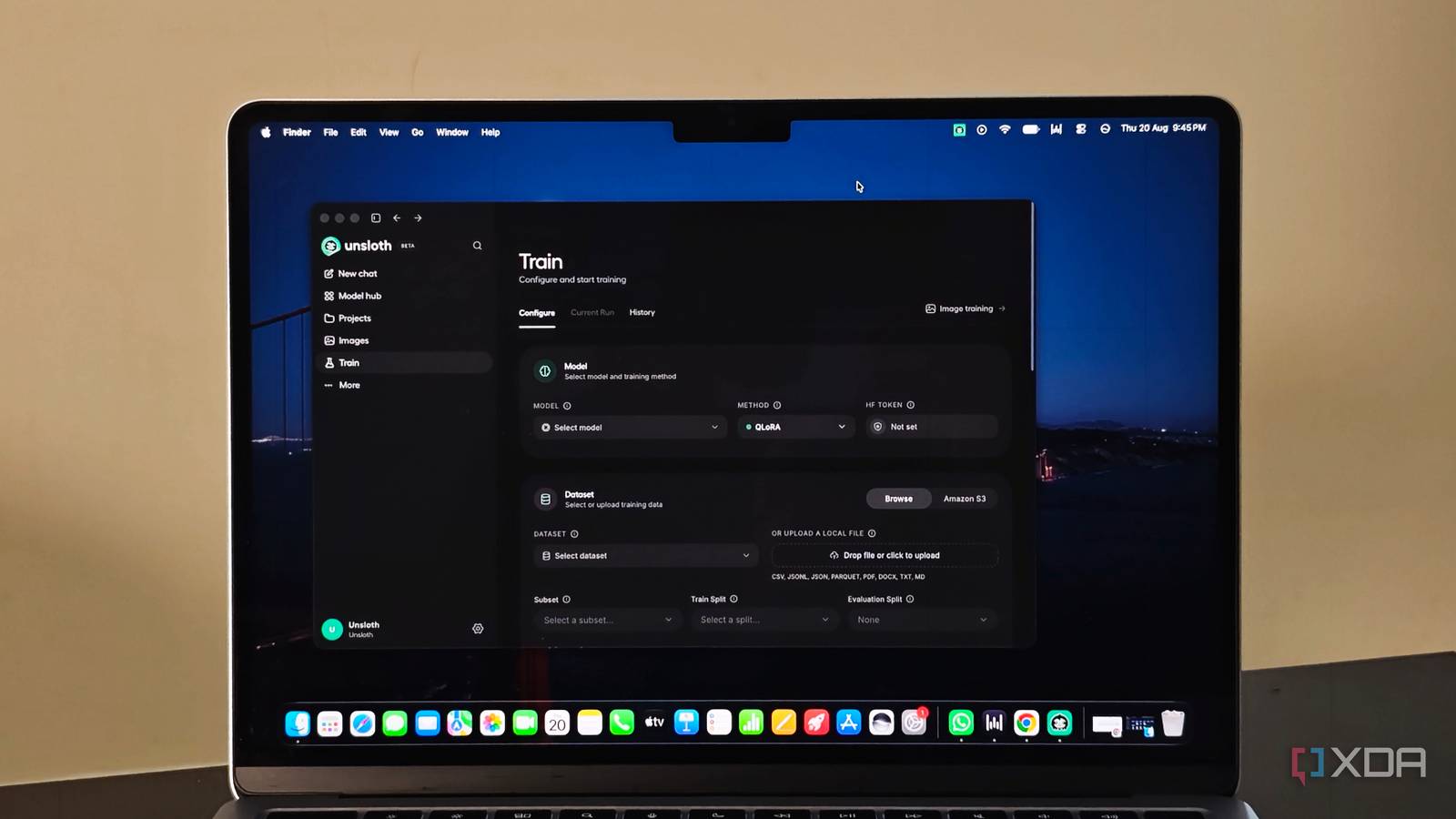
Published Aug 23, 2026, 5:30 PM EDT Anurag is an experienced journalist and author who’s been covering tech for the past 5 years, with a focus on Windows, Android, and Apple. He’s written for sites like Android Police, Neowin, Dexerto, and MakeTechEasier. Anurag’s always pumped about tech and loves getting his hands on the latest gadgets. When he's not procrastinating, you’ll probably find him catching the newest movies in theaters or scrolling through Twitter from his bed. I’ve tried several tools for running AI models locally, but I keep returning to Ollama and LM Studio. Both make it easy to download a model and start chatting without building a complicated environment first. I can change the system prompt or connect the model to another app through an API. The model itself, however, remains exactly as I downloaded it. Neither app lets me fine-tune that model. Ollama can run a compatible adapter created elsewhere, but the training still happens through another framework. Unsloth’s new desktop app fills this gap. I can download, run, fine-tune, and export a model from one interface without setting up a Python environment or working through a Colab notebook. You can fine-tune how your model works Unsloth has been available as an open-source framework for some time. Previously, to use the app, you had to work with Python scripts or follow one of its Colab notebooks. Unsloth built its reputation by making fine-tuning faster while reducing memory requirements, particularly with LoRA and QLoRA. The new desktop app puts those tools inside a graphical interface that runs on macOS, Windows, and Linux. It looks similar to Ollama or LM Studio. You can find models on Hugging Face, download the right quantization, and chat with them locally. Unsloth can also expose a model through an OpenAI-compatible API. Unsloth also includes web search and tool calling, but those features aren't why I would choose it over LM Studio or Ollama. The training interface is the real difference. You can select a base model, import a dataset, and choose between QLoRA, LoRA, or full fine-tuning. Unsloth also includes Data Recipes, which can turn existing files into a training dataset. It handles much of the formatting work that would otherwise require separate scripts. Once training is complete, you can save the adapter on its own or merge it with the base model. Unsloth can then export the result as a GGUF file that runs in apps such as Ollama and LM Studio. Fine-tuning an AI model using Unsloth Fine-tuning still begins with a dataset Fine-tuning still begins with a dataset, and preparing one takes more thought than choosing a model and pressing Train. For my home-lab LLM, I created examples based on the services I run and the problems I encounter regularly. I designed the examples in a way that each instruction was paired with the response I wanted from the model. Some examples showed the model how to handle an unresponsive Docker container. I had some examples covering storage warnings or the output of a monitoring command. The goal was to teach it how to respond when my tools returned familiar info. Unsloth accepts Hugging Face datasets alongside local JSON and CSV files. Data Recipes can also generate a dataset from existing documents, although I preferred checking every example myself. A model will learn from weak or contradictory responses too, so feeding it an unchecked folder of files would defeat the purpose. After importing the dataset, I selected a smaller Qwen3.5 model and used QLoRA for training. QLoRA loads the base model at 4-bit precision and trains a much smaller adapter on top. This keeps the memory requirement within reach of consumer hardware. Unsloth also has regular LoRA and full fine-tuning available, but neither made sense for this experiment. The app still exposes settings such as learning rate and batch size, but most defaults are already filled in. I confirmed the dataset columns, reserved some examples for evaluation, and started the run. The interface showed the training progress and loss without requiring me to write a script or keep a notebook running. Once training finished, I merged the adapter with the original model and exported it as a GGUF file. Fine-tuning doesn’t give the model live info about my containers, so it still needs access to my home-lab tools. The training changes how it interprets that info and what it does next. Fine-tuning actually makes local LLMs useful Because you're narrowing down the scope Local LLMs are already nowhere near models like Claude. When you’re running them on consumer hardware, whether it’s a MacBook or a mini PC, you don’t have enough resources to spin up a model that is nearly as capable as what you get in the cloud. For most people, a 32-billion-parameter model is around the practical limit, and even that requires fairly advanced hardware. Of course, you can run larger models, but performance will take a hit, or you’ll need an extremely expensive rig with enough GPU memory and RAM to handle them. When you fine-tune a model, however, you can give it a narrower scope, which makes it genuinely useful for specific tasks. For example, I built a home lab LLM trained specifically for my setup and the tasks I want it to handle. Similarly, you can build one for your automations or any other simple, repetitive tasks you want the model to perform without messing around. Fine-tuning gives these smaller local models a job they can realistically do well, rather than asking them to compete with massive cloud models at everything. Ollama is no longer the best option out there Ollama is the ideal choice if you are just starting off with a local LLM, but it's not the only choice. There are a lot better tools out there. I recently tried BaseRT, which makes running a local LLM on Mac a lot faster than Ollama. You also have Docker Model Runner, which does an equally good job, and then there are a bunch of other options like llama.cpp.
Unsloth's new desktop app does the one thing LM Studio and Ollama never let me do
Full Article
Original Source
Read the full article at Xda-developers →KhanList aggregates and links to publicly available news content. We do not host full articles from third-party sources. Always verify important information with original sources.