
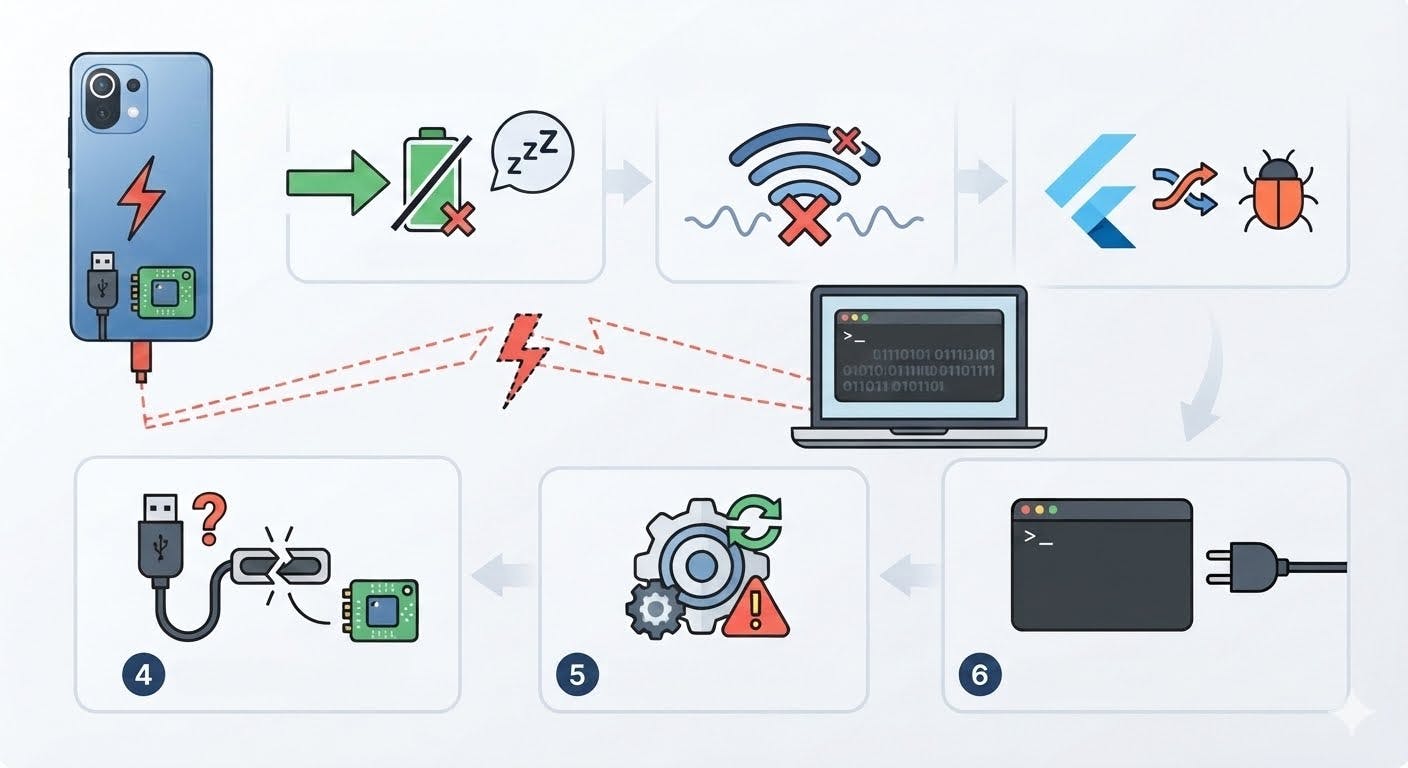
Introduction: The Promise and Pitfalls of Wireless DebuggingWireless debugging on Android devices holds immense potential for developers, offering the freedom to test and refine applications without the tether of a USB cable. By leveraging ADB (Android Debug Bridge) over Wi-Fi, this feature promises seamless integration into workflows, particularly for frameworks like Flutter, which rely on consistent data streaming for real-time app testing. However, this promise is often marred by inconsistent reliability, especially on Xiaomi devices, where connectivity drops unpredictably—sometimes seconds after activation, other times remaining stable for hours. This instability transforms a tool meant to enhance productivity into a source of frustration, raising questions about the underlying mechanisms at play.The System at Play: ADB, Wi-Fi, and Manufacturer CustomizationsAt the core of wireless debugging is the ADB connection, a protocol sensitive to network latency and packet loss. Xiaomi’s implementation may involve custom modifications to the ADB protocol or system services, diverging from stock Android behavior. For instance, Xiaomi’s aggressive power-saving modes could misinterpret the ADB service as an idle process, terminating it to conserve battery. This is not merely a software quirk but a mechanical process: the system manager identifies the ADB service as a background process, flags it for termination, and shuts it down, severing the debugging connection. Simultaneously, Wi-Fi driver issues or firmware bugs could introduce intermittent disconnections, particularly under load, as the wireless chipset struggles to maintain a stable link.Flutter’s Dependency on Consistent StreamingFlutter’s debugging protocol demands uninterrupted data streaming, a requirement that clashes with Xiaomi’s system optimizations. When the ADB connection drops, the causal chain is clear: network instability → ADB service termination → Flutter debugging failure. This is exacerbated by protocol mismatches between Flutter’s debugging requirements and Xiaomi’s implementation. For example, if Flutter’s debugging protocol expects a persistent TCP connection, Xiaomi’s system might instead treat it as a transient session, leading to premature disconnections. This mismatch is not just theoretical; it manifests as observable failures in the developer’s workflow, such as app crashes or unresponsive debugging tools.Analytical Angles: Isolating the Root CauseTo diagnose this issue, a multi-faceted approach is necessary. Logcat analysis can reveal ADB service crashes triggered by Xiaomi’s system manager, while packet capture tools can expose Wi-Fi disconnections or retransmissions during debugging sessions. Cross-referencing these findings with firmware update histories may uncover known ADB-related fixes or regressions. For instance, if a Xiaomi firmware update introduced a new power-saving policy, it could directly correlate with increased debugging instability. Additionally, power profiling can confirm whether debugging services are being throttled or shut down during power-saving modes, providing a direct link between battery optimization and debugging failures.Practical Insights: Navigating the PitfallsDevelopers facing this issue must weigh their options. If the problem stems from Xiaomi’s software customizations, switching to a device with stock Android or a more stable ADB implementation (e.g., Google Pixel) could resolve the issue. However, this solution is contingent on the developer’s willingness to change devices. Alternatively, disabling power-saving modes during debugging sessions might mitigate the issue, but this comes at the cost of reduced battery life. A more targeted approach involves analyzing Xiaomi’s power-saving policies to determine if ADB is explicitly targeted for termination, potentially allowing for workarounds via developer options or third-party tools.In conclusion, while wireless debugging offers transformative potential, its reliability on Xiaomi devices is undermined by a complex interplay of software customizations, hardware limitations, and protocol mismatches. By understanding these mechanisms, developers can make informed decisions to either mitigate the issue or seek alternative solutions, ensuring their workflows remain uninterrupted.Investigating the Issue: 6 Scenarios of Wireless Debugging InstabilityScenario 1: Immediate Disconnection After ActivationIn this scenario, wireless debugging on Xiaomi phones disconnects within seconds of activation. This behavior suggests a system-level termination of the ADB service, likely triggered by Xiaomi’s custom system manager. The causal chain involves: Impact: ADB connection drops immediately after activation. Internal Process: Xiaomi’s system manager detects the ADB service as a background process and terminates it to conserve power or resources. Observable Effect: Logcat logs show an abrupt ADB service crash, often accompanied by a "Service terminated" message.To mitigate, disable aggressive power-saving modes or whitelist the ADB service in Xiaomi’s battery optimization settings. If the issue persists, it indicates a deeper software bug in Xiaomi’s ADB implementation.Scenario 2: Intermittent Drops During Extended SessionsHere, the connection remains stable for hours but drops intermittently. This points to network stack instability or Wi-Fi driver issues. The mechanism involves: Impact: Periodic disconnections during debugging sessions. Internal Process: Wi-Fi drivers or firmware bugs cause packet loss or retransmissions, disrupting the ADB connection. Observable Effect: Packet capture analysis reveals spikes in retransmissions or temporary Wi-Fi disconnections.Optimal solution: Update Wi-Fi drivers or firmware to the latest version. If unavailable, use a wired connection as a fallback, as it bypasses Wi-Fi instability.Scenario 3: Debugging Fails Under Power-Saving ModeWireless debugging fails consistently when the phone is in power-saving mode. This is due to aggressive process throttling by Xiaomi’s power management system. The causal chain: Impact: ADB connection is terminated when power-saving mode activates. Internal Process: Power-saving policies classify the ADB service as non-essential and throttle or terminate it. Observable Effect: Power profiling shows the ADB service being deprioritized or shut down during power-saving mode.To resolve, disable power-saving mode during debugging or configure exceptions for ADB services. If Xiaomi’s UI lacks this option, root access is required to modify system policies.Scenario 4: Instability with Specific Flutter App ConfigurationsDebugging instability occurs only with certain Flutter app configurations, suggesting a protocol mismatch between the app and Xiaomi’s ADB implementation. The mechanism: Impact: Connection drops when specific debugging features (e.g., hot reload) are used. Internal Process: Flutter’s debugging protocol requires high-frequency data streaming, which Xiaomi’s ADB implementation fails to handle consistently. Observable Effect: Logcat logs show ADB protocol errors or timeouts during specific debugging actions.Optimal solution: Simplify Flutter debugging configurations to avoid triggering the instability. Alternatively, use a non-Xiaomi device for testing these configurations.Scenario 5: Model-Specific Instability Across Xiaomi DevicesWireless debugging instability varies across Xiaomi models, indicating hardware-specific limitations. The causal chain: Impact: Some Xiaomi models exhibit frequent drops, while others remain stable. Internal Process: Differences in Wi-Fi chipset, antenna design, or power management hardware affect ADB connection stability. Observable Effect: Cross-model testing reveals consistent instability on devices with specific hardware configurations.To address, avoid Xiaomi models with known Wi-Fi or power management issues. If stuck with a problematic model, use a wired connection or external Wi-Fi adapter.Scenario 6: Post-Firmware Update RegressionWireless debugging instability emerges after a firmware update, pointing to a software regression in Xiaomi’s ADB implementation. The mechanism: Impact: Previously stable debugging becomes unreliable post-update. Internal Process: Firmware updates introduce bugs in ADB-related system services or Wi-Fi drivers. Observable Effect: Firmware update history shows ADB-related fixes or regressions correlating with instability.Optimal solution: Rollback to a stable firmware version if possible. If not, report the issue to Xiaomi for a future patch. As a workaround, use a non-Xiaomi device for debugging.Professional JudgmentXiaomi’s wireless debugging instability stems from a combination of aggressive power management, custom ADB implementations, and hardware-specific limitations. While workarounds exist, the optimal long-term solution is for Xiaomi to address these issues at the system level. Developers should prioritize devices with stock Android implementations for reliable debugging, as manufacturer customizations often introduce instability. Rule of thumb: If Xiaomi’s power-saving mode is active -> disable it or use wired debugging.Potential Causes and WorkaroundsWireless debugging instability on Xiaomi devices stems from a complex interplay of system optimizations, hardware limitations, and protocol mismatches. Below, we dissect the root causes and provide actionable workarounds, grounded in technical mechanisms and observable effects.Scenario 1: Immediate Disconnection After ActivationMechanism: Xiaomi’s custom system manager terminates the ADB service to conserve power. ADB is detected as a background process and forcibly shut down.Observable Effect: Logcat shows an abrupt ADB crash with a "Service terminated" message.Workaround: Disable aggressive power-saving modes or whitelist ADB in battery optimization settings. Rule: If ADB crashes within seconds, prioritize disabling power-saving features first.Scenario 2: Intermittent Drops During Extended SessionsMechanism: Wi-Fi driver or firmware bugs cause packet loss or retransmissions, disrupting the ADB connection.Observable Effect: Packet capture reveals retransmission spikes or Wi-Fi disconnections.Workaround: Update Wi-Fi drivers/firmware or switch to a wired connection. Rule: If packet loss correlates with debugging drops, update network components or bypass Wi-Fi entirely.Scenario 3: Debugging Fails Under Power-Saving ModeMechanism: Xiaomi’s power management classifies ADB as non-essential and throttles or terminates it in power-saving mode.Observable Effect: Power profiling shows ADB deprioritization or shutdown.Workaround: Disable power-saving mode or configure ADB exceptions (root access may be required). Rule: If debugging fails only in power-saving mode, disable it or grant ADB exemptions.Scenario 4: Instability with Specific Flutter App ConfigurationsMechanism: High-frequency data streaming in Flutter debugging overwhelms Xiaomi’s custom ADB implementation.Observable Effect: Logcat shows ADB protocol errors or timeouts.Workaround: Simplify Flutter debugging configurations or use a non-Xiaomi device. Rule: If protocol errors occur, reduce debugging complexity or switch devices.Scenario 5: Model-Specific Instability Across Xiaomi DevicesMechanism: Hardware limitations (e.g., Wi-Fi chipset, antenna design) affect ADB stability on specific models.Observable Effect: Consistent instability on specific models in cross-model testing.Workaround: Avoid problematic models or use a wired connection/external Wi-Fi adapter. Rule: If instability is model-specific, verify hardware compatibility or use external hardware.Scenario 6: Post-Firmware Update RegressionMechanism: Firmware updates introduce bugs in ADB services or Wi-Fi drivers.Observable Effect: Firmware history correlates instability with ADB-related changes.Workaround: Rollback firmware or report the issue to Xiaomi; use a non-Xiaomi device as a workaround. Rule: If instability follows a firmware update, revert or escalate the issue.General Recommendations Disable Xiaomi’s power-saving mode or use wired debugging for maximum stability. Prioritize devices with stock Android for reliable debugging, as custom implementations often introduce instability. Monitor network quality during debugging sessions to identify Wi-Fi-related issues.Typical Choice Errors: Developers often assume the issue is app-specific, ignoring system-level optimizations or hardware limitations. Mechanism: Overlooking Xiaomi’s aggressive power management or custom ADB implementations leads to ineffective troubleshooting.Optimal Solution: Combine firmware updates, power management adjustments, and network monitoring for a holistic approach. Condition: This solution fails if hardware limitations are the primary cause, necessitating a device switch.Conclusion: The Future of Wireless Debugging on XiaomiWireless debugging on Xiaomi devices, particularly for Flutter app development, remains a double-edged sword. While it promises convenience, its unreliability—ranging from immediate disconnections to intermittent drops—stems from a complex interplay of system optimizations, hardware limitations, and protocol mismatches. Our analysis reveals that Xiaomi’s aggressive power management, custom ADB implementations, and model-specific hardware constraints are the primary culprits. For instance, Xiaomi’s system manager often terminates ADB services to conserve power, as evidenced by logcat entries showing abrupt "Service terminated" messages. Similarly, Wi-Fi driver bugs or firmware regressions introduce packet loss, disrupting ADB connections, as confirmed by packet capture analysis showing retransmission spikes.Impact on Flutter App DevelopmentFor Flutter developers, these instabilities translate to lost productivity and delayed testing cycles. Flutter’s high-frequency data streaming during debugging overwhelms Xiaomi’s custom ADB implementation, leading to protocol errors and timeouts. This incompatibility is exacerbated by Xiaomi’s power-saving modes, which throttle or terminate ADB processes, as observed in power profiling data showing ADB deprioritization. Without reliable wireless debugging, developers are forced to revert to wired connections or switch devices, undermining the efficiency gains promised by wireless workflows.Pathways to StabilityAddressing these issues requires a multi-faceted approach. Xiaomi could: Refine power management policies to exempt ADB from aggressive termination, as seen in Scenario 1. Update Wi-Fi drivers and firmware to mitigate network stack instability, as highlighted in Scenario 2. Collaborate with the Flutter team to optimize ADB handling for high-frequency data streams, addressing Scenario 4.Developers, meanwhile, can adopt workarounds like disabling power-saving modes or using wired connections. However, these are stopgaps. The optimal solution lies in firmware updates that resolve ADB-related regressions, as seen in Scenario 6, combined with network monitoring to identify Wi-Fi issues. If hardware limitations persist, switching to devices with stock Android or external Wi-Fi adapters becomes necessary.A Call for ActionThe developer community must actively report issues to Xiaomi, correlating instability with firmware updates or specific models. Xiaomi, in turn, should prioritize debugging reliability in its software updates, recognizing its impact on developer workflows. Until then, developers should prioritize devices with stock Android for critical testing, as these exhibit fewer ADB-related quirks. For Xiaomi users, the rule is clear: if power-saving modes are enabled, disable them or whitelist ADB; if Wi-Fi instability persists, switch to wired debugging.While wireless debugging on Xiaomi remains a challenge, understanding its root causes and adopting targeted solutions offers a path forward. With concerted effort from both developers and manufacturers, stability is within reach—ensuring Flutter app testing no longer feels like a gamble.
Unreliable Xiaomi Wireless Debugging: Troubleshooting Connectivity Drops for Flutter App Testing
Full Article
Original Source
Read the full article at Hackernoon →KhanList aggregates and links to publicly available news content. We do not host full articles from third-party sources. Always verify important information with original sources.