
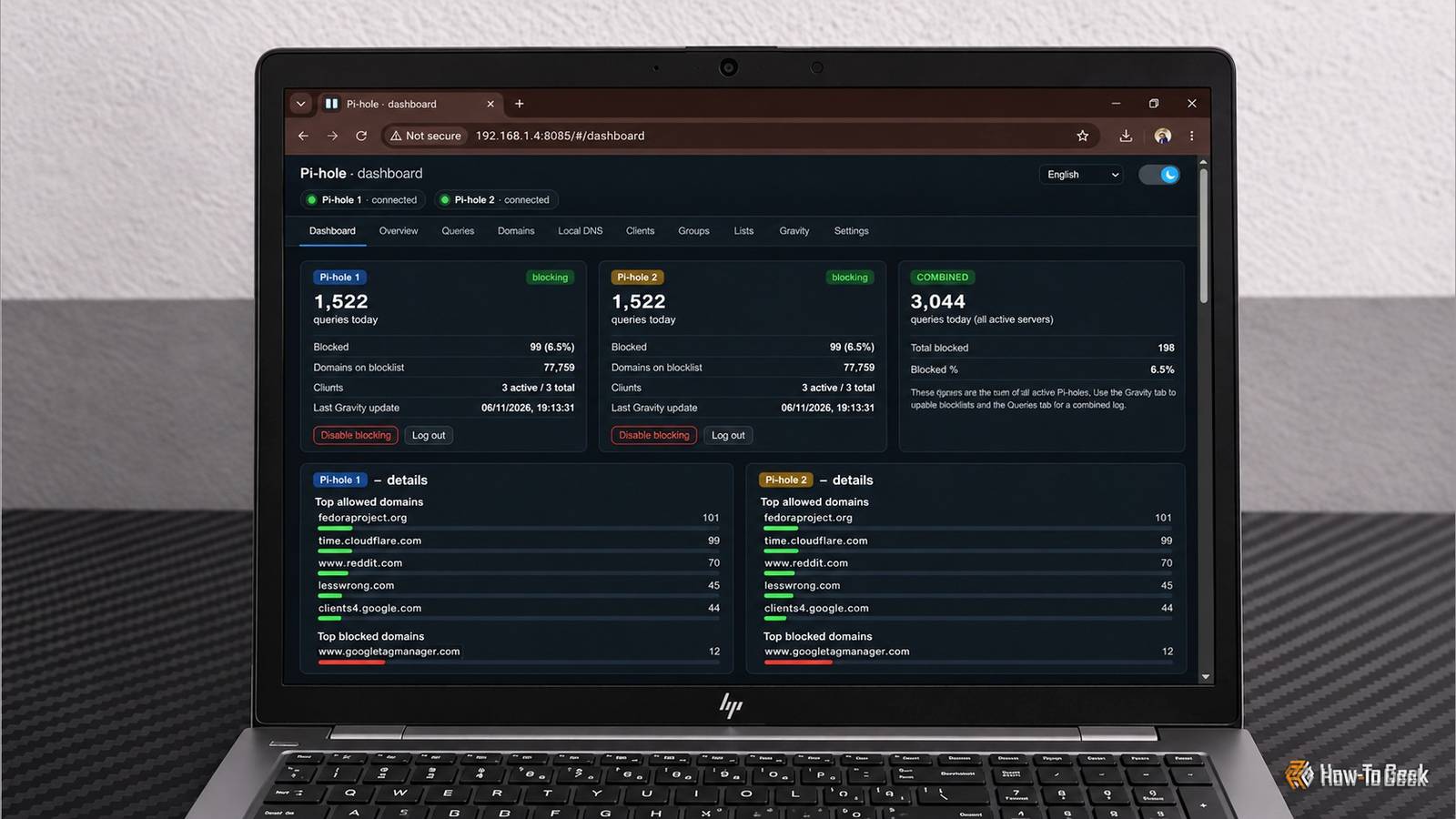
Published Nov 9, 2026, 7:01 AM EST Umair Khurshid is a technology writer and developer with a strong focus on Linux, FreeBSD, cloud infrastructure, and automation. Before focusing on writing, Umair worked as a developer and DevOps engineer building and automating cloud-native systems. Running Pi-hole on your network is a great way to block advertisements, trackers, and other unwanted domains across your devices. However, if you want some redundancy in your DNS setup, you might eventually end up running two Pi-hole instances. This gives your devices another DNS server to use if one instance becomes unavailable, but it also means maintaining two separate installations. I have been looking for a simpler way to manage multiple Pi-hole instances without constantly jumping between their web interfaces. That is where Dobbelt-Pi-hole comes in. It is a lightweight, open-source dashboard that lets me manage 2 to 4 Pi-hole instances from a single interface, and it has several useful features that make maintaining my homelab DNS setup considerably easier. Dobbelt-Pi-hole brings multiple Pi-hole instances together One dashboard instead of multiple web interfaces Dobbelt-Pi-hole addresses a relatively straightforward problem. When you run multiple Pi-hole instances, you have to manage each one through its own web interface. Even relatively simple tasks, such as adding a domain to your allowlist or checking query statistics, require switching between installations. Dobbelt-Pi-hole provides a central interface for managing 2, 3, or 4 Pi-hole instances. It communicates with the individual installations through their REST APIs and presents the information through a unified dashboard. I think Christian Kragh, the developer behind Dobbelt-Pi-hole, took a very practical approach to building Dobbelt-Pi-hole. It feels like something built to solve an actual problem rather than another project created simply for the sake of building something. Its implementation is straightforward and seems deliberately lightweight. The entire dashboard is contained in a single HTML file, with CSS and JavaScript built into it. It uses Chart.js for visualizations, while Nginx acts as a reverse proxy that forwards API requests directly to the connected Pi-hole instances. There is no application backend or Node.js runtime to maintain. I think this reflects a more purposeful approach to development, especially when so many developers today, with this AI genie at their disposal, seem to be constantly looking for something, anything, to build with it rather than starting with an actual problem. You can monitor DNS activity across both instances Combined statistics make monitoring easier Instead of checking the query count, blocked queries, and other statistics on each Pi-hole installation individually, using Dobbelt, you can view information from multiple instances in one place. The dashboard also includes the same visualizations and graphs that are found in the official Pi-hole interface, giving you an overview of DNS activity over time, query volumes, and blocked requests. The difference is that Dobbelt combines this information from all your Pi-hole instances in one place, making it much easier to monitor activity, compare instances, and spot unusual changes without switching between individual dashboards. It also provides a combined query log that lets you inspect DNS requests from all connected instances and filter them by client or query type. This is really useful when troubleshooting a device that suddenly stops resolving a domain, as you can examine its DNS activity from a single interface. Another useful feature is centralized management of allowed and blocked domains across multiple installations. If a domain is blocked by mistake, you can add it through the central dashboard instead of repeating the same operation on every Pi-hole instance. The dashboard also includes client management, allowing you to view named clients and manage their information across connected installations. This makes it much easier to identify which device is generating a particular DNS request without having to repeatedly look up its IP address. The same applies to blocked domains. You can manage domain entries across your installations and apply changes to the relevant instances. Dobbelt-Pi-hole also supports adlist management and Gravity updates. Gravity is responsible for processing Pi-hole’s subscribed blocklists and updating the domains used for filtering. Being able to trigger updates from a central interface saves another trip to an individual administration page. Another feature worth mentioning is Teleporter backup support. Pi-hole includes Teleporter for exporting and importing configuration backups, which can save considerable time when migrating installations or recovering from a configuration problem. Dobbelt-Pi-hole lets you download backups from individual Pi-hole instances through its interface, which gives you another convenient way to maintain copies of your DNS configuration without opening each installation separately. Dobbelt-Pi-hole is not a DNS failover solution There is something important to understand before deploying this project. Dobbelt-Pi-hole does not automatically replicate every configuration change, provide DNS failover, or turn multiple Pi-hole installations into a high-availability cluster. The connected instances remain independent DNS servers. You still need to configure your router, DHCP server, or individual devices to use the DNS addresses you want them to use. If you want automatic failover or a virtual IP address, you will need a separate solution designed for that purpose. If you already run multiple Pi-hole instances in your homelab, I think this project is worth trying. It does not replace Pi-hole or introduce a complicated new DNS architecture. Instead, it provides a practical management interface for something that would otherwise require maintaining several separate dashboards.
Tired of switching between Pi-hole dashboards? This open-source tool merges them
Full Article
Original Source
Read the full article at Howtogeek →KhanList aggregates and links to publicly available news content. We do not host full articles from third-party sources. Always verify important information with original sources.