
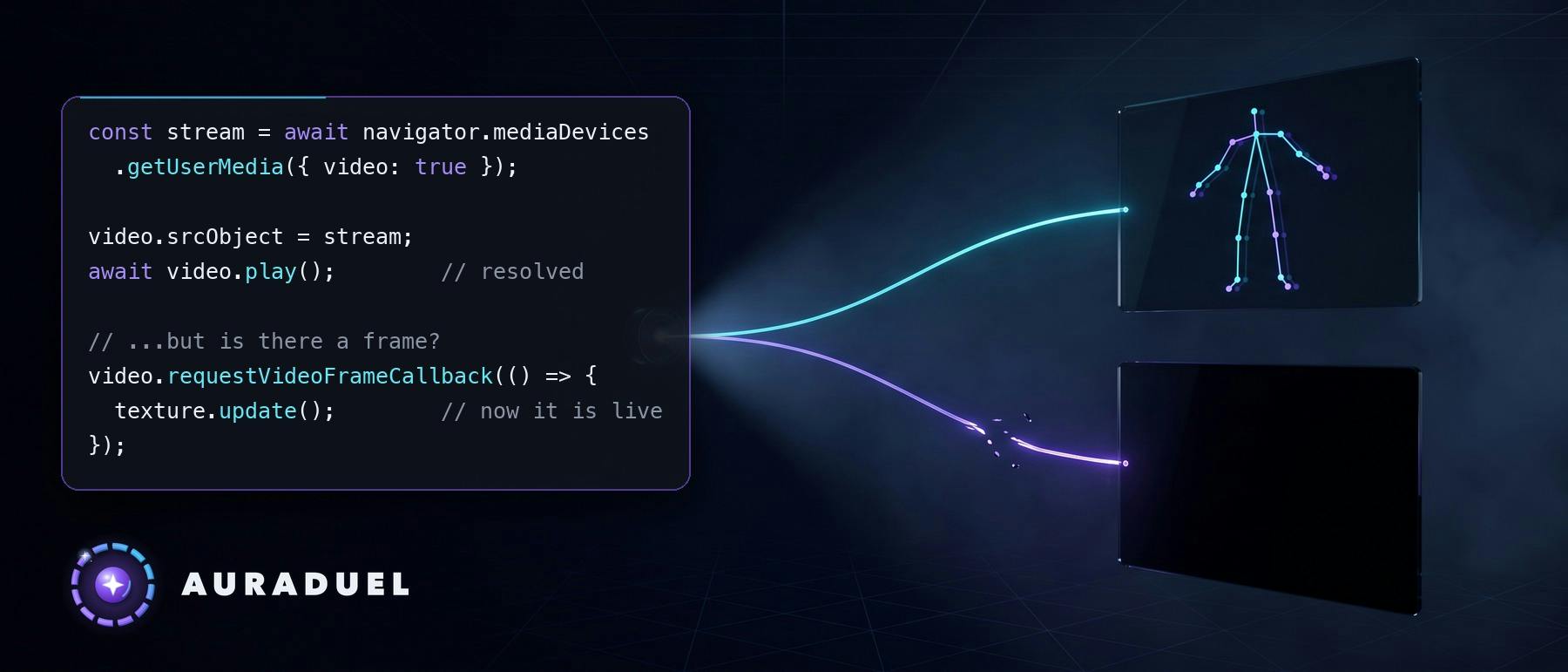
1. The setup The architecture is simple on purpose. One getUserMedia call, one hidden element, two consumers. pixi.js 8 turns that element into a WebGL texture and draws the orb, the rings and the sparks on top. MediaPipe reads the same element to find the body and the hands, and it uploads its own texture every frame. On iOS all of this runs inside the WKWebView of a Capacitor app, which means WebKit. The game has had a button to switch between the front and the rear camera since late August. On September 10 I installed a new build on my iPhone, recorded my screen while I played, and touched that button in the middle of a session. Everything in this article comes from four screen recordings made in one evening, September 10, 2026. I am not going to tell you this happens on every iPhone or every iOS version. I can tell you what the recordings showed on mine. 2. First, the wrong suspect The first recording is 107 seconds long. The screen froze for 8.5 seconds while the body model loaded, and for 5 more seconds after I touched the camera button. When it came back, a card said "Camera paused". That card was a lie, and the proof was in its own rule. The watchdog that shows it needs a couple of seconds without camera frames before it speaks. It appeared on the very first frame after the freeze. That is impossible unless the watchdog itself had been asleep. It had. The one that went silent was not the camera. It was the main thread. The watchdog runs on a timer, the timer was stuck in the queue behind the blocked thread, and when it finally ran it compared the clock with a timestamp that was five seconds old. It blamed the camera for its own absence. Two small fixes came out of that. The watchdog now receives its own heartbeat. If the gap since its last run is longer than the threshold, the verdict is not "paused". It is "blocked", and it does not accuse anybody. And there is a main-thread heartbeat: a short timer that compares the time it actually woke up with the time it expected to. The difference is how long the JavaScript of the page was blocked. It logs once per episode. It exists because of a detail that is obvious only afterwards: nothing had logged the freeze, because everything that logs runs on the thread that was frozen. 3. Trap one: destroying a pixi scene resets a video that is still in use During the camera switch, my camera hook passed through a transient "requesting" state. The arena screen only rendered while the camera was active, so for half a second React unmounted it. The recording shows it: a cover screen for 0.55 seconds, then the arena again, with a black canvas. Unmounting the arena destroyed the pixi scene. Destroying the scene destroyed its video texture. And pixi's VideoSource.destroy() does exactly what its name says to the underlying element: it pauses it, sets src to an empty string, and calls load(). That is correct behavior for a texture that owns its video. Mine did not own it. The camera was still using that element. So was the detector. The fix was not in pixi. It was in my screen logic. The arena now stays mounted through transient camera states, and mirroring or reframing is applied live on the existing layer instead of rebuilding the scene. The lesson is broader than pixi: if a resource is shared, any owner that cleans up "its" resource is cleaning up everybody's. 4. Trap two: play() resolved is not "there is an image" The second recording had the first fix installed. The arena no longer restarted when I switched cameras. But the video went black for 5.5 seconds after the first switch, and after the second switch it stayed black until the end of the round. The HUD was alive on top of nothing. The code was doing what every tutorial does: set the new srcObject, await video.play(), mark the camera as active. The promise resolved both times. No frame arrived. So the camera is no longer "active" when play() resolves. It is active when the first real frame arrives, which I detect with requestVideoFrameCallback, or with timeupdate and a currentTime above zero where that API does not exist. If the frame does not come within a short wait, there is a repair ladder: call play() again, then capture the stream again with a new getUserMedia, and if that fails too, an honest error with a Retry button. An overnight audit of every game mode found the opposite bug inside the fix. The wait had no fast path, so running the repair on a healthy element burned the whole wait and could escalate to a recapture for nothing. Now, if the element already has data and its clock has advanced, it resolves at once. The arena got the same idea. When frames stop, it recaptures the camera once on its own before it asks the player for anything. 5. Trap three: a reused leaves the WebGL texture black The third recording is the one that made me stop guessing. With both fixes installed, I switched to the rear camera at second 20 and the canvas went black until the end of the round. This time I had remote diagnostics, and they were clean: play() in 148 ms, the detector's first frame 29 ms after the switch, no repairs, no watchdog. By every number I had, the camera was fine. Then, at second 36 of the video, the orb appears. Drawn over a black canvas. The orb only appears when the detector sees my hands. So MediaPipe was seeing me through the rear camera, from the same element whose pixi texture was black. The mean luminance of the canvas in that stretch was 13.4. After the fix it reads between 68 and 141. That frame explains the whole bug. MediaPipe creates its texture from the element on every frame. pixi had created its texture once, from the element as it was with the previous stream. The element was delivering frames. The texture bound to it was still tied to the old player. I had already tried two reasonable fixes: not destroying the scene, and pushing the frame upload from my own ticker. Neither touched the root, because the element and its GL texture were still the ones from the previous camera. The rule that fixed it is one line in the decisions log: a new element per stream. Never reuse the element by changing its srcObject. Everything that hangs from the element, the pixi scene with a new video source and texture, and the frame callback loop, re-attaches by identity. The fourth recording, with that build installed minutes later: I switched cameras at second 21.9. The diagnostics say camera — element #2, play 149 ms, pixi init 8 ms, detector's first frame 30 ms, and a new trace I added for exactly this, texture — first frame uploaded · 1280x960. No black stretch anywhere in the video. I completed the charging ritual with the rear camera. There was a contingency plan if it had stayed black: an intermediate 2D canvas, drawImage and a canvas texture, the path MediaPipe had just proven alive. I did not need it. 6. Bonus trap: the mute switch The first recording had one more surprise. The audio track is digital silence for the first 100 seconds, with the in-app sound button on. At second 100.9 the iOS sound indicator of the mute switch appears, and only then does the game start to sound. I had set the audio session to playback in the native app delegate. It was not enough. In my recording, WebKit chose the session category from what the page plays, and a page that only uses Web Audio was treated as ambient sound, which the mute switch silences. The fix is an anchor: a tiny looping element with real silence, started in the same user gesture that enters the arena. The same overnight audit found that the anchor lied too. After a duel it was paused, but the start function only looked at its own flag and answered "ok" without playing. From the second duel on, the mute switch was back in charge. Idempotent functions should check the real state of the resource, not their memory of it. I had written "sounds the same" in my notes days before, without a recording. That was an assumption, not data. 7. How the evidence was read I work alone, so the debugging partner was Claude, and the input was my screen recordings. The method matters more than the tools: A contact sheet at one frame per second, to find where things happen. Dense windows, from 3 to 30 frames per second, around each event. Frame differencing at 10 frames per second on two regions: the camera image and a HUD ring that always breathes. If the ring stops breathing, the freeze is not the camera. It is the thread. Luminance of the canvas, to tell "black" from "dark room". The audio envelope, to find the exact second the sound started. One more failure taught me about diagnostics. The app has a panel where I can copy the traces of a session. I copied them after the incident and sent three lines. The panel reset when I entered the screen that has the copy button, so I had copied the new session. Evidence of an incident has to survive re-entry and app restarts. Now the previous session is kept, traces persist locally, and the native app also writes them to a file in its own container that I can pull from the Mac without touching the phone. Those traces are timings and states of my own test device. Nothing about the body is in them, and no camera image ever leaves the phone. 8. Takeaways A shared by two consumers has two truths. Ask what each consumer sees, not whether "the video works". One element per MediaStream. Do not recycle elements across streams when a WebGL texture hangs from them. await video.play() tells you the promise resolved. Wait for the first real frame before you call the camera active, and have a repair ladder that ends in an honest error. A library's destroy() assumes it owns what it destroys. If you share the element, keep the owner mounted. A watchdog needs its own heartbeat, or it will blame the first suspect when it wakes up. Log main-thread stalls from a timer. The stall itself cannot log. On iOS, test sound with the mute switch on, and record it. "Sounds fine" is not evidence. Before the third attempt at a fix, go back to the recording and look for proof of what each part actually saw. The pure logic, the first-frame ladder, the watchdog verdicts and the heartbeat, went in with a failing test first. The one-element-per-stream rule cannot be proven in a test runner, so it was proven on the phone, with the fourth recording. These fixes ship in AURADUEL 1.1, live on the App Store since September 15. Built for RevenueCat Shipaton 2026. AURADUEL is on the App Store: https://apps.apple.com/app/id6804470297
Three iOS WebKit Traps That Blacked Out My AR Game, and How I Caught Them
Full Article
Original Source
Read the full article at Hackernoon →KhanList aggregates and links to publicly available news content. We do not host full articles from third-party sources. Always verify important information with original sources.