
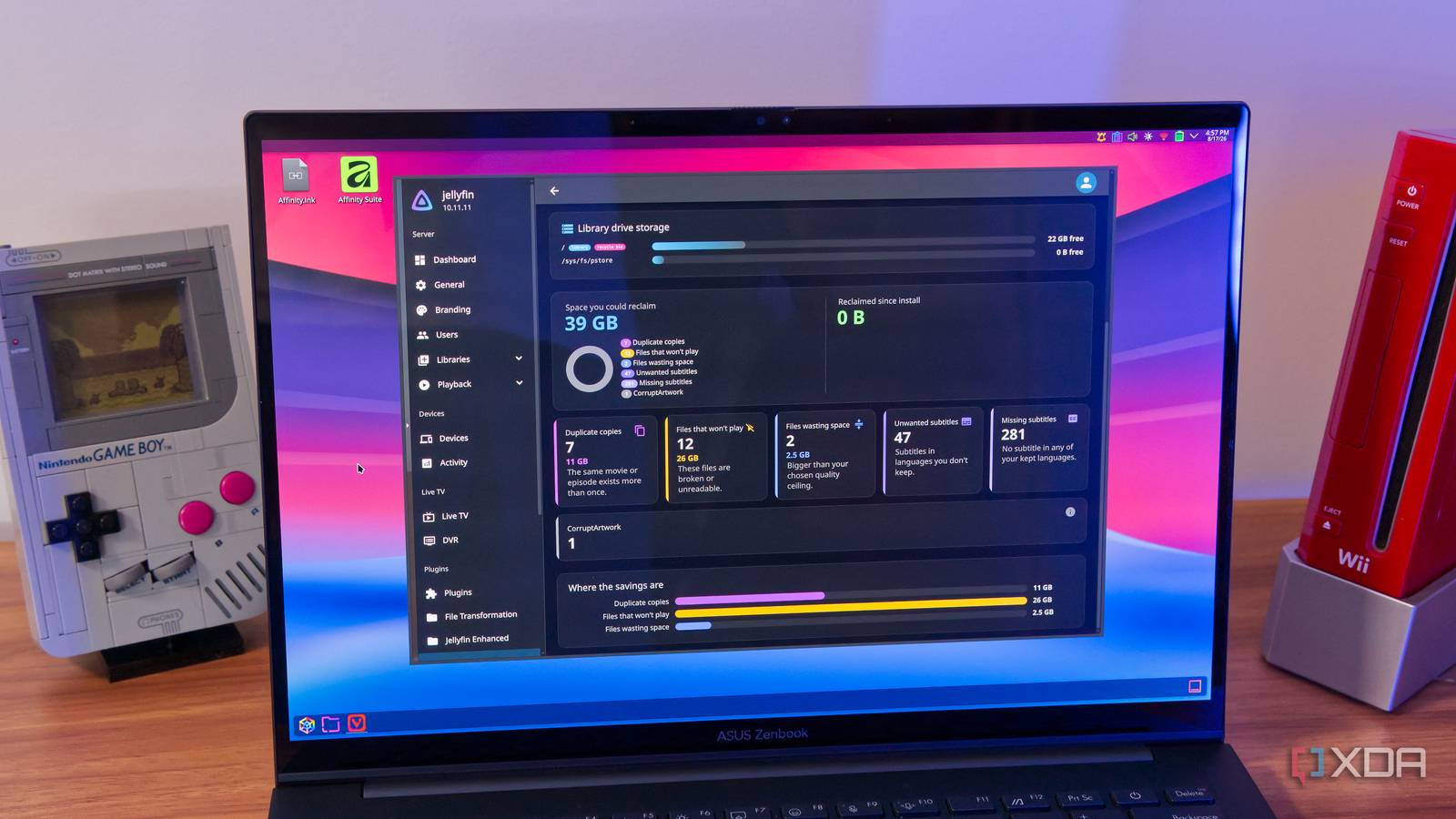
Published Aug 20, 2026, 11:30 AM EDT João has been covering the tech world for over 7 years, with a heavy focus on laptops and the Windows ecosystem. I also love all things tech and videogames, especially Nintendo, which he's always happy to talk about. Prior to joining XDA in 2021, he worked at Neowin: https://www.neowin.net/news/poster/jo%C3%A3o-carrasqueira/ Jellyfin is one of the best self-hosted services out there, and it's one of the most used in my home. But managing a library of movies and TV shows can become fairly difficult once you've amassed a big enough collection. Duplicates, missing subtitles, and a lack of storage space can quickly become a problem. Managing all this is a common problem, and someone finally took it upon themselves to create a solution. MediaDash is a Jellyfin plugin that does almost everything you could want in order to keep your library lean without sacrificing functionality, and after giving it a go, I simply can't recommend it enough. It fixes everything No, really Managing every aspect of your Jellyfin library can certainly be a challenge, but MediaDash can handle pretty much everything for you. Its feature set is vast, starting with something as simple as duplicate checking. MediaDash can scan your whole library for potential duplicate files so you can delete them and free up space. You can even set the priority for which files to keep, such as the highest quality or the smallest size. MediaDash also detects content you haven't watched in a long time, in case you want to purge your library of stale content. It can also check for missing subtitle files, but interestingly, it can even check if you have subtitles you don't need. In my home, we only really need English, Portuguese, and (sometimes) Chinese subtitles, so when a movie includes a lot of subtitle tracks for different languages, they can just be taking up space, not only on the drive, but on the Jellyfin menus. MediaDash can delete subtitles I don't need, making it easier to set things up. What's even better is that you're always in control of how MediaDash handles your library. During the first walkthrough, you can configure the behavior to either automatically delete unnecessary files, ask first, or just flag them and let you make any decisions manually. That's not a global setting, by the way, each feature is treated according to the preference you set in each case. It can even re-encode files Make them smaller Another feature that makes MediaDash especially helpful is its ability to re-encode files to help you save space. You can set the maximum resolution you want your content to have, and anything that exceeds that limit can be encoded at a lower resolution, using a codec of your choosing to help ensure higher quality or better compatibility. If you have HDR media, MediaDash leaves it alone by default, since re-encoding HDR isn't as straightforward, though you can enable it if you know what you're doing. Re-encoding is also helpful because, much like subtitles, MediaDash can detect audio tracks in a file and delete any you don't need. If you have a multi-track file with languages you don't need, MediaDash can re-encode it with the extra audio tracks removed, saving a bit more space on your drive. But wait, there's more File management and even potential malware protection If you thought that wasn't enough, there's still a bit more that MediaDash can do. Part of it is simply sorting your files in case you've got them mixed up. If you tend to throw media onto your server haphazardly, MediaDash can scan your library and find TV episodes in your Movies folder and vice versa, and move them back to the respective place. In fact, that can even extend to other kinds of files. If you use Jellyfin for music or books, or want a separate library for anime, you can have MediaDash sort all your content into the respective folders. Plus, if you want to do things manually, there's even another cool feature of MediaDash: a file browser. Typically, you'd have to set up an SMB share on your device to browse the files in your library, but MediaDash makes this possible without that requirement, so you can use a device you may not have set up yet or even a phone, where setting up an SMB share is more complicated. One last thing worth noting is that MediaDash can also scan your files for suspicious executables. The idea here is that if you download some of these files through torrents, you might also be downloading malware, and MediaDash helps fight that if needed. It works in the background A silent watcher Setting up and using MediaDash really doesn't take much effort. All you need to do is go into your Jellyfin dashboard, then select Plugins and then Add repository. You'll need to enter this address: https://raw.githubusercontent.com/crackruckles/MediaDash/main/manifest.json Then refresh the plugins page and install MediaDash, and restart the Jellyfin server so it properly loads the plugin. After that, the tutorial guides you through every feature so you can set everything up to match your needs. Once you've set it up to your liking, MediaDash runs for the first time, which can be pretty lengthy if you have a lot of media. You can skip this, but MediaDash can still run in the background. It waits about 15 minutes after someone last used the server to kick into action, and it will just do its thing without anyone noticing. If you've set it to take action automatically, it will do so on its own, but the default is still to run a dry run first, so you have to confirm the changes before they're actually made. If you've set it to only flag issues when they're detected, they'll be there for you on the MediaDash dashboard whenever you're ready to address them. Jellyfin can work so much better MediaDash offers such a wide range of tools that any Jellyfin user should consider checking it out. It does so much to fix my relatively small Jellyfin library, so I can easily see other users getting even more out of it. I'll definitely be keeping it on my server, and I recommend others do the same. MediaDash
This useful plugin handles every Jellyfin library problem I used to fix manually
Full Article
Original Source
Read the full article at Xda-developers →KhanList aggregates and links to publicly available news content. We do not host full articles from third-party sources. Always verify important information with original sources.