
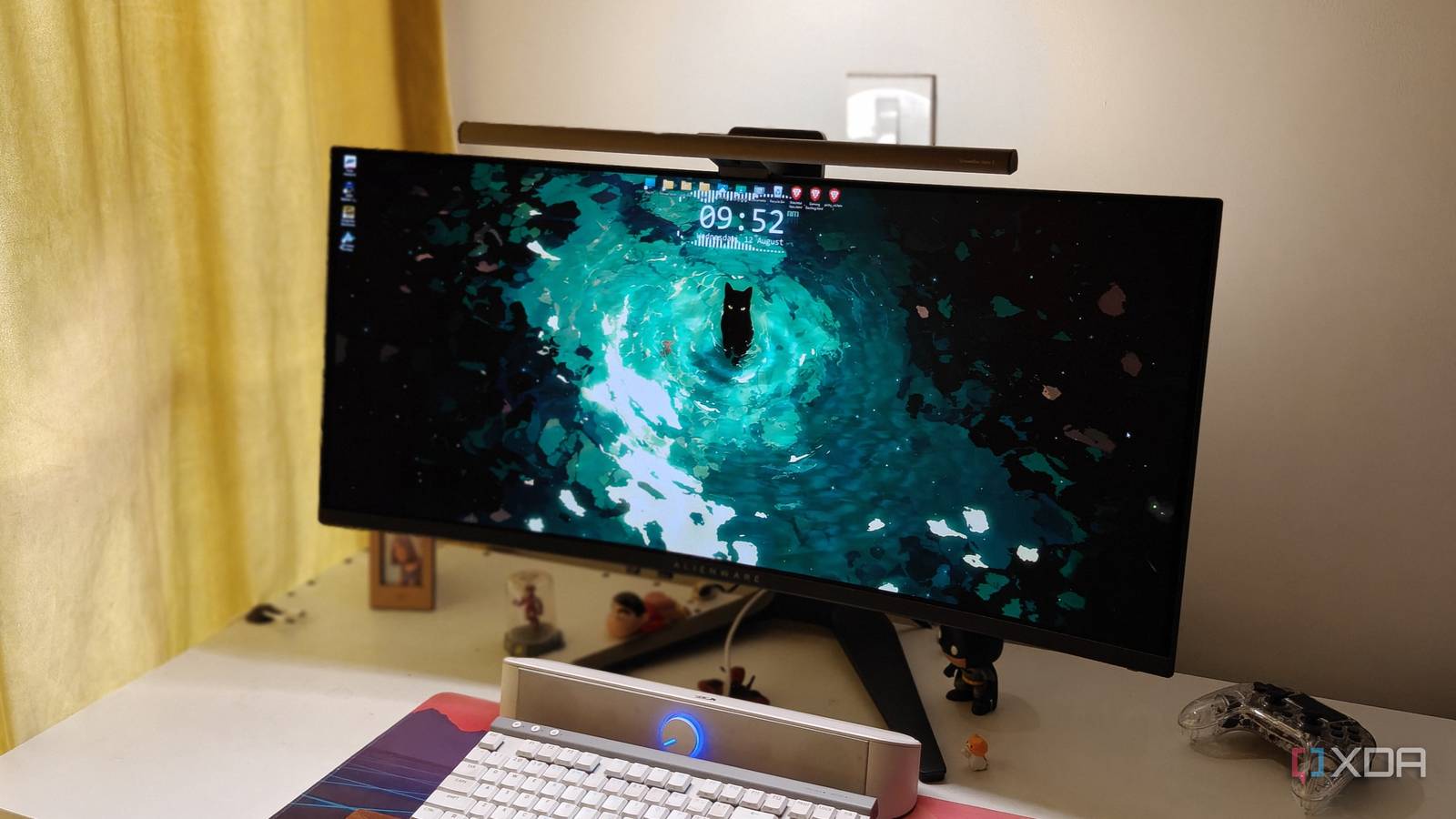
Published Aug 12, 2026, 12:00 PM EDT After a 7-year corporate stint, Tanveer found his love for writing and tech too much to resist. An MBA in Marketing and the owner of a PC building business, he writes on PC hardware, technology, and Windows. When not scouring the web for ideas, he can be found building PCs, watching anime, or playing Smash Karts on his RTX 3080 (sigh). When I upgraded from an IPS display to an ultrawide OLED last year, the upgrade was massive. The true blacks and punchy colors justified the $600 purchase. That said, it wasn't all sunshine and rainbows. OLED monitors still have their quirks, and my QD-OLED panel has more than a few. The most annoying thing isn't the frequent pixel refresh or raised blacks in direct lighting; it's the eye strain during long work sessions. While I had made some adjustments to the screen to make my life easier, the eye strain problem was solved only when I used the BenQ ScreenBar Halo 2 light bar, and it finally made me a believer. The front and back lighting eliminate the contrast between the screen brightness and the ambient light in the room, softening the glare on the eyes. You may not like how a light bar looks on your monitor, but you can't deny the benefits. The increased eye strain from IPS to QD-OLED wasn't my imagination It was by design, and something I couldn't eliminate Credit: Monitors Unboxed During the first few weeks of using the Alienware AW3423DWF, I thought I was wrong about the increased eye strain compared to my previous IPS monitor. When I searched about it, though, I found that QD-OLED displays can indeed be harder on the eyes compared to other panel types. Due to the quantum dots emitting pure and brighter colors, your eyes can get tired sooner, especially during 8-hour workdays. Besides, the unconventional subpixel layout not only messes with text clarity, but also forces your eyes to work harder to perform the same task. So, my monitor was exhausting my energy sooner rather than later, tangibly affecting my productivity. I even made some adjustments to the QD-OLED screen, reducing the brightness to 10–15%, and started taking more frequent breaks, but the eye strain never went away completely. I ignored monitor light bars for years, but I can't live without one anymore It has become an integral part of my setup I was never hyped about monitor light bars, trusting my floor lamp for warm lighting during evening and night work sessions. It did the job, but the light was too bright and illuminated the entire room instead of just my PC setup. I recently got the opportunity to test the BenQ ScreenBar Halo 2 for two weeks. It improves on the ScreenBar Halo, especially in the controller and backlight departments. The first thing that struck me after installing the light bar was how good the focused lighting looked without being harsh. I can adjust the lighting from warm to cool based on my mood and time of day, and I can also save my favorite settings. The wireless controller is premium and such a treat to use, rotating freely and offering temperature, brightness, and front and back lighting controls. The premium light bar fits easily on my 1800R curved screen, which happens to be the maximum the ScreenBar Halo 2 supports. The difference between using my floor lamp and the light bar is stark. The latter illuminates only my workspace and gets rid of the harsh brightness difference between the screen and the ambient light. It diffuses smoothly away from the desk, and the asymmetric lighting doesn't create stray reflections on the screen. Besides easing the eye strain, the light bar has also added bias lighting to my setup, thanks to the backlight-only mode, which I prefer during gaming. I can switch between the front and back lights or use them both using the controller. Plus, the presence detection lights up the bar when I sit on my chair, and turns it off when I step away. It doesn't fit every workspace seamlessly, but it's worth exploring Monitor light bars have grown on me As much as I like using a monitor light bar, I can't help but admit some downsides that might be dealbreakers for others. The obvious one is that adding a light bar changes the look of your display. Sure, the bar might look premium, but it interrupts the seamless look of the screen. The other one is the possibility of reflections. Even a slightly wrong angle can cause glare on the screen or raised blacks in the case of QD-OLED panels. The ScreenBar Halo 2 takes care of this with precisely angled front lighting, but it's still a possibility. That said, the benefits do exist, especially for users who are sensitive to eye strain. The $200 ScreenBar Halo 2 that I'm using isn't cheap for a light bar, but it's also a premium product. From the materials to the controller and features, it justifies its premium pricing. You can check out the ScreenBar or ScreenBar Pro variants if you're on a tight budget. If eye strain is a serious issue for you, a monitor light bar should be the next desk upgrade you should be considering. BenQ ScreenBar Halo 2 A monitor light bar has made my PC setup more enjoyable than ever Reducing eye strain is still the primary use case of adding a light bar to my monitor, but the aesthetic benefits aren't lost on me. My workspace looks more premium, and it's great fun using the wireless controller to adjust the lighting settings. This is truly one of the most useful accessories I've added to my setup in years.
This underrated desk upgrade finally made my OLED monitor easier on my eyes
Full Article
Original Source
Read the full article at Xda-developers →KhanList aggregates and links to publicly available news content. We do not host full articles from third-party sources. Always verify important information with original sources.