
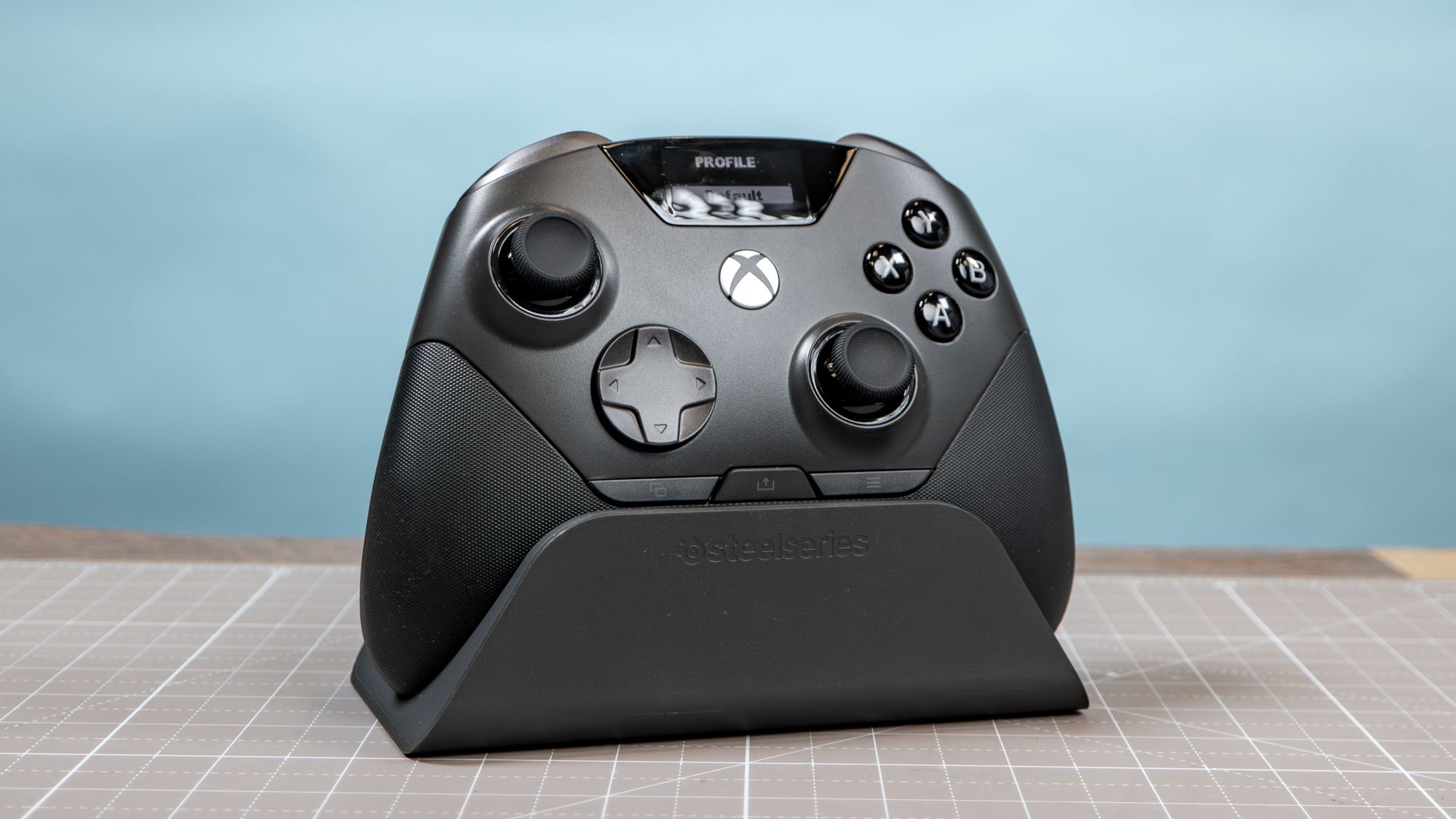
(Image credit: Tom's Guide) I mostly know SteelSeries for its lineup of gaming headsets, keyboards, and other accessories. Curiously enough, it has never released a full-fledged gaming controller for consoles and PC. Well, that used to be the case, as we now have the SteelSeries Aeon Pro. And let me tell you, it’s a pretty awesome gaming controller.Its standout feature is the QuickSwitch Dock System, which can connect to your PC and Xbox simultaneously for seamless pairing. The dock itself has a slot to charge the extra detachable battery, while the controller has an OLED panel for easy profile switching. It also includes expected “pro” controller features like Hall Effect thumbsticks, remappable back buttons, and rubber grips.While the SteelSeries Aeon Pro is pretty pricey at $259, it’s arguably worth the money given what it packs and what it can do. I’ve used and tested many of the best PC controllers, and this is one of the most impressive yet. If that price doesn’t scare you away, there’s a lot to like here. This is what I think after using the Aeon Pro for the better part of two weeks.A solid controller (Image credit: Tom's Guide)Let’s start with the Aeon Pro itself. Its overall size and weight are virtually identical to a standard Xbox controller. Of course, it feels much different in hand thanks to the wrap-around rubber grips and four back buttons. Still, if you’re familiar with the Xbox controller, it doesn’t take very long to acclimate to SteelSeries’ peripheral.Button layout isn’t radically different. The asymmetrical thumbsticks, raised D-Pad, four face buttons, and four shoulder buttons are exactly where you’d expect. The main difference here is that the Xbox Home button is lower to accommodate the OLED screen in the top center. The options and select buttons are now located directly beneath the D-Pad and right thumbstick instead of in the middle. (Image credit: Tom's Guide)Aside from the thumbsticks, all the buttons—including the D-Pad—are clicky like a keyboard, which is appropriate for a PC controller. I should add that the triggers only click once you flip the trigger locks to shorten their actuation point. I’m a fan of the best mechanical keyboards, so I’m all about the clicky.The back buttons generally don’t bother me because both are positioned where my middle and ring fingers naturally rest. That said, I wish they were removable, as on the Scuf Valor Pro. This is a minor thing for me, but it could be frustrating if you’re not a fan of back buttons. Still, I’d rather have four permanent back buttons than none.Get instant access to breaking news, the hottest reviews, great deals and helpful tips. (Image credit: Tom's Guide)Lastly, there are the Hall Effect thumbsticks. Even though TMR thumbsticks are all the rage now, Hall Effect — the OG magnetic switch type — still delivers smooth, precise movement, especially compared with traditional analog sticks. And since they’re magnetic instead of analog, you likely won’t have to suffer from stick drift for a long time — if ever.An innovative dock (Image credit: Tom's Guide)Controller charging stations aren’t new. However, SteelSeries’ QuickSwitch Dock System (as the company calls it) does something I’ve never seen before on a controller dock: it charges a separate battery (included with the controller). So when the battery inside your controller runs out, you can simply swap in the fully charged one and keep playing without a major interruption.If that sounds familiar, it’s because this feature comes from SteelSeries’ own Arctis Nova Pro headset, which has a hub that lets you charge its batteries. Best of all, the batteries for that headset and the Aeon Pro are interchangeable. If you own both peripherals, you’ll have four chargeable batteries at your disposal! (Image credit: Tom's Guide)Like the Arctis Nova Pro’s hub, the QuickSwitch Dock System lets you connect to your PC and Xbox at the same time via the two USB-C ports on the back. Thanks to this feature, you won’t have to constantly pair and re-pair the controller to whatever platform you’re using, as you would with other controllers.Another cool feature is the two slots for extra thumbsticks. One thumbstick is the same size as the two on the controller, only it is convex instead of concave. The other thumbstick is about twice as long for more precise aiming in shooting games. The magnetic thumbsticks snap in and out easily, which is a bonus.The compartment for the extra battery sits right under the thumbsticks, and you just press down to lock it in place or release it. This is a simple process, but it’s extremely satisfying to press the battery in and out.An OLED screen on a game controller? (Image credit: Tom's Guide)Remapping buttons or fine-tuning thumbstick sensitivity on controllers usually requires you to dive into a dedicated desktop or mobile app. While the SteelSeries GG desktop app exists for that, you can almost effectively ignore it and still customize the Aeon Pro to your liking thanks to the integrated OLED screen.On this monochrome screen, you can access profiles, switch between PC and Xbox, monitor battery life, and remap the controls. While the screen isn’t all that large, all the text appears nice and sharp.My favorite thing about the OLED is that it quickly shows which profile you’re using, which is especially handy if you have different configurations for different genres or games. This way, I don’t have to open an app to see if I’m using the right profile, or remember which colors correspond to which layouts, like some controllers have you do.Though I question why the screen needed to be OLED since it’s monochrome, I can’t complain about the results. Sure, you can make finer adjustments via the GG app, but it’s good that you can configure most of what you’d want right on the controller.My new daily driver (Image credit: Tom's Guide)We’ll have a full review of the SteelSeries Aeon Pro controller for you soon, but I wanted to share my thoughts ahead of that since I’ve been enjoying this awesome peripheral for some time. Again, it’s definitely pricey, but given all the cool features it packs, I think it’s worth the money for hardcore PC gamers.If you’ve liked what I had to say about the Aeon Pro, then give it a shot. I promise you won’t be disappointed. Follow Tom's Guide on Google News and add us as a preferred source to get our up-to-date news, analysis, and reviews in your feeds. More from Tom's GuideI just tested the new Alienware 16 Area-51 — and the OLED panel makes it the complete packageI went hands-on with Lenovo’s RTX Spark-powered Yoga 9n 2-in-1 laptop — and it’s a creative powerhouseMetal Gear Solid 4 on PS5 is an almost perfect port of my favorite PS3 exclusive Tony is a computing writer at Tom’s Guide covering laptops, tablets, Windows, and iOS. During his off-hours, Tony enjoys reading comic books, playing video games, reading speculative fiction novels, and spending too much time on X/Twitter. His non-nerdy pursuits involve attending Hard Rock/Heavy Metal concerts and going to NYC bars with friends and colleagues. His work has appeared in publications such as Laptop Mag, PC Mag, and various independent gaming sites.
This premium PC controller does something I've never seen before — and it’s a game-changer
Full Article
Original Source
Read the full article at Tomsguide →KhanList aggregates and links to publicly available news content. We do not host full articles from third-party sources. Always verify important information with original sources.