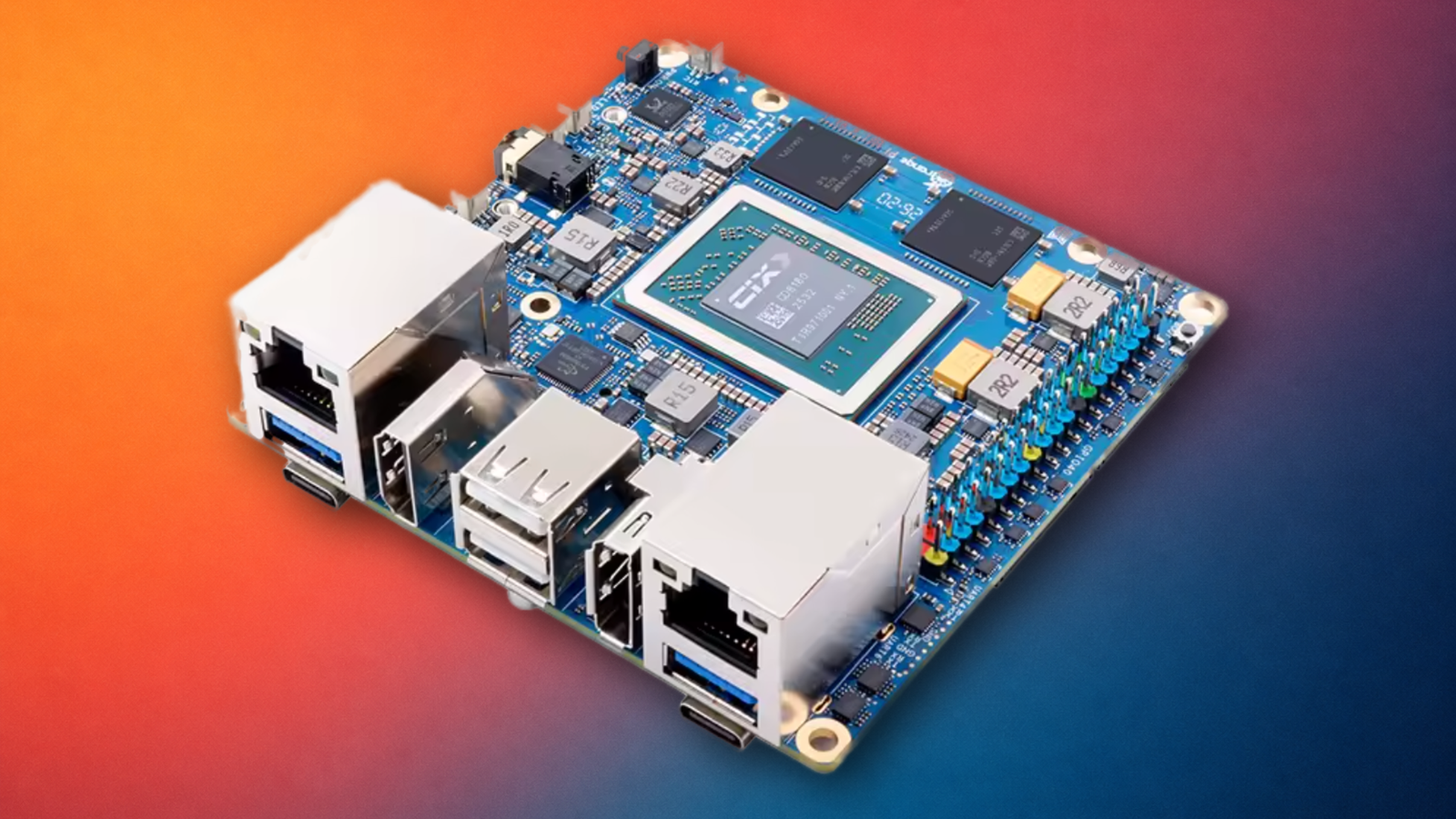
Published Jul 19, 2026, 9:45 AM EDT Patrick Campanale has been in the tech space for well over a decade, specializing in PC/gaming news and reviews, as well as maker-focused products to build small businesses. With a start in technology back in 2010 surrounding the Palm/webOS ecosystem, Patrick spent his formative years developing mobile applications as well as blogging for various publications, eventually leading to starting his own website in 2014. After running a technology blog for a few years, he stepped out of that role and into the world of high-end custom PC manufacturing and building, with a focus on YouTube video production and overclocking. Then, six years ago, Patrick joined the 9to5Toys team as an editor/writer/reviewer with over 14,000 articles being published there there, ranging from deals and roundups to in-depth reviews on the latest technology, video games, 3D printers, and more. In his free time, Patrick loves to create projects from wood using various robots and methods, including leveraging the technologies of CNCs and lasers. If Patrick isn't working on a computer or playing video games, he's likely in his 2-car garage workshop creating something unique. In addition to all this, Patrick is also a youth pastor at his local church where he feels God has called him to serve, and he loves every minute of it. Are you looking at building your homelab on a Raspberry Pi foundation? This Raspberry Pi alternative actually competes with mini PCs more than the Raspberry Pi, but it still might not be the best choice for your homelab. Raspberry Pis are looking pretty underpowered these days It was never meant to be a powerhouse The Raspberry Pi was never designed to be a full-on desktop replacement for powerful tasks. It's always been built to be an affordable, low-power single-board computer, and it excels at that. However, the low-power nature of the Raspberry Pi has always been a bit of a downfall for the platform. With the Raspberry Pi 4 and 5, higher RAM options were released, but the processors and actual capabilities of the Raspberry Pis didn't change significantly. This helped keep prices somewhat down—until the RAMpocolypse decided to jack all that up. Even still, Raspberry Pi single-board computers remain among the most affordable SBCs on the market for good reason—they're not ultra powerful, and that's okay. That's where Orange Pi takes things in a slightly different direction, for better or worse. Orange Pi makes your Raspberry Pi look weak More expensive, but way more features Even if you compare the 8GB Raspberry Pi 5 to the 8GB Orange Pi 6, the Orange Pi wins in a landslide. For starters, the Orange Pi features a 12-core CIX P1 CPU, with eight Cortex A720 cores and four Cortex A520. It's clocked higher at up to 2.6GHz, and has a more powerful Immortalis-G720 MC10 GPU. Orange Pi also uses LPDDR5 RAM, instead of LPDDR4X, like is used in the Raspberry Pi. The Orange Pi also has a built-in AI accelerator that can hit 28.85 TOPS, which makes it ideal for homelab AI workloads, while the Raspberry Pi requires a completely separate HAT for AI acceleration. One area where the Orange Pi starts to resemble a mini PC more than a Raspberry Pi is in storage. While the Raspberry Pi 5 finally added a PCIe 2.0x1 interface with an add-on adapter, allowing you to finally use NVMe storage, the Orange Pi 6 comes with two PCIe 4.0x4 M.2 slots built onto the board. That means you can use NVMe storage straight away without having to buy external HATs, and the NVMe drives can be the same speed as modern desktops. You also get a separate M.2 slot for a Wi-Fi/Bluetooth card, though none is pre-installed. This is a nice feature though because it's easy to upgrade the Wi-Fi to a more modern standard. The Raspberry Pi 5 is still stuck on Wi-Fi 5, so being able to update the Orange Pi with a new Wi-Fi card whenever a new standard comes out is quite useful. The Orange Pi also has more modern 10Gb/s USB-A ports and dual 2.5Gb/s Ethernet ports. In reality, the Orange Pi resembles a mini PC more than a Raspberry Pi. Effectively, it's a mini PC with GPIO pins. Same price point as a mini PC It all depends if you want a single-board computer or an x86 system Credit: Patrick Campanale / How-To Geek Really, your needs will determine what will fit your setup best. If you need GPIO pins with on-device AI compute and faster processing, then there's no doubt the Orange Pi is a better choice over a Raspberry Pi. It's better in every way when compared to the Raspberry Pi with better I/O, more power, and way more capabilities. However, the Orange Pi 6 does cost about the same as a mini PC, so you do have to consider that at the same time. Mini PCs are built on a more mature x86 platform and let you run traditional desktop operating systems. You also get all the benefits of mini PCs being basically normal desktops, like running Windows and having modern desktop features, which the Orange Pi has a lot of. Really, it comes down to whether you need GPIO functionality or x86 support on which is better to choose. Either way you go, both the Orange Pi and a mini PC will give you fantastic performance for your homelab. ACEMAGIC K1 mini PC $299 $399 Save $100 Brand ACEMAGIC CPU AMD Ryzen 4300U Graphics AMD Radeon Memory 16GB DDR4 SO-DIMM pre-instlaled Storage 1TB NVMe pre-installed The ACEMAGIC K1 mini PC packs a punch for its price point. With a Ryzen 4300U quad-core processor, 16GB of user-upgradable RAM, a pre-installed 1TB NVMe SSD and an extra M.2 SATA slot for more storage, this micro desktop offers a lot of performance. Plus, it handles up to three monitors at a time and has Windows 11 Pro pre-installed. Sometimes a single-board computer isn't the best option after all While I've talked a lot about the pros of the Orange Pi 6 over a Raspberry Pi 5 in this post, I do need to take a bit of time to explain some of the downsides of the Orange Pi 6 and why a mini PC might be better for your setup. Realistically, x86 is just a more mature platform when it comes to operating systems. The Orange Pi 6 does support Linux and Android operating systems, with a little bit of Windows support, but it's not a solid foundation for your homelab. If I was making the choice right now, I would probably choose to go with a mini PC over the Orange Pi 6 because they're easier to purchase and way more documented. However, if I needed a system that had built-in AI processing with GPIO pins and NVMe storage, then that's just what the Orange Pi 6 was made for.
This powerful Raspberry Pi alternative is basically a mini PC with GPIO pins
Full Article
📰 Original Source
Read full article at Howtogeek →KhanList aggregates and links to publicly available news content. We do not host full articles from third-party sources. Always verify important information with original sources.