
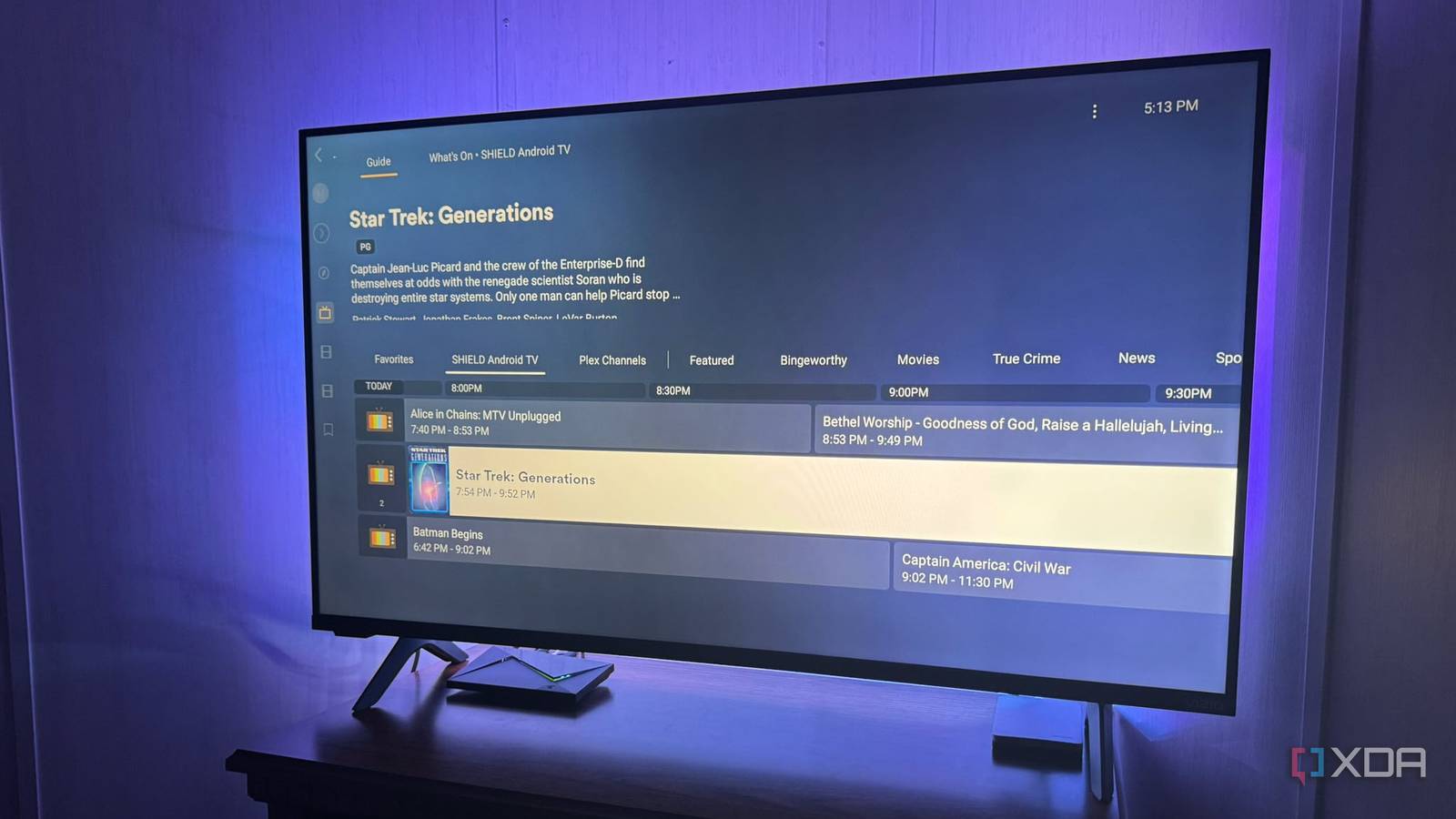
Published Oct 2, 2026, 6:00 PM EDT Based in rural Minnesota, Brian Burgess worked in IT for 10 years before finding his passion for writing about consumer technology. Brian earned his degree in computer and network technology in 2000. He held various IT positions, including help desk support, router installations for IBM, database administration, and other associate network administration roles. He's been a personal technology journalist for 18 years and has written thousands of articles about Microsoft products and services, Android, iOS, streaming, and more. He has written for notable tech sites including XDA, InformationWeek, How-To Geek, Byte, groovyPost, and others. When he is away from the keyboard, you will hear him playing guitar, working outdoors, and watching Star Trek. I was tired of my titles in my Plex library showing up at random. Even with the best companion apps, I end up flipping endlessly through movies and poster art icons, trying to find something to watch. I wanted a new experience more like linear TV, so I could turn my self-hosted library into a TV station. Live TV has always been a gamble on whether something good will be on. With Tunarr for Plex, I can create my own TV station and choose what airs on the stations I create. So I always have something I want to watch. It creates what would be considered the stations, networks, affiliates, and cable companies. I created it all through a free app that adds a Live TV section in Plex. Setting up Tunarr Install it on your computer first To set up this Plex add-on, install it on your computer first. The app is cross-platform and can be installed on Linux, Windows, or Mac. You can find the standalone binaries on the Tunarr GitHub releases page, and you'll want to install the ErsatsTV! FFmpeg build separately, which the project recommends. It is also available as a Docker image that includes FFmpeg if you want to go that route. I launched Tunarr, which opens a prompt window that you need to leave running while using it. I opened a browser, went to http://localhost:8000, and found Tunarr's welcome screen. From there, I added the Plex server from my Nvidia Shield Pro, went into settings, and pointed to the FFmpeg and FFprobe executable files. If you see a system notification about FFmpeg, it's because it isn't familiar with ErasatsTV! FFmpeg build. But I was able to set it up without worry. Once everything was running, I created a channel for music concerts and one for DVD movies from my server so I could get acclimated to how Tunarr runs. After creating my first channel, I was satisfied and added my UHD 4K movies, TV shows, music videos, and other content to round out my stations. After I added channels, I connected Tunarr via Plex Web. It didn't connect the first time I tried, and I realized Windows Firewall was enabled, so I turned it off (something I usually do anyway), but if you have connectivity issues with your Plex server, check the firewall. If you want to keep it on, just create an inbound rule that allows Tunarr TCP port 8000 through. That did the trick, and I can create stations with my self-hosted media from my computer and watch them through my Shield TV Pro. Tunarr Tunarr creates a customizable live TV station on Plex Once installed and running on my system, Tunarr creates a unique way to view my self-hosted files in Plex. I keep adding new channels and content. It's like having my own completely customizable live TV station for Plex. I can create as few or as many channels as I want and pick exactly what content shows on each one. For example, I created a channel that only shows episodes of House, and I created another that is all Game of Thrones. I haven't done a good job mixing my movies up yet, but I will create channels for different genres like Action, Thriller, and Drama, so I can pick a channel and know what I am getting. I know everyone, including myself, is used to skipping forward and back on movies and shows that we're watching. However, this is meant to act like actual live TV, and that option isn't available. I can skip back a few seconds, but I can't move around my content the way I can when watching an individual title on Plex. Still, it provides a fun way to view my library. I can leave it on in the background and flip through channels of my content to find something to watch. I even added my own music channels. I remember when I had cable, there would be 50 channels that played music at the bottom of the guide. So I created my own, selecting songs by genre, artist, playlist, and album. You can create channels that play whatever content is on your server, 24/7. Tunarr Trade-offs Managing a TV station can be cumbersome In addition to obtaining and managing the files on my Plex server, I found a few things to be irksome. For instance, I have to build my channel guide manually. Tunarr doesn't create a channel grid as QuasiTV does. This takes more work but is more customizable. It's nice to have my own channels, but there are some trade-offs. It also runs on a separate machine. Any time I want to change the channels or content, I have to do it from my PC. Or I can dial into my system with Tunarr installed using its IP and port 8000 via a browser, which is also a time-suck. The computer needs to stay awake and connected to the network continuously. Also, UHD 4K playback is inconsistent in my setup. Its default HLS mode uses FFmpeg to process each file. I switched the UHD channel to HLS Direct v2, which remuxes rather than transcodes the source, and I could play the channel, though results varied between titles. I haven’t identified a permanent fix yet. An engaging way to manage my self-hosted media Setting up Tunarr on my computer was straightforward. I have had a lot of fun being my own TV station manager. I no longer need to rely on linear TV to find something good to watch. Tunarr provides customizable TV channels; you can air anything, anytime — including the music channels buried in cable and live-streaming TV station lineups.
This Plex add-on turned my self-hosted library into my own personal live TV service
Full Article
Original Source
Read the full article at Xda-developers →KhanList aggregates and links to publicly available news content. We do not host full articles from third-party sources. Always verify important information with original sources.