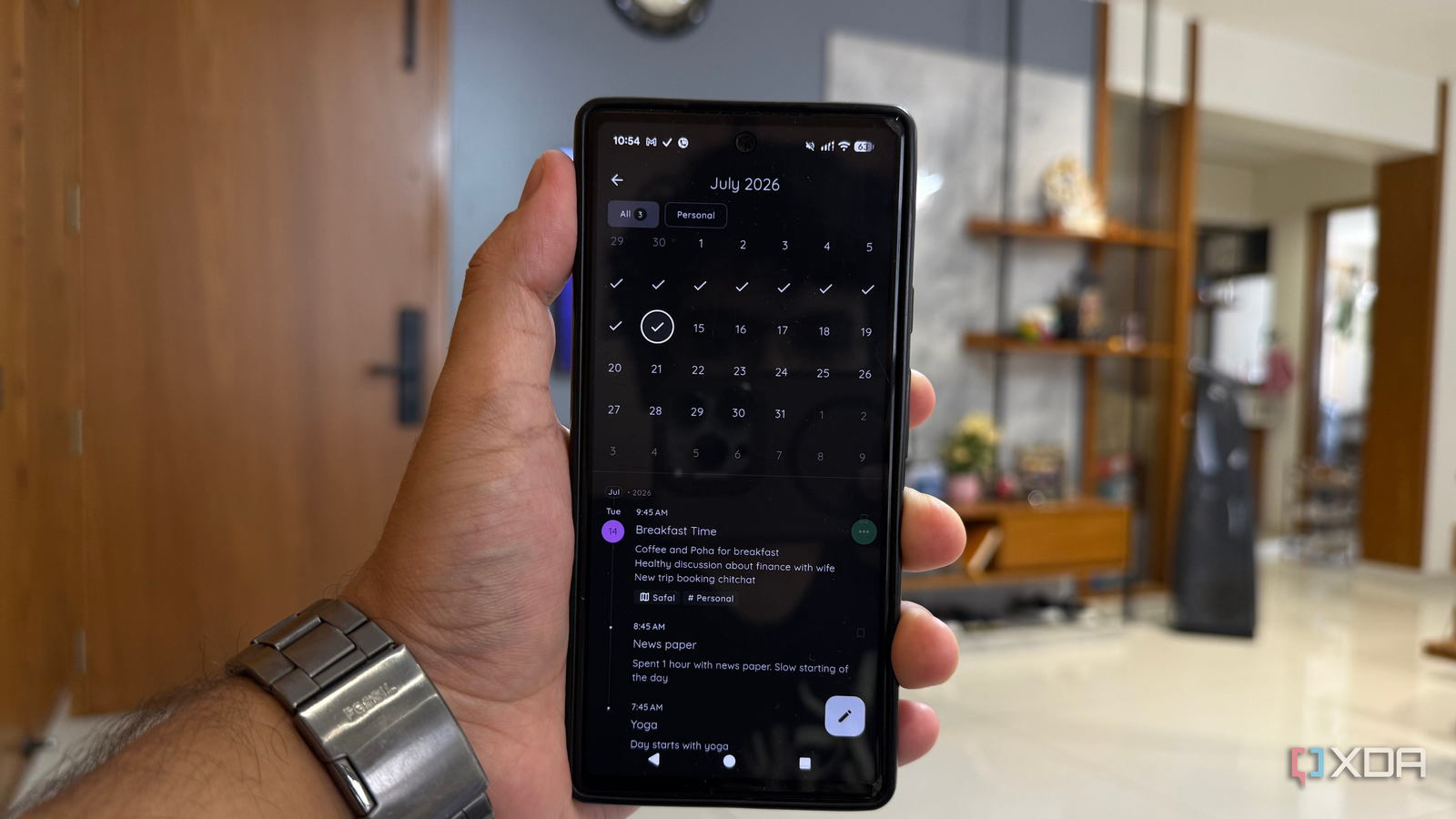
Published Jul 19, 2026, 2:30 PM EDT Beginning his professional journey in the tech industry in 2018, Yash spent over three years as a Software Engineer. After that, he shifted his focus to empowering readers through informative and engaging content on his tech blog – DiGiTAL BiRYANi. He has also published tech articles for MakeTechEasier. He loves to explore new tech gadgets and platforms. When he is not writing, you’ll find him exploring food. He is known as Digital Chef Yash among his readers because of his love for Technology and Food. Google Keep worked as my journal app for the longest time. Whenever I wanted to capture a thought, reflect on my day, or write down something personal, I'd open Keep because it was already part of my daily workflow. It worked, but journaling always felt like an afterthought instead of a habit. As I started exploring more open-source apps for my productivity setup, I realized I didn't need a better notes app; I needed a better journaling app. That's when I came across StoryPad, and after using it for a while, I found myself reaching for Google Keep less and StoryPad more. What is StoryPad? It focuses on journaling instead of note management StoryPad is an open-source, local-first journaling app for Android and iOS that I discovered while looking for something better than Google Keep for daily reflections. The biggest reason I switched is that it doesn't try to be an all-purpose notes app. Instead, it's built specifically for journaling, and that changes the entire experience. Google Keep is still one of my favorite apps for capturing quick ideas, reminders, shopping lists, and random snippets. But when I used it as a journal, my daily entries were always buried between everything else. StoryPad gives journaling its own dedicated space, so my personal thoughts don't feel like just another note. I also like that it's completely offline and stores everything locally on my device. There's no account to create, no ads to deal with, and no dependency on an internet connection just to write about my day. It's a simple app with a clear purpose, and that's exactly what made it a much better fit for my daily journaling workflow. The timeline changed how I write daily Looking back became just as important as writing The feature that made the biggest difference for me is StoryPad's timeline. Instead of opening a long list of unrelated notes, I can scroll through my journal day by day and immediately see what I was doing, thinking, or working on. It feels much closer to flipping through a real diary than searching through a notes app. That has changed the way I journal. I don't just write things down and forget about them anymore. Every few days, I find myself going back to older entries to see how my thoughts have changed or to remember something I would have otherwise overlooked. It's surprisingly satisfying to watch days turn into weeks and weeks turn into a personal record of my life. Because of that, I've started writing more complete entries instead of quick one-line updates. Knowing I'll actually revisit them later has made me more intentional about what I write, and that's something Google Keep never encouraged. Small details that improved my journaling habit The app gets out of the way and lets me write The biggest surprise wasn't a single standout feature; it was how many small touches made me want to keep using StoryPad. The interface is clean, loads quickly, and doesn't distract me with features I don't need. When I open the app, I'm ready to write within seconds. I also like that it supports Markdown. I don't use anything complicated, but simple headings, bullet lists, and checklists make longer entries much easier to organize. Some days I write a few sentences, while other days I document an entire experience, and the editor handles both equally well. Another thing I like is that I never have to think about syncing or whether I have an internet connection. Whether I'm traveling or simply away from Wi-Fi, I can keep writing without interruption. Many features, such as advanced customization, markdown export to Notion/Obsidian, templates, backgrounds, etc., are walled off behind the paid version. None of these features is groundbreaking on its own, but together they remove the small bits of friction that often stop me from maintaining a daily journaling habit. It still has scope for improvement No desktop app is the one thing I miss As much as StoryPad has replaced Keep for me, it isn't flawless. The biggest limitation is that it's mobile-only. There's no desktop or web version, so if I'm already on my laptop, I have to reach for my phone to add an entry. For a daily habit, that occasional friction is real. The local-first approach is great for privacy, but it also means there's no seamless sync across devices. Backups go to Google Drive, but restoring on a new phone takes a manual step rather than just picking up where I left off. None of this is a deal-breaker for me, since I do most of my journaling on my phone anyway. But if you split your writing between a phone and a computer, it's worth knowing before you switch. For everything StoryPad gets right, a little more flexibility in how and where I access my entries is the one thing I'm still hoping for. Keep for notes, StoryPad for me I never planned to replace Google Keep. I was simply looking for a better way to journal, and StoryPad naturally became that app over time. Google Keep is still where I save quick notes, reminders, and lists, but my daily reflections now have a dedicated place that feels separate from everything else. That distinction has made me more consistent with journaling and more likely to look back at what I've written. Sometimes, improving a habit isn't about adding more features; it's about using a tool that's built for exactly what you're trying to do. StoryPad: My Daily Journal DailyPad is an open-source journaling app that helps you capture daily thoughts, organize entries on a timeline, and maintain a private, offline-first journal without distractions or unnecessary features.
This open-source app turned my journal into a timeline I actually revisit
Full Article
📰 Original Source
Read full article at Xda-developers →KhanList aggregates and links to publicly available news content. We do not host full articles from third-party sources. Always verify important information with original sources.